
If you forgot your Gmail address or you use multiple Google accounts and lost track of the active one, four fast methods find it. All of them work in under a minute, even without your password. This 2026 guide covers desktop, mobile, browser-saved credentials, and the Google Account Recovery path.
The right method depends on what you have access to. If you can open Gmail already, the first two methods take three seconds. If you cannot sign in at all, the Account Recovery path uses your backup phone or email.
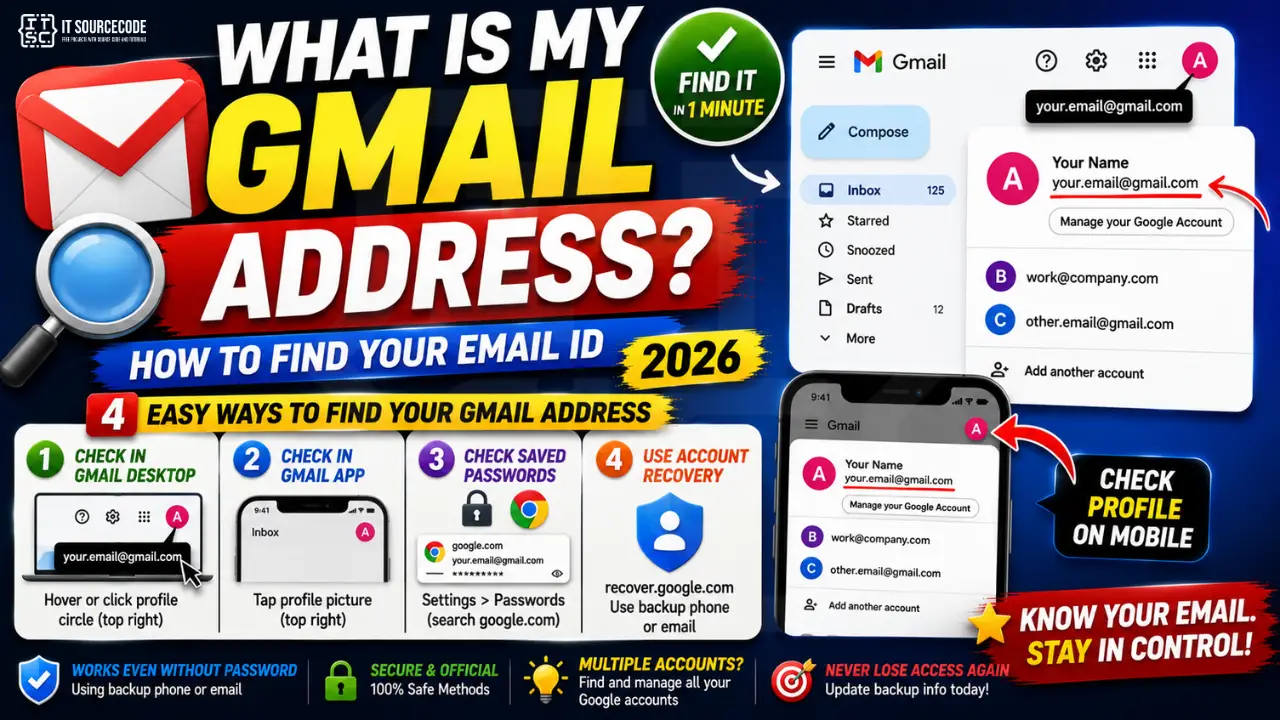
Method 1: Check the profile circle in Gmail on desktop
The fastest path when you can already sign in to Gmail. Your active Gmail address is always visible in the top right of the screen.
- Sign in to
gmail.comin any browser. - Look at the profile circle icon in the top right corner of the Gmail interface.
- Hover over the circle to see your full Gmail address in a tooltip.
- Click the circle to open an account panel that shows the address in larger text.
- If you have multiple Google accounts signed in, the panel lists each address separately.
Method 2: Open the Gmail app on mobile and check the profile
Same idea on mobile, just tap instead of click.
- Open the Gmail app on iPhone or Android.
- Tap the profile picture in the top-right corner of the Inbox screen.
- The active Gmail address appears at the top of the account switcher panel.
- If you have multiple accounts added, each address appears in its own row.
Method 3: Look up saved passwords in your browser
If you cannot access Gmail directly but you saved your login in Chrome, Firefox, Edge, or Safari, the browser stores the username (which is your Gmail address) with the password.
- Open browser Settings and go to the Passwords section (also called Password Manager or Autofill Passwords).
- Search for
google.comorgmail.comin the password list. - Each entry shows your Gmail address as the username.
- Click the entry to see the full address.
- On Chrome, the passwords are also visible at
passwords.google.comif you enabled Google Password Manager sync.
Method 4: Use Google Account Recovery to find a forgotten address
When you cannot sign in at all and have no browser saved credentials, Google Account Recovery uses a linked backup phone number or backup email to identify the Gmail address.
- Open
google.com/accounts/recoveryin any browser. - Click the link Forgot email? below the sign-in field.
- Enter the backup phone number OR the backup email address linked to the account.
- Enter your first and last name exactly as they appear on the Google Account.
- Google sends a verification code to the backup phone or email. Enter it.
- Google displays every Gmail address linked to that recovery info.
Common mistakes when finding your Gmail address
- Confusing Gmail with the display name. Your Gmail address always ends in @gmail.com. Anything else is a display name, alias, or a Google Workspace custom domain.
- Forgetting you signed in with a different Google account. If Gmail shows a different address than expected, tap the profile and check the account switcher. You may have logged in with a work or old account.
- Assuming Google Workspace addresses are Gmail. A Workspace email like
you@company.comuses Gmail infrastructure but the address is not @gmail.com. Confirm the domain before searching. - Losing access to the backup phone or backup email. Without either, Google cannot verify ownership. Update backup info regularly so future recovery is possible.
- Not typing the exact first and last name from account signup. Recovery requires the name Google has on file, not your preferred name.
When to use each method
If you are already signed in on desktop or mobile, methods 1 and 2 take three seconds and require no extra tools. Use these first.
If you have multiple Google accounts across devices and lost track of the primary one, the browser saved passwords method finds every Gmail address you have ever used on that computer. This is the fastest path when the account is dormant.
Account Recovery is the only path when you have no access to Gmail and no browser saved credentials. It requires backup phone or backup email to be up to date. If you never set backup info, recovery becomes much harder and may require answering security questions Google has stored.
To prevent this problem entirely, always add a backup phone number and backup email at signup, and update both any time you change providers. Backup info is what lets you (and only you) reclaim access.
Power-user tips for managing multiple Gmail accounts
If you use several Google accounts (personal + work + family), staying organized prevents accidental “sent from wrong account” moments. A few habits go a long way.
- Set a default account. In Gmail, click your profile picture, then choose an account. The one you last used before signing out becomes the default on next login.
- Use different browser profiles for different accounts. Chrome and Edge let you create profiles that isolate cookies and sessions. Work in the Work profile, personal in the Personal profile.
- Enable different color themes per account. Gmail lets you set custom color schemes in Settings > Themes. Use bold contrast (dark green vs deep blue) so you visually see which account you are in at a glance.
- Bookmark your specific inbox URLs. Gmail supports account-specific URLs like
mail.google.com/mail/u/0/(default),u/1/,u/2/, etc. Bookmark each so you jump directly to the right one.
For students, freelancers, and consultants juggling multiple client emails, invest 15 minutes in setting up browser profiles + color themes. The muscle memory of “green = personal, blue = work” prevents dozens of accidental sends every year.
Official documentation
Recommended email productivity resources
The links below are affiliate links. We may earn a commission at no extra cost to you when you buy or sign up. See our affiliate disclosure.
Frequently Asked Questions
How do I find my Gmail address without logging in anywhere?
Use Google Account Recovery at google.com/accounts/recovery, click Forgot email, and enter a backup phone number or backup email. Google will show you the Gmail address linked to that recovery info.
Can I have more than one Gmail address on the same account?
You can create multiple separate Gmail accounts and add them to the Gmail app using the account switcher. Each has its own inbox, sent folder, and settings. You cannot add extra @gmail.com aliases to a single account.
Does @gmail.com count as part of my address?
Yes, the full Gmail address always includes @gmail.com. When signing in, most Google services accept either you@gmail.com or just you as the username.
Why does my Gmail app show a different address than I expected?
You likely have multiple Google accounts added and one is the default. Tap the profile picture and switch to the account you want. Sign out of any accounts you no longer use to reduce confusion.
How do I recover a Gmail address I forgot completely?
You need a backup phone number or backup email linked to the account. Without either, Google cannot verify ownership. If you have neither, you may need to answer security questions Google stored during signup.
Is my Gmail address the same as my Google Account?
Your Gmail address is the ID for your Google Account. Every Google service (Drive, Photos, YouTube) uses this same address as your login. If you sign in to any Google service with the same credentials, that is your Gmail address.

Caren Bautista
Technical Writer at PIES IT Solution
Responsible for crafting clear, well-structured, and beginner-friendly content across the platform. Handles the writing, proofreading, and editorial review of tutorials, guides, and documentation to ensure every article is accurate, readable, and easy to follow.
Expertise: Technical Writing · Content Creation · Documentation · Editorial Writing · JavaScript · TypeScript · View all posts by Caren Bautista →
2026 method: check your Gmail address on mobile from the Google Account dashboard
The fastest way to find your Gmail address on your phone in 2026 is through the Google Account dashboard, not the Gmail app itself. This works even when the Gmail app is not installed.
On Android:
- Open the Settings app on your phone.
- Scroll to Google and tap it.
- Your Gmail address appears right below your profile picture at the top.
On iPhone:
- Open any Google app (Google, YouTube, Chrome, Google Maps).
- Tap your profile picture in the top-right corner.
- Your Gmail address appears in the account switcher.
If you use multiple Google accounts, all of them are listed in the switcher so you can copy any of the addresses. I use this trick when a form asks for my “secondary” email and I forget which one I set up.
Extra tip for shared devices: if the phone shows an address that is not yours, someone else’s account is signed in. Tap the address and choose Manage accounts on this device to remove it before you sign in with your own. This is a common gotcha on family iPads and lab-shared Chromebooks.
What is new for finding your Gmail in 2026
The Aug 2026 Gemini side panel added a Find my email action. If you are signed into any Google service (Chrome, Gmail, Drive, YouTube, Photos), open Gemini and type What is my Gmail address. Gemini instantly shows your primary email, plus any alias emails or Send As addresses configured.
Google also improved the account recovery flow in 2026. If you truly forgot your Gmail address, the recovery form now accepts partial memory clues (approximate creation year, phone country code, an old password fragment) and returns candidate matches faster than the previous strict phone-or-email-only lookup.
Common scenarios for finding your Gmail
- Multiple Google accounts confusion. Chrome shows the ACTIVE account first in the avatar dropdown. Other signed-in accounts appear below. Click each to see all accounts you have logged into on that browser.
- Old dormant account. If you have not signed in for 2+ years, Google may have deleted the account per its inactive account policy. Recovery still works for 30 days after deletion, but permanent after that window.
- Recovery phone changed. If your recovery phone number is outdated (old carrier, old country), the recovery flow may fail. Try alternative recovery paths: recovery email, trusted contacts (if configured), or Account Recovery form.
- Business email vs Gmail. Google Workspace accounts (like support@yourdomain.com) are Gmail-powered but the address is not @gmail.com. Same lookup methods work but the address is your business domain.
Finding old alias emails
If your Gmail has aliases (Send As addresses configured in Settings, Accounts and Import), the Gemini Find my email action lists both your primary Gmail AND all aliases. This helps if you remember sending mail as a work address (like joken@company.com) but forgot the underlying Gmail account. Aliases route to one inbox but use different visible addresses.
Official documentation
Quick step-by-step summary (click to expand)
- Check any signed-in browser Open a browser where you use Google (Chrome, Firefox, Safari). Visit gmail.com. If signed in, your Gmail address appears in the top-right avatar dropdown.
- Check Google Account settings Visit myaccount.google.com. Sign in if needed. Your Gmail address appears at the top of the page under Personal info.
- Check your phone settings On Android: Settings, Accounts (or Passwords and Accounts), tap Google, see the email listed. On iPhone: Settings, Mail, Accounts, tap your Google account.
- Use Google recovery flow If not signed in anywhere: go to accounts.google.com/signin/v2/usernamerecovery. Enter your recovery phone number or recovery email. Google shows accounts matched to that recovery info.
- Ask Gemini (2026 method) If signed into any Google service, ask Gemini What is my Gmail address. Gemini responds with your signed-in Google Account email.
Frequently Asked Questions
How do I find my Gmail address if I forgot it?
Check any browser signed into Google (avatar dropdown), or visit myaccount.google.com, or on Android go to Settings, Accounts, Google. If truly forgotten: accounts.google.com/signin/v2/usernamerecovery.
Can Gemini tell me my Gmail address?
Yes as of the Aug 2026 update. Open Gemini and type What is my Gmail address. Gemini responds instantly with your signed-in Google Account email + any aliases.
What if my recovery phone number is outdated?
The recovery flow may fail. Try recovery email, trusted contacts (if configured earlier), or fill out the Account Recovery form at accounts.google.com/signin/recovery.
Where do I find my Gmail on iPhone?
iPhone Settings, Mail, Accounts, tap your Google account. Or open the Gmail app if installed and tap the avatar to see the signed-in email.
How can I see all Gmail accounts signed in on my browser?
Click the avatar (top-right) in Google services. All signed-in accounts appear in the dropdown. Add another account via Add another account link.
Does Google auto-delete inactive Gmail accounts?
Yes. Google auto-deletes accounts inactive for 2 years per its inactive account policy. Sign in at least once per year to prevent deletion.