Python IndexError on requests.json() Empty List (2026 Fix)
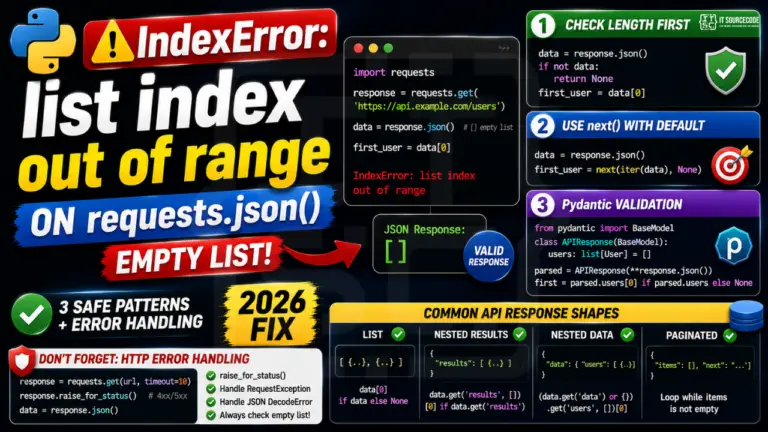
You called response.json(), expected a list of results, and tried data[0], only to get IndexError: list index out of range. The API returned an empty list (valid response, no matching …

Python IndexError is one of the most common runtime errors Python developers encounter, typically thrown when you try to access a list, tuple, or string element using an index that’s out of range. This hub collects fixes for the most common IndexError scenarios across base Python, pandas, NumPy, and common third-party libraries.
Common IndexError causes covered here
list index out of range: when you access lst[n] where n ≥ len(lst)
string index out of range: same issue but with str slicing
tuple index out of range: accessing tuple elements past the end
pandas IndexError: .iloc[] going past DataFrame rows
NumPy array IndexError: array slicing with wrong dimensions
Negative index issues: when negative indexing wraps incorrectly
How to prevent IndexError
Best practices: use len() checks before indexing, use try/except IndexError for unsafe access, use .get()-style safe accessors when available, prefer iteration over indexed access where possible. Most IndexError bugs are caught early with proper boundary checks.
Related Python error references
Python KeyError, dictionary missing keys (related but different)
Python TypeError, wrong type passed to operation
Python ValueError, right type but bad value
Python Tutorial Hub, broader Python learning resources
More IndexError solutions are being added. Bookmark this page or browse our other Python error references for similar troubleshooting guides.
You called response.json(), expected a list of results, and tried data[0], only to get IndexError: list index out of range. The API returned an empty list (valid response, no matching …
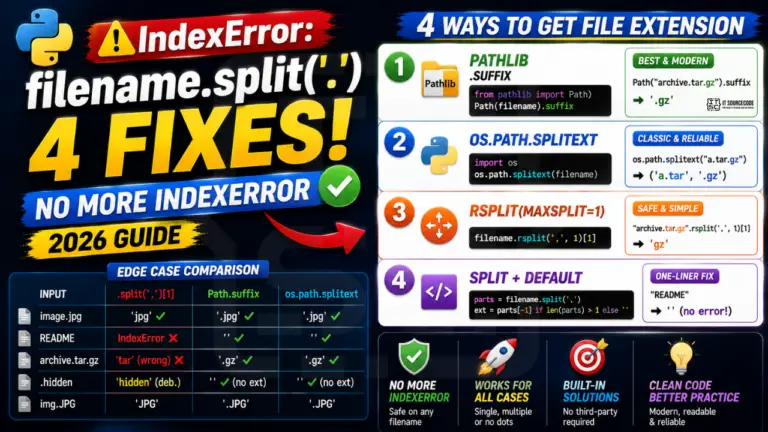
One of the most common Python beginner bugs: extracting a file extension with filename.split(‘.’)[1]. It works fine for “image.jpg” but raises IndexError on any filename without a dot (like “README” …
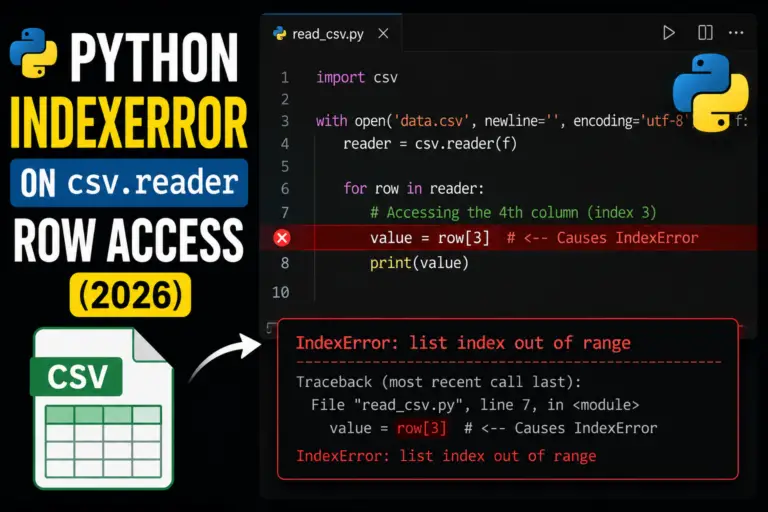
IndexError on csv.reader row access like row[3] means the current row has fewer than 4 columns. Common causes: a truly short row in the source file, a blank line near …
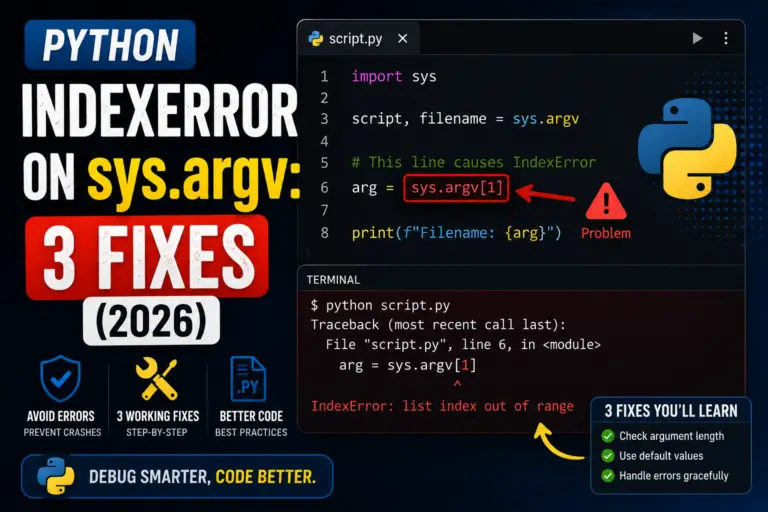
Python IndexError on sys.argv means you tried to read more command-line arguments than the user provided. The classic case: filename = sys.argv[1] when the user ran the script with no …
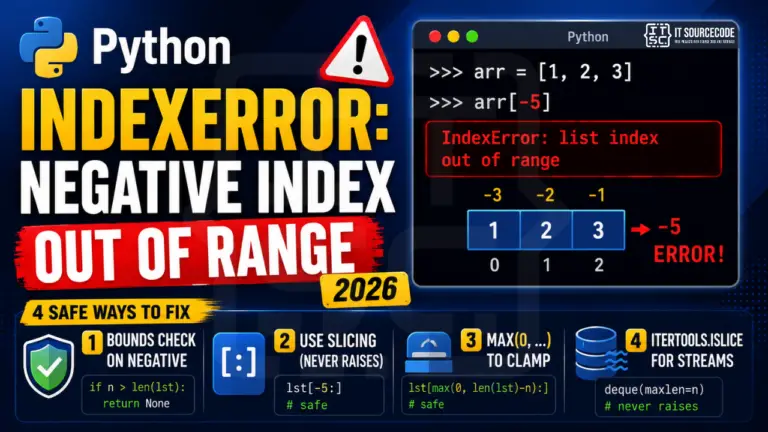
Python’s negative indices (lst[-1] = last item) are convenient but can still raise IndexError if the negative index is more negative than the list length. [1, 2][-5] raises just like …
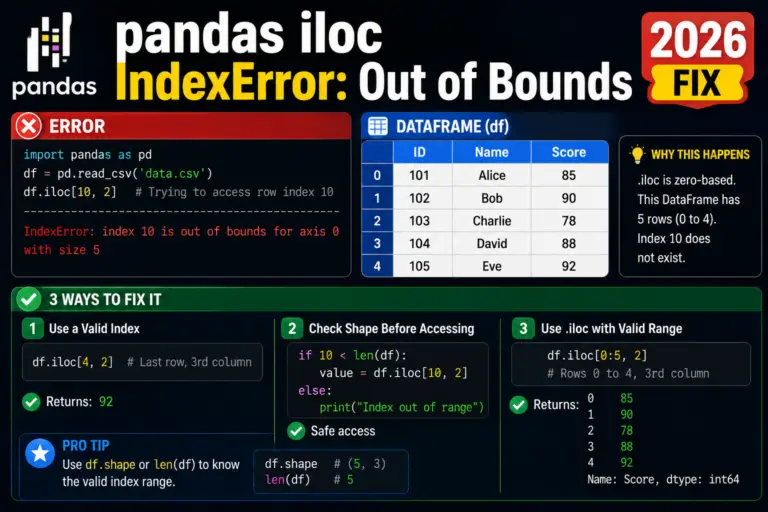
A pandas IndexError on df.iloc[i] means the positional index i is past the end of the DataFrame. The most common 2026 cause: you filtered or grouped the DataFrame and forgot …
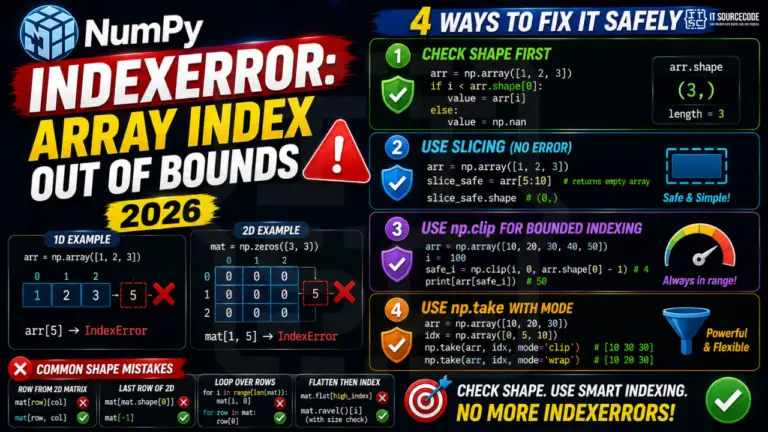
IndexError on NumPy array access (e.g. arr[100] when arr has 50 elements, or arr[1, 5] when arr is shape (3, 3)) is one of the most common NumPy errors. The …
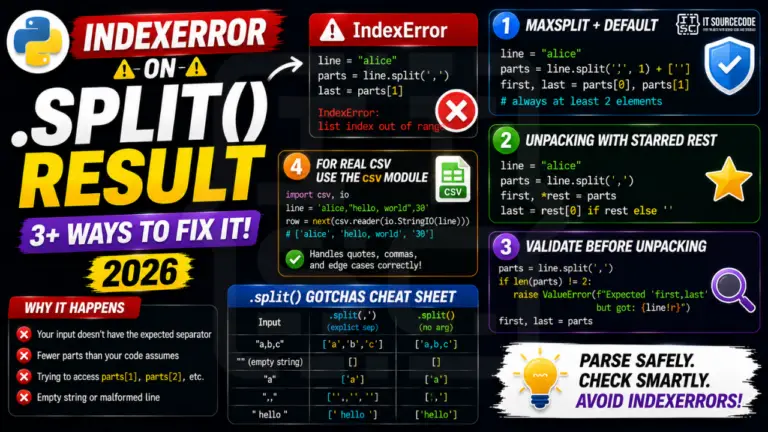
Python IndexError after calling .split() means the resulting list has fewer parts than your code expected. This is the classic “log parser breaks on the one line with a weird …
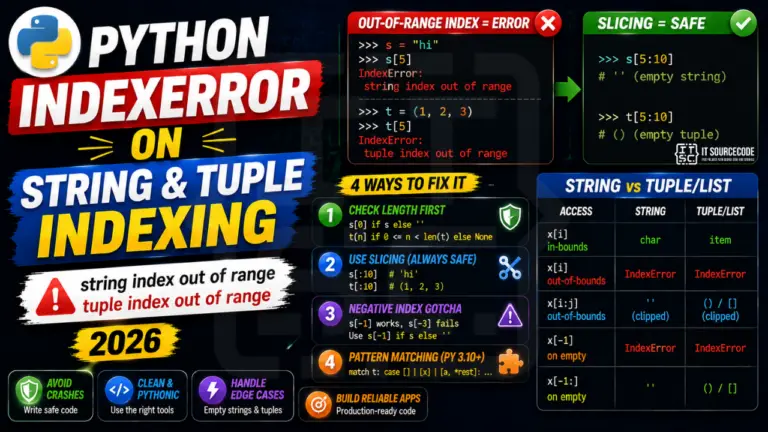
Strings and tuples in Python both raise IndexError on out-of-range indexing, but never on slicing. Knowing the difference between s[5] (raises) and s[5:10] (returns empty string) is the foundation of …
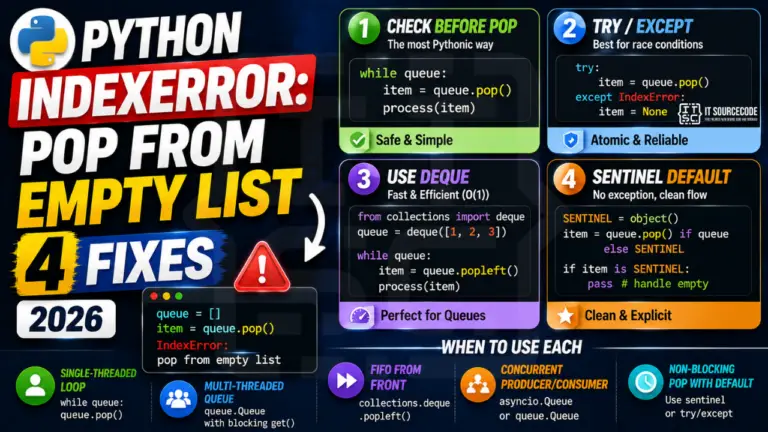
IndexError: pop from empty list happens when you call list.pop() on an empty list. This is one of the most common Python bugs in queues, stacks, work-stealing loops, and item-by-item …
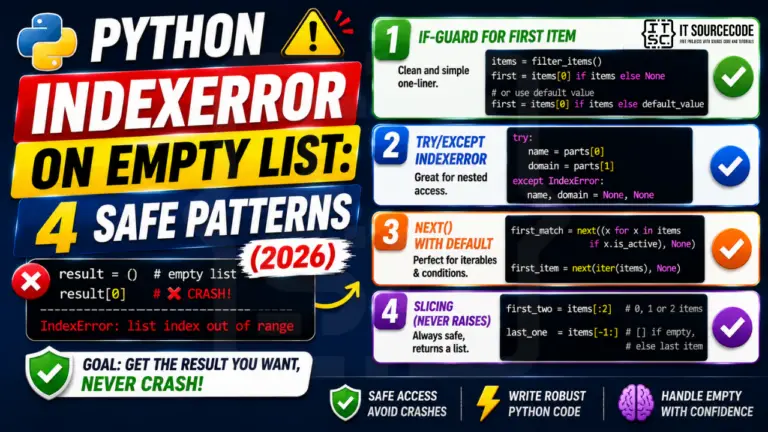
You wrote result[0] assuming the list had at least one item, but it was empty, and Python threw IndexError: list index out of range. The list might come from a …
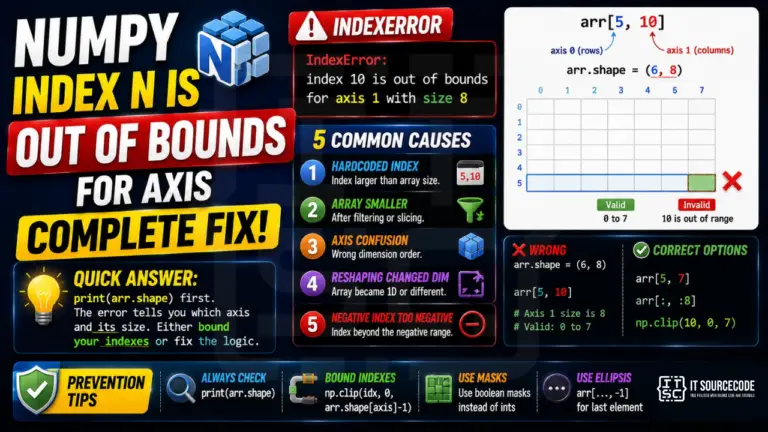
You wrote arr[5, 10] and NumPy threw IndexError: index 10 is out of bounds for axis 1 with size 8. The error names exactly which axis and what size, so …
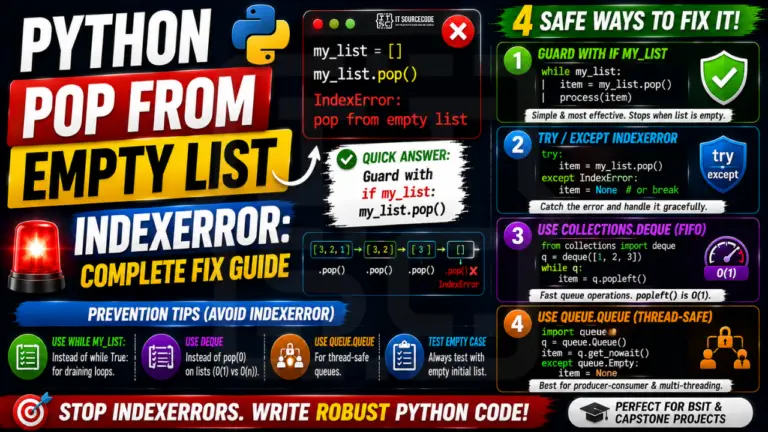
You called my_list.pop() in a loop and at some point Python crashed with IndexError: pop from empty list. The list got drained, the next pop has nothing to take, and …
my_list[3] raises IndexError: list index out of range. The same applies to negative indexes: my_list[-4] on a 3-item list also raises IndexError. The fix is always either (1) check the length before accessing with if i < len(my_list) or (2) iterate with for item in my_list instead of indexing.my_data[2] and got IndexError, you are indexing a sequence. If you wrote my_data["name"] and got KeyError, you are looking up a mapping.for i in range(1, len(my_list) + 1) when you meant for i in range(len(my_list)). The first loop tries to access my_list[len(my_list)] on the last iteration, which is one past the last valid index and raises IndexError. The defensive fix is to always use for item in my_list when you do not need the index, or for i, item in enumerate(my_list) when you do.if i < len(my_list): value = my_list[i] for explicit bounds checks. (2) value = my_list[i] if i < len(my_list) else default for one-liner default fallback. (3) try: value = my_list[i]\nexcept IndexError: value = default when you need to log the failure or handle it differently. Avoid my_list[i] if i in my_list because in checks for value membership, not index validity..iloc[] is positional indexing, so it raises IndexError when the position is out of range, just like a regular list. df.iloc[1000] on a 500-row DataFrame raises IndexError. .loc[] on the other hand is label-based and raises KeyError when the label is missing. Watch out: after filtering or dropping rows, the integer positions shift while the labels stay the same. df_filtered.iloc[5] may now point to a different row than df.iloc[5]."list index out of range", strings say "string index out of range". For strings, this often happens when you assume a string has at least N characters: name[0] on an empty string from user input raises IndexError. Defensive fix: name[0] if name else '' or check if len(name) > 0 first.if i < len(my_list)) for normal control flow. The check is cheaper than raising and catching an exception, and the intent reads more clearly. Catch IndexError with try/except when the out-of-range access represents a genuine error you want to log or handle distinctly from the happy path (parsing untrusted input, deserializing data with unknown shape, defensive coding around third-party return values). Use both together when defensive: validate length, log the unexpected case, then continue.