
What is PHP?
PHP is an open-source, interpreted, and object-oriented scripting language that is especially suited for web development and can be embedded in HTML.
Why do we use PHP?
- PHP is a server-side scripting language embedded in HTML.
- PHP is used to manage or create dynamic content, databases, session tracking, and even building e-commerce sites.
Advantages of PHP
- PHP is a recursive acronym for “PHP: Hypertext Preprocessor“.
- It is integrated with a number of popular databases, including MySQL, PostgreSQL, Oracle, Sybase, Informix and Microsoft SQL Server.
- PHP is pleasingly zippy in its execution, especially when compiled as an Apache module on the Unix side.
The MySQL server once started, executes even very complex queries with huge result sets in recording setting-time.
- It supports a large number of major protocols such as POP3, IMAP, and LDAP. PHP4 added support for java and distributed object architectures (COM and COBRA).
- PHP is forgiving: PHP language tries to be as forgiving as possible.
- PHP syntax is C-like.
- PHP is simple and easy to learn.
Important characteristics of PHP
Here are the 5 Important Characteristics of the PHP Programming Language:
- Simplicity
- Efficiency
- Security
- Flexibility
- Familiarity
Example
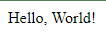
Here’s the example program on how to display “Hello World” using PHP Programming Language.
<html>

   <head>
      <title>Hello World</title>
   </head>

   <body>
      <?php echo "Hello, World!";?>
   </body>

</html>
Output:
PHP Features
PHP is a prevalent programming language because it is so simple to learn and open-source.
What can PHP do?
- Generate dynamic page content.
- Create, open, read, write, delete, and close files on the server.
- Collect form data.
- Send and receive cookies.
- Add, modify, and delete data from your database.
- PHP can be used to control user access.
- PHP can encrypt data.
Web Development
Nowadays, PHP is widely used in web development. PHP can easily develop dynamic web pages.
But, you must have the basic knowledge of the following technologies for web development:
- HTML
- CSS
- JavaScript
- Ajax
- XML and JSON
- JQuery
What this tutorial covers?
This PHP Tutorial, covers all the fundamental programming concepts, including data types, operators and using variables, generating outputs, structuring your code to make decisions on your programs or looping over the same block of code multiple times, creating and manipulating strings and arrays, defining and calling functions and etc.
If you are comfortable with the basics tutorial, you’ll be moving to the next level that explains the concept file system, session and cookies, dates and times, as well as how to send email from your script, handling and validating forms, perform data filtration and handling errors in PHP.
Finally, you’ll be exploring some advanced concepts like classes and objects, parsing JSON data, pattern matching with regular expressions, exception handling as well as how to use PHP to manipulate data in MySQL database and create useful features like registrations, log-in system and etc.
PHP Fundamentals
Here are the Other latest PHP Tutorials providing an example program for beginners who want to learn programming, especially PHP.
- Introduction To PHP Programming
- Setup PHP Development Environment
- PHP Basic Syntax
- PHP Variable Types
- Constants In PHP
- Types Of Operators In PHP
- Decision Making In PHP
- Types Of Loops In PHP
- PHP Arrays
- PHP String
- PHP Web Concepts
- GET and POST Method PHP
- File Inclusion In PHP
- PHP File IO
- PHP Function
- PHP Cookies
- PHP Session
- Send Email With PHP
- PHP File Upload
- PHP Coding Standards
Audience
This PHP Tutorial is designed for beginners who want to learn about PHP Programming.
This PHP Tutorial can help a lot to familiarize the basic requirements before learning and proceeding to the advanced level of PHP Tutorials.
Prerequisites
Before learning PHP Programming Language, you must have the basic knowledge of HTML, CSS, JavaScript, and MYSQL or other databases platforms for better implementation of PHP.
Conclusion
We have successfully discussed the PHP Tutorial for beginners and its importance, we learned What is PHP, Why We Use PHP, the Important Characteristics of PHP, its Features of PHP, and so on.
Inquiries
By the way, If you have any questions or suggestions about this article entitled PHP Tutorial For Beginners, please feel free to comment below. Thank You!
Next topic
In the next topic, you will learn about the Introduction To PHP Programming, which you can learn with the help of examples.
Common use cases for PHP Tutorial For Beginners – Easy Learning
- Web application development. Full-stack PHP apps using vanilla PHP or Laravel/Symfony frameworks.
- WordPress plugin/theme development. Custom functionality for the world’s most popular CMS.
- API development. REST or GraphQL endpoints serving mobile apps and SPAs.
- CLI tools. Command-line scripts for cron jobs, data migration, or automation.
- Legacy code maintenance. PHP powers a large share of the web; understanding it is a durable skill.
Working code example
<?php
declare(strict_types=1);

class UserService {
    public function getGreeting(string $name): string {
        if ($name === "") {
            throw new InvalidArgumentException("Name is required");
        }
        return "Welcome, " . htmlspecialchars($name);
    }
}

$service = new UserService();
echo $service->getGreeting("Alice");
?>
Best practices
- Enable strict types. declare(strict_types=1) at the top of every file catches type coercion bugs.
- Use Composer. Modern PHP uses Composer for dependency management, autoloading, and PSR-4 class naming.
- Follow PSR standards. PSR-12 for coding style, PSR-4 for autoloading, PSR-3 for logging.
- Write unit tests with PHPUnit. Aim for 70%+ code coverage on business-critical modules.
- Use static analysis. PHPStan or Psalm catch many bugs before code runs.
Common pitfalls
- Global state. Overusing global variables makes testing hard. Prefer dependency injection.
- SQL concatenation. Always use prepared statements. Never concatenate user input into SQL strings.
- Missing type declarations. Old PHP allowed loose types. Modern PHP encourages strict typing everywhere.
- Ignoring errors. Set error_reporting(E_ALL) in development. Handle errors explicitly in production.
Official documentation
Featured guides worth reading next
Frequently Asked Questions
What PHP version does this tutorial target?
Do I need XAMPP to run PHP code examples?
How do I test the code snippets in this tutorial?
Can I use this in a Laravel project?
Where can I get more PHP practice projects?

Angel Jude Suarez
Full-Stack Developer at PIES IT Solution
Focuses on Python development, machine learning, and AI integration. Has built production AI systems including OpenAI Whisper integration for medical transcription and GPT-4o-powered diagnosis assistance. Strong background in pandas, scikit-learn, and TensorFlow.
Expertise: Python · PHP · Java · VB.NET · ASP.NET · Machine Learning · AI Integration · OpenCV · Django · CodeIgniter
· View all posts by Angel Jude Suarez →
Great tutorials.