
Strings and tuples in Python both raise IndexError on out-of-range indexing, but never on slicing. Knowing the difference between s[5] (raises) and s[5:10] (returns empty string) is the foundation of safe string and tuple access.
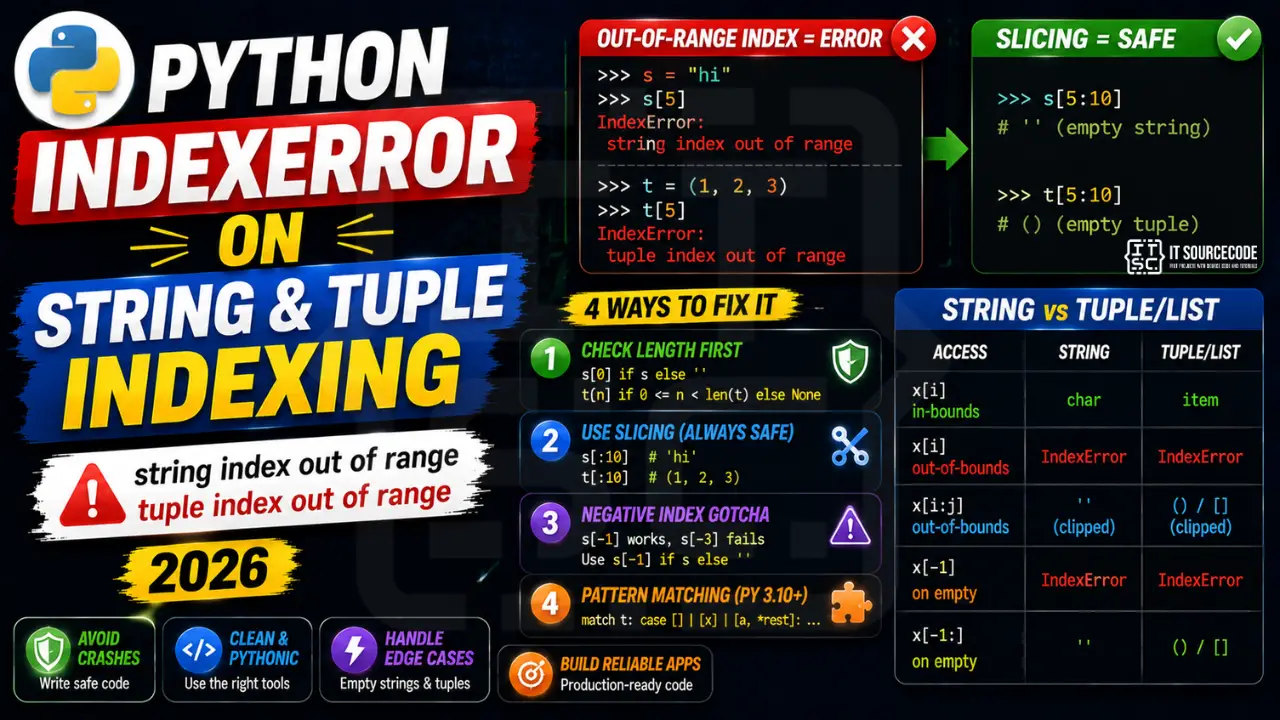
Minimal reproducer
s = "hi"
print(s[5])    # IndexError: string index out of range

t = (1, 2, 3)
print(t[5])    # IndexError: tuple index out of range

# But slicing is always safe:
print(s[5:10])  # '' (empty string)
print(t[5:10])  # () (empty tuple)
Fix 1: Check length first
def first_char(s):
    return s[0] if s else ''

def nth_item(t, n, default=None):
    return t[n] if 0 <= n < len(t) else default
Fix 2: Use slicing to avoid IndexError entirely
s = "hi"
first_two = s[:2]    # 'hi' (safe even if shorter)
first_ten = s[:10]   # 'hi' (no error, just shorter)
last_char = s[-1:]   # 'i' (slice, always safe; vs s[-1] which raises if empty)
Fix 3: Negative index gotcha
s = "ab"
print(s[-1])    # 'b' (valid: -1 = last)
print(s[-2])    # 'a' (valid: -2 = second-to-last)
print(s[-3])    # IndexError: -3 is out of range for length 2

# Safe last-character access:
last = s[-1] if s else ''
# Or use slicing:
last = s[-1:]  # '' for empty string, no error
Fix 4: Pattern matching (Python 3.10+)
def describe(t):
    match t:
        case []:
            return "empty"
        case [single]:
            return f"one item: {single}"
        case [first, *rest]:
            return f"first={first}, rest={rest}"

# Never raises IndexError, matches based on length
String vs list/tuple behavior table
| Access | String | Tuple/List |
|---|---|---|
| x[i] in-bounds | char | item |
| x[i] out-of-bounds | IndexError | IndexError |
| x[i:j] out-of-bounds | ” (clipped) | () / [] (clipped) |
| x[-1] on empty | IndexError | IndexError |
| x[-1:] on empty | ” | () / [] |
Debugging checklist
- Print
len(text)and the exact index right before the access. - Empty strings and empty tuples raise on
text[0]. Guard withif text. - Negative indices work but wrap.
text[-3]on a 2-char string raises the same error.
Safe patterns for string and tuple access
# Guard first
if text and len(text) >= 3:
    prefix = text[:3]
else:
    prefix = text

# Or use slicing which never raises
prefix = text[:3]           # empty string if text is empty
first = text[:1]            # empty string if text is empty; safer than text[0]

# Tuple
point = (10, 20)
x = point[0] if len(point) >= 1 else 0
y = point[1] if len(point) >= 2 else 0
Real-world example: safe substring extraction
def get_area_code(phone: str) -> str:
    """Extract 3-digit area code from a phone string safely."""
    digits = "".join(c for c in phone if c.isdigit())
    # Never raises even if digits is empty
    return digits[:3]

print(get_area_code("+1 (555) 123-4567"))   # "155"
print(get_area_code(""))                     # ""
print(get_area_code("no digits here"))      # ""
Related IndexError patterns
- list.pop() on empty list raises IndexError. Guard with
if items. - Negative index beyond length raises the same error.
text[-5]on a 3-char string. - Iterating with wrong bound:
for i in range(len(items)+1)is a classic off-by-one.
When to use bytes vs str for indexing
Python treats str and bytes identically for indexing but the returned type differs:
text = "hello"
print(text[0])       # "h" (str)

data = b"hello"
print(data[0])       # 104 (int, ASCII code)

# Watch for this when parsing binary data
header = b"\x89PNG\r\n"
first_byte = header[0]         # 137 (int)
# NOT b"\x89"
first_byte_bytes = header[:1]  # b"\x89"
Quick reference summary
For strings and tuples, slicing (text[:1]) is safer than indexing (text[0]) when the sequence might be empty. Slicing returns an empty sequence rather than raising IndexError. When you need the actual element and the sequence might be empty, guard with if text or use text[:1] and check the result.
Working with Unicode strings
Python 3 strings are Unicode. A single visible character can span multiple code points, especially for emoji or combining marks. If your text contains “café” as “cafe” + combining acute accent, text[3] returns the base “e”, not the “é” a user sees. For visual-character indexing, use the unicodedata library or the grapheme third-party package instead of raw indexing.
Why IndexError happens
String index out of range fires when you access s[i] with i beyond len(s). Python strings are indexed from 0 to len(s)-1. Negative indices count from the end.
Common triggers
- Off-by-one.
my_list[len(my_list)]fails — uselen(my_list) - 1. - Empty container.
my_list[0]fails when the list is empty. - Wrong data source. CSV had fewer columns than expected.
- Loop range wrong.
for i in range(len(my_list) + 1)— off-by-one. - API returned empty result. Unhandled empty response.
Diagnostic pattern
# BAD — accessing first element without check
def get_first(items):
    return items[0]     # IndexError if items is empty

# GOOD — guard for empty
def get_first(items):
    if not items:
        return None
    return items[0]

# BETTER — use Optional and let caller handle
from typing import Optional, Sequence, TypeVar
T = TypeVar("T")

def get_first(items: Sequence[T]) -> Optional[T]:
    return items[0] if items else None

# For pandas, use .iloc with .empty check
import pandas as pd
def first_row(df: pd.DataFrame) -> Optional[dict]:
    if df.empty:
        return None
    return df.iloc[0].to_dict()

# For enumerate-based loops, this is safe
for i, item in enumerate(items):
    print(i, item)      # never IndexError

# Never write: for i in range(len(items) + 1)
Best practices
- Prefer enumerate over range(len()). Never off-by-one.
- Guard empty containers. Return None or default before accessing.
- Use slicing.
items[:5]is safe even if items has fewer than 5 elements. - Use type hints with Optional. Communicates that the value may not exist.
- Use pytest with edge cases. Test empty lists, single-element lists, off-by-one boundaries.
Official documentation
Quick step-by-step summary (click to expand)
- Check length before positional access. Use if len(seq) greater than index: value = seq[index] to guard access.
- Use slicing instead of direct indexing. seq[i:i+1] returns empty on out-of-range instead of raising IndexError.
- Handle empty sequences at function entry. Add if not seq: return default at the top of any function that indexes into a passed sequence.
- Use try/except IndexError for user input. Wrap risky positional access in try IndexError except so unexpected input does not crash your program.
Frequently Asked Questions
Why does s[5:10] not raise IndexError on a 3-char string?
Slicing in Python clamps to valid bounds silently. s[5:10] on “hi” returns ” (empty string). This is by design: slicing represents “give me this range, clamp if you must” while indexing represents “give me exactly this element, fail if missing.”
What is the safest way to get the last character of a possibly-empty string?
Use s[-1:] (slicing) which returns ” on empty string instead of raising. If you need an explicit single char, write last = s[-1] if s else ”. Both are correct; the first is shorter, the second more explicit.
Why does Python use IndexError instead of returning None on out-of-range?
Returning None silently hides bugs. Raising IndexError forces you to handle the case explicitly. For dict-style “missing returns default” semantics, use dict.get() (dicts use KeyError) or wrap list access in your own safe_get function.
Can I use enumerate() to avoid IndexError in loops?
Yes. enumerate() iterates the sequence directly, so you never index past the end. for i, item in enumerate(items): never raises IndexError because i is generated from the actual length. Prefer this over for i in range(len(items)).
Does string slicing copy the data or share memory?
Python strings are immutable and slicing creates a new string object (copy). For very large strings, this can be expensive. Use memoryview on bytes/bytearray for zero-copy slicing of binary data. Pure string slicing always copies.

Adrian Mercurio
Full-Stack Developer at PIES IT Solution
Specializes in building complete capstone projects with full documentation. Strong background in PHP/MySQL development and database design. Has personally built and tested over 30 capstone-ready projects with ER diagrams, DFDs, and chapter-by-chapter thesis documentation.
Expertise: PHP · Laravel · Database Design · Capstone Projects · C# · C · C++ · Python · AI Projects
· View all posts by Adrian Mercurio →