
You wrote arr[5, 10] and NumPy threw IndexError: index 10 is out of bounds for axis 1 with size 8. The error names exactly which axis and what size, so debugging is mechanical: print(arr.shape) and verify your indexes fit.
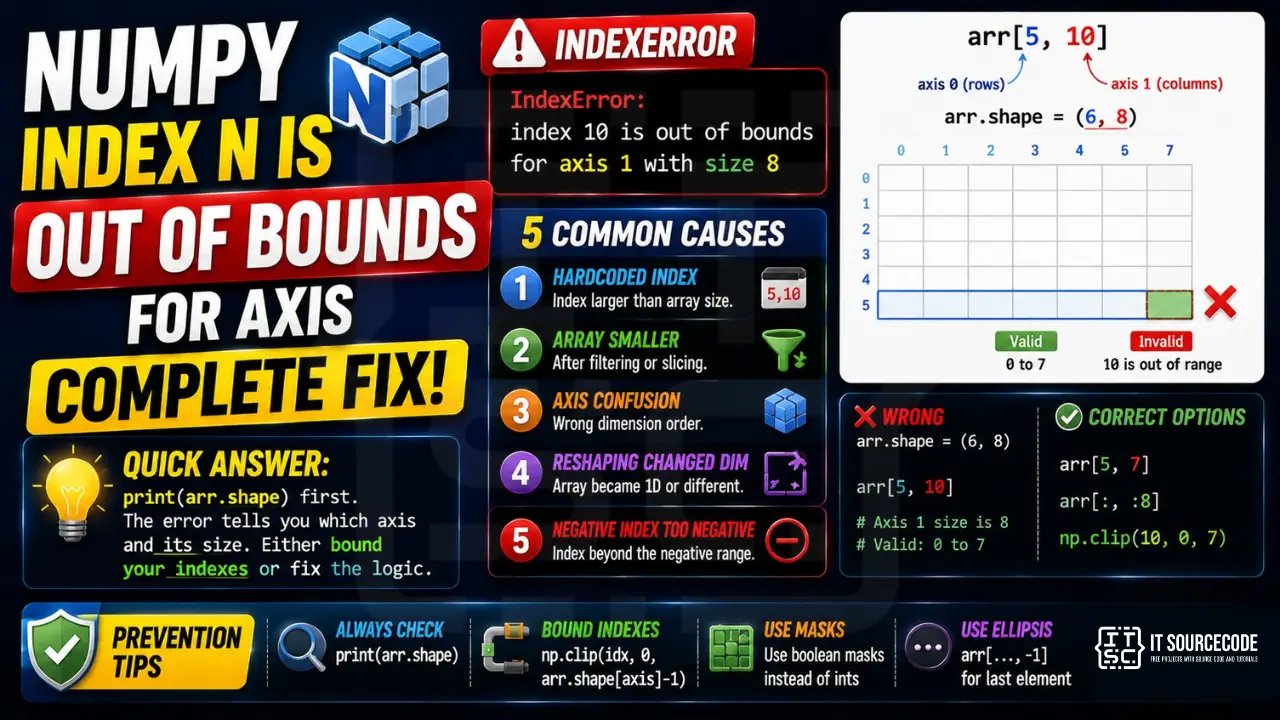
📌 Quick answer: print(arr.shape) first. The error message tells you which axis (0=rows, 1=columns for 2D, higher for tensors) and what valid range is. arr[5, 10] on shape (6, 8) means axis 1 (size 8) does not have index 10. Either bound your indexes or check why the array is smaller than expected.
Cause 1: Hardcoded index larger than array
The most common: your code assumed a fixed size but data is variable.
import numpy as np
arr = np.zeros((6, 8))
arr[5, 10]    # ❌ index 10 out of bounds for axis 1 with size 8

# Safe pattern
row, col = 5, 10
if row < arr.shape[0] and col < arr.shape[1]:
    val = arr[row, col]
else:
    val = None
Cause 2: Array smaller than expected after filter
You filtered an array with a boolean mask and tried to access by old index.
arr = np.array([10, 20, 30, 40, 50])
filtered = arr[arr > 25]    # shape (3,): [30, 40, 50]
filtered[4]    # ❌ index 4 out of bounds for size 3
Cause 3: Axis confusion in higher-dim arrays
For a 3D tensor of shape (batch, height, width), arr[0, 5, 10] means batch 0, row 5, col 10. Mixing up the order is the bug.
import numpy as np
batch = np.zeros((4, 28, 28))    # 4 images, 28x28 each
batch[5, 0, 0]    # ❌ axis 0 (batch) has size 4
batch[0, 5, 10]   # ✓ batch 0, row 5, col 10
Cause 4: Reshaping changed dimensions
arr.reshape(-1) flattens to 1D. Now arr[i, j] raises because there is no axis 1.
arr = np.zeros((4, 8))    # 2D
flat = arr.reshape(-1)    # 1D, shape (32,)
flat[0, 5]    # ❌ too many indices for array: array is 1-dimensional
flat[5]       # ✓
Cause 5: Negative index too negative
Negative indexing wraps: arr[-1] is the last element. But arr[-100] on a 5-element array fails.
arr = np.array([1, 2, 3, 4, 5])
arr[-1]    # ✓ 5 (last)
arr[-5]    # ✓ 1 (first via wrap)
arr[-6]    # ❌ index -6 out of bounds for size 5
Prevention
- Always
print(arr.shape)before indexing in new code - Use
np.clip(idx, 0, arr.shape[0]-1)to bound indexes to valid range - Use boolean masks instead of integer indexing when filtering
- Use
arr[..., -1]for “last along last axis” — works for any rank
Related Guides
- List index out of range (full guide)
- String index out of range
- All IndexError fixes
- Python Tutorial hub
Debugging index out of bounds in NumPy
- Print
arr.shapeimmediately before the failing indexing operation. - Confirm which axis your index targets — remember shape is
(rows, cols), soarr[i, j]means row i, column j. - Check whether i or j comes from a computed value that could be off-by-one after filtering or reshaping.
- If iterating, use
for i in range(arr.shape[0])— never hardcode the size. - For advanced indexing, print the index arrays to confirm they stay within bounds.
Safe alternatives to raw indexing
import numpy as np

# Option 1: np.take with mode='clip' silently clamps to valid range
arr = np.array([10, 20, 30])
np.take(arr, [0, 5], mode='clip')   # -> array([10, 30])

# Option 2: np.take with mode='wrap' wraps indices modulo length
np.take(arr, [0, 4], mode='wrap')   # -> array([10, 20])

# Option 3: boolean mask instead of integer index
mask = np.array([True, False, True])
arr[mask]   # -> array([10, 30])

# Option 4: explicit bounds check
i = 5
if 0 <= i < arr.shape[0]:
    print(arr[i])
else:
    print("out of range")
Common reshape gotcha
After reshape(), axis meanings can flip. If you get “index N is out of bounds for axis 0”, double-check whether reshape swapped rows and columns for you:
arr = np.arange(6).reshape(2, 3)   # shape (2, 3)
arr[5, 0]   # IndexError: axis 0 has size 2

# What went wrong: after reshape, axis 0 is the shorter dimension.
# Fix: check shape first, then index.
print(arr.shape)   # (2, 3)
arr[1, 0]   # 3, works
Why IndexError happens
NumPy IndexError comes from axis-specific bounds or wrong ndim assumption. Print arr.shape before indexing to see actual dimensions.
Common triggers
- Off-by-one.
my_list[len(my_list)]fails — uselen(my_list) - 1. - Empty container.
my_list[0]fails when the list is empty. - Wrong data source. CSV had fewer columns than expected.
- Loop range wrong.
for i in range(len(my_list) + 1)— off-by-one. - API returned empty result. Unhandled empty response.
Diagnostic pattern
# BAD — accessing first element without check
def get_first(items):
    return items[0]     # IndexError if items is empty

# GOOD — guard for empty
def get_first(items):
    if not items:
        return None
    return items[0]

# BETTER — use Optional and let caller handle
from typing import Optional, Sequence, TypeVar
T = TypeVar("T")

def get_first(items: Sequence[T]) -> Optional[T]:
    return items[0] if items else None

# For pandas, use .iloc with .empty check
import pandas as pd
def first_row(df: pd.DataFrame) -> Optional[dict]:
    if df.empty:
        return None
    return df.iloc[0].to_dict()

# For enumerate-based loops, this is safe
for i, item in enumerate(items):
    print(i, item)      # never IndexError

# Never write: for i in range(len(items) + 1)
Best practices
- Prefer enumerate over range(len()). Never off-by-one.
- Guard empty containers. Return None or default before accessing.
- Use slicing.
items[:5]is safe even if items has fewer than 5 elements. - Use type hints with Optional. Communicates that the value may not exist.
- Use pytest with edge cases. Test empty lists, single-element lists, off-by-one boundaries.
Official documentation
Quick step-by-step summary (click to expand)
- Check array shape before axis access. Use if arr.shape[axis] greater than index before accessing arr[:, index] or arr[index, :].
- Use np.take with mode=”clip”. np.take(arr, indices, axis=1, mode=”clip”) clamps out-of-range indices to valid values.
- Use boolean masks instead of index arrays. For filtering, mask = arr[:, 0] greater than 0; filtered = arr[mask] never raises IndexError.
- Print arr.shape before the failing access. A single print of arr.shape reveals whether your mental model of the array matches reality.
Frequently Asked Questions
What does ‘index N is out of bounds for axis N with size N’ mean in NumPy?
You tried to access an array element at a position that doesn’t exist. The error names exactly which axis (0=rows, 1=cols for 2D) and what the valid range is. arr[5, 10] on shape (6, 8) fails because axis 1 has size 8 (valid indexes 0-7).
How do I find out an array’s dimensions before indexing?
Use arr.shape (returns a tuple), arr.ndim (number of axes), arr.size (total elements). print(arr.shape) is the first debugging step for any IndexError on a NumPy array.
Why does flat[0, 5] fail when arr[0, 5] worked?
Because flat = arr.reshape(-1) is 1-dimensional. A 1D array only supports single-axis indexing. Use flat[5] or reshape back to 2D: flat.reshape(4, 8)[0, 5].
How do I safely index when the array shape varies?
Use np.clip(idx, 0, arr.shape[0]-1) to bound any index. Or use boolean masks (arr[arr > threshold]) which never raise IndexError. Or use try/except IndexError with a sensible fallback.
What’s the difference between IndexError and ValueError in NumPy?
IndexError: index out of bounds for an existing axis. ValueError: shape mismatch in operations (broadcast, dot product). They’re distinct, but both common in tensor code. Both go away once you print shapes first and verify operations match.

Adrian Mercurio
Full-Stack Developer at PIES IT Solution
Specializes in building complete capstone projects with full documentation. Strong background in PHP/MySQL development and database design. Has personally built and tested over 30 capstone-ready projects with ER diagrams, DFDs, and chapter-by-chapter thesis documentation.
Expertise: PHP · Laravel · Database Design · Capstone Projects · C# · C · C++ · Python · AI Projects
· View all posts by Adrian Mercurio →