
You called my_list.pop() in a loop and at some point Python crashed with IndexError: pop from empty list. The list got drained, the next pop has nothing to take, and Python signals the boundary. This guide covers all 4 safe patterns for popping in production code.
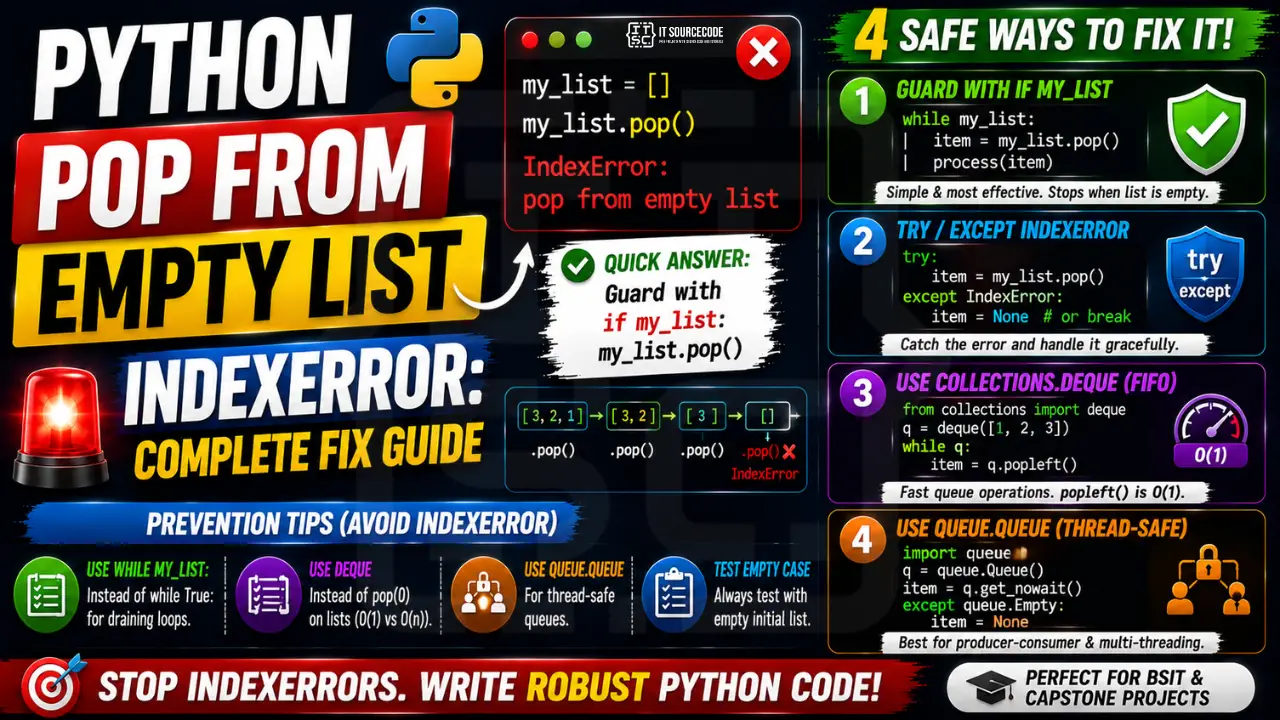
📌 Quick answer: Guard with if my_list: my_list.pop(). For queue patterns, use collections.deque and deque.popleft() + try/except. For long-lived queues, use queue.Queue from the standard library which has explicit get_nowait() / put_nowait().
Pattern 1: Guard with if my_list
The simplest. Truthiness of a list is False when empty.
work = [1, 2, 3]
while work:
    item = work.pop()
    process(item)
# loop exits cleanly when work becomes []
Pattern 2: try / except IndexError
Useful when the pop is deep inside conditional logic and a simple if-guard is awkward.
try:
    item = work.pop()
except IndexError:
    item = None    # or break, or return sentinel
Pattern 3: Use collections.deque for FIFO queues
list.pop(0) is O(n) and triggers the error on empty just like .pop(). deque.popleft() is O(1).
from collections import deque
q = deque([1, 2, 3])
while q:
    item = q.popleft()    # O(1), fails on empty
    process(item)
Pattern 4: queue.Queue for thread-safe drain
For producer-consumer patterns across threads, use queue.Queue with get_nowait() and Empty exception handling.
import queue
q = queue.Queue()
q.put("task1")
try:
    item = q.get_nowait()
except queue.Empty:
    item = None
Prevention
- Use
while my_list:instead ofwhile True:for loops that drain a list - Switch to collections.deque if you do .pop(0) frequently (O(1) vs O(n))
- Use queue.Queue for cross-thread queues, never bare list.pop
- Test the empty-list case in your unit tests with empty initial state
Related Guides
- List index out of range (full guide)
- String index out of range
- All IndexError fixes
- Python Tutorial hub
Common patterns that cause pop from empty list
- Loop that pops until “done”: forgot the exit condition, ran one extra iteration. Use
while my_list:instead ofwhile True:. - Consuming a queue in production: multiple consumers pop from the same list without a lock. Switch to
collections.dequewithpopleft()and threading.Lock, or usequeue.Queuewhich handles empty gracefully. - Stack in a recursive function: base case fires before the pop. Check
if stack:first. - Undo-redo history: user undoes past the start. Guard with
if history: history.pop(). - Dequeue in BFS/DFS: reached the last node but tried to pop the next. The empty check IS the terminating condition — respect it.
Safe alternatives to pop()
# Option 1: guarded pop with default
value = my_list.pop() if my_list else None

# Option 2: pop with fallback using slice
value = my_list.pop() if my_list else "default"

# Option 3: use collections.deque for thread-safe queue
from collections import deque
q = deque([1, 2, 3])
try:
    x = q.popleft()
except IndexError:
    x = None

# Option 4: use queue.Queue with timeout for producer/consumer
from queue import Queue, Empty
q = Queue()
try:
    x = q.get(timeout=1.0)   # blocks up to 1 second
except Empty:
    x = None
Debugging checklist
- Print
len(my_list)right before the pop line — is it really zero? - If yes, trace back which code path emptied the list unexpectedly.
- If the list should never be empty at that point, add an assertion:
assert my_list, "list should not be empty here". - If the list can legitimately be empty, replace pop with a guarded pattern.
- If concurrent code is involved, switch to
collections.dequeorqueue.Queuewith proper locking.
When pop() is NOT the right tool
- Reading the last item without removing → use
my_list[-1]. - Getting the first item → use
my_list[0](fast) ormy_list.pop(0)(slow — O(n)). - Random access removal → use
del my_list[i]or slicing.
Testing your code against empty lists
import pytest

def process_queue(items):
    return items.pop() if items else None

def test_empty():
    assert process_queue([]) is None

def test_single():
    assert process_queue([42]) == 42

def test_many():
    lst = [1, 2, 3]
    assert process_queue(lst) == 3
    assert lst == [1, 2]

# Run: pytest -q
Add an “empty” test case to every function that pops. It takes two lines and prevents this specific IndexError from ever hitting production.
Why IndexError happens
List index out of range means you accessed my_list[i] beyond the list’s actual length. Python lists are indexed from 0 to len(list)-1.
Common triggers
- Off-by-one.
my_list[len(my_list)]fails — uselen(my_list) - 1. - Empty container.
my_list[0]fails when the list is empty. - Wrong data source. CSV had fewer columns than expected.
- Loop range wrong.
for i in range(len(my_list) + 1)— off-by-one. - API returned empty result. Unhandled empty response.
Diagnostic pattern
# BAD — accessing first element without check
def get_first(items):
    return items[0]     # IndexError if items is empty

# GOOD — guard for empty
def get_first(items):
    if not items:
        return None
    return items[0]

# BETTER — use Optional and let caller handle
from typing import Optional, Sequence, TypeVar
T = TypeVar("T")

def get_first(items: Sequence[T]) -> Optional[T]:
    return items[0] if items else None

# For pandas, use .iloc with .empty check
import pandas as pd
def first_row(df: pd.DataFrame) -> Optional[dict]:
    if df.empty:
        return None
    return df.iloc[0].to_dict()

# For enumerate-based loops, this is safe
for i, item in enumerate(items):
    print(i, item)      # never IndexError

# Never write: for i in range(len(items) + 1)
Best practices
- Prefer enumerate over range(len()). Never off-by-one.
- Guard empty containers. Return None or default before accessing.
- Use slicing.
items[:5]is safe even if items has fewer than 5 elements. - Use type hints with Optional. Communicates that the value may not exist.
- Use pytest with edge cases. Test empty lists, single-element lists, off-by-one boundaries.
Official documentation
Quick step-by-step summary (click to expand)
- Guard pop with truthy check. Use if mylist: value = mylist.pop() before removing the last item.
- Use conditional expression for default. value = mylist.pop() if mylist else None returns None on empty instead of crashing.
- Track list state with a counter. For producer-consumer patterns, track remaining items and stop consuming when count hits zero.
- Use try/except IndexError for cleanup patterns. When draining a list in a loop, wrap the pop in try IndexError except and break the loop on empty.
Frequently Asked Questions
What does ‘pop from empty list’ mean in Python?
list.pop() removes and returns the last element. When the list is empty there’s nothing to remove, so Python raises IndexError: pop from empty list. The fix is to check the list first or use try/except.
How do I safely pop until the list is empty?
Use ‘while my_list:’ as the loop condition. The list is truthy when non-empty and falsy when empty, so the loop ends naturally when the last item is popped.
What’s the difference between list.pop() and deque.popleft()?
list.pop() removes the LAST element in O(1). list.pop(0) removes the first in O(n) (every other element shifts). collections.deque.popleft() removes the FIRST element in O(1). Use deque for FIFO queues, list for LIFO stacks.
How do I pop with a default value?
Python’s list has no default-pop. Wrap with: item = my_list.pop() if my_list else None. Or use collections.deque and try/except IndexError.
Is list.pop() thread-safe?
It’s atomic for the pop operation but not safe for the check-then-pop pattern (if my_list: my_list.pop()) across threads. Use queue.Queue or collections.deque with explicit locking for thread-safe queues.

Adrian Mercurio
Full-Stack Developer at PIES IT Solution
Specializes in building complete capstone projects with full documentation. Strong background in PHP/MySQL development and database design. Has personally built and tested over 30 capstone-ready projects with ER diagrams, DFDs, and chapter-by-chapter thesis documentation.
Expertise: PHP · Laravel · Database Design · Capstone Projects · C# · C · C++ · Python · AI Projects
· View all posts by Adrian Mercurio →