
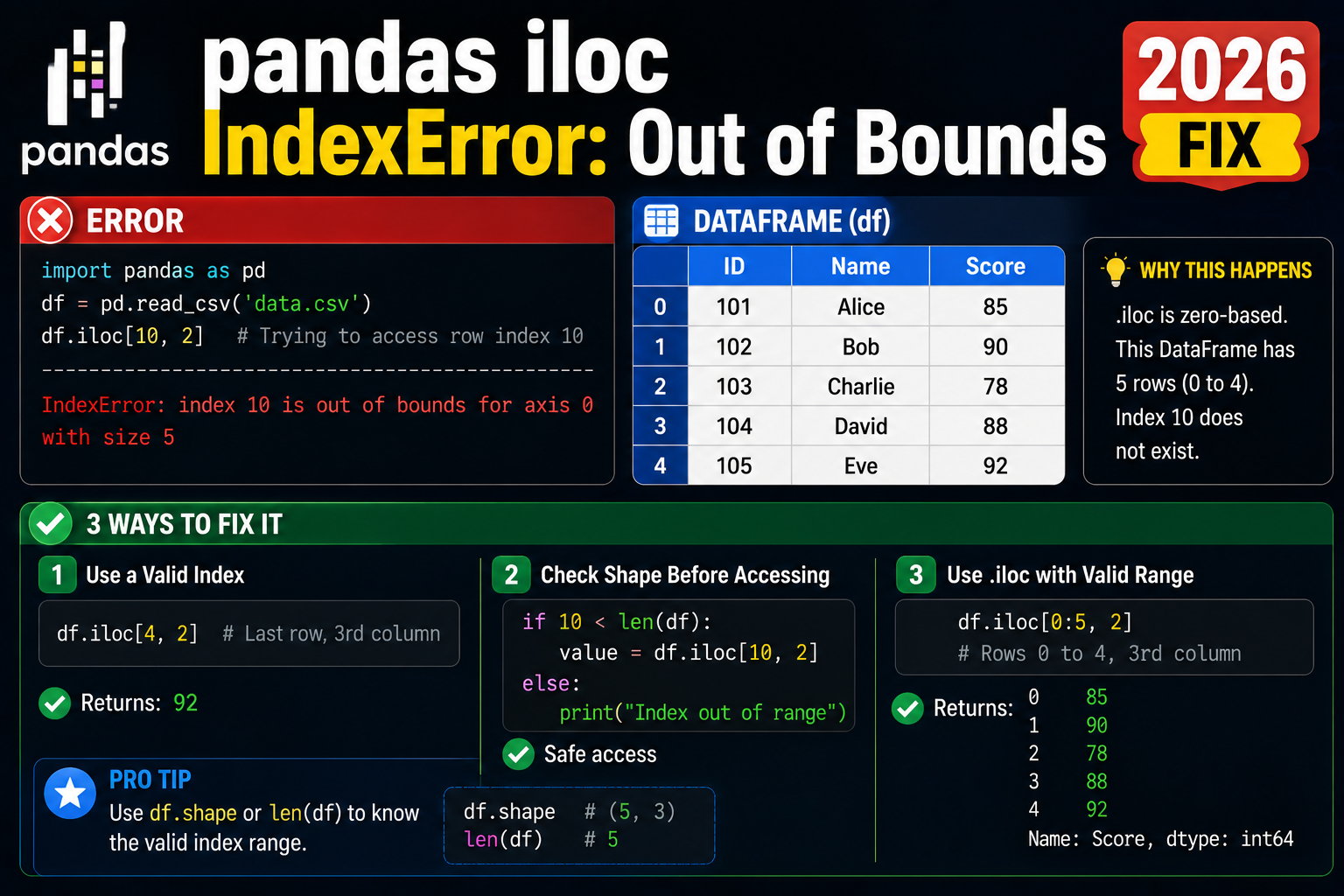
A pandas IndexError on df.iloc[i] means the positional index i is past the end of the DataFrame. The most common 2026 cause: you filtered or grouped the DataFrame and forgot that .iloc uses positional indices (0, 1, 2, …) not the original row labels.
Minimal reproducer
import pandas as pd
df = pd.DataFrame({'name': ['a','b','c']})

filtered = df[df.name == 'b']  # 1 row, original index = 1
print(filtered.iloc[1])  # IndexError: positional indexer out-of-bounds
# Even though the row's LABEL is 1, its POSITION after filter is 0
Fix 1: Use .loc for label-based access
filtered = df[df.name == 'b']
print(filtered.loc[1])  # works, label-based
Fix 2: Reset the index after filtering
filtered = df[df.name == 'b'].reset_index(drop=True)
print(filtered.iloc[0])  # works, positions 0..N-1 again
Fix 3: Bounds check before iloc
def safe_iloc(df, i):
    if 0 <= i < len(df):
        return df.iloc[i]
    return None
Fix 4: Use .at or .iat for single cell access (faster, same bounds rules)
# .iat is faster than .iloc for single cell, same IndexError semantics
value = df.iat[0, 1]  # row 0, col 1
# .at is faster than .loc for single cell by label
value = df.at[1, 'name']  # row label 1, col 'name'
.iloc vs .loc vs .at vs .iat
| Accessor | Lookup by | Multi-cell | Raises on miss |
|---|---|---|---|
| .iloc | Position (0..N-1) | Yes | IndexError |
| .loc | Label | Yes | KeyError |
| .iat | Position | No (single cell) | IndexError |
| .at | Label | No (single cell) | KeyError |
Official documentation
Common causes of pandas iloc IndexError
The IndexError: single positional indexer is out-of-bounds from pandas iloc almost always comes from one of these five patterns. Understanding which one applies to your case gives you the fix in seconds.
- Filtering returned an empty DataFrame. After a filter like
df[df["status"] == "active"], if nothing matched,result.iloc[0]raises IndexError immediately. Always checklen(result) > 0before accessing the first row. - Off-by-one error in loops. Using
range(len(df) + 1)instead ofrange(len(df))makes the last iteration try to access a row that does not exist. - Wrong axis assumption.
df.iloc[5]gives you the sixth row.df.iloc[:, 5]gives you the sixth column. Confusing the two axes causes IndexError when the shape does not match your mental model. - Slicing with a filter that returns zero rows.
df[df["age"] > 100].iloc[0]crashes if no rows match the age filter. Add a length check before accessing. - Passing a boolean series to iloc. iloc expects positional integers, not boolean masks. Use
df.loc[mask]ordf[mask]for boolean filtering.
iloc vs loc vs at: when to use each in pandas
pandas has three main indexers, each with different semantics. Picking the right one for your case avoids IndexError and KeyError bugs.
Use iloc for positional indexing
df.iloc[0] always returns the first row regardless of the index label. Best for when you want the first N rows, last N rows, or a specific numeric slice. Follows Python list conventions with negative indices supported.
Use loc for label-based indexing
df.loc[100] returns the row whose index label is 100, not the 101st row. Best for when your DataFrame has a meaningful index like dates, user IDs, or product codes. Also accepts boolean masks: df.loc[df["status"] == "active"].
Use at for fast single-cell access
df.at[100, "price"] is much faster than df.loc[100, "price"] for reading a single cell. Use it inside loops or when performance matters. It only works for single-cell access, not slices or masks.
My rule of thumb: default to loc for readability, drop to iloc only when you need positional access, and use at inside performance-critical loops. This convention prevents most iloc IndexError bugs in production pandas code because you only use iloc when you actually need positional access.
Quick fix summary
If your pandas iloc call throws IndexError, work through this checklist in order. First, print the DataFrame shape before the iloc access to see what you actually have. Second, add a length check before any positional access to prevent crashes on empty results. Third, verify whether you want positional or label indexing (iloc vs loc). Fourth, if you are filtering, check the filter returned matches before accessing them. Fifth, remember iloc takes integers, not boolean masks. Ninety percent of iloc IndexErrors resolve at one of these five checks. The other 10 percent are usually caused by data type surprises like index columns that look like integers but are actually strings.
For any pandas code you plan to run in production, add explicit shape assertions after loading data. Example: assert len(df) > 0, "loaded empty DataFrame". Failing fast with a clear message beats debugging a mysterious IndexError buried inside your business logic three weeks later. This small habit saves hours across the lifetime of any data pipeline.
One more habit that eliminates iloc bugs almost entirely: use pandas type annotations with mypy or pyright. Modern Python IDEs can catch iloc misuse at edit time, before your code even runs. Adding these tools to a data pipeline pays for itself the first time it catches an off-by-one error that would have crashed a nightly ETL job at 3 AM. This is table stakes for professional pandas code in 2026 production environments.
Finally, when you deploy pandas code to production, add pandas version pinning to your requirements file. Different pandas versions have subtle behavior differences in iloc handling that can cause silent data quality issues. Pinning to a specific version means your production code behaves exactly like your development code. This is table stakes for professional pandas deployments in 2026, and it saves you from debugging “worked yesterday” mysteries on Monday mornings.
Quick step-by-step summary (click to expand)
- Check DataFrame shape before iloc access. Print df.shape or len(df) to confirm the DataFrame has enough rows for the position you want.
- Add a length check before positional access. Use if len(df) greater than 0 then access iloc[0] to prevent IndexError on empty DataFrames.
- Choose iloc vs loc based on your intent. Use iloc for positional access (first row, last row). Use loc for label-based access (specific index value).
- Use boolean masks with df.loc[], not df.iloc[]. Change df.iloc[mask] to df.loc[mask] because iloc does not accept boolean masks.
Frequently Asked Questions
Why does iloc raise IndexError but loc raises KeyError?
iloc is positional (like list indexing), so out-of-range is IndexError. loc is label-based (like dict access), so missing label is KeyError. Knowing this lets you write the right except clause.
Why does iloc[-1] work but iloc[len(df)] does not?
iloc accepts negative indices like Python lists (-1 = last row). But len(df) is one past the last valid position (positions go 0 to len(df)-1). Use iloc[-1] for last, iloc[len(df)-1] is equivalent but uglier.
When should I use reset_index(drop=True) vs reset_index()?
drop=True throws away the old index. drop=False (default) keeps the old index as a new column named ‘index’. After filtering, drop=True is usually what you want unless you need the original row labels for traceability.
What is the fastest way to access a single cell in pandas?
.iat for positional (df.iat[0, 1]) or .at for label (df.at[1, ‘col’]). Both are 5-10x faster than .iloc/.loc for single-cell access because they skip the slicing infrastructure. Use them in tight loops.
Can I slice with iloc safely past the end?
Yes. iloc slicing (df.iloc[5:100]) clamps to valid bounds, returns empty DataFrame if start is past end. Only single-position access (df.iloc[100]) raises IndexError. Same rule as Python list slicing.

Angel Jude Suarez
Full-Stack Developer at PIES IT Solution
Angel Jude Suarez is a full-stack developer at PIES IT Solution. Focuses on Python development, machine learning, and AI integration. Has built production AI systems including OpenAI Whisper integration for medical transcription and GPT-4o-powered diagnosis assistance. Strong background in pandas, scikit-learn, and TensorFlow.
Expertise: Python, PHP, Java, VB.NET, ASP.NET, Machine Learning, AI Integration, OpenCV, Django, CodeIgniter · View all posts by Angel Jude Suarez →