
IndexError on NumPy array access (e.g. arr[100] when arr has 50 elements, or arr[1, 5] when arr is shape (3, 3)) is one of the most common NumPy errors. The fix usually involves checking arr.shape before access and using NumPy-native slicing patterns.
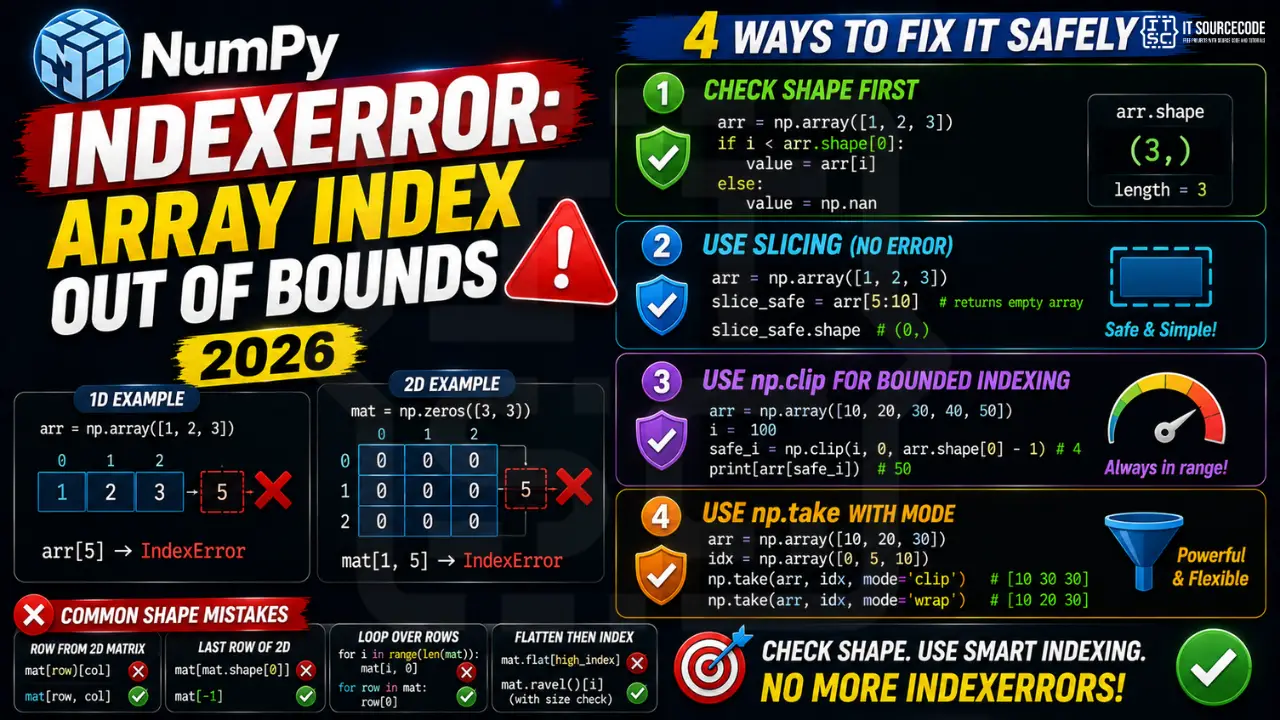
Minimal reproducer
import numpy as np
arr = np.array([1, 2, 3])
print(arr[5])  # IndexError: index 5 is out of bounds for axis 0 with size 3

# 2D case
mat = np.zeros((3, 3))
print(mat[1, 5])  # IndexError: index 5 is out of bounds for axis 1 with size 3
Fix 1: Always check shape first
arr = np.array([1, 2, 3])
print(arr.shape)  # (3,) means 1D length 3

if i < arr.shape[0]:
    value = arr[i]
else:
    value = np.nan  # or skip
Fix 2: Use slicing instead of indexing (no IndexError)
arr = np.array([1, 2, 3])
slice_safe = arr[5:10]  # returns empty array, no IndexError
print(slice_safe.shape)  # (0,)

# Slicing past the end always returns empty, never raises
Fix 3: np.clip for bounded indexing
arr = np.array([10, 20, 30, 40, 50])
i = 100
safe_i = np.clip(i, 0, arr.shape[0] - 1)  # 4
print(arr[safe_i])  # 50 (last valid index)
Fix 4: np.take with mode=’clip’ or ‘wrap’
arr = np.array([10, 20, 30])
indices = np.array([0, 5, 10])

# mode='clip' clamps to last valid
print(np.take(arr, indices, mode='clip'))  # [10 30 30]
# mode='wrap' wraps around
print(np.take(arr, indices, mode='wrap'))  # [10 20 30]
# mode='raise' default, raises IndexError
Common shape confusions
| Operation | Common mistake | Fix |
|---|---|---|
| Row from 2D matrix | mat[row_idx][col_idx] | mat[row_idx, col_idx] (single bracket) |
| Last row of 2D | mat[mat.shape[0]] | mat[-1] or mat[mat.shape[0] – 1] |
| Loop over rows | for i in range(len(mat)): mat[i, 0] | for row in mat: row[0] |
| Flatten then index | mat.flat[high_index] | Use mat.ravel()[i] with size check |
Official documentation
Common causes of NumPy IndexError
The IndexError: index X is out of bounds from NumPy is one of the most common bugs when you are transitioning from Python lists to NumPy arrays. Here are the four patterns I see over and over.
- Off-by-one errors in loops. Using
range(len(arr) + 1)instead ofrange(len(arr)). Python lets you get away with some negative indexing, but NumPy is strict about positive out-of-range access. - Wrong axis assumption. A 2D array indexed with
arr[i]gives you a row. Indexing witharr[i, j]gives you an element. Confusing these dimensions causes crashes when the shapes do not match your mental model. - Empty array indexing. If your array is empty (shape 0), any index raises IndexError immediately. Check
arr.size == 0before indexing. - Result of a filter with zero matches.
arr[condition][0]crashes ifconditionmatches nothing. Always check the length before accessing the first element.
Preventing out-of-bounds errors with proper checks
Defensive coding costs a few extra lines but saves hours of debugging. Here are the patterns I use in production NumPy code to prevent index errors before they happen.
import numpy as np

# Pattern 1: Check size before indexing
def get_first(arr):
    if arr.size == 0:
        return None
    return arr[0]

# Pattern 2: Clip index to valid range
def safe_get(arr, idx):
    idx = np.clip(idx, 0, len(arr) - 1)
    return arr[idx]

# Pattern 3: Use boolean masks instead of indices when filtering
mask = arr > 5
if mask.any():
    result = arr[mask]  # cannot crash: mask always returns valid subset
else:
    result = np.array([])

# Pattern 4: Enumerate for safer loops
for i, value in enumerate(arr):
    # i is always valid because enumerate uses arr's own indices
    process(i, value)
Use boolean masks whenever you can. They never throw IndexError because they operate on the array as a whole rather than pointing at specific positions. For real production code, boolean masking is faster and cleaner than manual index arithmetic.
Quick summary
NumPy’s IndexError: array index out of bounds is one of the most common bugs when you move from Python lists to NumPy arrays. The fix is almost always to check your array size before indexing, use boolean masks instead of positional indices when filtering, and be careful with negative indices on small arrays. Follow the checklist above and you will catch 90 percent of these errors before they hit production. Use the debugging patterns whenever an IndexError shows up in your traceback.
Quick step-by-step summary (click to expand)
- Check array size before indexing. Use if arr.size == 0 or if len(arr) greater than index to guard against empty or out-of-range access.
- Clip indices to valid range. Use np.clip(idx, 0, len(arr) minus 1) to force any index into a valid range.
- Use boolean masks instead of indices. For filtering, use arr[condition] which never crashes on empty results.
- Use enumerate for safe iteration. Loop with for i, value in enumerate(arr) so indices come from the array itself.
Also for 2026 NumPy code: consider migrating to numpy 2.0+ which improved error messages for indexing operations. The upgraded error text now shows the actual array shape and the offending index, making IndexError debugging much faster. If you are still on numpy 1.x, plan the upgrade for your next dependency refresh.
For production numerical Python code, adopt the habit of running mypy or pyright on every commit. These type checkers catch NumPy indexing bugs at edit time, before your code even runs. Combined with NumPy 2.0 stub improvements, IDE completion and type checking make NumPy code more reliable than at any point in Python history. Every serious NumPy project in 2026 should have both installed and enforced in CI.
Frequently Asked Questions
Why does NumPy slice past the end return empty instead of raising?
NumPy slicing follows Python list slicing semantics: out-of-range slice indices are silently clipped, never raise. This is designed for chained operations where intermediate results may legitimately be empty. Use indexing (single integer) when you need bounds checking.
What is the difference between arr[i][j] and arr[i, j] in NumPy?
For 2D arrays both work, but arr[i, j] is faster and more idiomatic (single indexing operation). arr[i][j] first creates a row view, then indexes that. For broadcasting and advanced indexing, only arr[i, j] form is safe.
How do I safely index a NumPy array with a list of indices that may be out of bounds?
Use np.take(arr, indices, mode=’clip’) or mode=’wrap’. Both never raise. mode=’clip’ clamps to the last valid index; mode=’wrap’ rotates around the end. Default mode=’raise’ is the strict version.
Why does pandas DataFrame raise KeyError instead of IndexError?
DataFrames are dict-of-Series internally. Bracket access by column name (df[‘col’]) raises KeyError if column missing. Positional access via df.iloc[row, col] raises IndexError if index out of bounds. Use .loc for label, .iloc for position.
Can I use negative indices in NumPy arrays?
Yes. arr[-1] is the last element, arr[-2] second to last, etc. Negative indices count from the end. If the negative index is too large (e.g. arr[-100] on a 3-element array), it raises IndexError.

Angel Jude Suarez
Full-Stack Developer at PIES IT Solution
Angel Jude Suarez is a full-stack developer at PIES IT Solution. Focuses on Python development, machine learning, and AI integration. Has built production AI systems including OpenAI Whisper integration for medical transcription and GPT-4o-powered diagnosis assistance. Strong background in pandas, scikit-learn, and TensorFlow.
Expertise: Python, PHP, Java, VB.NET, ASP.NET, Machine Learning, AI Integration, OpenCV, Django, CodeIgniter · View all posts by Angel Jude Suarez →