
AI moved from “futuristic concept” to “table-stakes skill” between 2023 and 2026. For BSIT students, AI literacy is now what database knowledge was 10 years ago, non-negotiable. The good news: learning AI in 2026 is dramatically easier than it was in 2020. You don’t need a PhD or expensive hardware. You need a clear roadmap and consistent daily practice.
This guide walks you through learning AI from zero, designed specifically for Filipino BSIT students with limited budget and access. No fluff. Skip what you don’t need; master what matters.
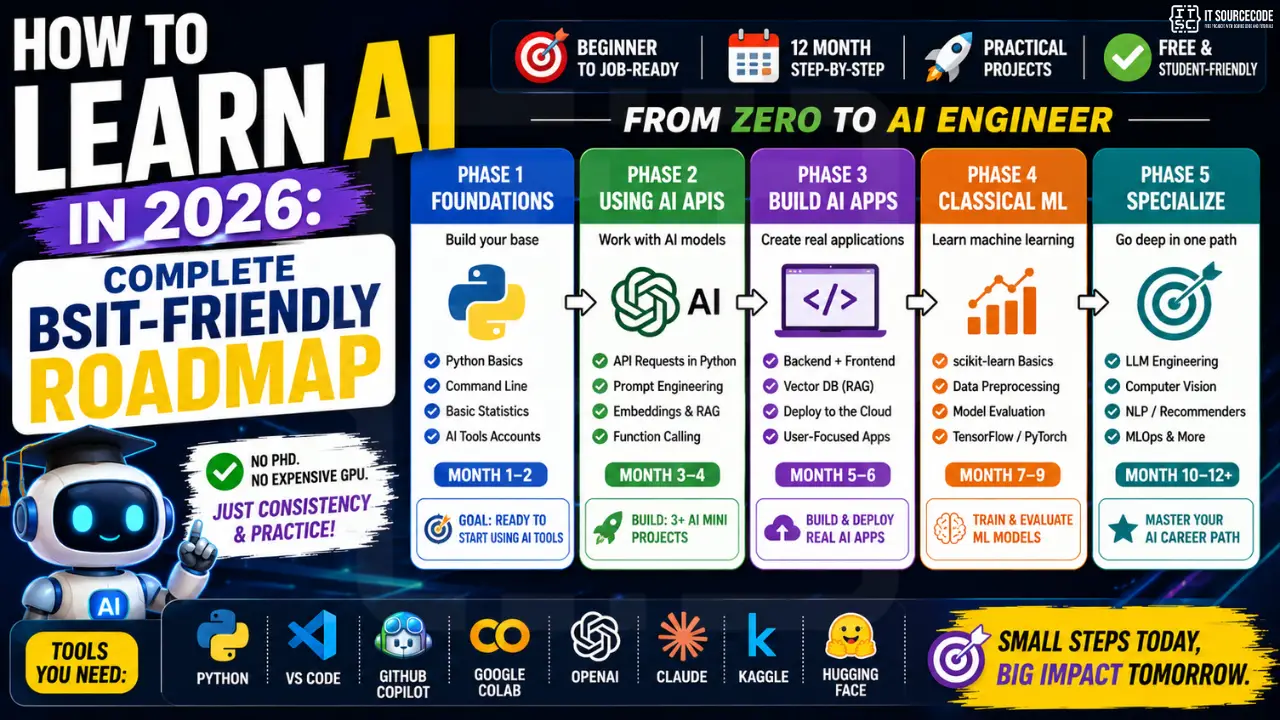
📌 The new reality: You don’t need to “build models from scratch” to be AI-competent in 2026. Most professional AI work is now integrating existing models (OpenAI, Claude, Gemini) into applications. Master that first; deep ML theory later.
Phase 1: Foundations (Month 1-2)
Prerequisites you actually need
- Python basics: variables, loops, functions, lists, dictionaries. See our Python tutorial.
- Basic command line: running scripts, installing packages with pip
- Basic statistics: mean, median, percentages. NOT calculus or linear algebra (yet).
- English reading comprehension: most AI docs are in English
What you DON’T need (skip the gatekeeping)
- Advanced math: calculus, linear algebra, statistics theory. Skip for now. Add later if you go deep into ML research.
- PhD-level knowledge: most AI engineering jobs don’t require it
- Expensive GPU: use Google Colab (free) for training; deploy models via APIs
- MacBook: any laptop runs API-based AI work. See our laptop guide.
Month 1 action items
- Complete a Python crash course if you haven’t (3-4 weeks of daily practice)
- Sign up for free accounts: OpenAI Playground, Claude Console (claude.ai), Google AI Studio
- Read Designing Machine Learning Systems by Chip Huyen (skim, don’t try to absorb everything)
- Subscribe to 2-3 AI YouTube channels (Andrej Karpathy, Two Minute Papers, Sentdex)
- Join r/MachineLearning + r/LearnMachineLearning on Reddit
Phase 2: Using AI APIs (Month 3-4)
This is where most modern AI engineering work happens in 2026. Before learning to TRAIN models, learn to USE existing models via APIs.
Skills to develop
- Making API requests in Python (using openai or anthropic libraries)
- Prompt engineering basics: getting consistent results from LLMs. See our prompt engineering guide.
- Token economics: understanding API costs, context windows, rate limits
- Streaming responses: for chat-like UX
- Function calling / tool use: making LLMs invoke your custom code
- Embeddings + vector search: building “chat with your documents” apps
Month 3-4 mini-projects (build at least 3)
- Personal coding tutor chatbot: Python script that takes your coding question + answers via OpenAI/Claude
- Resume reviewer: Upload PDF resume, AI scores it against a job description
- Capstone documentation summarizer: feed Chapter 1, AI extracts key arguments
- Filipino news headline classifier: politics/sports/business via AI categorization
- Image-to-text receipt parser: for expense tracking apps (uses Vision API)
Phase 3: Building AI Apps (Month 5-6)
Now integrate AI into web apps that users can actually use.
Tech stack
- Backend: Python + Flask OR FastAPI (for AI-heavy apps)
- Frontend: Simple React or vanilla JS + Tailwind
- Database: SQLite for prototypes, PostgreSQL for production
- Vector DB: Pinecone (free tier) or Chroma (free, self-hosted) for RAG apps
- Deployment: Render or Railway (free tiers); Vercel for frontend
Phase 3 projects
- RAG-powered FAQ chatbot: uploads PDFs, answers questions based on them. Perfect capstone foundation.
- AI-powered job board: auto-matches resumes to JDs using embeddings
- Voice-controlled task manager: Whisper API for voice → tasks created in DB
- AI study companion: generates practice quizzes from your notes
- Local language translator: Tagalog/Cebuano to English with context preservation
Phase 4: Classical ML (Month 7-9, OPTIONAL)
If your goal is data science, ML research, or specialized AI roles, this phase is critical. If you’ll work in general software with AI features, you can mostly skip this and stay productive.
Topics to cover
- scikit-learn fundamentals (classification, regression, clustering)
- pandas + NumPy for data manipulation
- Data preprocessing (cleaning, encoding, scaling)
- Model evaluation (accuracy, precision, recall, F1, ROC curves)
- Cross-validation + hyperparameter tuning
- Introduction to TensorFlow + Keras (or PyTorch)
Where to learn
- Free: Kaggle Learn courses, fast.ai (Practical Deep Learning), CS229 Stanford on YouTube
- Paid: Andrew Ng’s Coursera ML Specialization, DeepLearning.AI courses
- Books: “Hands-On Machine Learning” by Aurélien Géron (3rd ed.)
Phase 5: Specialization (Month 10-12+)
By now you’ve explored enough to find your interest. Pick ONE specialization to go deep:
- LLM Engineering: building production AI apps (RAG, agents, fine-tuning)
- Computer Vision: image classification, object detection, video analysis
- NLP: sentiment, summarization, translation, classification
- Recommendation Systems: for e-commerce, content platforms
- Data Engineering: building pipelines that feed AI models
- MLOps: deploying + monitoring ML models in production
For BSIT students in PH targeting local jobs, LLM Engineering has the highest immediate demand, most companies want to add ChatGPT-like features to their products, not train models from scratch.
Tools Every AI-Learning BSIT Student Needs
- Python 3.12+: base runtime
- VS Code with Python extension: primary IDE. See our editor guide.
- GitHub Copilot: FREE via GitHub Student Pack
- Google Colab: free GPU for training models
- OpenAI account: $5 free credit on signup, then pay-per-use
- Anthropic Claude: free tier sufficient for learning
- Kaggle account: free datasets + competitions
- Hugging Face account: pre-trained models, datasets
Common Mistakes to Avoid
- Tutorial paralysis: watching 100 hours of AI YouTube without building anything
- Math obsession: spending 6 months on linear algebra before writing AI code
- Latest model FOMO: chasing every new model release instead of mastering 2-3 well
- Tool hopping: switching between TensorFlow, PyTorch, JAX without finishing anything
- Building toy projects only: replicating “spam classifier” tutorials forever instead of building something real
- Ignoring deployment: learning to train models but never serving them to actual users
How AI Skills Pay Off in 2026 Career
Filipino BSIT graduates with AI skills earn significantly more than those without:
- Junior dev WITHOUT AI skills: ₱25,000-40,000/month
- Junior dev WITH AI integration skills: ₱40,000-65,000/month
- Junior AI engineer (LLM integration): ₱50,000-85,000/month
- Remote AI roles for US/EU companies: ₱150,000-300,000/month
Source: salary data from our Software Engineer Salary Philippines 2026 guide.
Frequently Asked Questions
Build your first AI capstone project
Do I need to be good at math to learn AI?
How long does it take to learn AI well enough to get a job?
Should I learn TensorFlow or PyTorch first?
Can I learn AI without buying a GPU?
Is it too late to start learning AI in 2026?
What AI capstone projects impress panels in 2026?
Final Thoughts
The AI skill gap is wider than it has ever been. BSIT students who develop AI fluency in 2026 will dominate Filipino tech hiring through 2030. The good news: the learning curve is steepest at the start, then accelerates. Focus on building real things, not collecting certificates. By month 9-12 of consistent practice, you’ll be ahead of 80% of your batchmates.
🎯 Your AI learning quickstart:
- Complete Python fundamentals, free Python tutorial
- Sign up for OpenAI ($5 free credit) + Claude (free tier)
- Build your first AI app, see our step-by-step first project guide
- Pick your AI coding assistant, Best AI Coding Assistants
- Learn the model differences, ChatGPT vs Claude vs Gemini
- Master prompts, Prompt Engineering Basics

Adrian Mercurio
Full-Stack Developer at PIES IT Solution
Specializes in building complete capstone projects with full documentation. Strong background in PHP/MySQL development and database design. Has personally built and tested over 30 capstone-ready projects with ER diagrams, DFDs, and chapter-by-chapter thesis documentation.
Expertise: PHP · Laravel · Database Design · Capstone Projects · C# · C · C++ · Python · AI Projects · View all posts by Adrian Mercurio →