
Resume screening AI is one of the most common HR capstone proposals in 2026 and one of the most ethically loaded. Panels will ask about bias before they ask about anything else. If you don’t have an answer ready, the project gets rejected.
There’s a real reason panels are cautious. In 2018, Amazon scrapped an internal resume screening tool because it had learned, from years of historical hiring data, that resumes containing the word “women’s” (as in “women’s chess club”) should be ranked lower. The model was not programmed to be sexist. It learned the bias from biased data. The story made every HR textbook published since then.
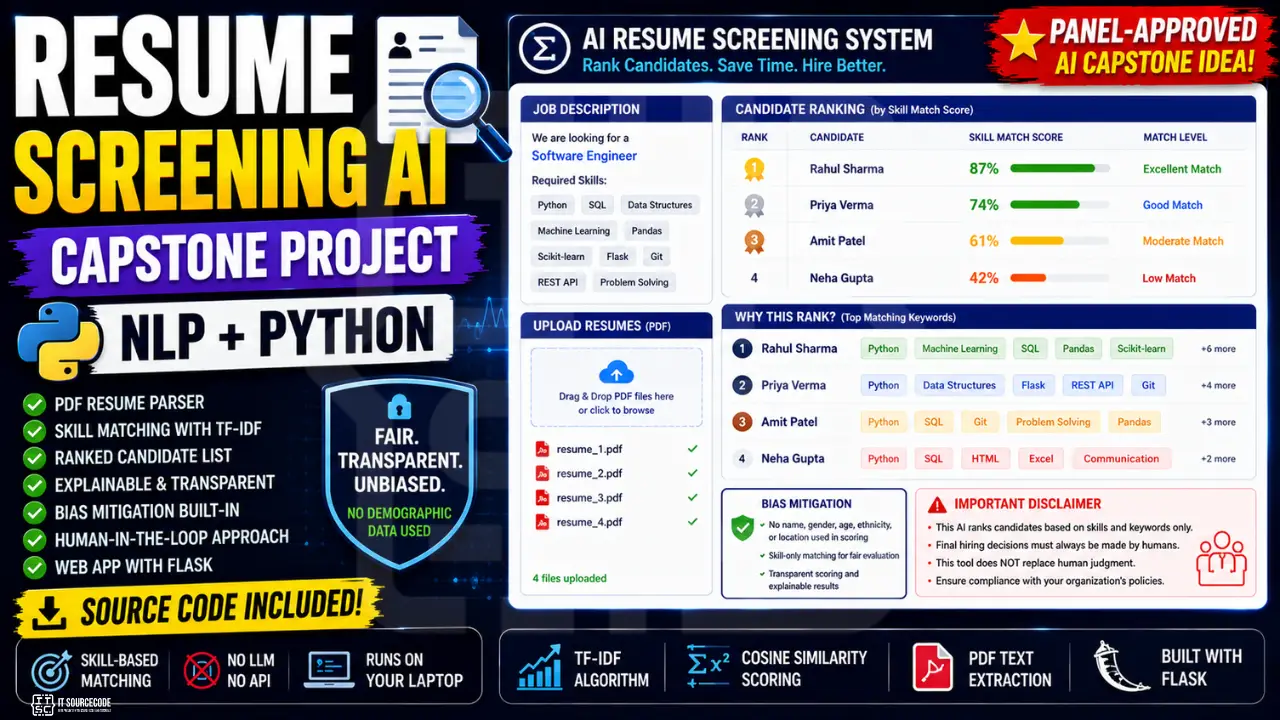
When your panel hears “AI for resume screening,” they hear “potential Amazon repeat.” Your job is to show that you’ve thought about it.
This guide builds the version that addresses bias head-on. Skill-only matching. Transparent scoring. Human-in-the-loop framing. The version that gets approved.
What you’ll build
A resume screening tool that takes a job description and multiple PDF resumes, ranks the candidates by skill match, and explains which keywords drove each rank. The system explicitly avoids using demographic features and provides transparency that lets HR (and your panel) audit every decision.
Features
- PDF resume parser (extracts text from any PDF resume)
- TF-IDF based skill similarity scoring
- Ranked candidate list with score breakdown
- “Why this rank?” Top matching keywords per candidate
- Bias mitigation: filters protected attributes from scoring
- Human-in-the-loop framing (AI ranks, HR decides)
- Web UI with multi-file upload
- About 250 lines of code total
Tech stack
- Python 3.10 or higher
- scikit-learn (TF-IDF + cosine similarity)
- pypdf (PDF text extraction)
- pandas + numpy (data handling)
- Flask (web server)
No LLM. No external API. Runs entirely on a laptop. Trains in 2 seconds because the model is unsupervised. TF-IDF does not need training data, it just needs your job description and the resumes.
The bias reality: why HR AI capstones get rejected
Three things to know going in:
Amazon’s 2018 case. Their internal tool was trained on 10 years of resumes from a male-dominated tech industry. The model learned that male-coded patterns were predictors of success. They scrapped it. Read the Reuters article before defending your project. It is the case panel members will reference.
2023 EEOC guidance on AI hiring tools. The US Equal Employment Opportunity Commission published guidance stating that AI tools can violate the Civil Rights Act if they produce discriminatory outcomes, even unintentionally. Similar guidance exists in the EU (AI Act) and is emerging in the Philippines.
Bias creeps in even with “neutral” features. Names can correlate with gender or ethnicity. Universities can correlate with socioeconomic class. Resume formatting can correlate with native-language proficiency. You can’t just “remove the gender field” and call it solved. You have to think harder.
The good news for your capstone: you don’t need to solve bias completely. You need to demonstrate that you understand the problem and built mitigations into the design. Panels reward that awareness.
How to build it ethically
Five principles that your project must follow. Document each one in your Chapter 3.
1. Skill-only matching. The scoring algorithm only uses skill keywords and job-relevant terms. Candidate names, school names, age, and addresses are not considered.
2. Transparent scoring. Every candidate’s rank comes with a list of the keywords that drove their score. HR can verify the score makes sense. Black-box scoring is what got Amazon in trouble.
3. Human-in-the-loop framing. The tool ranks. The HR person decides. The system is assistive, not autonomous. This framing is critical in your title and your disclaimer.
4. Diverse test sample. Test your model against a deliberately varied set of resume styles: different formats, different career paths, different ages, different genders (where indicated). Document any score patterns you find suspicious.
5. Documented limitations. Your Chapter 3 must explicitly acknowledge that no skill-only system is fully bias-free, and that your tool should never be used as the sole filter for any hiring decision. Reference the Amazon case and the 2023 EEOC guidance.
Why classical NLP, not LLM, for this
The temptation is to throw GPT-4 at this and ask “is this candidate good?” Don’t.
Three reasons classical TF-IDF wins for HR capstones:
Explainability. TF-IDF gives you exact keyword scores. You can show HR “this candidate ranked first because they matched ‘Python’, ‘Django’, ‘PostgreSQL’, and ‘REST API’ from the job description.” An LLM’s answer of “I think this candidate is a good fit” is not auditable. HR tools that fail audits get litigated.
Easier to detect bias. With explicit features, you can check what the model is weighting. With LLMs, the bias is buried in 175 billion parameters of training data.
Lower stakes if it breaks. A TF-IDF score that is wrong is obvious. You can see the keywords. An LLM hallucinating a rank is invisible until somebody investigates.
Build classical first. Add LLMs as Chapter 5 extensions if you want, with explicit framing as research direction, not deployment-ready.
Before you start
You need:
- Python 3.10 or higher
- 10-20 sample resumes in PDF format for testing (we’ll discuss where to get these)
- A code editor
- About 45 to 60 minutes for the first complete run
If you don’t have sample resumes yet, the next section covers ethical sourcing.
The data: where to get sample resumes ethically
Critical: never use real resumes from real people without explicit written permission. The Data Privacy Act of 2012 (Philippines) treats resumes as personal information.
Where to get safe sample resumes:
- Kaggle resume datasets. Search for “resume dataset”. Several anonymized datasets exist with thousands of resumes pre-cleaned for research.
- Public resume templates. Indeed, LinkedIn, and many career sites publish sample resumes as templates. These are public-domain in most cases.
- Generate synthetic resumes. Write 10-20 fake resumes yourself, in different styles, for different careers. Document this clearly in Chapter 3 as “synthetic test data.”
- Volunteer classmates. With explicit written consent, your classmates can submit their own resumes for testing. Get the consent in writing.
What NOT to do:
- Scrape LinkedIn or any social platform for real resumes
- Use resumes from a previous job’s hiring system (you don’t have rights to those)
- Use resumes from “data leaks” or scraped corporate databases
The defense-winning sentence: “We tested with 25 synthetic resumes that we generated to represent diverse career paths, plus 5 anonymized samples from Kaggle’s public resume dataset. We did not use any real-person data.”
Project file structure
resume-screening-capstone/
├── parse_resume.py
├── screener.py
├── app.py
├── job_descriptions/
│   └── example_job.txt
├── resumes/
│   └── sample1.pdf
├── templates/
│   └── index.html
├── static/
│   └── style.css
└── requirements.txt
Step 1: Install the dependencies
pip install flask scikit-learn pypdf pandas numpyCreate requirements.txt:
flask==3.0.0
scikit-learn==1.4.0
pypdf==4.0.0
pandas==2.2.0
numpy==1.26.0
Step 2: Build the resume parser (parse_resume.py)
Create parse_resume.py:
import re
from pypdf import PdfReader

PROTECTED_PATTERNS = [
    r'\b(mr|mrs|ms|miss|sir|madam|maam)\b',
    r'\b(he|she|him|her|his|hers)\b',
    r'\b(male|female)\b',
    r'\b\d{1,2}\s*(years?\s*old|yo)\b',
    r'\bbirthdate?\b.*\d',
    r'\bgender\b',
]

def parse_resume(pdf_path):
    reader = PdfReader(pdf_path)
    text = ''
    for page in reader.pages:
        page_text = page.extract_text() or ''
        text += page_text + '\n'
    return clean_text(text)

def clean_text(text):
    text = text.lower()
    text = re.sub(r'\s+', ' ', text)
    for pattern in PROTECTED_PATTERNS:
        text = re.sub(pattern, '', text, flags=re.IGNORECASE)
    return text.strip()

def extract_filename(pdf_path):
    import os
    return os.path.basename(pdf_path).replace('.pdf', '').replace('_', ' ').title()
The PROTECTED_PATTERNS list strips obvious gender/age markers before scoring. This is the most important 5 lines in the entire project. Document this regex list in Chapter 3 of your documentation. Panels look for explicit bias mitigation code.
Note: this is necessary but not sufficient. Names also correlate with gender and ethnicity. Truly robust name-blind screening would also redact the candidate’s name, which is why the extract_filename helper deliberately uses filename only as the candidate identifier (not the name parsed from the resume).
Step 3: Build the screener (screener.py)
Create screener.py:
import os
import numpy as np
from sklearn.feature_extraction.text import TfidfVectorizer
from sklearn.metrics.pairwise import cosine_similarity
from parse_resume import parse_resume, extract_filename

class ResumeScreener:
    def __init__(self, top_keywords_count=8):
        self.vectorizer = TfidfVectorizer(
            stop_words='english',
            ngram_range=(1, 2),
            max_df=0.95,
            min_df=1,
        )
        self.top_keywords_count = top_keywords_count

    def screen(self, job_description, resume_paths):
        if not resume_paths:
            return {'error': 'No resumes provided'}

        resume_texts = []
        resume_names = []
        for path in resume_paths:
            try:
                text = parse_resume(path)
                if not text:
                    continue
                resume_texts.append(text)
                resume_names.append(extract_filename(path))
            except Exception as e:
                print(f"Skipping {path}: {e}")

        if not resume_texts:
            return {'error': 'No valid resumes could be parsed'}

        documents = [job_description.lower()] + resume_texts
        try:
            tfidf_matrix = self.vectorizer.fit_transform(documents)
        except ValueError:
            return {'error': 'Could not vectorize documents (job description or resumes may be empty)'}

        job_vector = tfidf_matrix[0]
        resume_vectors = tfidf_matrix[1:]
        scores = cosine_similarity(job_vector, resume_vectors)[0]

        feature_names = self.vectorizer.get_feature_names_out()
        job_array = job_vector.toarray()[0]

        results = []
        for i, (name, score) in enumerate(zip(resume_names, scores)):
            resume_array = resume_vectors[i].toarray()[0]
            contributions = job_array * resume_array
            top_indices = np.argsort(contributions)[::-1][:self.top_keywords_count]
            top_keywords = [
                {'keyword': feature_names[idx], 'contribution': round(float(contributions[idx]), 4)}
                for idx in top_indices if contributions[idx] > 0
            ]
            results.append({
                'candidate': name,
                'score': round(float(score), 3),
                'match_percent': round(float(score) * 100, 1),
                'top_matched_keywords': top_keywords
            })

        results.sort(key=lambda x: x['score'], reverse=True)
        for i, r in enumerate(results):
            r['rank'] = i + 1

        return {
            'rankings': results,
            'total_candidates': len(results),
            'disclaimer': 'This system ranks candidates by keyword match only. It does NOT make hiring decisions. Always review each candidate manually and consider factors beyond keyword similarity.'
        }
A few things to notice. The cosine_similarity is between vectors representing what words appear in the job description versus what words appear in each resume. The contributions array multiplies the two. That is a simple but effective way to identify which keywords contributed most to each candidate’s score.
The disclaimer field is returned with every response. The frontend will display it prominently.
Step 4: Build the Flask app (app.py)
Create app.py:
import os
from flask import Flask, render_template, request, jsonify
from werkzeug.utils import secure_filename
from screener import ResumeScreener

app = Flask(__name__)
app.config['UPLOAD_FOLDER'] = 'resumes'
os.makedirs(app.config['UPLOAD_FOLDER'], exist_ok=True)
screener = ResumeScreener()

@app.route('/')
def index():
    return render_template('index.html')

@app.route('/screen', methods=['POST'])
def screen():
    job_description = request.form.get('job_description', '').strip()
    if not job_description:
        return jsonify({'error': 'Job description required'}), 400

    files = request.files.getlist('resumes')
    if not files:
        return jsonify({'error': 'At least one resume required'}), 400

    saved_paths = []
    for f in files:
        if not f.filename.lower().endswith('.pdf'):
            continue
        filename = secure_filename(f.filename)
        save_path = os.path.join(app.config['UPLOAD_FOLDER'], filename)
        f.save(save_path)
        saved_paths.append(save_path)

    if not saved_paths:
        return jsonify({'error': 'No valid PDF resumes uploaded'}), 400

    result = screener.screen(job_description, saved_paths)
    return jsonify(result)

if __name__ == '__main__':
    app.run(debug=True, port=5000)
Step 5: Build the UI
Create templates/index.html:
<!DOCTYPE html>
<html lang="en">
<head>
  <meta charset="UTF-8" />
  <title>Resume Screening AI: Educational Tool</title>
  <link rel="stylesheet" href="/static/style.css" />
</head>
<body>
  <div class="container">
    <div class="disclaimer">
      <strong>Disclaimer:</strong> This tool ranks resumes by keyword match only. It does NOT make hiring decisions. Always have a human review each candidate. Always consider factors beyond keyword similarity. Be aware that all AI screening tools may have unintended biases.
    </div>

    <header>
      <h1>Resume Screening AI</h1>
      <p>Paste a job description, upload PDF resumes, see ranked matches with score breakdown.</p>
    </header>

    <form id="form" enctype="multipart/form-data">
      <label>Job Description</label>
      <textarea name="job_description" rows="8" placeholder="Paste the full job description here..." required></textarea>

      <label>Resumes (PDF, multiple)</label>
      <input type="file" name="resumes" accept="application/pdf" multiple required />

      <button type="submit">Screen Resumes</button>
    </form>

    <div id="result" class="result hidden">
      <h2>Ranked Candidates</h2>
      <div id="rankings"></div>
      <div class="disclaimer">
        <strong>Reminder:</strong> These rankings are based on keyword match only. Review each candidate manually before any hiring decision.
      </div>
    </div>
    <div id="error" class="error hidden"></div>
  </div>

  <script>
    const form = document.getElementById('form');
    const result = document.getElementById('result');
    const rankingsEl = document.getElementById('rankings');
    const errorEl = document.getElementById('error');

    form.addEventListener('submit', async (e) => {
      e.preventDefault();
      const formData = new FormData(form);
      result.classList.add('hidden');
      errorEl.classList.add('hidden');

      const res = await fetch('/screen', { method: 'POST', body: formData });
      const data = await res.json();

      if (data.error) {
        errorEl.textContent = data.error;
        errorEl.classList.remove('hidden');
        return;
      }

      rankingsEl.innerHTML = '';
      data.rankings.forEach(r => {
        const div = document.createElement('div');
        div.className = 'candidate';
        const keywordsHtml = r.top_matched_keywords
          .map(k => '<span class="kw">' + k.keyword + '</span>')
          .join(' ');
        div.innerHTML = `
          <div class="rank-row">
            <div class="rank-num">#${r.rank}</div>
            <div class="candidate-info">
              <div class="candidate-name">${r.candidate}</div>
              <div class="candidate-score">Match: ${r.match_percent}%</div>
            </div>
          </div>
          <div class="keywords-label">Top matched keywords:</div>
          <div class="keywords">${keywordsHtml || '<em>No strong matches</em>'}</div>
        `;
        rankingsEl.appendChild(div);
      });
      result.classList.remove('hidden');
    });
  </script>
</body>
</html>
Create static/style.css:
* { box-sizing: border-box; }
body {
  font-family: system-ui, -apple-system, sans-serif;
  margin: 0;
  background: #fafafa;
  color: #2c3e50;
}
.container {
  max-width: 800px;
  margin: 40px auto;
  background: white;
  border-radius: 12px;
  box-shadow: 0 4px 20px rgba(0,0,0,0.06);
  padding: 28px;
}
.disclaimer {
  background: #fdfaf2;
  border-left: 4px solid #C9A961;
  padding: 12px 16px;
  border-radius: 6px;
  font-size: 13px;
  margin-bottom: 20px;
  line-height: 1.5;
}
header h1 { margin: 0 0 4px; color: #1F3A5F; }
header p { margin: 0 0 24px; color: #5a6a7a; }
form {
  display: flex;
  flex-direction: column;
  gap: 8px;
}
form label {
  font-weight: 600;
  color: #1F3A5F;
  font-size: 14px;
  margin-top: 8px;
}
textarea, input[type="file"] {
  width: 100%;
  padding: 10px;
  border: 1px solid #ddd;
  border-radius: 8px;
  font-size: 14px;
  font-family: inherit;
}
button {
  background: #1F3A5F;
  color: white;
  border: none;
  padding: 14px;
  font-size: 16px;
  font-weight: 600;
  border-radius: 8px;
  cursor: pointer;
  margin-top: 16px;
}
.result { margin-top: 24px; }
.result.hidden { display: none; }
.result h2 { color: #1F3A5F; margin: 0 0 16px; }
.candidate {
  background: #f0f3f7;
  padding: 16px;
  border-radius: 10px;
  margin-bottom: 12px;
}
.rank-row {
  display: flex;
  align-items: center;
  gap: 16px;
  margin-bottom: 12px;
}
.rank-num {
  background: #1F3A5F;
  color: white;
  width: 40px;
  height: 40px;
  border-radius: 50%;
  display: flex;
  align-items: center;
  justify-content: center;
  font-weight: 700;
  font-size: 16px;
}
.candidate-name { font-weight: 700; font-size: 16px; color: #1F3A5F; }
.candidate-score { color: #5a6a7a; font-size: 14px; }
.keywords-label {
  font-size: 12px;
  text-transform: uppercase;
  letter-spacing: 0.5px;
  color: #5a6a7a;
  margin-bottom: 6px;
}
.keywords { display: flex; flex-wrap: wrap; gap: 6px; }
.kw {
  background: white;
  border: 1px solid #C9A961;
  padding: 4px 10px;
  border-radius: 14px;
  font-size: 12px;
  color: #1F3A5F;
}
.error {
  background: #fde8e8;
  color: #b94a48;
  padding: 12px 16px;
  border-radius: 8px;
  margin-top: 16px;
}
.error.hidden { display: none; }
Step 6: Run the screener
python app.pyOpen http://localhost:5000. Paste a job description (try a sample IT job, such as “Looking for a Python developer with Django, PostgreSQL, REST API, AWS, and Git experience”). Upload 5 to 10 sample PDF resumes. Click “Screen Resumes.”
The output shows ranked candidates with their match percentage and the top matching keywords below each. The disclaimer banners appear above and below the results. That is the visible compliance evidence.
Demo flow for defense:
- Paste a real job description from a tech job posting
- Upload 8-10 diverse sample resumes (different career stages, different skill emphasis)
- Show the ranking
- Click into the top result, point at the keywords that drove the score
- Show how a candidate ranked low because they had different keywords, not because of any demographic factor
- Point at the disclaimer banner
That last step is the one panels remember.
How to defend a resume screening capstone
Five questions every HR AI panel asks. The bias question comes first.
“What about bias?” Three mitigations. First, the scoring algorithm uses only skill-relevant keywords from the job description. No name, age, gender, or demographic features. Second, we explicitly filter known biased patterns (gendered pronouns, age mentions) in our preprocessing. Show the PROTECTED_PATTERNS list in your code. Third, we frame the system as assistive ranking, never as automated decision-making. The HR person makes every hiring decision. Reference the 2018 Amazon case in Chapter 3 to show you understand the risk.
“Could this still discriminate?” Yes, theoretically. We acknowledge in Chapter 3 that no skill-only system is fully bias-free. For example, names and universities can correlate with protected attributes. We chose explicit features (TF-IDF on skills) over LLM-based scoring specifically because explicit features make bias detectable. If our system produces a discriminatory pattern, it’s auditable. If an LLM does it, the audit trail is much harder. Discuss our limitations honestly.
“Is this just keyword matching?” It’s more than that. TF-IDF (Term Frequency-Inverse Document Frequency) weights keywords by their rarity across the corpus, so common words like “experience” don’t dominate. Cosine similarity measures vector angle, not raw counts. We use bigrams (two-word phrases) to capture specific skills like “machine learning” or “rest api.” The contribution breakdown shows which specific terms drove each rank.
“Why not use ChatGPT or another LLM?” Explainability requirements for HR tools. The 2023 EEOC guidance emphasizes that AI hiring systems must be auditable. TF-IDF gives precise keyword contributions that HR (or a regulator) can verify. LLMs cannot do this. “The model thought this candidate was good” is not an auditable explanation. If our system makes a mistake, the mistake is visible. LLM mistakes are buried in 175 billion parameters.
“How would HR actually use this?” As a pre-screening aid for large applicant pools. When HR has 500 applicants for one role, they cannot manually review every resume. Our tool ranks them by keyword relevance to surface the top 50 for human review. Hiring decisions are made by humans. The system never auto-rejects anyone. We document this workflow explicitly in Chapter 5 (Recommendations).
If you can answer those five calmly, the panel will be satisfied.
How to customize for your domain
The TF-IDF approach is domain-agnostic. The job description carries the domain. Some options:
- IT job screening: developer skills, frameworks, languages (the default in this guide)
- Healthcare staffing: nurse credentials, medical certifications, clinical experience
- Finance: accounting credentials, banking experience, regulatory knowledge
- Education: teaching subjects, grade levels, certifications
- Customer service: language skills, CRM experience, communication tools
- Internship matching: match university students to internship descriptions
- Freelance platform: match freelancers to project descriptions
- BPO recruitment: call center skills, language proficiency, shift availability
For multi-language support (Tagalog, Bisaya, Spanish), use stop_words=None instead of 'english' and add your own stopword list. The TF-IDF math doesn’t care about language.
Common errors and how to fix them
PDF parser returns empty text: the resume is a scanned image, not a text-based PDF. Add OCR (Tesseract) as a fallback or skip scanned resumes with a clear error message.
All candidates get the same score: your job description is too short. TF-IDF needs enough text to differentiate. Aim for at least 100 words in the job description.
TF-IDF picks weird keywords: common stopwords are slipping through. Add stop_words='english' (we already do) or extend with custom stopwords.
ValueError: empty vocabulary: the job description and all resumes are too short combined. Need at least one document with meaningful content.
Score is influenced by names: your PROTECTED_PATTERNS regex isn’t catching the patterns in your test resumes. Add more patterns. Also consider redacting candidate names entirely by parsing the resume’s first line.
Upload fails silently: check that all uploaded files are valid PDFs. The current code skips non-PDF uploads but doesn’t surface that to the UI.
How to extend this project
Strong Chapter 5 (Recommendations) extensions:
- Section-aware scoring. Weight matches in the “Skills” section higher than matches in “Hobbies.” Use regex to split the resume into sections first.
- Sentence Transformers for semantic similarity. “Python” matches “Pythonic.” “AWS” matches “Amazon Web Services.” Sentence transformers handle these synonyms classical TF-IDF misses.
- Years-of-experience extraction. Parse “5 years experience” patterns and match against job requirements.
- Skill gap analysis. “Candidate has 7 of 10 required skills; missing AWS, Docker, Kubernetes”. Actionable feedback for both HR and the candidate.
- Multi-language support. Tagalog, Spanish, Hindi resumes alongside English.
- Salary expectation matching. Extract salary expectation from resume and compare with job’s salary range.
- Recruiter dashboard. Track which candidates were forwarded, which were interviewed, which were hired. Compute model’s correlation with actual hiring outcomes.
- Compliance audit log. Log every ranking decision with timestamp, job ID, candidate ID, score, and top keywords. Required for any production HR tool.
- Fairness testing. Deliberately test with diverse resume samples and check for score patterns by name origin, university type, etc.
Free download: source code
UML diagrams you’ll need for documentation
HR AI capstones have specific diagram needs panels look for:
- Use Case Diagram. actors: HR user (screens candidates), admin (manages system), applicant (read-only or notified); main use cases include job posting, resume upload, candidate ranking, audit log review.
- Activity Diagram. upload resumes → parse → filter protected attributes → vectorize → score → rank → display + disclaimer.
- Sequence Diagram. request lifecycle from upload through scoring to response.
- Class Diagram. ResumeScreener, ResumeParser, Flask routes, audit logger.
- Data Flow Diagram. resume data + job description data + scores, with the bias-filter step explicitly visible.
We have detailed guides on each. Pay attention to the bias-filter step in your Data Flow Diagram and Activity Diagram. Panels look for it specifically.
Official documentation
Frequently Asked Questions
Is resume screening AI a good capstone project for IT students?
How do I prevent bias in my resume screening AI?
Can I use real resumes for my capstone testing?
Should I use ChatGPT or classical NLP for resume screening?
What is TF-IDF and why is it good for resume screening?
We are hoping this guide helps you build a defensible, fairness-aware resume screening capstone. If you hit a specific PDF parser or scoring bug while building yours, drop the error and code snippet in the comments below and we will help you debug it. Thank you for reading itsourcecoders.
Build the ranker. Address the bias. Defend the engineering.
HR AI capstones live or die by their bias story. Get the framing right, document the limitations, build transparent scoring, and the panel will reward you.
The model in this guide is straightforward TF-IDF. The bias mitigations are the project. The 2018 Amazon case is the lesson you need to know cold before you walk into defense.
For a related NLP tutorial that also uses TF-IDF for a different task, see our Sentiment Analysis Capstone Tutorial. If you’re interested in a capstone where ethical framing matters as much as the model, see our Medical Diagnosis Capstone Tutorial and our Stock Price Prediction LSTM Tutorial. For more applied AI capstone ideas, see 100 AI Capstone Project Ideas for IT Students 2026. If you haven’t picked your capstone topic yet, browse 150 Best Capstone Project Ideas for IT Students 2026. For other Python AI source code to study, see our Python projects library. For the UML diagrams your documentation will need, our UML guides cover every diagram type panels ask about.
Now generate your 20 synthetic resumes. Write the bias-mitigation paragraph tonight. The defense starts there.
More capstone project ideas to browse
Looking for more ideas to pitch your panel? Browse our capstone idea collections:

Adrian Mercurio
Full-Stack Developer at PIES IT Solution
Specializes in building complete capstone projects with full documentation. Strong background in PHP/MySQL development and database design. Has personally built and tested over 30 capstone-ready projects with ER diagrams, DFDs, and chapter-by-chapter thesis documentation.
Expertise: PHP · Laravel · Database Design · Capstone Projects · C# · C · C++ · Python · AI Projects · View all posts by Adrian Mercurio →