
Disclosure: Affiliate links may be present. itsourcecode.com may earn a small commission on referrals at no extra cost to you.
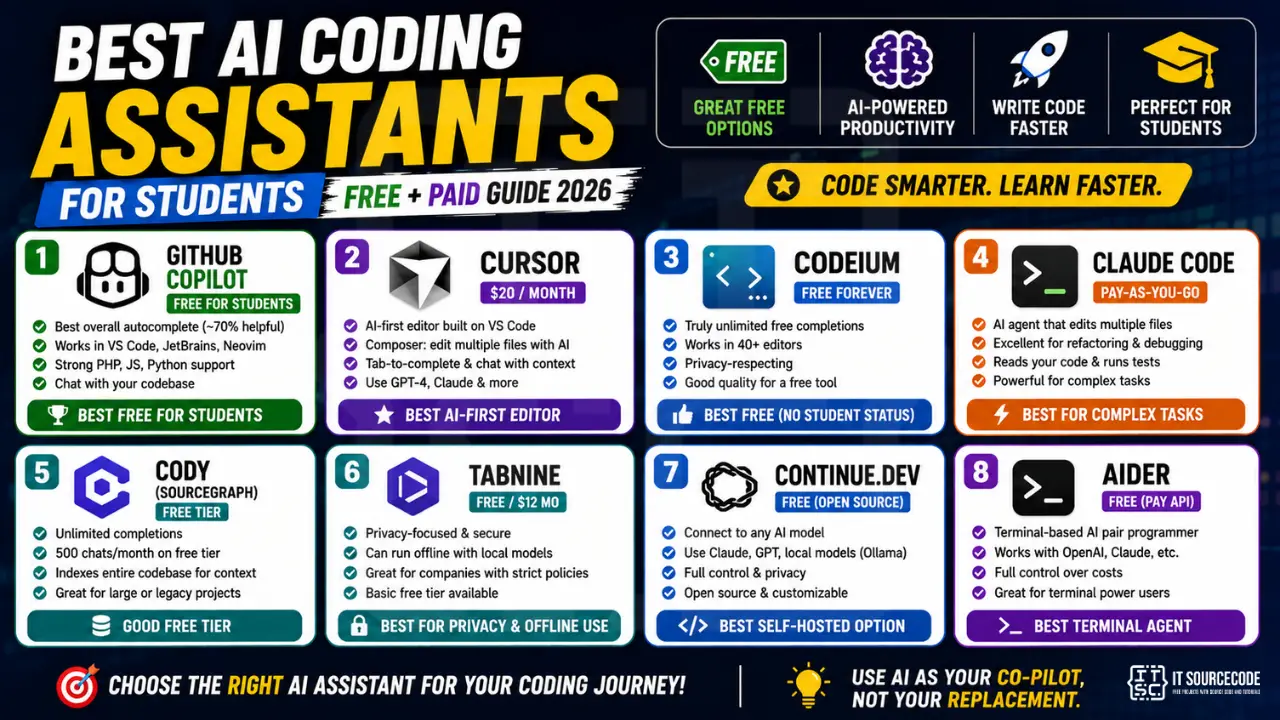
AI coding assistants are no longer optional in 2026, they’re how every productive developer works. The question isn’t WHETHER to use one, but WHICH one. This guide compares the top 8 AI coding assistants available to Filipino BSIT students, with honest pros/cons and clear recommendations by use case.
📌 Quick recommendation:
- Free for students: GitHub Copilot (via Student Pack)
- Best free without student status: Codeium
- Best AI-first editor: Cursor ($20/mo)
- Best for complex tasks: Claude Code (Anthropic CLI)
What “AI Coding Assistant” Actually Means in 2026
Modern AI coding assistants fall into three categories:
- Inline completion: autocomplete on steroids. Suggests the next line/block as you type. Examples: Copilot, Codeium.
- Chat-based: paste code, ask questions, get explanations. Examples: ChatGPT, Claude (web). See our model comparison.
- Agent-based: describe a task, AI edits multiple files autonomously. Examples: Cursor Composer, Claude Code, Aider.
Most BSIT students should start with inline completion (familiar editing experience) and add chat/agent tools as projects get larger.
Top 8 AI Coding Assistants Compared
#1: GitHub Copilot (FREE for students)
Price: $10/mo individual, $19/mo business. FREE for verified students via GitHub Student Developer Pack.
Best for: BSIT students with a school email. The free student tier is the best deal in software for Filipino students.
Strengths:
- Best inline completion accuracy (~70% useful suggestions)
- Works in VS Code, JetBrains, Neovim, Visual Studio
- Strong PHP and JavaScript support (key for BSIT capstones)
- Chat feature included (chat with your codebase)
- Most mature product, 5+ years of development
How to get free access: Apply at github.com/education with your school email + valid student ID. Approval takes 1-7 days.
#2: Cursor (BEST AI-FIRST EDITOR)
Price: Free tier (200 slow requests/mo), Pro $20/mo, Business $40/mo.
Best for: Developers who want AI deeply integrated, not as an add-on.
Standout features:
- Tab-to-complete: predicts multi-line completions far ahead
- Composer mode: describe what you want, AI edits multiple files
- Chat knows your codebase: no need to paste context manually
- Built on VS Code: all extensions work, zero learning curve
- Choice of models: GPT-4, Claude, custom Cursor models
Tradeoff: $20/mo is steep for Filipino students. Free tier is good for evaluation but caps out for daily use. See our editor comparison.
#3: Codeium (BEST FREE WITHOUT STUDENT STATUS)
Price: FREE forever for individuals (unlimited completions).
Best for: Students who don’t qualify for GitHub Student Pack, or want a permanent free option.
Strengths:
- Truly unlimited free tier (no daily quota)
- Works in 40+ editors (VS Code, JetBrains, Vim, Eclipse)
- Privacy-respecting (your code isn’t used to train their models on free tier)
- Decent autocomplete quality (~60% useful)
- Chat feature included
Weakness: Quality is noticeably below Copilot. Suggestions are sometimes generic. But for free, it’s unbeatable.
#4: Claude Code (BEST FOR COMPLEX TASKS)
Price: Pay-as-you-go via Anthropic API (~$5-20/mo typical student usage)
What it is: Anthropic’s terminal-based agent. You describe a task in plain English, Claude reads your project, makes multi-file changes, runs tests, iterates.
Best for: Larger refactoring tasks, capstone integration work, debugging complex issues spanning multiple files.
Strengths:
- Most capable for complex multi-file changes
- Reads your existing code patterns and matches your style
- Excellent at debugging cryptic errors
- Can run tests and iterate until they pass
Weakness: Command-line interface, less beginner-friendly than VS Code-based tools. Best paired with a regular AI assistant for daily work.
#5: Cody (Sourcegraph), Good Free Tier
Price: Free tier (unlimited completions, 500 chats/mo), Pro $9/mo.
Standout: Indexes your entire codebase for context-aware suggestions (similar to Cursor). Free tier is generous.
Best for: Students with large existing codebases (legacy capstones, OSS contributions) where context matters more than completion speed.
#6: Tabnine, Privacy-Focused
Price: Free tier (basic completions), Pro $12/mo (better model).
Standout: Can run completely offline with local models. Useful if you work with proprietary code that can’t be sent to cloud APIs.
Best for: Students at companies (interns) with strict no-cloud-AI policies. Not the top choice for general learning.
#7: Continue.dev, Best Self-Hosted
Price: FREE (open-source).
What it is: Open-source VS Code/JetBrains extension that connects to ANY AI model, Claude, GPT, local Ollama models, or self-hosted LLaMA.
Best for: Students with a capable laptop who want to run AI locally (no API costs, full privacy). See our laptop guide.
#8: Aider, Best Terminal Agent
Price: FREE software, you pay for API usage (OpenAI/Claude/etc.).
What it is: Open-source terminal-based AI pair programmer. Similar to Claude Code but model-agnostic.
Best for: Students comfortable with terminal who want full control over costs (choose cheapest model per task).
Comparison Table
| Tool | Price | Free for Students | Editor | Best For |
|---|---|---|---|---|
| GitHub Copilot | $10/mo | ✅ FREE | VS Code, JetBrains | Inline completion |
| Cursor | Free / $20mo | Limited free | Own editor (VS Code fork) | AI-first workflow |
| Codeium | FREE | ✅ Always free | VS Code, 40+ editors | Budget-conscious |
| Claude Code | Pay-as-you-go | Free credits initially | Terminal | Complex multi-file tasks |
| Cody | Free / $9mo | Generous free | VS Code, JetBrains | Large codebases |
| Tabnine | Free / $12mo | Limited free | Multiple | Privacy/offline |
| Continue.dev | FREE | ✅ Always free | VS Code, JetBrains | Self-hosted/custom models |
| Aider | FREE software | Pay only API | Terminal | Terminal-loving devs |
Recommended Workflow for BSIT Students
Beginner BSIT student (1st-2nd year)
Sign up for GitHub Student Pack (free Copilot) + use ChatGPT/Claude web for explanations. That’s it. Don’t over-tool.
Intermediate BSIT student (3rd year, capstone year)
Copilot for daily completion + Claude (paid, ~$5-10/mo) for complex refactoring. Skip Cursor unless you really need agent mode.
Advanced BSIT student (focused on AI career)
Cursor Pro ($20/mo) + Claude Code (pay-as-you-go) + Copilot Free Student. The combination unlocks workflow patterns competitive with top US tech companies.
Common Mistakes
- Using AI without understanding: accepts every suggestion blindly, can’t defend capstone code. See our AI for capstone guide.
- Tool hopping: switching weekly between Copilot/Cursor/Codeium. Pick one for 3 months minimum.
- Ignoring keyboard shortcuts: Tab to accept, Esc to dismiss, Ctrl+] to next suggestion. Learn them.
- Treating AI as oracle: AI is wrong ~30% of the time. Always verify.
FAQ
Is GitHub Copilot really free for students?
Will using AI coding assistants make me a worse programmer?
Which AI coding assistant has the best PHP support?
Can I use multiple AI assistants at the same time?
Does my school detect if I use AI coding assistants?
How much do AI coding assistants cost monthly for serious use?
Final Recommendation
For Filipino BSIT students in 2026: Start with GitHub Copilot (free via Student Pack) in VS Code. Add Claude or ChatGPT web for explanations when stuck. Master that combination for 3-6 months. THEN evaluate if you need Cursor or Claude Code for advanced workflows. Don’t pay until you’ve outgrown the free options.
🎯 Your next steps:
- Apply to GitHub Student Pack at github.com/education
- Once approved, install GitHub Copilot in VS Code (see our editor guide)
- Sign up for free Claude at claude.ai for explanation conversations
- Build your first AI-assisted project, see our First AI Project guide
- Master prompts, Prompt Engineering Basics

Angel Jude Suarez
Full-Stack Developer at PIES IT Solution
Focuses on Python development, machine learning, and AI integration. Has built production AI systems including OpenAI Whisper integration for medical transcription and GPT-4o-powered diagnosis assistance. Strong background in pandas, scikit-learn, and TensorFlow.
Expertise: Python · PHP · Java · VB.NET · ASP.NET · Machine Learning · AI Integration · OpenCV · Django · CodeIgniter · View all posts by Angel Jude Suarez →