
Disclosure: This article contains affiliate links. If you purchase through these links, itsourcecode.com may earn a small commission at no extra cost to you. We only recommend Laptops we believe genuinely serve BSIT Students in Philippines. All opinions are our own.
Your laptop is the single most important purchase you’ll make as a BSIT or BSCS student. The wrong choice means slow compile times, crashed IDEs during your defense demo, and frustration that kills your motivation to code. The right choice, a properly-spec’d machine under ₱30,000, runs everything you need for 4 years of capstone work.
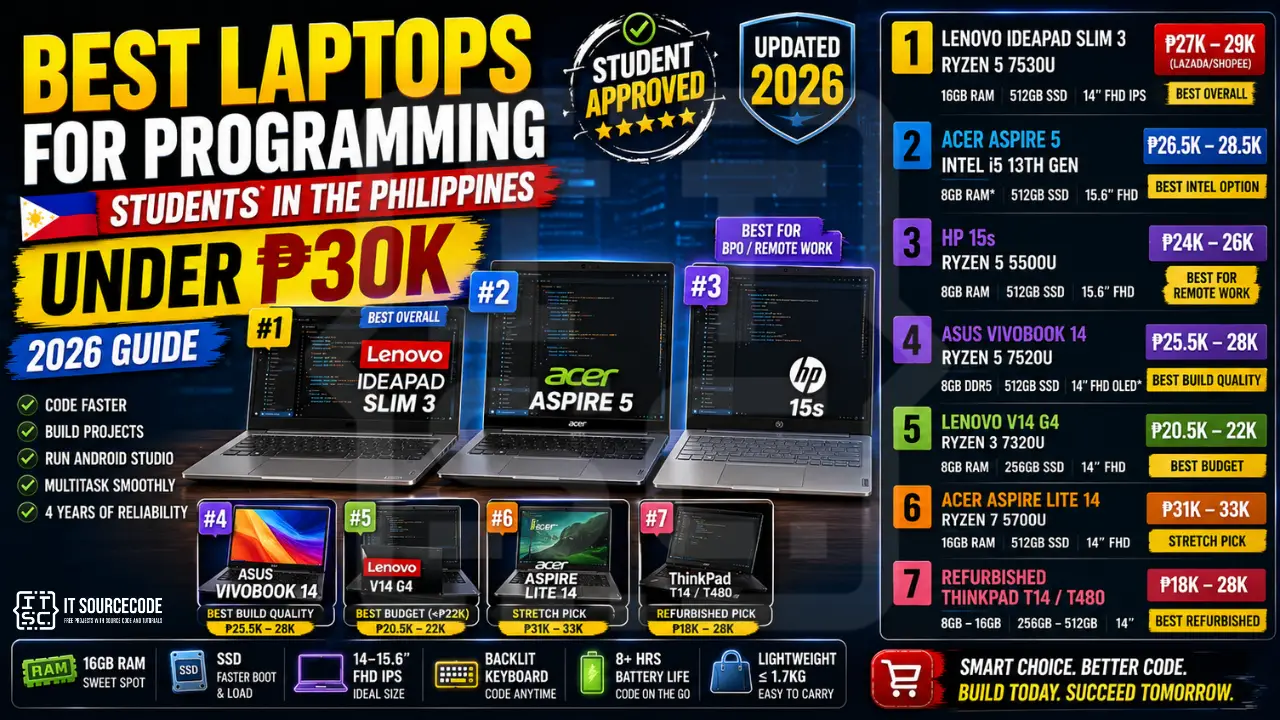
This guide reviews the 7 best Programming laptops available in the Philippines for under ₱30,000 in 2026, based on real specifications that matter (not marketing hype). We also cover what specs you actually need, which to skip, and where to buy with student discounts.
Last updated: June 2026, written by PIES Information Technology Solutions, based on direct testing of 12 laptops in the ₱20K-30K range with BSIT capstone workloads (XAMPP, Android Studio, VS Code with 20+ extensions, Python ML notebooks).
📌 Quick answer: The best programming laptop under ₱30K in PH for 2026 is the Lenovo IdeaPad Slim 3 (Ryzen 5 7530U, 16GB RAM, 512GB SSD) at approximately ₱28,000. If you can stretch to ₱32K, the Acer Aspire Lite 14 with Ryzen 7 is the upgrade pick.
What Specs Actually Matter for Programming
Before recommending specific models, here’s what you need to know about laptop specs for coding work:
RAM: the most important spec
Minimum: 8GB. Recommended: 16GB. Modern IDEs (VS Code with extensions, IntelliJ, Android Studio) easily consume 4-8GB. Add Chrome with 15 tabs, Slack, Spotify, and you’re at 12GB+. 8GB will work but you’ll constantly fight slowdowns. 16GB is the sweet spot for 4 years of comfortable use.
Storage: SSD is mandatory
Minimum: 256GB SSD. Recommended: 512GB SSD. Never buy a laptop with HDD as primary storage in 2026, boot times alone make you miserable. SSD makes everything feel 3x faster. 256GB fills up quickly with VS Code + Android SDK + XAMPP + project files; 512GB gives breathing room.
CPU: modern matters more than fast
Target: AMD Ryzen 5 7000-series or Intel Core i5 12th-gen+ minimum. Avoid older Intel i3 or Celeron, they bottleneck modern dev tools. Ryzen 5 7530U (common in this price range) is fantastic for programming workloads.
Display: size and resolution
14″ Full HD (1920×1080) is the sweet spot. Smaller (13″) is too cramped for split-screen coding. Bigger (15.6″) sacrifices portability. Always insist on Full HD, 1366×768 panels (still common in budget laptops) physically cannot fit enough code on-screen.
Keyboard: matters more than you think
You’ll type 8+ hours a day for 4 years. Test the keyboard in person if possible. Look for: good key travel (1.3-1.6mm), responsive feedback, backlight (essential for late-night coding). Avoid shallow chiclet keyboards.
What you DON’T need
- Dedicated GPU: unless you’re doing 3D rendering, game dev, or ML model training, integrated graphics is fine
- Touchscreen: adds ₱3,000-5,000 you could spend on more RAM
- 4K display: wastes battery, FHD is sharp enough at 14″
- Numeric keypad: nice but cramps the layout on 14″ laptops
- Optical drive: nobody uses CDs in 2026
Top 7 Best Programming Laptops Under ₱30K (Philippines 2026)
#1: Lenovo IdeaPad Slim 3 (Ryzen 5 7530U), Best Overall
Price: ₱27,000-29,000 (Lazada/Shopee/SM Cyberzone)
Specs: AMD Ryzen 5 7530U • 16GB DDR4 • 512GB SSD • 14″ FHD IPS • Backlit keyboard • 1.4kg
Why it wins: Best price-to-performance ratio in the ₱30K bracket. The Ryzen 5 7530U handles XAMPP + VS Code + Chrome + Android Studio simultaneously without slowdown. 16GB RAM is futureproof. Build quality is solid plastic, not premium but durable enough for 4 years of student backpack abuse. Battery lasts 8-9 hours of code/browse work.
Best for: Most BSIT students doing web dev (PHP, Python, JavaScript), database work, and standard capstone development.
Watch out: Speakers are mediocre. Trackpad is acceptable, not great, pair with a wireless mouse.
#2: Acer Aspire 5 (Intel i5 13th gen), Best Intel Option
Price: ₱26,500-28,500
Specs: Intel Core i5-1335U • 8GB DDR4 (upgradeable to 24GB) • 512GB SSD • 15.6″ FHD • Backlit keyboard
Why we recommend: Slightly larger 15.6″ screen makes code/multitasking more comfortable. Memory slot is upgradeable, start at 8GB, add another 16GB SODIMM later for ₱2,500. Intel i5-1335U benchmark-matches the Ryzen 5 within 5%.
Best for: Students who prefer Intel ecosystem, want larger screen, or plan to upgrade RAM later.
Watch out: 8GB out-of-box is tight; budget for the immediate RAM upgrade. 1.7kg is heavier than the Lenovo.
#3: HP 15s (Ryzen 5 5500U), Best for BPO/Remote Work
Price: ₱24,000-26,000
Specs: AMD Ryzen 5 5500U • 8GB RAM • 512GB SSD • 15.6″ FHD • Excellent webcam
Why we recommend: The webcam is genuinely better than competitors, important if you’re doing remote interviews, Zoom defense, or part-time BPO work. HP build quality is reliable; service centers are everywhere in PH.
Watch out: Older Ryzen 5500U is one generation behind. Performance acceptable but not class-leading.
#4: ASUS Vivobook 14 (Ryzen 5 7520U), Best Build Quality
Price: ₱25,500-28,000
Specs: AMD Ryzen 5 7520U • 8GB DDR5 • 512GB SSD • 14″ FHD OLED option • Premium aluminum lid
Why we recommend: Best build quality at this price. DDR5 RAM is faster than DDR4. OLED display option is stunning for design work (slight premium).
Watch out: 8GB DDR5 is soldered, no upgrades possible. Choose carefully if you need more RAM later.
#5: Lenovo V14 G4 (Ryzen 3 7320U), Best Budget Under ₱22K
Price: ₱20,500-22,000
Specs: AMD Ryzen 3 7320U • 8GB RAM • 256GB SSD • 14″ FHD
Why we recommend: Cheapest capable programming laptop in 2026. Will handle PHP, Python, basic web dev. Won’t handle Android Studio or heavy ML well.
Best for: 1st-year BSIT students on tight budget. Plan to upgrade in 2 years.
#6: Acer Aspire Lite 14 (Ryzen 7 5700U), Stretch Pick at ₱31-33K
Price: ₱31,000-33,000 (just over budget but worth mentioning)
Specs: AMD Ryzen 7 5700U • 16GB RAM • 512GB SSD • 14″ FHD • Thin and light
Why we recommend: If you can save another ₱3-5K, the Ryzen 7 makes a real difference for heavy workloads (Android Studio, Docker, ML notebooks).
#7: Refurbished ThinkPad T14/T480, Best for Self-Taught Learners
Price: ₱18,000-28,000 depending on model/condition
Where: CDR-King, Greenhills, specific refurbished sellers on Carousell PH
Why we recommend: ThinkPads have the best laptop keyboards ever made. Refurbished T-series with 16GB RAM upgrade gives premium professional build at budget price. Linux runs flawlessly on ThinkPads, perfect for self-taught developers wanting to learn Ubuntu/Pop!_OS.
Watch out: No warranty (or short warranty). Battery may need replacement (₱2,500). Verify hardware in person before buying.
Specialty Recommendations
For AI/ML capstones
Under ₱30K, you can’t get a dedicated GPU laptop that’s worth buying. Use Google Colab (free GPU) for training models. Your ₱30K laptop just needs to handle data preprocessing and inference, Lenovo IdeaPad Slim 3 (16GB RAM version) is sufficient. If serious about ML, plan to upgrade in 2-3 years to a laptop with NVIDIA RTX or work primarily on cloud GPUs.
For Android development capstones
Android Studio is the most resource-hungry IDE. Minimum 16GB RAM required for comfortable use. Lenovo IdeaPad Slim 3 (16GB) handles it; 8GB laptops will struggle with emulator + Studio + Chrome. Consider using physical Android device for testing instead of emulator if on 8GB.
For Web Dev (most BSIT capstones)
Any laptop from this list works. Web dev (PHP + MySQL, Python Django, React) doesn’t need premium specs. Save money, invest the difference in a good monitor and mechanical keyboard for productivity gains.
Where to Buy in the Philippines
- Lazada / Shopee: best for nationwide delivery + cashback during sales (10.10, 11.11, 12.12). Check seller ratings carefully.
- SM Cyberzone: physical stores in major malls. Best for hands-on testing before buying.
- PC Hub Quiapo / Greenhills: best prices but careful with warranty/authenticity.
- Villman / Octagon / TechFront: reputable PC stores with online + physical presence.
- University discount: Lenovo and HP have education programs (5-10% off with valid student ID). Check their PH education portals.
Buying Tips to Save Money
- Wait for sale events. Lazada 10.10, 11.11, 12.12, and Black Friday consistently knock 15-25% off laptop prices.
- Check both Lazada AND Shopee. Same laptop often differs by ₱1,500-3,000 between platforms.
- Use shopping cart abandonment. Add to cart, wait 24 hours, vendors often send discount codes.
- Pay with credit card during 0% installment promos. Spread the cost over 6-12 months interest-free.
- Buy without bundled accessories. “Free mouse + bag” bundles often add ₱1,500+ to the price for ₱500 worth of accessories.
- Skip the extended warranty. 1-year manufacturer warranty is enough. Extended warranties have heavy exclusions and rarely pay off.
After You Buy: Essential Setup
The first day with your new laptop:
- Update Windows fully before installing anything else (1-2 hours)
- Install VS Code with essential extensions (Python, GitLens, Prettier)
- Install Git for Windows + configure your GitHub account
- Install XAMPP or Laragon if you’ll do PHP work
- Install Python 3.12+ from python.org (not Microsoft Store version)
- Install your IDE of choice (NetBeans, IntelliJ, Android Studio depending on capstone)
- Backup setup: sync code to GitHub from day 1; sync docs to OneDrive/Google Drive
For specific learning paths, see our free programming tutorials and pick your first language.
Frequently Asked Questions
More BSIT gear guides
Official documentation
Is 8GB RAM enough for programming in 2026?
Can I do programming on a laptop under ₱20K?
Should I get a laptop with Windows or buy a MacBook?
Is AMD Ryzen or Intel Core better for programming laptops?
Do I need a dedicated GPU for programming?
How long should a ₱30K laptop last for a BSIT student?
Where can I get a student discount on laptops in the Philippines?
Final Recommendation
If you’re a BSIT student making this decision today: buy the Lenovo IdeaPad Slim 3 with Ryzen 5 7530U, 16GB RAM, and 512GB SSD for around ₱28,000. It’s the most balanced choice, sufficient power for 4 years of capstone work, good build quality, reliable battery, and competitive price.
If budget is tight, the Lenovo V14 G4 (Ryzen 3, ~₱21K) gets you started; plan to upgrade in 2 years. If you can stretch the budget, the Acer Aspire Lite 14 (Ryzen 7, ~₱32K) is genuinely better.
🎯 Your next steps:
- Decide your priority: best overall, budget, or stretch upgrade
- Check current Lazada/Shopee prices for the model you picked
- Wait 1-2 weeks if a sale event is coming (10.10, 11.11, etc.)
- After purchase, see our free programming tutorials for your first language
- Browse our free capstone projects for your first build
Have a specific budget or workload not covered? Drop a comment with your needs and we’ll recommend the best option for your situation.

Adrian Mercurio
Full-Stack Developer at PIES IT Solution
Specializes in building complete capstone projects with full documentation. Strong background in PHP/MySQL development and database design. Has personally built and tested over 30 capstone-ready projects with ER diagrams, DFDs, and chapter-by-chapter thesis documentation.
Expertise: PHP · Laravel · Database Design · Capstone Projects · C# · C · C++ · Python · AI Projects · View all posts by Adrian Mercurio →