
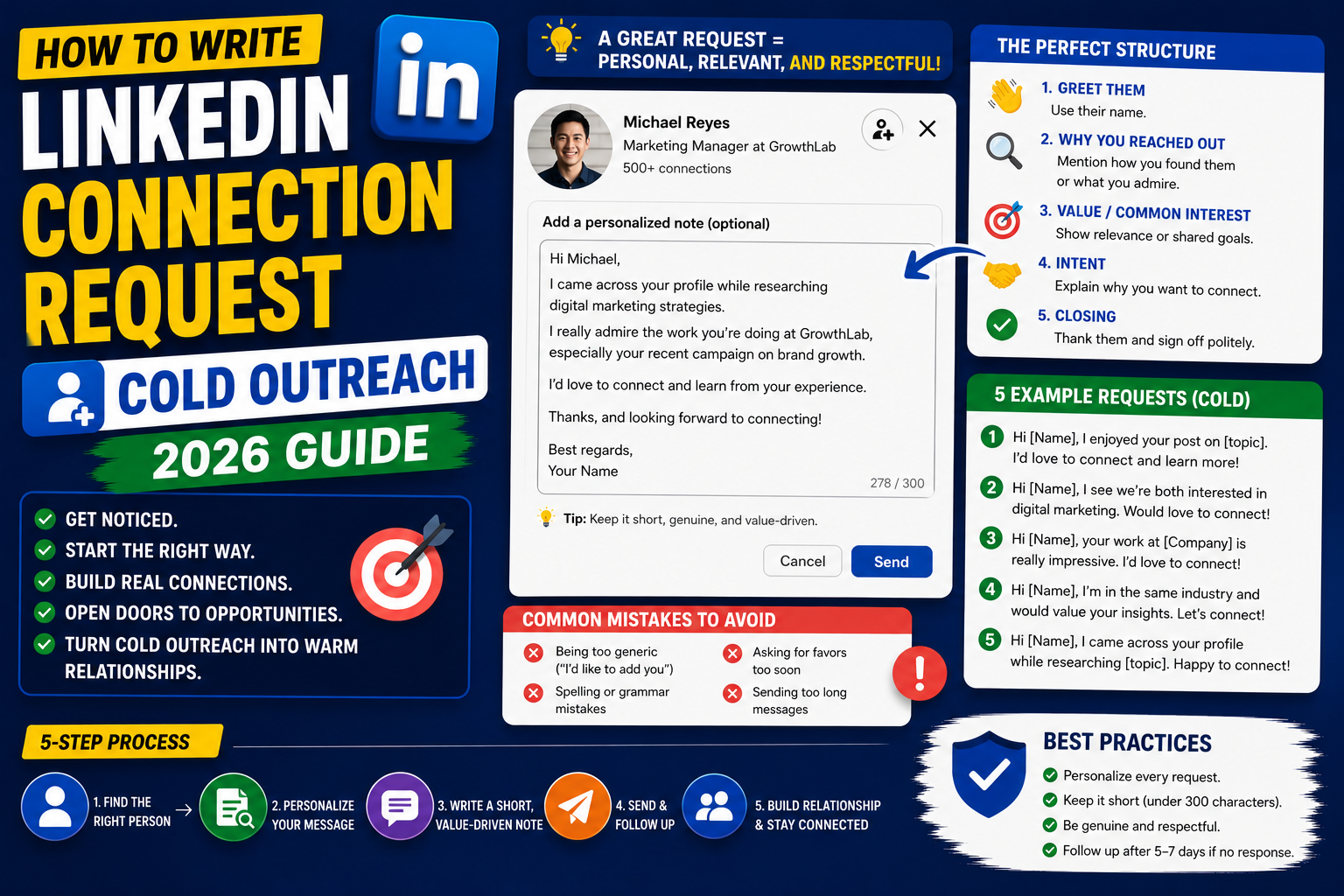
A LinkedIn connection request with a personalized message gets accepted 3-5x more often than a blank request. This 2026 tutorial teaches you how to write connection requests that land, whether you’re reaching out to hiring managers, potential mentors, industry contacts, or prospects. Includes 10 real templates.
Why personalized requests work
- Personalized: ~50% acceptance rate.
- Blank/generic: ~15% acceptance rate.
- Sets expectation you’re not spam.
- Recipient reads message; understands why to accept.
- Starts a conversation, not just a connection count.
Send a personalized connection request
- Go to the person’s profile.
- Click Connect.
- Click Add a note.
- Type your message (300 characters max, very tight).
- Click Send.
Message template structure
Structure (all in 300 characters):

1. Personalized opener (1 sentence about why you're reaching out).
2. Common ground or specific reason for connecting.
3. Brief mention of why they'd care.
4. Soft CTA or ask.

Keep tone: casual but professional.
Template 1: Job seeker to hiring manager
Hi Sarah, I saw you're hiring for the Senior Backend Engineer role. I've been building distributed systems for 6 years at healthcare tech companies. Would love to connect and learn more about the team. Thanks!
Template 2: Career changer to industry mentor
Hi Marcus, I'm transitioning from finance to product management (targeting SaaS specifically). Your writing on go-to-market strategy has been incredibly helpful. Would appreciate connecting to learn from your journey.
Template 3: Student to senior professional
Hi Elena, I'm a final-year BSIT student at Manila. Your journey from junior engineer to Staff Engineer is exactly the path I'm aiming for. Would love to connect and follow your posts.
Template 4: Same industry, new to your circle
Hi Alex, we're both in fintech engineering at ~50-person startups. I've been reading your posts on scaling engineering teams, great stuff. Would love to connect and share notes.
Template 5: Mutual event or conference
Hi Priya, we both attended KubeCon Manila last month. I loved your talk on GitOps. I've been experimenting with ArgoCD and would love to compare notes. Thanks for the great presentation!
Template 6: Reaching out to a recruiter (be direct)
Hi Jamie, I'm actively looking for senior backend engineer roles. I have 8 years of experience with Node.js and AWS, most recently at StripeAlternative. Would love to connect and learn about open roles you're working on.
Template 7: Following someone whose content you love
Hi Casey, your posts on B2B SaaS pricing strategy have been incredibly helpful for my company. Would love to connect and follow your work more closely.
Template 8: Old colleague / classmate reconnection
Hi Nick, we were in the same class at UP Diliman '19 (BSIT). Just circling back to grow my network. Curious what you've been up to since graduating!
Template 9: B2B sales/networking (soft ask)
Hi Marcus, saw your post about hiring a Head of Growth. If you're open to it, I'd love to share a couple of ideas I have from running growth at 3 similar-stage SaaS companies. No pressure, just a connection first.
Template 10: Reaching out to speaker/author you admire
Hi Julia, I read your book "Startup CTO" last month, the section on hiring senior engineers changed how I think. Would appreciate connecting to follow your future work.
What NOT to write
- Blank (default): “Hi, I’d like to connect.”
- Sales pitch immediately: “Hi, want to buy my product?”
- Long paragraphs (over 300 chars, LinkedIn cuts off).
- Copy-paste generic template.
- Just “I’d like to add you to my professional network on LinkedIn” (LinkedIn’s default is boring).
- Fake compliments (“I love your work!” without specifics).
After they accept
- Send a follow-up thank-you within a day or two.
- Don’t immediately pitch or sell.
- Ask a small, easy question if you want to continue conversation.
- Or just express appreciation and stay connected.
Follow-up template:

Thanks for connecting, Sarah! I've been following your team's work on [specific project]. If you're ever open to a quick chat about [topic], I'd love to learn more. No rush, enjoy your week.
Send request via mobile
- Open LinkedIn app.
- Search or tap the person’s profile.
- Tap Connect (may need to tap “…” menu first).
- Tap Add a note.
- Type message and tap Send.
Common connection request issues
- Cannot add a note: reached free tier’s monthly note limit. Wait or upgrade to Premium.
- “Connect” button missing: you’re not a 2nd or 3rd-degree connection. Try “Follow” instead.
- Request never accepted: message may not have landed or wasn’t compelling. Try again after 2 weeks with different angle.
- Accepted but no follow-up: many connections are silent. Not always a rejection.
- Warning: too many connect attempts: LinkedIn flags heavy request activity. Space out your outreach (10-20/day max).
Official documentation
Recommended networking and outreach resources
The links below are affiliate links. We may earn a commission at no extra cost to you when you buy or sign up. See our affiliate disclosure.
LinkedIn connection request templates by relationship
Cold connection requests get ignored most of the time. Warm, specific requests get accepted 60 to 80% of the time. The difference is context. Match your message to how you are connected (or want to be connected). Here are proven templates by relationship type.
To a recruiter you have never met
Focus on relevance to their industry, not your job search. Example: Hi Alex, I saw you specialize in placing data engineers at fintech startups. I have been in the data engineering space for 4 years and would love to be connected in case a role fits down the road. Happy to stay in touch either way.
To a hiring manager at your target company
Do not ask for a job in the connection request. Ask to be connected first. Example: Hi Priya, I really admire the work your team has been doing on the new payments API. I have been building similar systems for 3 years and would love to connect and follow your work.
To a peer in your industry
Reference something specific they posted or built. Example: Hi Marcus, your post on breaking down microservices resonated with a project I am working on now. Would love to be connected and follow more of your thinking.
To an alumnus from your school
Shared alma mater is one of the strongest warm signals on LinkedIn. Use it. Example: Hi Sarah, fellow Boston College alum here (Class of 2020). I saw you moved into product management at Shopify and I am exploring that transition myself. Would love to connect.
How to follow up when your connection request gets ignored
People ignore connection requests for a hundred different reasons, most of which have nothing to do with you. They might be busy, they might not check LinkedIn often, or they might not have seen it in their notifications. A polite follow-up 2 to 3 weeks later works more often than you would expect.
Rule 1: Wait 14 to 21 days minimum
Do not follow up in 3 days. That reads as desperate and pushy. Wait at least 2 weeks. If the person is genuinely busy, this gives them time to catch up. If they missed the notification, it may resurface naturally by then.
Rule 2: Follow up via a different signal
Instead of sending another connection request, engage with their content. Like one of their recent posts. Leave a thoughtful comment on a topic they wrote about. This puts your name in front of them in a natural context. Often they will accept your original request after seeing your comment.
Rule 3: If still nothing, try a single polite DM
If 3 to 4 weeks pass with no response and no engagement traction, try one polite direct message. Example: Hi Jamie, I sent a connection request a few weeks back but understand LinkedIn notifications get buried. Would still love to be connected. Reaching out because your work on onboarding funnels is exactly the challenge I am solving right now.
If that also gets ignored, let it go. Some people simply do not build their LinkedIn networks broadly. Move on to the next connection. You will find that following up thoughtfully wins you connections you would have missed otherwise, but chasing hard rarely converts.
Frequently Asked Questions
How long should the message be?
300 characters max (LinkedIn’s limit). Aim for 100-250. Short and specific beats long and generic. Recipient sees whole thing at once.
Should I connect with strangers?
Yes, with personalized reason. LinkedIn is a professional network, connecting broadens your career opportunities. Just avoid mass-connecting; be selective.
Is there a monthly connection limit?
Free tier: ~100 connection requests per week is safe. Premium: higher. Send 10-20 per day max to avoid triggering LinkedIn’s anti-spam filters.
Can I withdraw a pending request?
Yes. Settings & Privacy > Manage sent invitations > find pending > Withdraw. Withdrawn requests count against your rejected requests limit.
What if they haven’t accepted after 2 weeks?
Withdraw the request. Don’t take it personally. Move on. Optional: try again after 3 months with different angle if it really matters.

Leah Whynett Dela Pena
Technology Writer at PIES IT Solution
Leah Whynett Dela Pena is a technology writer at PIES IT Solution, author of 93 career and IT education guides at itsourcecode.com. Specializes in tech career paths (software engineering, web development, cybersecurity, IT analyst roles), degree and certification guidance, and IT industry how-to content for students and career changers.
Expertise: Tech Careers, IT Education, Web Development Careers, Software Engineering Careers, Cybersecurity Careers, IT Certifications, Career Guidance · View all posts by Leah Whynett Dela Pena →