
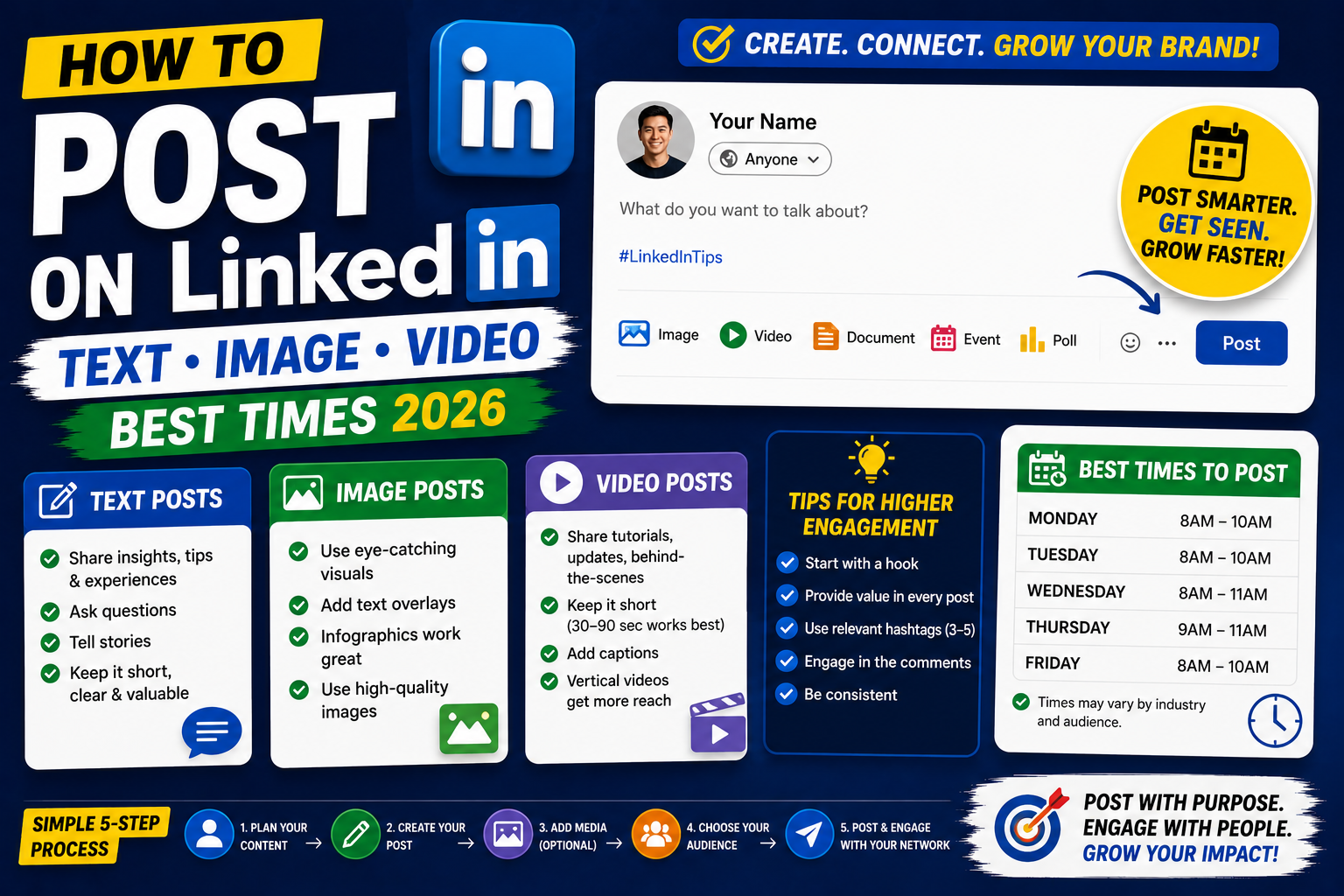
Posting on LinkedIn builds your professional brand, attracts inbound opportunities, and demonstrates your expertise to recruiters and prospects. LinkedIn favors certain content types and posting patterns. This 2026 tutorial covers what to post, when, and how to grow engagement using best practices.
Create a post
- Sign into LinkedIn.
- Click Start a post at the top of your feed.
- Type your content.
- Add media, hashtags, mentions.
- Click Post.
Post types and how they perform
| Type | Character/size limit | Engagement performance |
|---|---|---|
| Text-only | 3000 | High (great for storytelling) |
| Image + text | 3000 text + 20 photos | Highest (~2x text) |
| Video | Up to 10 min, 5GB | Very high (~3x text) |
| Poll | 2 to 4 options | Very high (interactive) |
| Document (PDF) | 50MB, up to 300 pages | High (carousel effect) |
| Article (long-form) | 125,000 characters | Low-medium (audience investment) |
Best times to post
- Weekdays: highest engagement Tuesday-Thursday.
- Time of day: 8:30-9:00 AM (people checking during commute), or 5:00-6:00 PM (end of workday).
- Weekends: much lower engagement, avoid unless targeting specific audience.
- Time zone: post in your target audience’s zone. Global brands may post at multiple times.
The hook: first 3 lines matter most
LinkedIn shows only the first 3 lines before “see more”. Nail the hook or you lose the reader.
Great hook types:

- Curiosity: "I made a $10K mistake in year 1 of my company..."
- Contrarian: "Popular career advice is wrong. Here's why..."
- Personal: "I got rejected from 47 jobs before landing my dream role."
- Numbered: "5 skills that helped me get promoted twice in 2 years."
- Question: "What's the one thing you wish you knew before your first job?"
Formatting: make posts scannable
- Short paragraphs (1-2 lines max).
- Use line breaks liberally, LinkedIn honors them.
- Bullet points with • or, or → symbols.
- Emphasize key points on their own line.
- End with a question to boost comments (comments = boost).
Hashtag strategy
- Use 3-5 relevant hashtags at the END of your post.
- Mix specific ones (#Python, #JavaScript) with broader (#TechCareers, #DevLife).
- Avoid over-tagging (10+ hashtags looks spammy).
- Search LinkedIn hashtags to see follower counts, pick those with 10K-100K followers.
Mentions (@ people or companies)
- Type @ then the name.
- Pick from dropdown.
- Mentions notify the person (good) or company (good publicity).
- Don’t over-mention: 1-2 per post max.
LinkedIn algorithm essentials
- Algorithm rewards early engagement (comments in first 30 min matter most).
- Comments > likes for boosting distribution.
- Replies to comments feed algorithm, respond to every comment.
- Video and image posts have higher reach than text-only.
- Personal stories perform better than pure company/brand promos.
Post consistency
- Post 3-5 times per week for steady growth.
- Daily posting: possible but risk of quality decline.
- Once weekly: fine but slower growth.
- Batch content creation: write 5 posts on Sunday, schedule for the week.
What NOT to post on LinkedIn
- Politics (divides your audience).
- Personal relationship drama.
- Excessive complaints without solutions.
- “Job search sob stories” (feels manipulative).
- Direct sales pitches (“Buy my course!”) without value.
- Reposts of others without credit.
Post templates that work
Template 1: Lesson learned

I made this mistake early in my career.
[The mistake]
[What I learned]
[How I'd do it differently now]

Question for readers?

Template 2: Contrarian take

Everyone says [common advice].
Here's why that's wrong for [audience]:
[Point 1]
[Point 2]
[Point 3]

What's your take?

Template 3: Story with data

I helped a client [achievement].
Here's the exact process:
[Step 1]
[Step 2]
[Step 3]

Numbers:
- [Metric 1: value]
- [Metric 2: value]

Happy to discuss the details.
Common posting issues
- Low engagement: hook is weak, post at wrong time, or content too promotional.
- Post not appearing in feed: refresh browser. Or LinkedIn is A/B testing your post’s audience.
- Cannot post video: file size limit (5GB). Compress with HandBrake.
- Post got flagged as spam: likely too many external links or promotional content.
- Cannot @-mention someone: they may have privacy settings blocking mentions.
Official documentation
Recommended content and branding resources
The links below are affiliate links. We may earn a commission at no extra cost to you when you buy or sign up. See our affiliate disclosure.
Post types by industry and audience
Not every LinkedIn post format works for every industry. A photo carousel that gets 10,000 impressions in marketing might flop for a legal audience. Know your audience first, then pick the format that fits how they consume content. Here are the highest-performing post types by field.
Developers and engineers
Technical audiences reward code snippets, project retrospectives, and architecture diagrams. Post format: text with a code block or a simple screenshot. Do not over-produce. A raw “here is the bug that took me 4 hours to find” post will out-perform a polished carousel. Add context, show the code, share what you learned.
Marketers and content creators
Marketing audiences love carousels, before/after screenshots, and campaign case studies. Post format: 5 to 10 slide carousel with a clear takeaway on each slide. Include a real dollar figure or growth metric on slide one to earn the swipe. Numbers stop the scroll.
Executives and leaders
Executive audiences want strategic takes, industry observations, and lessons learned. Post format: long-form text (200 to 400 words) with one clear point. Avoid pure hype posts. Executives respect nuance and admit when they got something wrong. That authenticity builds their brand.
Recent graduates and job seekers
Job seekers get most engagement by sharing what they are learning and building. Post format: quick text update on a project, a certification earned, or a lesson from an internship. Recruiters actually watch these posts because they signal drive and self-direction. Do not fake activity. Post something real once a week.
How to schedule LinkedIn posts for best times
Posting at the right time can double your reach for the same content. LinkedIn users behave predictably. They check the app during commutes, at lunch, and briefly after work. Aligning your post to their behavior is a free multiplier. Here is how to schedule for maximum reach.
Best posting times by audience
For US or European professional audiences, aim for Tuesday to Thursday, between 8 AM and 10 AM in your target audience’s time zone. This catches the commute and morning coffee scroll. Second-best window is 12 PM to 1 PM local (lunch break). Avoid Monday mornings (people catch up on email) and Friday afternoons (they log off).
Native LinkedIn scheduling (free)
LinkedIn added native post scheduling in 2023. Click the clock icon next to the “Post” button. Choose your date and time in 15-minute increments. You can schedule up to 3 months out. This works for text, image, video, and article posts. Use it to batch your week on Sunday and let posts fire automatically.
Third-party tools for advanced scheduling
If you cross-post to Twitter, Facebook, or Instagram, tools like Buffer, Hootsuite, and Later let you schedule everything from one dashboard. These are worth the monthly fee if you post across 3 or more platforms. If LinkedIn is your only channel, native scheduling is enough.
Track your engagement rate (comments plus reactions divided by impressions) for each posting time slot over 4 weeks. You will find your own personal peak window, which may differ from the general advice. Every audience is a little different, and your own data is more reliable than any generic best-practice article.
Frequently Asked Questions
When is the best time to post on LinkedIn?
Tuesday-Thursday, 8:30-9 AM or 5-6 PM local time. Weekends much lower. Post during your target audience’s active hours.
How often should I post?
3-5 times per week is sweet spot for growth. Daily possible but risks quality decline. Once weekly is fine but slower growth.
Do videos really outperform text?
Yes, especially short-form (1-2 minutes). Video gets 2-3x more reach than text-only. But well-written text with strong hook can outperform poorly executed video.
Should I add hashtags?
Yes, 3-5 relevant ones at the end. Helps discovery. Avoid 10+ hashtags (looks spammy). Search LinkedIn hashtags for follower counts to pick well-populated ones.
Can I schedule posts?
Yes. Native LinkedIn: click clock icon in post creator > schedule for future. Third-party tools: Buffer, Hootsuite, Later. Great for consistency.

Leah Whynett Dela Pena
Technology Writer at PIES IT Solution
Leah Whynett Dela Pena is a technology writer at PIES IT Solution, author of 93 career and IT education guides at itsourcecode.com. Specializes in tech career paths (software engineering, web development, cybersecurity, IT analyst roles), degree and certification guidance, and IT industry how-to content for students and career changers.
Expertise: Tech Careers, IT Education, Web Development Careers, Software Engineering Careers, Cybersecurity Careers, IT Certifications, Career Guidance · View all posts by Leah Whynett Dela Pena →