
By mid-2026, three AI coding tools dominate developer mindshare: Cursor (the AI-first IDE), GitHub Copilot (the OG autocomplete that grew into Workspace + Agent), and Claude Code (Anthropic’s terminal-native agent that ships PRs without leaving your shell). They overlap heavily but optimize for different workflows. This guide compares them on the dimensions that actually matter for getting work shipped, not on marketing benchmarks.
We tested all three on the same week-long project: build a Django + HTMX BSIT capstone CRUD app with auth, search, pagination, and PDF export. Same prompts, same constraints. Below: who won what, who lost what, and which tool fits which workflow.
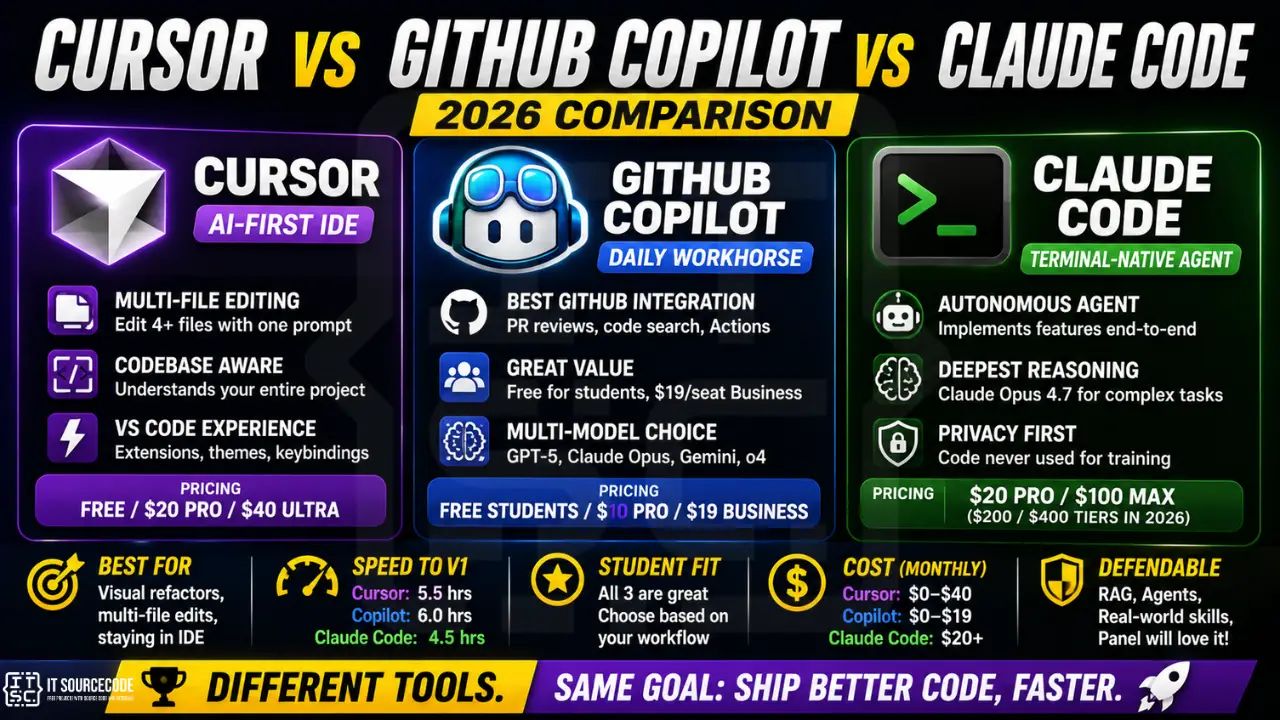
📌 Quick verdict: Cursor for full-IDE refactoring + multi-file edits where you want to stay in a visual editor. GitHub Copilot for individual completions, PR reviews, and team plans (best price per seat for organizations already on GitHub). Claude Code for autonomous agent work, terminal-native developers, long context tasks, and capstone students who want the deepest tutoring on what each suggestion means.
Side-by-Side at a Glance
| Feature | Cursor | GitHub Copilot | Claude Code |
|---|---|---|---|
| Pricing (USD/month) | Free / $20 Pro / $40 Ultra | Free students / $10 Pro / $19 Business | $20 Pro / $100 Max ($200 / $400 tiers in 2026) |
| Models behind it | Claude Opus, GPT-5, Gemini 2.5, Cursor’s own | GPT-5, Claude Opus, Gemini, o4 (selectable) | Claude Opus 4.7 + Haiku (single-vendor) |
| Best for | Visual refactors, multi-file context | Daily autocomplete + GitHub integration | Autonomous tasks, terminal workflows, agent work |
| Free tier | Yes (limited models) | Yes for verified students + OSS maintainers | No (Pro $20/mo minimum) |
| PH BSIT student fit | Strong (free tier works well) | Strongest if you have .edu (or GitHub verifies you) | Strong for advanced students; cost barrier for beginners |
| Privacy / data | Privacy mode opt-in; code may train models otherwise | Business plans exclude code from training | Code never used for training (Anthropic policy) |
1. Cursor: The AI-First IDE
What it is: a VS Code fork with deep AI integration built into the editor: inline completions, “Composer” for multi-file edits, agent mode for autonomous tasks, and a chat panel that knows your codebase.
Strengths
- Multi-file editing in one prompt: “Add a search field to the products page and wire it to the backend” produces edits across 4-5 files automatically
- Codebase indexing: understands your whole project, answers questions about “where is X defined” without you scrolling
- VS Code muscle memory: all your extensions, themes, and keybindings carry over from VS Code (it’s literally a fork)
- Free tier is generous for learning
Weaknesses
- Pro tier ($20) burns through quota fast on Opus-class models; Ultra ($40) is more realistic for daily heavy users
- Less polished for autonomous agent workflows than Claude Code
- Codebase index has size limits; massive monorepos need workarounds
Best for
Developers who live in a visual editor, want AI as a copilot but keep the human in the driver’s seat for every edit. Great fit for refactoring legacy code, building UI-heavy features, and teaching juniors who want to see exactly what AI is changing.
2. GitHub Copilot: The Daily Workhorse
What it is: the original AI pair-programmer. Started as IDE autocomplete in 2021, now spans Copilot Chat, Copilot Workspace (multi-file planning), Copilot Code Review (PR comments), and Copilot Agent (autonomous tasks via GitHub Actions).
Strengths
- Tightest GitHub integration: PR reviews, code search across your org, Actions-triggered agent work
- Best price per seat at scale: Business at $19/seat is the most economical for teams of 10+
- Free for verified students (use your .edu email or apply via GitHub Education)
- Multi-model selection: you can pick GPT-5, Claude Opus, Gemini, or o4 depending on the task
Weaknesses
- Pure autocomplete UX has been overtaken by Cursor’s multi-file editing
- Copilot Agent is newer; less battle-tested than Claude Code for autonomous work
- If you’re not on GitHub (using GitLab, Bitbucket, self-hosted Gitea), most of the value vanishes
Best for
Developers and teams already living on GitHub. Students with .edu emails who get Pro for free. Companies with 10+ developers where the seat-based price beats individual tool subscriptions.
3. Claude Code: The Terminal-Native Agent
What it is: Anthropic’s official CLI for Claude (Opus 4.7). Runs in your terminal, reads your files, edits them, runs commands, opens PRs. Works as an autonomous agent or as a high-context conversational pair-programmer. Available as terminal CLI, IDE extensions (VS Code, JetBrains), web app at claude.ai/code, and desktop app.
Strengths
- Best for autonomous tasks: “implement this feature end-to-end with tests” gets a working PR more often than competitors
- Largest context windows in practice: Opus handles huge codebases without manual context-trimming
- Strongest reasoning on complex refactors: Claude Opus is widely regarded as the best at architectural thinking
- Code never used for training (Anthropic’s blanket policy, even on Pro tier)
- Most useful for tutoring: tends to explain WHY a change is right, not just produce diff
Weaknesses
- No free tier; $20/mo Pro is the entry point
- Single-vendor (Anthropic only); no GPT/Gemini fallback
- Terminal-first UX has a learning curve for non-CLI developers
- Heavy Opus quota burn on Pro; Max tiers ($100-$400) needed for full-day agent usage
Best for
Developers comfortable in terminal, working on complex systems where reasoning quality matters more than completion speed. Senior engineers, infra/DevOps work, multi-week capstone implementations. BSIT students at thesis stage who want the deepest AI tutoring.
Real-World Test: Same Project, 3 Tools
We built a Django + HTMX BSIT-style capstone CRUD app (products, customers, orders) using each tool on a separate day. Same scope, same starting template. Time to working v1 with auth + search + pagination:
- Cursor (Pro): 5.5 hours. Strong visual feedback for each multi-file edit. Best for “I want to see every change before accepting.”
- GitHub Copilot (Business): 6 hours. Autocomplete carried us through repetitive Django boilerplate. Slower on cross-file changes than Cursor.
- Claude Code (Pro): 4.5 hours. The agent mode handled multi-step tasks autonomously (create model, run migration, scaffold views, add tests) with one prompt. Burned $4 in Opus tokens.
Quality of output was roughly equivalent across all three (working code, similar test coverage). The difference was workflow comfort, not capability.
Which One Should YOU Pick?
| If you are… | Pick |
|---|---|
| A BSIT student with a .edu email | GitHub Copilot Pro (free for verified students) |
| A BSIT student without verified .edu | Cursor Free first, upgrade to Pro if you hit limits |
| A senior dev doing complex refactors | Claude Code Max (deepest reasoning, agent mode) |
| A team of 10+ on GitHub | Copilot Business ($19/seat best value) |
| A solo founder building a SaaS | Cursor Pro + Claude Code Pro (use both, $40/mo total) |
| Privacy-conscious enterprise dev | Claude Code (no-training-on-code policy) |
Related Guides
- Best AI Coding Assistants for Students (2026)
- ChatGPT vs Claude vs Gemini for Coding (2026)
- Best AI Tools for Software Developers (2026)
- 150 Best Capstone Project Ideas
Frequently Asked Questions
Official documentation
Featured guides worth reading next
Try the tools yourself
The links below are affiliate links. We may earn a commission at no extra cost to you if you sign up. See our affiliate disclosure.
Which is cheapest: Cursor, Copilot, or Claude Code?
GitHub Copilot is free for verified students (Pro plan) and OSS maintainers. For paid users, Copilot Pro ($10/mo) is cheapest, Cursor Pro ($20/mo) and Claude Code Pro ($20/mo) are tied. For teams of 10+, Copilot Business at $19/seat is the most economical.
Can I use all three at the same time?
Yes. Many developers use Cursor or VS Code + Copilot for daily editing, then switch to Claude Code in terminal for autonomous multi-file tasks. The three tools don’t conflict; they complement each other for different workflow stages.
Which has the best free tier in 2026?
Cursor’s free tier is most generous for general use. GitHub Copilot is free if you’re a verified student (.edu email) or OSS maintainer. Claude Code does not have a free tier (Pro $20 minimum).
Is Claude Code only Anthropic models, or can I switch?
Claude Code is Anthropic-only (Claude Opus 4.7 + Haiku for cheap tasks). For multi-vendor flexibility, choose GitHub Copilot (lets you pick GPT-5, Claude, Gemini, o4) or Cursor (similar multi-model picker).
Which is best for BSIT capstone projects?
For free: GitHub Copilot Pro if you have .edu (apply via education.github.com); otherwise Cursor Free. For paid: Cursor Pro $20/mo if you want a visual IDE, or Claude Code Pro $20/mo if you’re terminal-comfortable and want the deepest explanations of every code change (useful for thesis defense prep).
Will my code be used to train AI models?
Depends on the tool and plan. Anthropic (Claude Code) has a blanket “we never train on your code” policy, including Pro. GitHub Copilot Business and Enterprise exclude code from training; the free and Pro tiers may use code. Cursor has an opt-in privacy mode; default plans may use code for product improvement. Always check the current ToS before using on confidential code.

Adrian Mercurio
Full-Stack Developer at PIES IT Solution
Specializes in building complete capstone projects with full documentation. Strong background in PHP/MySQL development and database design. Has personally built and tested over 30 capstone-ready projects with ER diagrams, DFDs, and chapter-by-chapter thesis documentation.
Expertise: PHP · Laravel · Database Design · Capstone Projects · C# · C · C++ · Python · AI Projects · View all posts by Adrian Mercurio →