
An AI tutoring system is one of the most defensible 2026 capstone topics because it combines genuine educational value with proven AI architecture (RAG, LangChain, embeddings). Students upload their textbooks or course PDFs, ask questions in plain language, and get answers grounded in the actual material plus follow-up explanations.
This guide walks through building one end-to-end: architecture, code, deployment, and the panel-defense angle. Full Python source linked at the bottom.
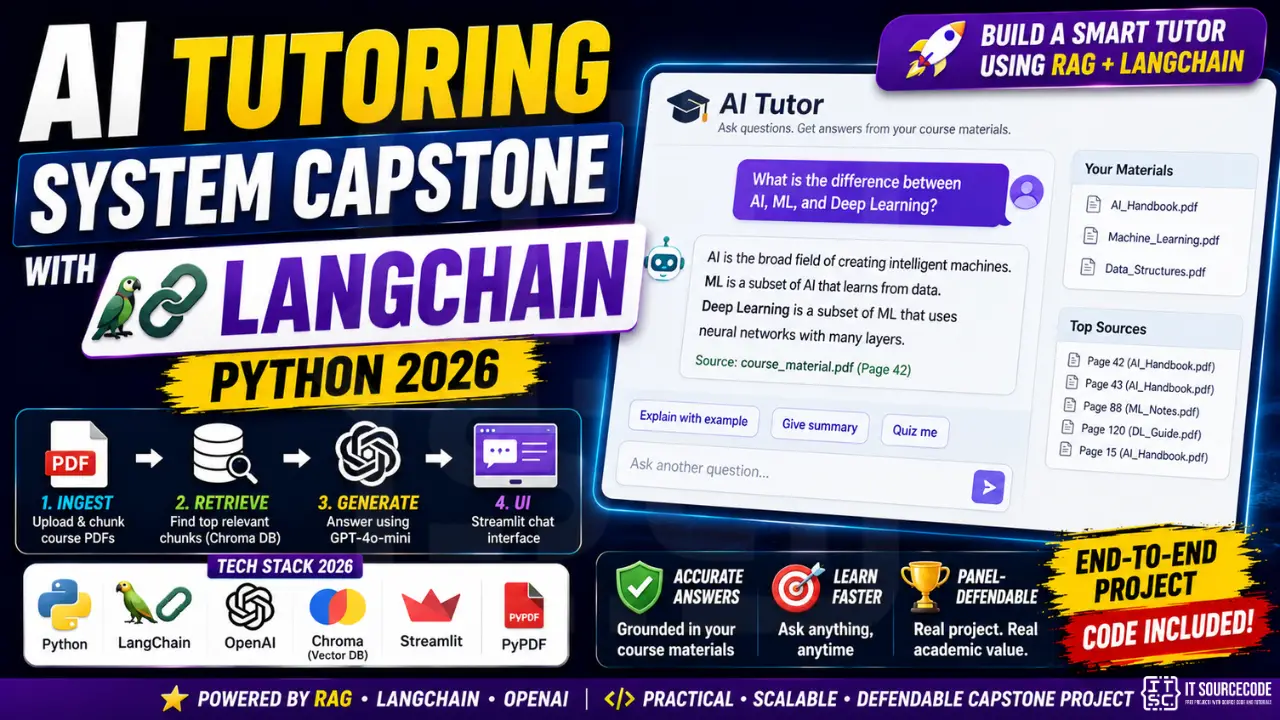
📌 Stack at a glance: Python 3.11 + LangChain 0.3 + OpenAI API (gpt-4o-mini) + Chroma (vector DB) + Streamlit (UI) + PyPDF (PDF parsing). Total monthly cost: ~$3-8 for a class of 50 active students. Build time: 2-3 weeks of part-time work.
Architecture Overview
The system has 4 layers, each independently testable:
- Ingestion, PDFs are uploaded by teacher/admin, split into chunks (~500 tokens each), embedded via OpenAI text-embedding-3-small, and stored in Chroma vector DB
- Retrieval, student question is embedded, top-5 similar chunks are pulled from Chroma
- Generation, retrieved chunks + question are sent to GPT-4o-mini with a tutoring-style system prompt; answer streams back to UI
- Frontend, Streamlit chat interface (or Next.js if you want fancier UX)
This is classic RAG (Retrieval-Augmented Generation), the gold standard pattern for “AI that knows your specific documents.” It’s defensible at the panel because every architectural choice has a clear reason.
First Step: Setup and Dependencies
# Create virtual environment
python -m venv tutor_env
source tutor_env/bin/activate  # Linux/Mac
# tutor_env\Scripts\activate  # Windows

# Install dependencies
pip install langchain==0.3.0 langchain-openai==0.2.0 langchain-chroma==0.1.4
pip install streamlit==1.40.0 pypdf==4.3.0 chromadb==0.5.5
pip install python-dotenv==1.0.1

# Create .env file
OPENAI_API_KEY=sk-proj-...
Second Step: PDF Ingestion (ingest.py)
from langchain_community.document_loaders import PyPDFLoader
from langchain.text_splitter import RecursiveCharacterTextSplitter
from langchain_openai import OpenAIEmbeddings
from langchain_chroma import Chroma
import os

def ingest_pdf(pdf_path: str, persist_dir: str = "./chroma_db"):
    """Load PDF, split into chunks, embed, store in Chroma."""
    loader = PyPDFLoader(pdf_path)
    docs = loader.load()

    splitter = RecursiveCharacterTextSplitter(
        chunk_size=500,
        chunk_overlap=50,
        separators=["\n\n", "\n", ". ", " "]
    )
    chunks = splitter.split_documents(docs)
    print(f"Split {len(docs)} pages into {len(chunks)} chunks")

    embeddings = OpenAIEmbeddings(model="text-embedding-3-small")
    vectorstore = Chroma.from_documents(
        documents=chunks,
        embedding=embeddings,
        persist_directory=persist_dir
    )
    print(f"Saved to {persist_dir}")

if __name__ == "__main__":
    ingest_pdf("course_material.pdf")
Third Step: RAG Chain (chain.py)
from langchain_openai import ChatOpenAI, OpenAIEmbeddings
from langchain_chroma import Chroma
from langchain.prompts import ChatPromptTemplate
from langchain.schema.runnable import RunnablePassthrough
from langchain.schema.output_parser import StrOutputParser

TUTOR_PROMPT = """You are a friendly tutor helping a BSIT student understand course material.
Use only the provided context to answer. If the context does not contain the answer,
say so honestly and suggest what to study next.

Context:
{context}

Student question: {question}

Answer in clear, conversational English. Use examples when helpful."""

def build_chain(persist_dir: str = "./chroma_db"):
    embeddings = OpenAIEmbeddings(model="text-embedding-3-small")
    vectorstore = Chroma(persist_directory=persist_dir, embedding_function=embeddings)
    retriever = vectorstore.as_retriever(search_kwargs={"k": 5})

    llm = ChatOpenAI(model="gpt-4o-mini", temperature=0.3)
    prompt = ChatPromptTemplate.from_template(TUTOR_PROMPT)

    def format_docs(docs):
        return "\n\n".join(doc.page_content for doc in docs)

    chain = (
        {"context": retriever | format_docs, "question": RunnablePassthrough()}
        | prompt
        | llm
        | StrOutputParser()
    )
    return chain
Fourth Step: Streamlit UI (app.py)
import streamlit as st
from dotenv import load_dotenv
from chain import build_chain

load_dotenv()
st.set_page_config(page_title="AI Tutor", page_icon="🎓")
st.title("🎓 AI Tutor for BSIT")

if "messages" not in st.session_state:
    st.session_state.messages = []
if "chain" not in st.session_state:
    st.session_state.chain = build_chain()

for msg in st.session_state.messages:
    with st.chat_message(msg["role"]):
        st.markdown(msg["content"])

if question := st.chat_input("Ask about your course material..."):
    st.session_state.messages.append({"role": "user", "content": question})
    with st.chat_message("user"):
        st.markdown(question)

    with st.chat_message("assistant"):
        response = st.write_stream(st.session_state.chain.stream(question))
        st.session_state.messages.append({"role": "assistant", "content": response})

# Run with: streamlit run app.py
Fifth Step: Panel-Defensible Extensions
Strip-down version above is a strong demo but light on capstone scope. Add these for defense:
- User accounts (Streamlit Authenticator or migrate to Django frontend)
- Multi-course support, separate Chroma collection per course
- Question history per student stored in SQLite/Postgres
- Teacher dashboard, see what students ask most (identifies weak topics)
- Citation display, show which page of which PDF each answer came from
- Quiz generation, “create 5 multiple-choice questions from Chapter 3” via second LangChain prompt
- Evaluation, BLEU/ROUGE scores on a gold-standard Q&A set (panel loves quantitative metrics)
Cost Estimate (For Your Chapter 4 Budget Section)
| Resource | Monthly cost |
|---|---|
| OpenAI API (text-embedding-3-small) | $0.50-2.00 (one-time per PDF + cheap queries) |
| OpenAI API (gpt-4o-mini for answers) | $2-5 for 1000 student questions/month |
| Hosting (Streamlit Community Cloud) | $0 (free tier) |
| Chroma vector DB | $0 (local SQLite-based) |
| Total | ~$3-8/month for a class of 50 |
Related Guides
- 40 ChatGPT Capstone Project Ideas
- Machine Learning Projects
- Deep Learning Projects
- 150 Best Capstone Project Ideas
Frequently Asked Questions
What is RAG and why use it for a tutoring system?
RAG (Retrieval-Augmented Generation) lets the AI answer questions grounded in your specific documents (course PDFs) instead of hallucinating from generic training data. It’s the standard pattern for any ‘AI that knows X’s material’ product. Defensible because every answer can be traced back to a source chunk.
Do I need OpenAI’s API, or can I use a local LLM?
Both work. OpenAI gpt-4o-mini is cheap (~$3-8/month for capstone scale) and easiest to set up. For zero-cost / privacy-focused: use Ollama with llama3.1:8b locally, but you’ll need a machine with 16GB+ RAM. Local LLMs are slower and lower quality but free.
Can I use Filipino / Tagalog questions?
Yes. GPT-4o-mini handles Tagalog and Taglish well. Add a system-prompt instruction: ‘Answer in the same language the student asked.’ Embeddings work across languages but quality is best when PDF text + questions are in the same language.
What if students ask trick questions to bypass the tutor’s scope?
Two defenses: (1) tighten the system prompt: ‘If the question is unrelated to the course, politely decline.’ (2) Add a classifier step before retrieval that detects off-topic questions. For capstone defense, mention you implemented both layers.
How do I handle multiple courses or subjects?
Create a separate Chroma collection per course. When the student selects a course in the UI, build a chain that points to that collection’s retriever. One vector DB file per course (e.g. chroma_db_math/, chroma_db_history/).
Can I deploy this for free for my capstone defense demo?
Yes. Streamlit Community Cloud (streamlit.io/cloud) hosts your app free with GitHub integration. Push your code to a public repo, link to Streamlit Cloud, deploy in 3 clicks. Free tier supports demo-level traffic.

Adrian Mercurio
Full-Stack Developer at PIES IT Solution
Specializes in building complete capstone projects with full documentation. Strong background in PHP/MySQL development and database design. Has personally built and tested over 30 capstone-ready projects with ER diagrams, DFDs, and chapter-by-chapter thesis documentation.
Expertise: PHP · Laravel · Database Design · Capstone Projects · C# · C · C++ · Python · AI Projects · View all posts by Adrian Mercurio →