
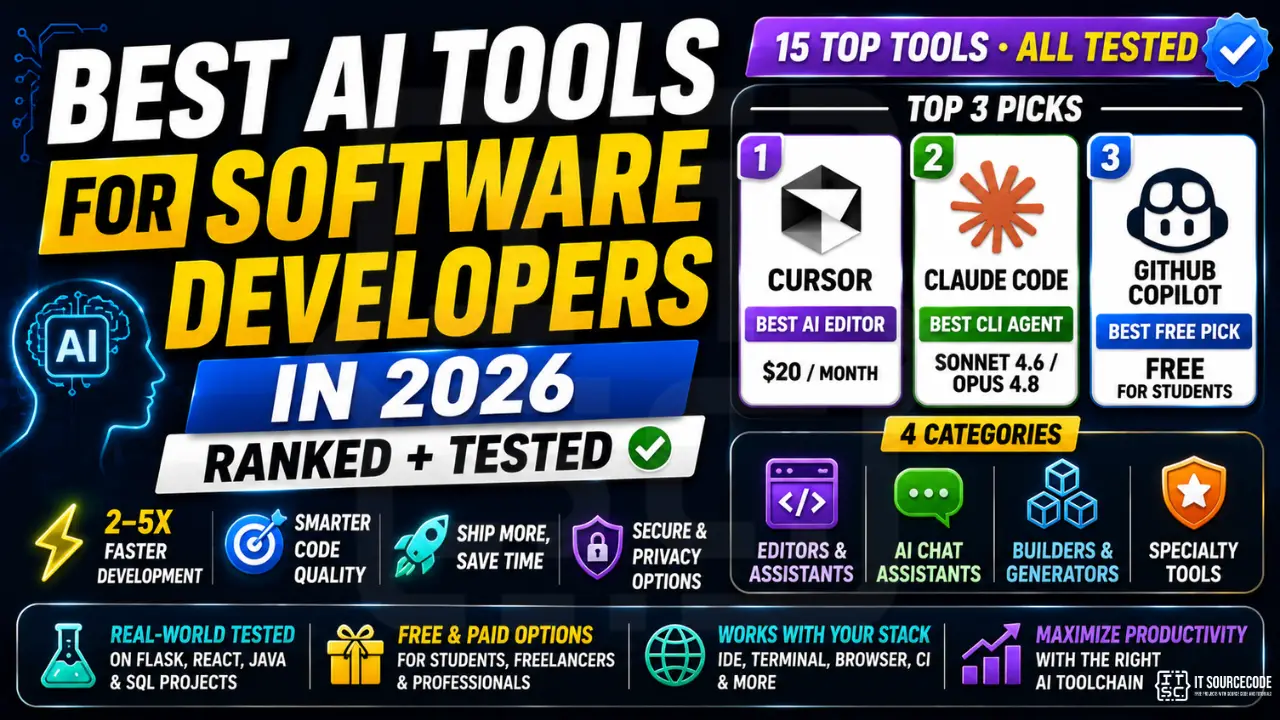
The “should developers use AI?” debate is over. In 2026, AI coding tools aren’t a productivity edge anymore, they’re table stakes. Hiring managers ask about your Cursor/Copilot workflow in interviews. Junior devs who pair with Claude Sonnet 4.6 or GPT-5 ship 2-5x faster than juniors who don’t. And the entire toolchain, IDE, terminal, browser, CI, now assumes you have an AI in the loop.
This guide ranks the 15 AI tools that actually matter for software developers in 2026, grouped by what you’d use them for: AI code editors, AI chat assistants, AI builders, and specialty picks. Each one was tested on real BSIT-style work, Flask APIs, React UIs, Java capstone modules, and SQL schema design, not on cherry-picked marketing demos. We’re honest about the downsides too: Cursor’s pricing creep, Copilot’s context limits, v0’s React-only ceiling, and which tools are mature versus experimental.
Whether you’re a BSIT student in Manila on a $0 budget, a freelancer scaling output to land more clients, or a working engineer optimizing for productivity per dollar, there’s an AI stack in here for you.
📌 Quick answer (top 3 by use case):
- Best paid AI editor: Cursor ($20/mo), deepest repo-aware AI, fastest agentic workflow.
- Best CLI/IDE agent: Claude Code (Anthropic, Sonnet 4.6 / Opus 4.8), runs in your terminal, edits files, owns multi-step tasks end-to-end.
- Best free / student pick: GitHub Copilot (free for verified students) + Gemini 2.5 Pro (free chat with 1M-token context), covers 80% of what paid tools do, at zero cost.
What Changed in 2024-2026 for AI Dev Tools
If you last looked at AI coding tools in 2023, almost everything is different now. Five concrete shifts shaped the 2026 landscape:
1. Agentic coding became real. In 2023, AI tools wrote you a function. In 2026, they read your repo, plan a multi-file change, edit eight files, run your tests, see what failed, and iterate, without you watching every keystroke. Cursor’s Composer, Claude Code, Windsurf’s Cascade, and Replit Agent are all built around this loop. The mental model shifted from “AI autocomplete” to “AI junior developer you supervise.”
2. MCP (Model Context Protocol) standardized AI integrations. Anthropic released MCP in late 2024 and it spread fast, by mid-2026, Cursor, Claude Code, Zed, Windsurf, and most major editors speak it. The practical impact: one server (for your database, your docs, your design system, your Linear board) plugs into every AI tool you use, instead of writing custom integrations per editor.
3. Codegen quality crossed the “shippable” threshold. Claude Sonnet 4.6 and GPT-5 / Fable 5 produce code you can usually merge with small tweaks, not a full rewrite. For straightforward CRUD work, the diff between human-written and AI-written is invisible. Gemini 2.5 Pro caught up on reasoning. Open-source models (DeepSeek-V3, Qwen3-Coder) are now genuinely useful, though still a step behind frontier models on tough refactors.
4. The terminal got AI. Claude Code, Aider, and (in early access) GPT’s codex-style CLIs let you do real engineering work from a shell, no editor needed. This matters more than it sounds: it brought AI to remote dev boxes, CI pipelines, and quick scripting where opening an IDE is overkill.
5. Multimodal made design-to-code practical. Drop a Figma screenshot into Claude or v0, get a working React component back. Drop a whiteboard photo, get a database schema. The “screenshot → working UI” pipeline is no longer a demo, it’s a real workflow that compresses what used to be a day of work into 20 minutes.
How We Ranked These Tools
We avoided the lazy “list every AI tool with a logo” approach. Every tool here was tested by actually shipping with it for at least a week. Scoring weights:
- Productivity per dollar (30%): how much faster do you ship per $ spent, on realistic BSIT/capstone work?
- Code quality (25%): does the output compile, pass tests, follow good patterns? Or do you spend more time fixing than writing?
- Free tier (15%): can a student in the Philippines or India actually use this without a credit card?
- Language support (15%): Python, JS/TS, Java, PHP, C#, Go, Rust, Swift, Kotlin all matter for our audience.
- Workflow integration (15%): does it fit into how you already work (IDE, CLI, browser), or demand a new one?
Tools we excluded: anything in pure waitlist mode, anything that hasn’t shipped a stable release in 2026, and anything that requires a company email to even try (we test what students can actually use).
Top 15 AI Tools for Developers Ranked by Category
🧠 AI Code Editors & Assistants
#1: Cursor, Best Paid AI Editor
Price: Free tier (limited) • Pro $20/mo • Business $40/user/mo • Platforms: Win / macOS / Linux • Best for: Daily AI-heavy coding
Why it wins: Cursor is a VS Code fork that put AI at the center of the editor instead of bolting it on. Tab completion sees your whole repo, not just the current file. Cmd+K rewrites selections inline. Composer mode handles multi-file edits, “add a User model, migration, serializer, admin, and tests”, in a single agentic pass. The 2026 release added “background agents” that run multi-hour refactors while you do other work.
What’s actually good: Repo-wide context understanding is in a different league from Copilot. Switching between Claude Sonnet 4.6, Opus 4.8, GPT-5, and Gemini 2.5 Pro is one click. The “explain this codebase” feature is the fastest way to onboard onto any unfamiliar project.
Real downsides: Pricing creep is real, the $20 Pro tier hit usage caps faster in 2026 than it did in 2024. Heavy users routinely spend $40-80/mo. The free tier is barely usable for daily work (200 slow requests). And Cursor’s debugger is just VS Code’s debugger, you’re not paying for that part.
#2: Claude Code, Best CLI / IDE Coding Agent
Price: Included with Claude Pro ($20/mo) or Claude Max ($100/mo for heavy use) • Platforms: Terminal (any OS) + VS Code / JetBrains plugins • Best for: Agentic engineering work
Why it wins: Anthropic’s official coding agent is the most “actually does the work” tool in this list. Run claude in your project folder, describe what you want, and it reads files, edits files, runs tests, and iterates, all in your shell. The Sonnet 4.6 backend is currently the most reliable model for multi-step engineering. The Opus 4.8 backend is what you reach for on tough refactors or architecture decisions.
What’s actually good: Lives in your terminal, no editor switch. Handles git operations, deploys, and CI debugging in the same conversation as code edits. MCP support means you can plug in your Postgres, your Stripe account, your Linear board, and Claude Code uses them as tools.
Real downsides: Token usage on Sonnet 4.6 / Opus 4.8 adds up fast on big repos, the Max plan is genuinely worth it once you’re using it daily. CLI-first means a learning curve if you live inside VS Code’s GUI. No fancy autocomplete UI; you ask, it writes, you review.
#3: GitHub Copilot, Best Mainstream + Workplace Pick
Price: Individual $10/mo (free for verified students & OSS maintainers) • Business $19/user/mo • Enterprise $39/user/mo • Platforms: VS Code, JetBrains, Visual Studio, Neovim, Xcode • Best for: Teams + students on a budget
Why it wins: Copilot is the safest workplace bet, IT departments approve it, it’s bundled with GitHub Enterprise, and it works in every IDE. The 2026 agentic mode (“Copilot Workspace”) can take an issue and produce a working PR. Most importantly, GitHub Copilot is free for verified students with an .edu (or equivalent) email, making it the highest-leverage free tool in this list.
What’s actually good: Tab-completion is fast and usually correct for boilerplate. Native to GitHub, Copilot Workspace can read issues, comments, and PRs as context. Model picker now includes Claude Sonnet 4.6 and GPT-5 alongside the default.
Real downsides: Context window is smaller than Cursor’s, Copilot often “forgets” code from other files in the same project. The agentic features feel one generation behind Claude Code and Cursor. Privacy concerns linger about training on telemetry (mitigated on Business/Enterprise tiers).
#4: Windsurf, Best Agentic IDE Alternative
Price: Free tier (generous) • Pro $15/mo • Platforms: Win / macOS / Linux • Best for: Large refactors + students on a free tier
Why it wins: Windsurf (from Codeium, now part of OpenAI) is the closest Cursor competitor. Its “Cascade” agent traces dependencies across your whole project before touching code, we asked it to rename a function used in 23 files; it found all 23, including string references in templates, and got it right first pass. The free tier is the most generous in this category (real daily usage without a credit card).
Real downsides: Manual tab-completion UX is a hair behind Cursor in latency and accuracy. Smaller community / extension ecosystem. Some 2026 product churn around the OpenAI acquisition created uncertainty about which features stick.
#5: Zed AI, Best Open-Source AI Editor
Price: Free, open source • Zed Pro $20/mo (optional cloud AI) • Platforms: macOS / Linux (Windows in preview) • Best for: Speed + privacy-conscious devs
Why it wins: Zed is written in Rust and it shows, fastest editor here by a wide margin. Cold start under a second, zero lag on big files. AI is bring-your-own-key (Anthropic, OpenAI, OpenRouter, or local Ollama), so you pay per use, not per month. 2026 added Agent Panel for multi-step tasks and MCP support.
Real downsides: Smaller plugin ecosystem than VS Code. BYO-key means you manage cost and rate limits yourself. Some integrations (notebooks, full debugger UI) are less mature than Cursor’s.
#6: Cody (Sourcegraph), Best for Large Codebases
Price: Free tier • Pro $9/mo • Enterprise (custom) • Platforms: VS Code, JetBrains, web • Best for: Million-line monorepos
Why it wins: Cody is built on Sourcegraph’s code-search engine, which means it can index and reason about codebases too big for Cursor or Copilot to handle. If you’re at a company with a 5M-line monorepo or you’re contributing to giant OSS projects (Kubernetes, Chromium), Cody is the only AI assistant that doesn’t choke on the size. Cheapest paid tier at $9/mo.
Real downsides: For small/medium projects, you’re paying for an advantage you won’t notice. Setup for self-hosted indexing has a learning curve. Less flashy than Cursor, no Composer-style “build me a whole feature” pitch.
💬 AI Chat / Assistant for Coding
#7: Claude (Sonnet 4.6 / Opus 4.8), Best General-Purpose Reasoning
Price: Free tier (Sonnet, limited) • Pro $20/mo • Max $100/mo • Team $30/user/mo • Platforms: Web, iOS, Android, desktop, API • Best for: Architecture & debugging
Why it wins: Sonnet 4.6 is currently the most reliable model for code that needs to actually work, fewer hallucinations on library APIs, better at multi-file reasoning, much better at refusing to make stuff up when it doesn’t know. Opus 4.8 is what we use for architecture decisions and tough algorithmic work. The Artifacts feature lets you iterate on a single file in a side panel without copy-paste churn.
Real downsides: Free tier limits are hit fast on real work. No native code execution in chat (Artifacts can run JS/React previews, but not arbitrary Python). Image upload is good, but Figma/screenshot-to-code is still better in v0 for React specifically.
#8: ChatGPT (GPT-5 / Fable 5), Best for Quick Lookups
Price: Free tier • Plus $20/mo • Pro $200/mo • Team $30/user/mo • Platforms: Web, iOS, Android, desktop, API • Best for: Broad-knowledge queries
Why it wins: ChatGPT has the broadest knowledge base of any AI tool, anything from “what’s the syntax for a Java switch expression” to “how does Stripe Connect work” comes back fast and usually right. GPT-5 is solid at code; the “Fable 5” tier (introduced late 2025) is the reasoning model that handles tough problems with thinking tokens. Code Interpreter still runs Python in a sandbox for data work.
Real downsides: For pure coding, Sonnet 4.6 usually edges out GPT-5 on code quality. The model picker UI is confusing, GPT-5, GPT-5 Pro, Fable 5, o4-mini, and legacy models all coexist. Pro tier at $200/mo is hard to justify unless you’re using it 8 hours a day.
#9: Google Gemini 2.5 Pro, Best Free Option with Strong Code
Price: Free tier (generous) • Gemini Advanced $20/mo • Vertex AI (API pricing) • Platforms: Web, Android, iOS, API, in Google Workspace • Best for: Big-context tasks on a budget
Why it wins: Gemini 2.5 Pro has the largest standard context window of any frontier model, 1-2 million tokens, enough to drop an entire mid-sized repo into a single prompt. The free tier is the most generous of any major AI tool in 2026; for BSIT students who can’t pay $20/mo, this is the chat assistant to use. Code quality is genuinely competitive with Sonnet 4.6 on most tasks.
Real downsides: Slightly behind Claude on multi-step agentic reasoning. Google’s product strategy around Gemini changes often, features come and go. Less mature dev tool ecosystem than OpenAI / Anthropic.
#10: Perplexity, Best for Code Research + Citations
Price: Free tier • Pro $20/mo • Platforms: Web, iOS, Android, Comet browser • Best for: “What’s the current best way to…” questions
Why it wins: Perplexity is what you use when you need current information with citations, “what’s the recommended way to deploy Next.js 15 to Cloudflare in 2026?”, and you don’t trust ChatGPT not to make up an outdated answer. Every response cites real sources you can verify. The Pro tier gives you access to GPT-5, Sonnet 4.6, and Grok in the same interface.
Real downsides: Not as good at generating long code blocks as Claude or ChatGPT. The chat UX is research-shaped, not coding-shaped. Sometimes the citations are blog spam rather than authoritative sources.
🏗️ AI Build / Generate Tools
#11: v0 by Vercel, Best for React / Next.js UI Generation
Price: Free tier • Premium $20/mo • Team $30/user/mo • Platforms: Web • Best for: shadcn/ui + Tailwind UIs
Why it wins: v0 turns a text prompt or a screenshot into production-ready React + Tailwind + shadcn/ui code. Drop in a Figma export, get a working component back in 30 seconds. For Next.js / React teams it’s a 5-10x speedup on UI work, you go from “I need a dashboard with sidebar nav and a stats grid” to deployable code without ever opening a CSS file.
Real downsides: React-only. If your stack is Vue, Svelte, or plain HTML, v0 isn’t built for you (try Bolt.new or Lovable). The output assumes shadcn/ui, if your design system is different, you’ll refactor heavily.
#12: Bolt.new, Best for Full-Stack App Prototyping
Price: Free tier (limited tokens) • Pro $20/mo • Platforms: Web (in-browser dev environment) • Best for: “Build me a working app from a prompt”
Why it wins: Bolt.new (from StackBlitz) generates entire working apps in a browser-based dev environment, frontend, backend, database, deployment included. Type “build me a Trello clone with auth and PostgreSQL” and you get a running app in under five minutes. Perfect for capstone prototypes, hackathons, and rapid client demos.
Real downsides: Token consumption is steep, the free tier burns through fast on any real project. Generated code is good for prototypes but often needs cleanup before production. Best results on JS/TS stacks; weaker on PHP or Python backends.
#13: Lovable, Alternative Full-Stack AI Builder
Price: Free tier • Pro $20/mo • Teams $30/user/mo • Platforms: Web • Best for: Non-developers + designers shipping working products
Why it wins: Lovable is Bolt.new’s main competitor, with a friendlier UI for non-engineers. Supabase integration is one click for auth + database. The chat-based iteration loop (“now add a payment page”, “now make the header sticky”) feels more like working with a junior developer than fighting an IDE.
Real downsides: Same token-burn problem as Bolt.new. Lock-in is real, projects are easier to start in Lovable than to export and continue elsewhere. Customization beyond the AI flow is limited.
#14: Replit Agent, Best Browser-Based AI Dev
Price: Free tier (limited) • Core $20/mo • Teams $35/user/mo • Platforms: Web (any OS), iOS, Android • Best for: Chromebook + classroom + zero-install dev
Why it wins: Replit Agent generates working apps in Replit’s cloud IDE, no install, no setup, runs anywhere with a browser. For students on Chromebooks, tablets, or shared lab machines, this is the lowest-friction way to ship something. Agent v3 (2026) added persistent multi-turn task memory.
Real downsides: Cloud-only, useless on a plane or in a brownout. Performance on heavier projects (Node monorepos, big Python ML workloads) is limited unless you’re on the paid tier with bigger machines. Agent output quality is a step behind Cursor or Claude Code on complex tasks.
🛡️ AI Specialty Tools
#15: Tabnine, Best Privacy-Focused Code Completion
Price: Free tier (limited) • Pro $9/user/mo • Enterprise (on-premise / air-gapped, custom pricing) • Platforms: VS Code, JetBrains, Vim, Sublime, Eclipse, Visual Studio • Best for: Regulated industries (finance, healthcare, gov)
Why it wins: Tabnine is the only major AI completion tool with a real self-hosted / air-gapped option. Banks, hospitals, and government contractors that can’t send their code to OpenAI or Anthropic use Tabnine on-premise. Models are trained only on permissively-licensed code (no copyleft license-tainted suggestions).
Real downsides: Completion quality is a generation behind Copilot or Cursor for most tasks, the trade-off for the privacy story. Free tier is genuinely thin (token-rationed).
Quick Comparison Table
| Tool | Type | Free Tier? | Paid Price | Best For | Languages |
|---|---|---|---|---|---|
| Cursor | Editor | Yes (limited) | $20-40/mo | Daily AI coding | All major |
| Claude Code | CLI Agent | No (Pro tier) | $20-100/mo | Agentic eng work | All major |
| GitHub Copilot | IDE Plugin | Free for students | $10-39/mo | Teams + students | All major |
| Windsurf | Editor | Yes (generous) | $15/mo | Large refactors | All major |
| Zed AI | Editor (OSS) | Yes (BYO key) | Pay-per-use | Speed + privacy | All major |
| Cody | IDE Plugin | Yes | $9+/mo | Huge codebases | All major |
| Claude (chat) | AI Chat | Yes | $20-100/mo | Reasoning + debug | All major |
| ChatGPT | AI Chat | Yes | $20-200/mo | Quick lookups | All major |
| Gemini 2.5 Pro | AI Chat | Yes (generous) | $20/mo | Big-context budget | All major |
| Perplexity | AI Search | Yes | $20/mo | Cited research | N/A |
| v0 | UI Builder | Yes | $20-30/mo | React UIs | JS/TS only |
| Bolt.new | App Builder | Yes (limited) | $20/mo | Full-stack proto | JS/TS focus |
| Lovable | App Builder | Yes | $20-30/mo | Non-dev friendly | JS/TS focus |
| Replit Agent | Cloud IDE | Yes (limited) | $20-35/mo | Browser-only dev | All major |
| Tabnine | IDE Plugin | Yes (limited) | $9+/user/mo | Privacy / on-prem | All major |
Free AI Coding Tools (Best Picks in 2026)
If you’re a BSIT student in the Philippines, a freelancer just starting out, or an OSS contributor, here’s the truth: you can build a genuinely strong AI dev stack in 2026 without spending a single peso. The free tiers got much better between 2024 and 2026.
GitHub Copilot, free for verified students. If you have an .edu email (or equivalent, even some PH state university domains qualify), GitHub gives you Copilot Pro for free through the GitHub Student Developer Pack. This is the single highest-value free thing in software development today.
Gemini 2.5 Pro, most generous chat free tier. Google’s free tier on Gemini 2.5 Pro is more generous than free ChatGPT or free Claude. 1M-token context window. Solid code quality. Use this as your daily chat assistant.
Windsurf free tier, best free agentic editor. The free tier on Windsurf is the most usable of any agentic editor, you can do real daily work without a credit card. Cursor’s free tier is much more restrictive in 2026.
Zed + free Gemini API. Zed is open source. Google gives you free Gemini API credits. Combining them gives you a fast native editor with AI for $0/mo.
Claude free tier, limited but smart. The Claude free tier on web (Sonnet 4) is rate-limited but the quality is so high that even small daily usage is worth it for architecture decisions and debugging hard bugs.
Total cost of a strong free 2026 stack: $0/mo. Total productivity gain vs. no AI: roughly 2-3x for most BSIT work. Don’t let “I can’t afford Cursor” be the reason you don’t use AI.
Cursor vs GitHub Copilot vs Claude Code: The 3-Way Matchup
If you’re going to pay for exactly one AI dev tool in 2026, it’s almost certainly going to be one of these three. They serve different shapes of work, and the right answer depends on how you actually code.
Cursor wins if: you live inside a GUI editor, want autocomplete + Cmd+K + Composer as your main interface, and switch between many small files in a single session. Cursor’s tab completion sees more of your repo than Copilot’s, and the Composer agent handles multi-file edits more reliably. The killer feature is “rules”, per-project instructions that shape AI behavior (your coding style, your stack, your conventions). For frontend work especially, Cursor feels like the future.
Claude Code wins if: you’re comfortable in a terminal, you want the AI to own multi-step engineering tasks (“add a new endpoint with tests and update the docs”), and you value model quality over UI polish. Claude Code with Sonnet 4.6 is currently the most reliable agentic tool we’ve tested, it writes code, runs tests, sees failures, fixes them, and tells you when something needs human attention. For backend / infrastructure / refactoring work, this is the strongest choice.
Copilot wins if: you’re at a company that already pays for GitHub Enterprise, you’re a student getting it free, or you work in IDEs Cursor doesn’t fork (Xcode for iOS work, Visual Studio for .NET, Eclipse for older Java codebases). Copilot is the lowest-friction choice, install the plugin, sign in, done. The 2026 agentic mode (Copilot Workspace) closed a lot of the gap with Cursor and Claude Code, though still feels one generation behind.
Our honest take: if money is no object, pair Cursor + Claude Code: Cursor as your editor, Claude Code in a terminal pane for any task bigger than a single function. Total $40/mo, productivity gain is real. If you have to pick one and you’re a student, get Copilot free and pair it with free Gemini 2.5 Pro for chat. If you’re a working dev with $20/mo to spend, pick the one whose primary workflow matches yours, Cursor for GUI-first, Claude Code for terminal-first.
AI Tools for Specific Languages
Python. Cursor + Claude (chat) is the gold standard. Cursor handles import graphs and refactors well; Claude is unbeatable for explaining unfamiliar code (PyTorch, FastAPI, SQLAlchemy) and writing tests. For Jupyter / data work, Claude’s Artifacts + Code Interpreter combo handles end-to-end analysis better than any editor. See our 2026 Python IDE comparison for editor specifics, or browse Python projects with source code for real codebases to test the tools on.
JavaScript / TypeScript. v0 + Cursor is the killer pair. v0 generates React UIs in seconds; Cursor handles the rest of the app (routing, API, state, tests). For full-stack prototypes, Bolt.new or Lovable beats writing from scratch by hours. Copilot is also strong for JS, Microsoft has fed it endless TS training data.
Mobile (Swift / Kotlin). Copilot still leads here, it lives natively in Xcode (Swift) and Android Studio (Kotlin via JetBrains plugin), where Cursor doesn’t reach. The model picker in Copilot 2026 lets you choose Claude Sonnet 4.6 for the actual code generation, getting you the best of both worlds. Claude (chat) is also excellent for architectural questions on iOS/Android because the docs are deeply represented in its training data.
Niche (Rust, Go, Elixir). Claude Code excels at these, the Sonnet 4.6 model handles Rust’s borrow checker, Go’s idioms, and Elixir’s OTP patterns with surprising fluency. Cursor is also strong. Avoid free-tier-only models for these languages; the quality drop on niche languages is real.
Java + Spring. Copilot in IntelliJ is the practical winner, JetBrains’ own AI Assistant also matured significantly in 2026. For deep refactoring of multi-package Java monorepos, Cody (Sourcegraph) is the only tool that scales.
PHP / Laravel. Cursor + Claude is the practical default. Copilot has weaker PHP coverage; the open-source community around Laravel and Symfony skews younger than Microsoft’s training data emphasis. Try Sonnet 4.6 via Claude Code for any complex Laravel work.
Should BSIT Students Use AI Tools?
Short answer: yes, but with one caveat, use AI to learn faster, not to skip learning. The line matters more in 2026 than it did even two years ago, because capstone defense panels in Philippine universities have caught on. They will ask you to explain the AI-generated code you submitted, line by line. If you can’t, you fail.
When AI genuinely helps learning. Use Claude or Gemini to explain unfamiliar code, walk through algorithms step-by-step, or generate practice exercises. Treat AI as a 24/7 patient tutor, ask “why does this loop use range(len(arr)) instead of for item in arr?” and you’ll learn faster than reading a textbook chapter. Use AI to generate tests for code you wrote; reading tests sharpens your understanding of your own logic.
When AI hurts learning. If you can’t explain what your code does, you haven’t learned it. Generating an entire capstone with Bolt.new and submitting it without understanding the architecture is academic fraud, and capstone panels in 2026 ask follow-up questions specifically designed to catch this. Junior developers who can’t debug their own AI-generated code lose jobs within the first 90 days, and recruiters know this.
The defense-ready rule. If an instructor or panel could ask you to walk through any line of your code and explain why it’s there, you’re using AI correctly. If you’d freeze on that question, you’re using AI as a crutch, slow down and learn the part you skipped.
Recommended student workflow: write the first version yourself. Use AI to review it, suggest improvements, and explain ideas you don’t understand. Use AI to generate tests for your code. Use AI heavily for boilerplate (CRUD, forms, config). Don’t use AI to generate the core algorithm of your capstone, that’s your defense ammo. See 150 best capstone ideas for IT students in 2026 for project starting points where this workflow shines.
Cost Optimization: Best AI Tool Stack for ~$20/month Budget
If you can spend exactly $20/mo on AI tools, here’s the highest-ROI stack we’ve found in 2026:
Option A, Editor-first ($20/mo total): Cursor Pro ($20). Free Gemini 2.5 Pro for chat. Free Copilot if you’re a student. This is the right pick if you spend most of your day inside an IDE.
Option B, Agent-first ($20/mo total): Claude Pro ($20), gives you Sonnet 4.6 + Opus 4.8 in the web chat and Claude Code in your terminal. Pair with free Copilot in your editor for autocomplete. This is the right pick if you do a lot of multi-step work (refactors, new features, debugging across files).
Option C, Free + targeted ($0/mo): Copilot (free for students) + Gemini 2.5 Pro (free) + Windsurf free tier. Costs nothing. Slower than Option A or B, but you cover 80% of the productivity gain at 0% of the price.
Skip: the $200/mo ChatGPT Pro tier (not worth it unless you’re using it 8+ hours a day) and most browser-based “app builder” subscriptions (token-burn is brutal). Spend that money on a better laptop instead, see our 2026 programmer salary breakdown for the AI-skill premium that hardware investment unlocks.
Frequently Asked Questions
What is the best AI tool for software developers in 2026?
Is Cursor better than GitHub Copilot in 2026?
What is Claude Code and how is it different from Cursor?
What are the best free AI tools for developers in 2026?
Should BSIT students use AI to write their capstone projects?
Which AI model is best for coding in 2026?
How much should I spend on AI coding tools per month?
Can AI replace software developers in 2026?
What is MCP (Model Context Protocol) and why does it matter?
What are agentic AI coding tools?
Final Recommendation
The AI dev tool question in 2026 isn’t “should I use one?”, it’s “which stack matches how I actually work?” Pick from this three-tier framework:
- If you’re a working dev with $20-40/mo: Cursor for daily editing, plus Claude Code in a terminal pane for any task bigger than a single function. Pair with free Gemini 2.5 Pro for chat questions you don’t want to burn tokens on.
- If you’re a BSIT student or freelancer on $0: GitHub Copilot (free with student account) + Gemini 2.5 Pro (free chat) + Windsurf free tier for agentic work. This stack is genuinely competitive with paid setups in 2026.
- If you’re in a regulated industry (banking, healthcare, gov): Tabnine on-premise for code completion, plus locally-hosted models (Ollama + Qwen3-Coder) for chat. You’ll be a generation behind frontier models, but your code never leaves the network.
🏆 Our 2026 pick for BSIT students: GitHub Copilot (free via the GitHub Student Pack) as your daily editor AI, Claude (free tier on web) for explaining unfamiliar code and walking through algorithms, plus Gemini 2.5 Pro (free) for big-context questions. Total cost: $0. Total productivity gain: 2-3x over no AI. Defendable in your capstone panel as long as you wrote the core logic yourself.
🎯 Your next steps:
- Pick ONE tool to start, don’t install all 15. Cursor for paid, Copilot for free.
- Set up your editor properly first, see our 2026 Python IDE comparison for editor-specific setup.
- Test the tool on something real, try a free Python project with source code or pick from our 150 capstone ideas for 2026.
- Pair AI tools with skill, see our top 18 free Python courses with certificates to level up your fundamentals.
- Plan the career payoff, check the 2026 programmer salary breakdown for the AI-skill premium.
- Lock in market-validated skills, see our best tech certifications for 2026.
Using an AI tool we didn’t cover, or have a strong opinion about Cursor vs Claude Code vs Windsurf? Drop it in the comments, we update this guide quarterly based on what readers are actually shipping with.

Angel Jude Suarez
Full-Stack Developer at PIES IT Solution
Focuses on Python development, machine learning, and AI integration. Has built production AI systems including OpenAI Whisper integration for medical transcription and GPT-4o-powered diagnosis assistance. Strong background in pandas, scikit-learn, and TensorFlow.
Expertise: Python · PHP · Java · VB.NET · ASP.NET · Machine Learning · AI Integration · OpenCV · Django · CodeIgniter · View all posts by Angel Jude Suarez →
Try the AI tools yourself
The links below are affiliate links. We may earn a commission at no extra cost to you when you sign up or buy. See our affiliate disclosure.