
RAG is the most-approved LLM capstone pattern in 2026. Panels approve it because the engineering is real. Students approve it because once you understand the four steps, it’s not hard.
Most students hear “RAG” and assume it’s some elite-tier AI thing. It’s not. The whole pipeline is: parse documents, chunk them, embed them, store them, search for relevant chunks at query time, stuff them into the LLM prompt, generate the answer. That’s it. Four steps. About 250 lines of Python.
This guide walks through all four steps. By the end, you’ll have a working Q&A system over a folder of PDFs: your school handbook, your barangay services manual, your hospital’s clinical guidelines, whatever your capstone domain is. Cost during development: about 50 pesos in OpenAI API charges. Or free if you use the local LLM alternative covered at the end.
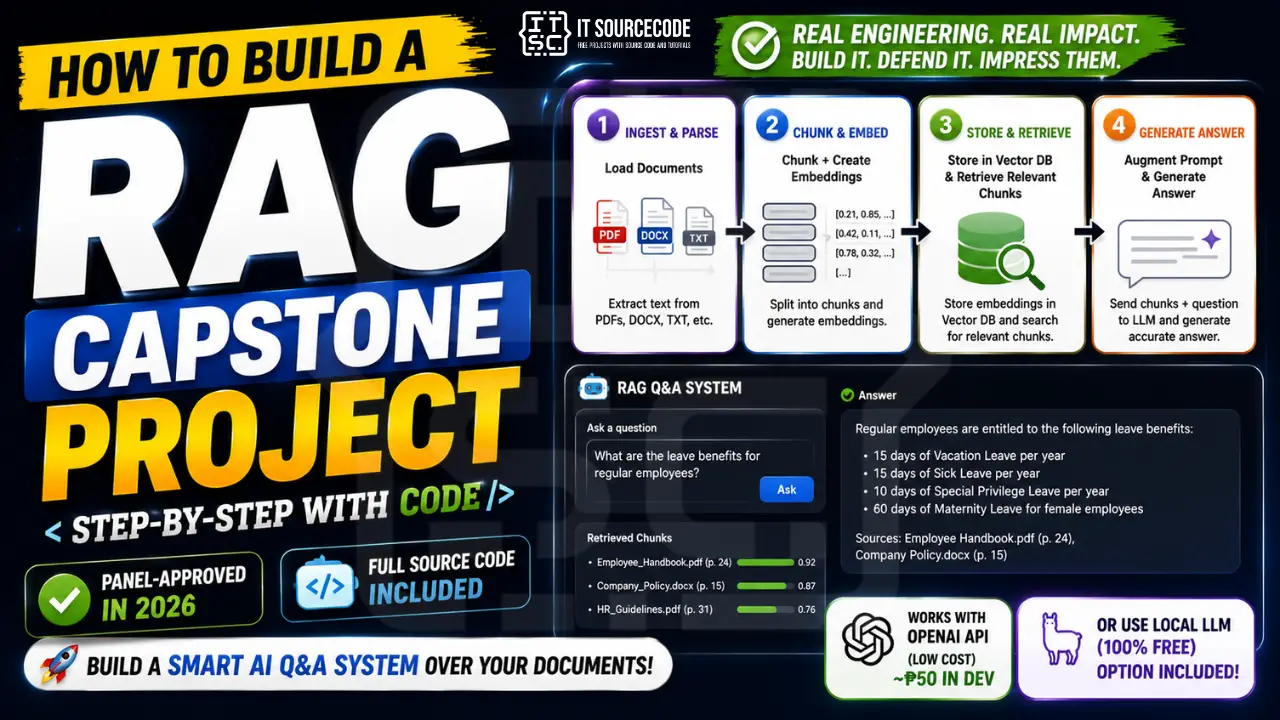
What you’ll build
A Flask web app where a user asks a question in natural language and the system answers using your indexed documents. Every answer includes source citations (which file, which page) so you can verify it’s not hallucinating.
Features
- Ingest PDFs from a folder
- Chunk + embed + store in ChromaDB (free, local vector database)
- Flask web app with question input and cited answer display
- Top-k retrieval with similarity scores
- Source citations on every answer (filename + page number)
- Fallback message when no relevant context is found
Tech stack
- Python 3.10 or higher
- ChromaDB (free, local, persistent vector database)
- pypdf (PDF text extraction)
- OpenAI Python SDK (embeddings + chat completion)
- Flask (web server)
- python-dotenv (API key management)
- About 250 lines of code total
The Ollama + Llama 3.1 free-local-alternative is covered near the end if your school doesn’t allow paid APIs.
How RAG actually works
Four steps. Every RAG system is built on this pattern. Memorize this, your panel will ask.
1. Ingest. You take your documents (PDFs, Word files, web pages, whatever) and split them into chunks of ~500 tokens each. Each chunk gets turned into a vector (an embedding) using an embedding model. The chunks and their embeddings are stored in a vector database with metadata showing where each chunk came from.
2. Retrieve. When a user asks a question, you turn the question into a vector using the same embedding model. You search the vector database for the top-k chunks whose vectors are closest to the question’s vector. That’s your “relevant context.”
3. Augment. You build a prompt that includes the retrieved chunks plus the original question. Something like: “Based on the following context, answer the question. Context: [retrieved chunks]. Question: [user input].”
4. Generate. You send the prompt to an LLM. The LLM generates the answer based only on what’s in the context, not on its training data. That’s the magic, and the defensibility.
Draw this diagram in your Chapter 3. Every RAG panel will want to see it.
Why RAG beats fine-tuning and vanilla ChatGPT
Three reasons RAG is better than the alternatives for a capstone:
Vanilla ChatGPT can’t answer questions about your data. Your school handbook isn’t in its training set. Even if you paste the whole handbook into the chat, you’ll hit context limits. RAG solves this by selectively retrieving only the relevant parts.
Fine-tuning is expensive, slow, and brittle. To fine-tune a model on your documents, you need thousands of labeled examples, hours of GPU time, and the result is locked to that specific data. Change a document and you re-fine-tune everything. RAG updates instantly when you re-ingest a changed file.
RAG is defensible. The panel can see exactly where each answer came from (the source citation). They can verify the answer against the actual document. That transparency is gold during defense.
Before you start
You need:
- Python 3.10 or higher
- An OpenAI API key (set a usage cap of 500 pesos to be safe, actual development cost is around 50)
- 5 to 10 PDF documents to index. We’ll talk about what makes a good document set in a moment.
- About 60 minutes for the first complete run
If your school doesn’t allow paid APIs, skip ahead to the “Free local alternative” section near the end: same code, swap two libraries.
The document choice: what makes RAG capstones defensible
This is where most students get lazy and pay for it in defense.
A defensible RAG capstone has a document set the panel can verify is real, relevant, and substantial. Some examples that work well:
- School handbook + faculty manual + policies: partner with your registrar
- Barangay services manual + ordinances: partner with your local hall
- Hospital clinical guidelines (with disclaimers, non-diagnostic only): partner with a clinic adviser
- Research paper collection in a specific field: 50 papers minimum
- Legal contracts: anonymized, with permission
- Filipino recipe collection: published cookbooks or a recipe blog you have rights to
- Tourism guide for one province or region: DOT brochures, municipal tourism sites
- HR policy + benefits manual: partner with a small business
The defense-winning sentence: “We ingested 47 PDFs containing 312 pages of barangay ordinances from Binalbagan, Negros Occidental, organized into 1,148 retrievable chunks.” Specific numbers. Specific source. Verifiable.
The defense-losing sentence: “We used some PDFs we downloaded from the internet.”
Project file structure
rag-capstone/
├── ingest.py
├── rag.py
├── app.py
├── .env
├── .env.example
├── requirements.txt
├── documents/
│   ├── handbook.pdf
│   └── policies.pdf
├── chroma_db/
├── templates/
│   └── index.html
└── static/
    └── style.css
The chroma_db/ folder will be created automatically when you run ingest.py. Do not commit it to Git. Add it to .gitignore.
Step 1: Install the dependencies
In your terminal, inside the project folder:
pip install openai chromadb pypdf flask python-dotenv tiktokenCreate requirements.txt:
openai==1.40.0
chromadb==0.4.24
pypdf==4.0.0
flask==3.0.0
python-dotenv==1.0.1
tiktoken==0.6.0
ChromaDB will take a minute to install. It is a heavier dependency than the others. Don’t worry about the warnings during install.
Step 2: Set up your OpenAI API key
Sign up at platform.openai.com, add a payment method, and create an API key. Then in your project folder, create two files:
.env (this stays on your computer, never commit it):
OPENAI_API_KEY=sk-proj-your-actual-key-here.env.example (this you can commit, shows the format without leaking the key):
OPENAI_API_KEY=your-key-hereAdd .env to your .gitignore. Forgetting this step is how students accidentally leak API keys to GitHub and wake up to a 5000-peso bill from someone using their key.
For cost expectations: ingesting 50 PDFs of 10 pages each costs about 5 pesos in embedding fees. Each question costs about 0.10 to 0.30 pesos. Total development: 30 to 80 pesos across the whole capstone.
Step 3: Build the ingest pipeline (ingest.py)
This script walks your documents/ folder, parses each PDF, chunks the text, embeds the chunks, and stores them in ChromaDB with metadata.
Create ingest.py:
import os
from pypdf import PdfReader
from openai import OpenAI
from dotenv import load_dotenv
import chromadb
import tiktoken

load_dotenv()
client = OpenAI()
chroma_client = chromadb.PersistentClient(path='chroma_db')
collection = chroma_client.get_or_create_collection('documents')

CHUNK_SIZE = 500
CHUNK_OVERLAP = 50
EMBED_MODEL = 'text-embedding-3-small'
encoder = tiktoken.get_encoding('cl100k_base')

def chunk_text(text, size=CHUNK_SIZE, overlap=CHUNK_OVERLAP):
    tokens = encoder.encode(text)
    chunks = []
    i = 0
    while i < len(tokens):
        chunk_tokens = tokens[i:i + size]
        chunks.append(encoder.decode(chunk_tokens))
        i += size - overlap
    return chunks

def embed(texts):
    response = client.embeddings.create(input=texts, model=EMBED_MODEL)
    return [item.embedding for item in response.data]

def ingest_pdf(path):
    reader = PdfReader(path)
    filename = os.path.basename(path)
    docs, ids, metas = [], [], []
    chunk_idx = 0
    for page_num, page in enumerate(reader.pages, start=1):
        text = page.extract_text() or ''
        if not text.strip():
            continue
        for chunk in chunk_text(text):
            docs.append(chunk)
            ids.append(f"{filename}_p{page_num}_c{chunk_idx}")
            metas.append({'source': filename, 'page': page_num})
            chunk_idx += 1

    if not docs:
        print(f"  No text extracted from {filename}")
        return

    print(f"  Embedding {len(docs)} chunks...")
    for i in range(0, len(docs), 100):
        batch = docs[i:i+100]
        embeddings = embed(batch)
        collection.add(
            documents=batch,
            embeddings=embeddings,
            ids=ids[i:i+100],
            metadatas=metas[i:i+100]
        )
    print(f"  Done: {filename}")

if __name__ == '__main__':
    docs_folder = 'documents'
    pdfs = [f for f in os.listdir(docs_folder) if f.lower().endswith('.pdf')]
    print(f"Found {len(pdfs)} PDFs")
    for pdf in pdfs:
        print(f"\nIngesting {pdf}")
        ingest_pdf(os.path.join(docs_folder, pdf))

    print(f"\nTotal chunks in collection: {collection.count()}")
Drop a few PDFs into the documents/ folder, then run:
python ingest.pyYou’ll see each PDF being parsed, chunked, and embedded. Total time depends on document size. Expect 30 seconds to 5 minutes for a typical handbook.
The script is idempotent only if you change the IDs. If you re-run with the same PDFs, you will get a “duplicate ID” error. Either delete chroma_db/ first or add an existence check.
Step 4: Build the RAG wrapper (rag.py)
This class connects to ChromaDB, embeds the user question, retrieves the top-k chunks, builds the prompt, and calls the LLM.
Create rag.py:
from openai import OpenAI
from dotenv import load_dotenv
import chromadb

load_dotenv()
client = OpenAI()
chroma_client = chromadb.PersistentClient(path='chroma_db')
collection = chroma_client.get_collection('documents')

EMBED_MODEL = 'text-embedding-3-small'
CHAT_MODEL = 'gpt-4o-mini'
TOP_K = 4

SYSTEM_PROMPT = (
    "You are a helpful assistant that answers questions based ONLY on the "
    "provided context. If the context does not contain the answer, reply with "
    "'I do not have that information in my documents.' Always cite the source "
    "filename and page number from the context. Do not make up information."
)

class RAGSystem:
    def __init__(self, top_k=TOP_K):
        self.top_k = top_k

    def retrieve(self, question):
        question_embedding = client.embeddings.create(
            input=[question], model=EMBED_MODEL
        ).data[0].embedding

        results = collection.query(
            query_embeddings=[question_embedding],
            n_results=self.top_k
        )
        return [
            {
                'text': doc,
                'source': meta['source'],
                'page': meta['page'],
                'distance': dist
            }
            for doc, meta, dist in zip(
                results['documents'][0],
                results['metadatas'][0],
                results['distances'][0]
            )
        ]

    def answer(self, question):
        chunks = self.retrieve(question)
        if not chunks:
            return {'answer': 'No documents indexed.', 'sources': []}

        context = '\n\n'.join(
            f"[{c['source']} page {c['page']}]\n{c['text']}"
            for c in chunks
        )
        user_prompt = f"Context:\n{context}\n\nQuestion: {question}"

        completion = client.chat.completions.create(
            model=CHAT_MODEL,
            messages=[
                {'role': 'system', 'content': SYSTEM_PROMPT},
                {'role': 'user', 'content': user_prompt}
            ],
            temperature=0.2
        )
        answer = completion.choices[0].message.content
        sources = [
            {'source': c['source'], 'page': c['page'], 'distance': round(c['distance'], 3)}
            for c in chunks
        ]
        return {'answer': answer, 'sources': sources}
The temperature=0.2 keeps the LLM close to the source material instead of getting creative. For a Q&A system, you want low temperature. For creative writing, you’d raise it.
The SYSTEM_PROMPT is the most important piece. It tells the model to only use the provided context and to admit when it doesn’t know. Without this, the model will hallucinate confidently.
Step 5: Build the Flask app (app.py)
Create app.py:
from flask import Flask, render_template, request, jsonify
from rag import RAGSystem

app = Flask(__name__)
rag = RAGSystem()

@app.route('/')
def index():
    return render_template('index.html')

@app.route('/ask', methods=['POST'])
def ask():
    question = request.json.get('question', '').strip()
    if not question:
        return jsonify({'error': 'Please enter a question.'}), 400

    result = rag.answer(question)
    return jsonify(result)

if __name__ == '__main__':
    app.run(debug=True, port=5000)
Two routes. The home page renders the form. The ask route takes a question and returns the answer with sources.
Step 6: Build the UI
Create templates/index.html:
<!DOCTYPE html>
<html lang="en">
<head>
  <meta charset="UTF-8" />
  <title>RAG Capstone: Document Q&A</title>
  <link rel="stylesheet" href="/static/style.css" />
</head>
<body>
  <div class="container">
    <header>
      <h1>Document Q&A</h1>
      <p>Ask questions about your indexed documents.</p>
    </header>

    <form id="form">
      <textarea id="question" rows="3" placeholder="Ask a question about your documents..."></textarea>
      <button type="submit">Ask</button>
    </form>

    <div id="status" class="status hidden">Thinking...</div>

    <div id="result" class="result hidden">
      <h2>Answer</h2>
      <p id="answer"></p>
      <h3>Sources</h3>
      <ul id="sources"></ul>
    </div>
  </div>

  <script>
    const form = document.getElementById('form');
    const status = document.getElementById('status');
    const result = document.getElementById('result');
    const answerEl = document.getElementById('answer');
    const sourcesEl = document.getElementById('sources');

    form.addEventListener('submit', async (e) => {
      e.preventDefault();
      const question = document.getElementById('question').value.trim();
      if (!question) return;

      result.classList.add('hidden');
      status.classList.remove('hidden');

      const res = await fetch('/ask', {
        method: 'POST',
        headers: { 'Content-Type': 'application/json' },
        body: JSON.stringify({ question })
      });
      const data = await res.json();

      status.classList.add('hidden');
      answerEl.textContent = data.answer || data.error;
      sourcesEl.innerHTML = '';
      (data.sources || []).forEach(s => {
        const li = document.createElement('li');
        li.textContent = s.source + ' page ' + s.page + ' (distance ' + s.distance + ')';
        sourcesEl.appendChild(li);
      });
      result.classList.remove('hidden');
    });
  </script>
</body>
</html>
Create static/style.css:
* { box-sizing: border-box; }
body {
  font-family: system-ui, -apple-system, sans-serif;
  margin: 0;
  background: #fafafa;
  color: #2c3e50;
}
.container {
  max-width: 720px;
  margin: 40px auto;
  background: white;
  border-radius: 12px;
  box-shadow: 0 4px 20px rgba(0,0,0,0.06);
  padding: 28px;
}
header h1 {
  margin: 0 0 4px;
  color: #1F3A5F;
}
header p { margin: 0 0 20px; color: #5a6a7a; }
textarea {
  width: 100%;
  padding: 12px;
  border: 1px solid #ddd;
  border-radius: 8px;
  font-size: 14px;
  font-family: inherit;
  resize: vertical;
}
button {
  background: #1F3A5F;
  color: white;
  border: none;
  padding: 12px 24px;
  border-radius: 8px;
  cursor: pointer;
  margin-top: 8px;
  font-size: 14px;
}
button:hover { background: #163049; }
.status {
  margin-top: 16px;
  padding: 12px;
  background: #fdfaf2;
  border-left: 4px solid #C9A961;
  border-radius: 4px;
  color: #5a6a7a;
}
.status.hidden { display: none; }
.result { margin-top: 24px; padding-top: 24px; border-top: 1px solid #eee; }
.result.hidden { display: none; }
.result h2 { color: #1F3A5F; margin: 0 0 8px; }
.result h3 { color: #5a6a7a; margin: 16px 0 8px; font-size: 14px; text-transform: uppercase; letter-spacing: 0.5px; }
.result p {
  background: #f0f3f7;
  padding: 14px;
  border-radius: 8px;
  line-height: 1.6;
  white-space: pre-wrap;
}
.result ul {
  list-style: none;
  padding: 0;
  margin: 0;
}
.result li {
  background: #fdfaf2;
  border-left: 3px solid #C9A961;
  padding: 8px 12px;
  margin-bottom: 6px;
  border-radius: 4px;
  font-size: 14px;
}
Step 7: Run the system
Make sure you’ve already run ingest.py and your chroma_db/ folder exists. Then start the server:
python app.pyOpen http://localhost:5000. Ask a question that should be answerable from your documents, like “What are the requirements for graduation?” if you indexed your school handbook. The answer comes back with source citations below.
Try a question your documents don’t cover, like “Who won the NBA finals in 2024?” Watch the model say “I do not have that information in my documents.” That refusal is the defense-saving behavior. The model is not hallucinating, it is admitting uncertainty.
How to defend a RAG capstone
Four questions you’ll definitely hear.
“Is this just ChatGPT?” No. Vanilla ChatGPT cannot answer questions about our indexed documents. They are not in its training data. The retrieval step is where our engineering lives. Show the architecture diagram. Point at the chunking, embedding, vector search. The LLM only sees what we retrieved.
“How do you know the answer is correct?” Two answers. First, every response includes source citations. The panel can verify against the original document. Second, we built an evaluation set of 30 question-answer pairs the answers should match, and our accuracy on that set is X%. Have the eval set in your appendix.
“What if the documents don’t have the answer?” The system prompt instructs the model to reply “I do not have that information in my documents” when context is irrelevant. Demo this live by asking an off-topic question.
“What about hallucinations?” Three mitigations: low temperature (0.2) keeps the model close to the source, the system prompt forbids inventing information, and source citations let users verify. We accept the model can still hallucinate occasionally, but the citation layer makes hallucinations detectable.
Answer those four calmly and you’ll pass.
How to customize for your domain
Same code, different documents in the documents/ folder.
- School handbook + policies bot: partner with your registrar for the documents
- Barangay services Q&A: partner with your local hall
- Hospital clinical guidelines lookup: non-diagnostic, with disclaimers
- Legal contract Q&A: anonymized contracts with permission
- Local cookbook + recipe assistant: Filipino dishes, regional cuisines
- Tourism guide for one province: DOT materials + municipal sites
- Code documentation search: index your own codebase as text
- HR policy chatbot: employee handbooks, benefits manuals
The code doesn’t care about the domain. It cares about the document set being substantial, relevant, and verifiable.
Common errors and how to fix them
Error code: 401: invalid OpenAI API key. Check .env for typos and confirm the key is active at platform.openai.com.
Rate limit exceeded during ingest: you’re hitting OpenAI’s per-minute embedding limit. Add a 1-second sleep between batches in ingest.py.
RuntimeError: collection 'documents' not found: you ran app.py before ingest.py. Run ingestion first.
pypdf.errors.PdfReadError on a specific PDF: that PDF is corrupted or scanned (no text layer). Either skip it or run it through OCR first using Tesseract.
The bot says “I do not have that information” for everything: chunks too small or embedding model mismatch. Confirm CHUNK_SIZE is 500 and you’re using the same EMBED_MODEL in both ingest.py and rag.py.
Answers reference content not in the documents (hallucination): your SYSTEM_PROMPT isn’t strict enough, or your retrieved chunks have very high distance scores. Add a distance threshold: only use chunks with distance below 0.5.
ChromaDB throws on re-ingest: delete the chroma_db/ folder before re-running ingest.py, OR add an “upsert” check on document IDs.
How to extend this project
Chapter 5 (Recommendations) extensions panels love:
- Replace OpenAI with Ollama + Llama 3.1: free, local, no API key. See the next section.
- Add reranking: use a cross-encoder model (like
cross-encoder/ms-marco-MiniLM-L-6-v2) to rerank the top-20 retrieved chunks down to top-4. Usually improves accuracy by 5-15%. - Multi-modal RAG: index images alongside text using CLIP embeddings.
- Hybrid search: combine BM25 keyword search with embedding search for better retrieval on rare terms.
- Conversational RAG: track chat history so follow-up questions like “what about the second one?” make sense.
- RAGAS evaluation harness: formal RAG evaluation metrics for Chapter 4.
- Deploy to Render or Railway: public URL, demo from anywhere during defense.
Free local alternative: Ollama + sentence-transformers
If your school doesn’t allow paid APIs, swap two libraries and the rest of the code stays the same.
Install Ollama from ollama.ai, then pull a model:
ollama pull llama3.1:8bInstall Python dependencies:
pip install sentence-transformers ollamaIn ingest.py and rag.py, replace the OpenAI embedding calls with sentence-transformers:
from sentence_transformers import SentenceTransformer
embedder = SentenceTransformer('all-MiniLM-L6-v2')

def embed(texts):
    return embedder.encode(texts).tolist()
Replace the OpenAI chat completion with Ollama:
import ollama

response = ollama.chat(
    model='llama3.1:8b',
    messages=[
        {'role': 'system', 'content': SYSTEM_PROMPT},
        {'role': 'user', 'content': user_prompt}
    ]
)
answer = response['message']['content']
Quality drops a bit (Llama 3.1 8B is slightly weaker than GPT-4o-mini for complex questions), but it’s free, fully local, and survives the “you just paid OpenAI to do your capstone” criticism. For most BSIT capstones, this is the better choice.
Free download: source code
UML diagrams you’ll need for documentation
RAG projects have specific diagram needs:
- Use Case Diagram. actors are user (asks questions) and admin (uploads documents); main use cases include question answering and document ingestion.
- Sequence Diagram. request flow: user submits question → embed → query vector DB → top-k retrieve → build prompt → LLM call → return answer with citations.
- Activity Diagram. two pipelines: ingestion (parse → chunk → embed → store) and query (embed → retrieve → augment → generate).
- Data Flow Diagram. document → text → chunks → embeddings → vector DB → context → answer.
- Class Diagram. RAGSystem class, embedding service, vector store wrapper, Flask routes.
We have detailed guides on each. Use them as templates and adapt to RAG specifically. Your panel will love seeing both the ingestion and query pipelines as separate activity diagrams.
Official documentation
Frequently Asked Questions
What is a RAG capstone project?
Do I need ChatGPT API for a RAG project?
How is RAG different from fine-tuning?
How many documents do I need for a RAG capstone?
Can I build RAG without paying for OpenAI?
We are hoping this guide helps you build a defensible RAG capstone over your own documents with source citations and a real-domain dataset. If you hit a ChromaDB, embedding, or chunking bug while building yours, drop the error in the comments below and we will help you debug it. Thank you for reading itsourcecoders.
Index your docs tonight. Defend the system in a month.
RAG is the cleanest engineering story you can tell in a 2026 capstone defense. Four pipeline steps. Real documents. Source citations. A model that admits when it doesn’t know.
If you’ve followed this guide, you’re already past the point where most LLM capstones fall apart.
For more defensible LLM capstone patterns, see our 100 AI Capstone Project Ideas for IT Students (2026). If you haven’t picked your topic yet, browse 150 Best Capstone Project Ideas for IT Students 2026. For other Python AI source code to study, see our Python projects library. And for the UML diagrams your documentation will need, our UML guides cover every diagram type panels ask about.
Now stop scrolling. Drop your PDFs in the folder. Run ingest tonight.
More capstone project ideas to browse
Looking for more ideas to pitch your panel? Browse our capstone idea collections:

Adrian Mercurio
Full-Stack Developer at PIES IT Solution
Specializes in building complete capstone projects with full documentation. Strong background in PHP/MySQL development and database design. Has personally built and tested over 30 capstone-ready projects with ER diagrams, DFDs, and chapter-by-chapter thesis documentation.
Expertise: PHP · Laravel · Database Design · Capstone Projects · C# · C · C++ · Python · AI Projects · View all posts by Adrian Mercurio →