
Hello, guys I just want to share with you this system called Student Transcript processing system created 5 years ago using simple PHP and MySQL.
This system can be modified easily and I hope this will help you improve your skills in programming using PHP language.
Here the following Features:
Student Side::
- Viewing of personal Profile
- Track Enrollment Records
- View Enrolled Subject with Grades by Course
You can login to the student side using ID number of student.
Example:
ID number: 20004277
Password: 1
Admin Side::
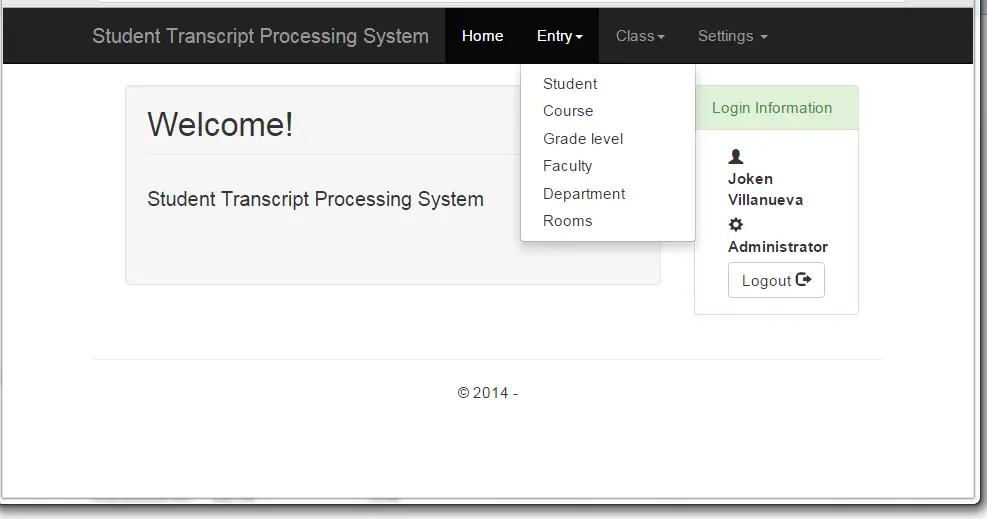
- Data Entry for Student
- Data Entry for Course
- Data Entry for Grade Level
- Data Entry for Faculty
- Data Entry for Department
- Data Entry for Rooms
- Import and Export Student Information
- Import Course
- Import Grade Level
- Listing of Loads for Faculty
- Add New Subject loads for Faculty
- View Class Listing by Subject
- Faculty can Add and Auto compute Grades for individual Students
- Friendly Navigation using Responsive Pagination
- View Student Enrollment Records
- View Enrolled Subjects
- Generate Transcripts
- Assign New Subject to Individual Student
- Can Remove Subjects to student
- Student Enrollment
- Print List of subjects with schedule
- Scheduling of classes
- User Management System
Example Screenshots:
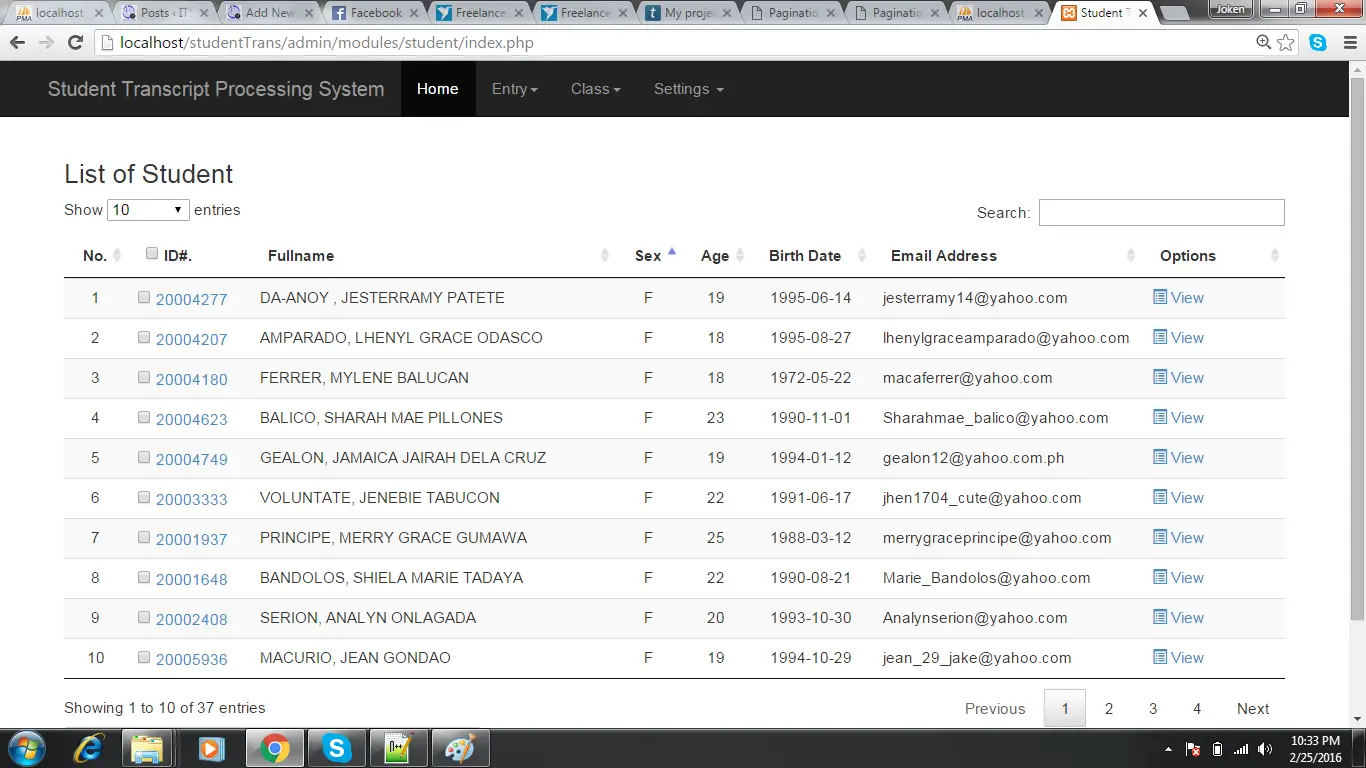
Student Listing
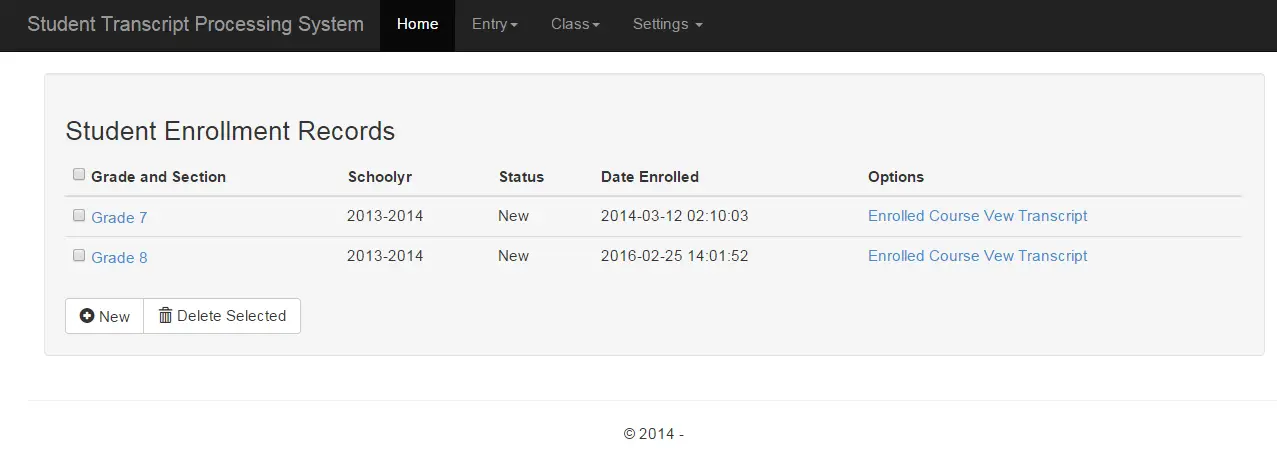
Student Enrollment Records

Subjects Enrolled by Students
You login to the admin side using the given account:
- Email:joken@yahoo.com
- Password:1234
Download the Transcript processing system Source Code here.studentTrans
To run the project follow these steps:
- Create a MySQL database named “studenttransdb“
- then Download the source code and extract it
- Look for the “studenttransdb.sql” file
- and import this file to “studenttransdb” database.
If you have some question or any suggestion please feel to contact me here.
Technology stack and requirements
To run this PHP project, you need these tools on your development machine:
- XAMPP or WAMP server. Bundles Apache, MySQL, and PHP so you can run PHP on Windows without individual installs. Free from apachefriends.org.
- PHP 8.0 or higher. Included with XAMPP. Older versions (5.x, 7.x) may work but modern PHP features improve security and performance.
- MySQL or MariaDB. Comes with XAMPP. phpMyAdmin manages the database through a browser UI.
- VS Code or PhpStorm. Free code editor with PHP syntax highlighting, IntelliSense, and debugging support.
- Web browser. Chrome, Firefox, or Edge for testing the running app.
Installing the source code
- Download the archive. Get the ZIP file from the download link on this page and extract it.
- Move to htdocs. Place the extracted folder inside C:\xampp\htdocs\ so Apache can serve it.
- Import the database. Open http://localhost/phpmyadmin, click Import, and select the .sql file included in the archive.
- Update database credentials. Open the config.php or connection.php file and set the correct database name, username, and password (default XAMPP: root / empty password).
- Run the project. Start Apache + MySQL in XAMPP, then visit http://localhost/your-project-folder/ in a browser.
Using this project for your BSIT capstone
This PHP project maps cleanly to standard BSIT capstone documentation. Suggested chapter alignment:
- Chapter 1 (Introduction). Discuss the problem the system solves in real-world context. Cite Philippine business or academic use cases where a manual process could be replaced.
- Chapter 2 (Review of Related Literature). Compare this system’s features against 5-10 similar published projects. Cite journals like IJERT or IEEE Access for academic-standard sources.
- Chapter 3 (Methodology). Include Use Case Diagram, Data Flow Diagram, Entity Relationship Diagram, and Activity Diagram covering all major workflows.
- Chapter 4 (Results and Discussion). Screenshot each module of the running system with a caption explaining what data it processes and which user role interacts with it.
- Chapter 5 (Conclusion and Recommendations). Identify features that could be added in a Version 2, such as mobile app, REST API export, or AI-powered analytics.
Modules typical of Student Transcript Processing System
- Student information. Personal info, guardian details, enrollment status, program of study.
- Enrollment / registration. Term-by-term subject selection with prerequisite checking.
- Grading system. Teacher input for quiz, exam, and project scores with weighted average.
- Report card generation. Printable grade slip and transcript of records.
- Library / borrowing (optional). Track book borrowing, return date, fine computation.
- Announcements. Post school-wide bulletins visible from the login screen.
Common enhancements for capstone review
- Online portal. Add PHP or ReactJS portal so parents and students see grades from home.
- SMS grade notification. Auto-send new-grade alerts to parent’s mobile via a service like Semaphore.
- Digital ID card. Print student ID with photo, QR code, and academic year.
- Alumni tracking. Extend the database to include post-graduation contact info.
Official documentation
Frequently Asked Questions
How does this PHP student information or enrollment system work?
Records student demographics, enrollment per term, class assignments, grades, attendance, fees. Smaller-scope than full school management, student-centric. Foundation BSIT capstone.
What PHP and MySQL versions does this project require?
Most projects in this batch run on PHP 7.4 to PHP 8.2 with MySQL 5.7+ or MariaDB 10+. A few older projects need PHP 5.6 (deprecated, use XAMPP 7.x). To run: install XAMPP / WAMP / Laragon, extract project to htdocs, import the included .sql file via phpMyAdmin, edit the connection file (usually config.php or db_connect.php) with your DB credentials, browse to the project URL in your browser.
How do I set up the database for this PHP project?
Open phpMyAdmin (http://localhost/phpmyadmin/ on XAMPP), create a new empty database with the name specified in the project’s config.php. Click the Import tab, choose the included .sql file, click Go. Then edit config.php (or includes/connection.php) with: ‘localhost’, your MySQL username (usually ‘root’), your MySQL password (usually blank for XAMPP), and the database name.
Can I use this PHP project for a BSIT capstone or thesis?
Yes, but extend it. A bare CRUD app is too narrow for full capstone scope. Add: user roles via session checks, reports/dashboards (Chart.js + AJAX), PDF exports (TCPDF library), email notifications (PHPMailer), real domain extension (analytics, audit log, multi-branch support). Pair with Chapter 1-5 documentation matching your panel’s rubric.
Why am I getting ‘connection error’ or ‘undefined function mysqli_connect’?
Three common PHP issues: (1) Connection error: Apache + MySQL services not running in XAMPP control panel, OR database name in config.php does not match what you created in phpMyAdmin. (2) ‘undefined function mysqli_connect’: MySQL extension not enabled, in php.ini uncomment extension=mysqli (then restart Apache). (3) ‘No such file or directory’: MySQL socket path wrong, use 127.0.0.1 instead of localhost in the connection string.
Where can I find more PHP projects with source code?
Browse the PHP Projects hub for the full library (300+ vanilla PHP systems). For modern PHP MVC alternatives see Laravel Projects (74 systems) or CodeIgniter Projects (32 systems). For BSIT-focused capstone idea lists see 150 Best Capstone Project Ideas.
Related PHP Projects
- Student Record System Using MySQL In PHP
- Student Management System In PHP With Source Code
- Online Student Enrollment System
- Student Management System In Laravel With Source Code
- Student Management System Project In CodeIgniter With Source Code
- Student Information System Software Free Download

Joken E. Villanueva
Founder & Lead Developer at PIES IT Solution
Founder of PIES Information Technology Solutions, a software company building production-grade applications for institutions across the Philippines. Over 8 years of hands-on full-stack development experience, currently leading the development of ClinicAI, an AI-powered clinic management platform.
Expertise: PHP · MySQL · JavaScript · AI Integration · SaaS Architecture · VB.NET · Database Design · Capstone Documentation · Java
· View all posts by Joken E. Villanueva →
http://localhost/studentTrans/admin/
login : joken@yahoo.com
Password: 1234
sukses
Nice project..but there is a little addition that needs to be on the system…Can all the grade level of each student be on the same page?..I.E 100 level to 400 level on the final transcript page..Thanks..
Parse error: parse error in C:\wamp\www\studentTrans\login.php on line 68
how thi error can be avoided
pls it also given me :: parse error in C:\wamp\studentTrans\login.php on line 68
Ur system worked fine but the login IDs and password are not correct, especially that of admin. pls sent it to me via vaat.francis.bem@gmail.com
My did not work. What went wrong with my? Please help
mysql_* functions have been removed in PHP7!
hello, i did everything but it just displays a blank page pls do get back to me on perkins20887@gmail.com
very good
Please can someone help?
hi ,i think you have cooked this project and is plagiarism
I need help i cant fix the database php in line 26 pleasehelpme
not open plzz reply
this error…………………………………….
Fatal error: Uncaught Error: Call to undefined function mysql_connect() in F:\xampp\htdocs\studentTrans\includes\database.php:26 Stack trace: #0 F:\xampp\htdocs\studentTrans\includes\database.php(20): Database->open_connection() #1 F:\xampp\htdocs\studentTrans\includes\database.php(135): Database->__construct() #2 F:\xampp\htdocs\studentTrans\includes\member.php(8): require_once(‘F:\\xampp\\htdocs…’) #3 F:\xampp\htdocs\studentTrans\includes\initialize.php(26): require_once(‘F:\\xampp\\htdocs…’) #4 F:\xampp\htdocs\studentTrans\admin\modules\student\index.php(2): require_once(‘F:\\xampp\\htdocs…’) #5 {main} thrown in F:\xampp\htdocs\studentTrans\includes\database.php on line 26
insted of using mysql_connect() use mysqli_connect()
when i browse Enrolled courses it displys course.php and subject.php not found can you help me
and i want to say good job Joken Villanueva
Password and username not working
Password and username not working help me on ckasumani@gmail.com