
Hotel Management System In PHP With Source Code
The Hotel Management System In PHP is a collection of hotel software applications that keep things running smoothly.
Accounting software, customer relationship management (CRM) software, and a bewildering assortment of industry-specific software are all available.
Hotel Management System Project In PHP: About the project
Justine’s Guest House is the subject of a PHP-based Hotel Management System Project.
This is the complete source code for a PHP/MySQL-based Online Hotel Management System.
It allows guests to see rooms with comparable rates regardless of whether or not a room is available.
The system can also be used to store and retrieve information about guests and transactions.
Project Output
Here’s the Hotel Management System Output

Hotel Management System Project Documentation : Features
- This system also integrated into the booking of hotel rooms.
- The admin side of this system has the capability to confirm the booking,
- Room Reservation Management,
- and cancellation of transactions.
- Admin module can Add, Update and delete Room,
- And Amenities, Room Types, User, View comments,
- and issue different hotel management system Reports.
In this Hotel Management System Project also includes a downloadable Source Code for free, just find the downloadable source code below and click to start downloading.
To start executing this Hotel Management System In PHP, makes sure that you have sublime or any platform of PHP and MySQL installed in your computer.
Hotel Management System : Project Details and Technology
| Project Name: | Hotel Management System In PHP |
| Language/s Used: | PHP |
| PHP version (Recommended): | 5.6.3, 7.4.12 |
| Database: | MySQL |
| Type: | Web Application |
| Developer: | IT SOURCE CODE |
| Updates: | 0 |
Hotel Management System In PHP With Source Code : Steps on how to run the project
Time needed: 5 minutes
These are the steps on how to run Hotel Management System In PHP With Source Code
- Step 1: Download Source Code
First, find the downloadable source code below and click to start downloading the source code file.

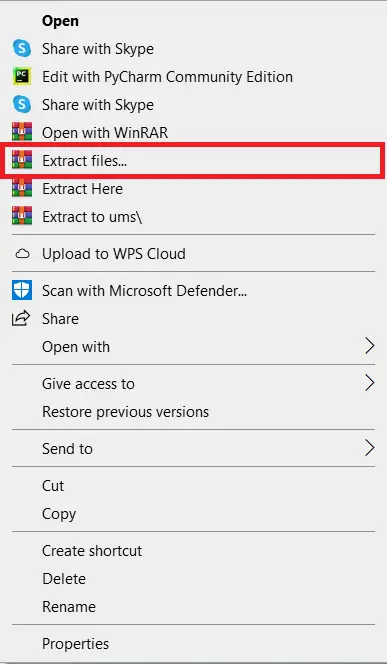
- Step 2: Extract File
Next, after finished to download the file, go to file location and right click the file and click extract.

- Step 3: Copy Project Folder
Next, copy the project folder and paste it to C:\xampp\htdocs.

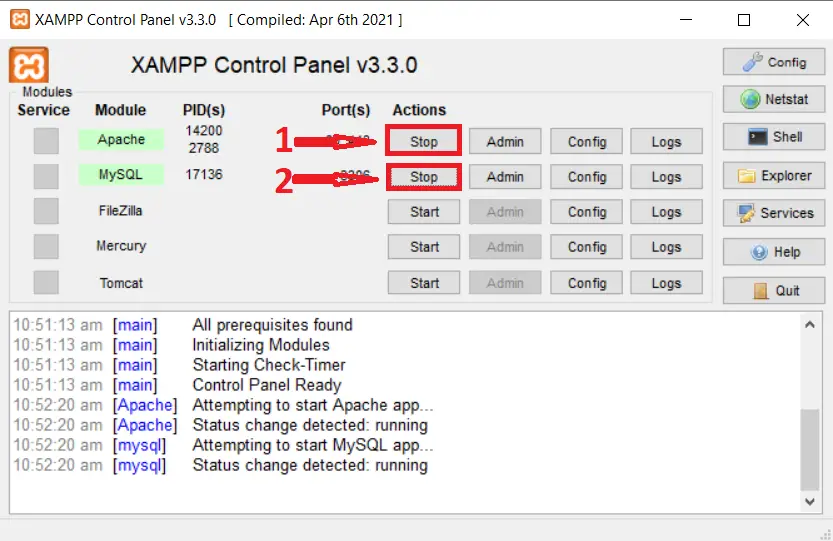
- Step 4: Open Xampp
Next, open xampp and start the apache and mysql.

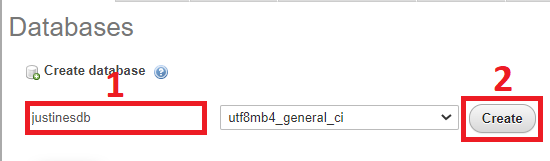
- Step 5: Create Database
Next, click any browser and type to the URL localhost/phpmyadmin and create database.

- Step 6: Import Database
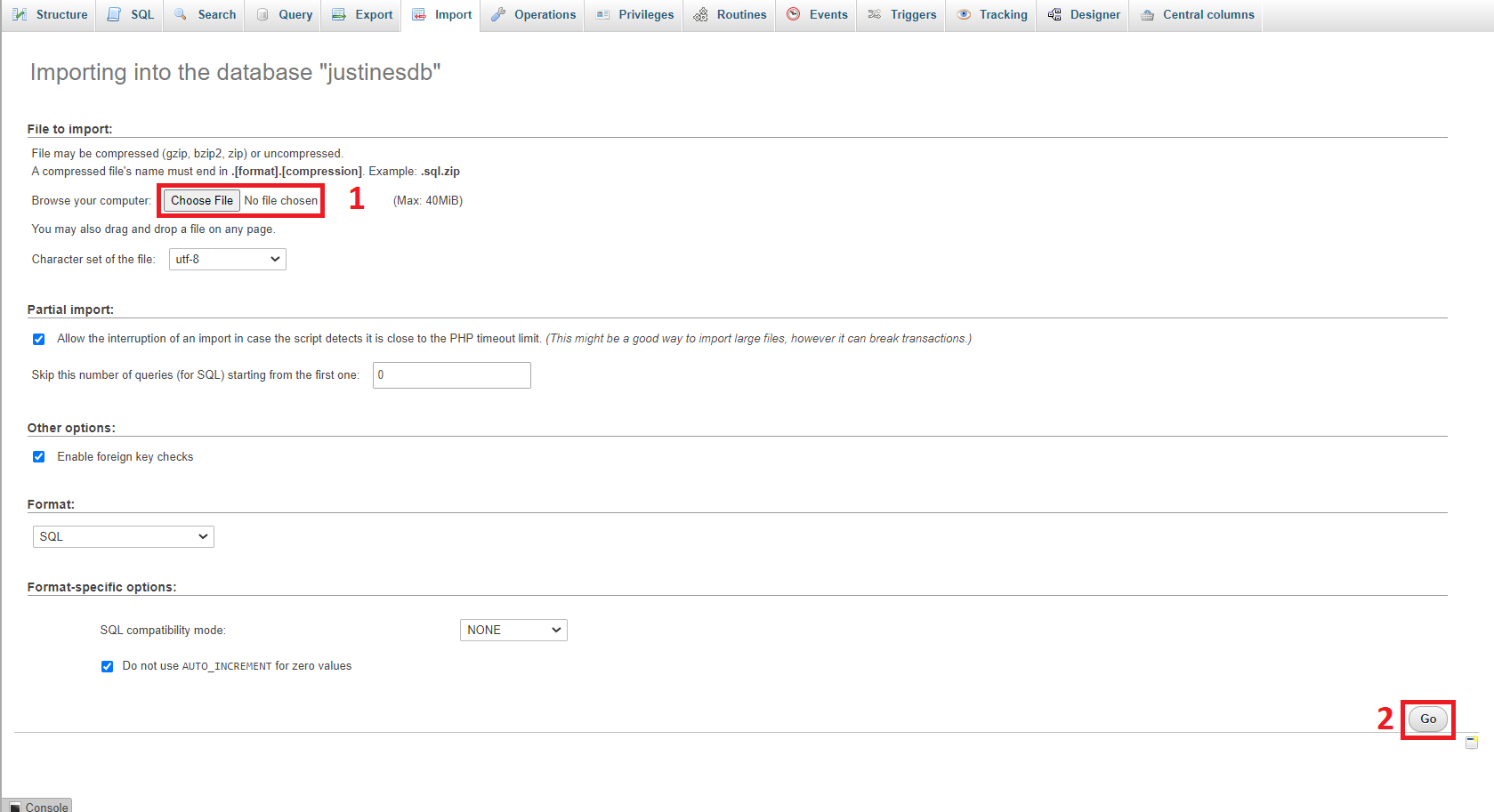
Next, click the created database and click import to the right tab and click choose file and import the sql file inside the download folder.

- Step 7: Execute Project
Final, type to the URL localhost/justines


Download Source Code bel
Anyway, if you want to level up your programming knowledge, especially PHP, try this new article I’ve made for you Best PHP Projects With Source Code Free Download 2021.
Summary
This PHP project for a simple hotel reservation system is intended for educational purposes primarily, but you can customize it to meet the demands of your clients.
Please contact us if you have any questions or suggestions concerning these PHP Projects, or simply leave a comment below.
Technology stack and requirements
To run this PHP project, you need these tools on your development machine:
- XAMPP or WAMP server. Bundles Apache, MySQL, and PHP so you can run PHP on Windows without individual installs. Free from apachefriends.org.
- PHP 8.0 or higher. Included with XAMPP. Older versions (5.x, 7.x) may work but modern PHP features improve security and performance.
- MySQL or MariaDB. Comes with XAMPP. phpMyAdmin manages the database through a browser UI.
- VS Code or PhpStorm. Free code editor with PHP syntax highlighting, IntelliSense, and debugging support.
- Web browser. Chrome, Firefox, or Edge for testing the running app.
Installing the source code
- Download the archive. Get the ZIP file from the download link on this page and extract it.
- Move to htdocs. Place the extracted folder inside C:\xampp\htdocs\ so Apache can serve it.
- Import the database. Open http://localhost/phpmyadmin, click Import, and select the .sql file included in the archive.
- Update database credentials. Open the config.php or connection.php file and set the correct database name, username, and password (default XAMPP: root / empty password).
- Run the project. Start Apache + MySQL in XAMPP, then visit http://localhost/your-project-folder/ in a browser.
Using this project for your BSIT capstone
This PHP project maps cleanly to standard BSIT capstone documentation. Suggested chapter alignment:
- Chapter 1 (Introduction). Discuss the problem the system solves in real-world context. Cite Philippine business or academic use cases where a manual process could be replaced.
- Chapter 2 (Review of Related Literature). Compare this system’s features against 5-10 similar published projects. Cite journals like IJERT or IEEE Access for academic-standard sources.
- Chapter 3 (Methodology). Include Use Case Diagram, Data Flow Diagram, Entity Relationship Diagram, and Activity Diagram covering all major workflows.
- Chapter 4 (Results and Discussion). Screenshot each module of the running system with a caption explaining what data it processes and which user role interacts with it.
- Chapter 5 (Conclusion and Recommendations). Identify features that could be added in a Version 2, such as mobile app, REST API export, or AI-powered analytics.
Modules typical of Hotel Management System
- Room / property master. CRUD for room types, amenities, pricing per season.
- Booking calendar. Real-time availability across dates with drag-to-select interface.
- Guest information. Full guest profile, contact, ID scan, and stay history.
- Check-in / check-out. Automated flow that generates the guest bill and receipt.
- Housekeeping status. Room status (dirty, cleaning, clean) tracked per shift.
- Reports. Occupancy rate, revenue per room, cancellations, and repeat-guest data.
Common enhancements for capstone review
- Payment gateway integration. Connect with GCash, PayMaya, or Stripe for online booking deposits.
- Email confirmation. Send automatic booking confirmations and reminders 24 hours before check-in.
- Multi-property support. Add a Property table so a hotel chain can share one system.
- Reviews and ratings. Post-checkout review flow embedded in the confirmation email.
Official documentation
Frequently Asked Questions
How does this PHP hotel reservation system work?
Guests browse rooms by date range, the PHP script checks Booking table for conflicts via MySQL queries, confirmed reservations save with status (pending/confirmed/cancelled). Admin sees occupancy + manages rates. Built with vanilla PHP + MySQL + Bootstrap.
What PHP and MySQL versions does this project require?
Most projects in this batch run on PHP 7.4 to PHP 8.2 with MySQL 5.7+ or MariaDB 10+. A few older projects need PHP 5.6 (deprecated, use XAMPP 7.x). To run: install XAMPP / WAMP / Laragon, extract project to htdocs, import the included .sql file via phpMyAdmin, edit the connection file (usually config.php or db_connect.php) with your DB credentials, browse to the project URL in your browser.
How do I set up the database for this PHP project?
Open phpMyAdmin (http://localhost/phpmyadmin/ on XAMPP), create a new empty database with the name specified in the project’s config.php. Click the Import tab, choose the included .sql file, click Go. Then edit config.php (or includes/connection.php) with: ‘localhost’, your MySQL username (usually ‘root’), your MySQL password (usually blank for XAMPP), and the database name.
Can I use this PHP project for a BSIT capstone or thesis?
Yes, but extend it. A bare CRUD app is too narrow for full capstone scope. Add: user roles via session checks, reports/dashboards (Chart.js + AJAX), PDF exports (TCPDF library), email notifications (PHPMailer), real domain extension (analytics, audit log, multi-branch support). Pair with Chapter 1-5 documentation matching your panel’s rubric.
Why am I getting ‘connection error’ or ‘undefined function mysqli_connect’?
Three common PHP issues: (1) Connection error: Apache + MySQL services not running in XAMPP control panel, OR database name in config.php does not match what you created in phpMyAdmin. (2) ‘undefined function mysqli_connect’: MySQL extension not enabled, in php.ini uncomment extension=mysqli (then restart Apache). (3) ‘No such file or directory’: MySQL socket path wrong, use 127.0.0.1 instead of localhost in the connection string.
Where can I find more PHP projects with source code?
Browse the PHP Projects hub for the full library (300+ vanilla PHP systems). For modern PHP MVC alternatives see Laravel Projects (74 systems) or CodeIgniter Projects (32 systems). For BSIT-focused capstone idea lists see 150 Best Capstone Project Ideas.
Related PHP Projects
- Hotel Management System In CodeIgniter With Source Code
- Hotel Management System Project PHP
- Hotel Management System Project In Laravel With Source Code
- Online Hotel Management System Source Code
- Attendance Management System In PHP With Source Code
- Hospital Management System Project In PHP With Source Code
Inquiries
If you have any questions or suggestions about Hotel Management System In PHP With Source Code, please feel free to leave a comment below.

Angel Jude Suarez
Full-Stack Developer at PIES IT Solution
Focuses on Python development, machine learning, and AI integration. Has built production AI systems including OpenAI Whisper integration for medical transcription and GPT-4o-powered diagnosis assistance. Strong background in pandas, scikit-learn, and TensorFlow.
Expertise: Python · PHP · Java · VB.NET · ASP.NET · Machine Learning · AI Integration · OpenCV · Django · CodeIgniter
· View all posts by Angel Jude Suarez →
Fatal error: Uncaught Error: Call to undefined function mysql_connect() in /Applications/XAMPP/xamppfiles/htdocs/justines/includes/database.php:26 Stack trace: #0 /Applications/XAMPP/xamppfiles/htdocs/justines/includes/database.php(20): Database->open_connection() #1 /Applications/XAMPP/xamppfiles/htdocs/justines/includes/database.php(135): Database->__construct() #2 /Applications/XAMPP/xamppfiles/htdocs/justines/includes/member.php(8): require_once(‘/Applications/X…’) #3 /Applications/XAMPP/xamppfiles/htdocs/justines/includes/initialize.php(24): require_once(‘/Applications/X…’) #4 /Applications/XAMPP/xamppfiles/htdocs/justines/index.php(2): require_once(‘/Applications/X…’) #5 {main} thrown in /Applications/XAMPP/xamppfiles/htdocs/justines/includes/database.php on line 26
You already import the database?
Fatal error: Uncaught Error: Call to undefined function mysql_connect() in /Applications/XAMPP/xamppfiles/htdocs/justines/includes/database.php:26 Stack trace: #0 /Applications/XAMPP/xamppfiles/htdocs/justines/includes/database.php(20): Database->open_connection() #1 /Applications/XAMPP/xamppfiles/htdocs/justines/includes/database.php(135): Database->__construct() #2 /Applications/XAMPP/xamppfiles/htdocs/justines/includes/member.php(8): require_once(‘/Applications/X…’) #3 /Applications/XAMPP/xamppfiles/htdocs/justines/includes/initialize.php(24): require_once(‘/Applications/X…’) #4 /Applications/XAMPP/xamppfiles/htdocs/justines/index.php(2): require_once(‘/Applications/X…’) #5 {main} thrown in /Applications/XAMPP/xamppfiles/htdocs/justines/includes/database.php on line 26
You already import the sql database in phpmyadmin?
Warning: require_once(C:/xampp/htdocs\justines\includes\includes/config.php): Failed to open stream: No such file or directory in C:\xampp\htdocs\hotel 6\justines\includes\initialize.php on line 19
Fatal error: Uncaught Error: Failed opening required ‘C:/xampp/htdocs\justines\includes\includes/config.php’ (include_path=’C:\xampp\php\PEAR’) in C:\xampp\htdocs\hotel 6\justines\includes\initialize.php:19 Stack trace: #0 C:\xampp\htdocs\hotel 6\justines\index.php(2): require_once() #1 {main} thrown in C:\xampp\htdocs\hotel 6\justines\includes\initialize.php on line 19