
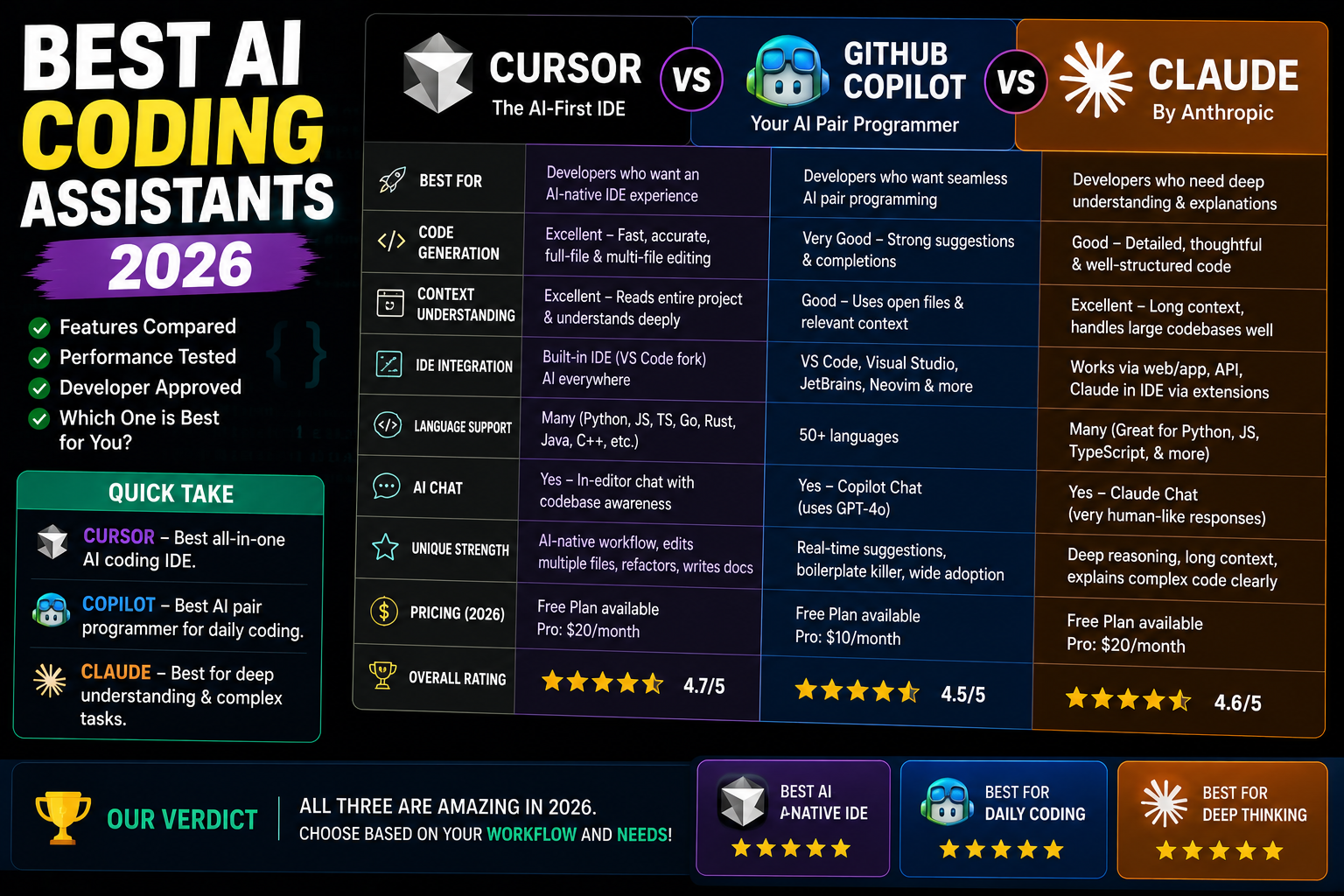
AI coding assistants got a lot better in 2026. Four tools dominate: Cursor, GitHub Copilot, Claude Code, and Windsurf. Each has a distinct strength. Here is a real-world comparison based on pricing, model quality, workflow fit, and how Filipino developers actually use them.
Head-to-head comparison (2026)
| Feature | Cursor | GitHub Copilot | Claude Code | Windsurf |
|---|---|---|---|---|
| Base editor | VS Code fork | VS Code / JetBrains | Terminal + IDE | VS Code fork |
| Default model | Claude Opus 4.8, GPT-5 | GPT-5, Claude Sonnet 5 | Claude Opus 4.8 | GPT-5, Claude Opus 4.8 |
| Monthly price (USD) | $20 Pro, $40 Ultra | $10 Individual, $39 Enterprise | $20 Pro, $100+ MAX | $15 Pro, $30 Ultra |
| Agentic workflow | Yes (Compose, agents) | Yes (Workspace) | Yes (agent-first) | Yes (Cascade) |
| Best at | Full-repo edits | Inline completions | Terminal + repo-wide | Cascade multi-file |
Which one to pick (by use case)
- You want the best inline autocomplete for one file at a time: GitHub Copilot. Cheapest, fastest, integrates with JetBrains.
- You want to refactor 20 files at once with clear intent: Cursor Compose. Best UI for repo-wide edits with review flow.
- You live in the terminal and want the AI to run commands, edit files, run tests: Claude Code. Agentic by default.
- You want the fastest multi-file “Cascade” feel with real-time preview: Windsurf.
- You are on a strict ₱1,000/month budget: Copilot Individual at $10 is your only option.
- Team of 5+ devs: Cursor Business or Copilot Enterprise for shared billing + audit logs.
PH pricing reality (2026)
All four tools bill in USD. Convert at ~₱58 per USD (mid-2026):
- Copilot Individual: ₱580/month
- Cursor Pro / Windsurf Pro / Claude Code Pro: ~₱1,160/month
- Cursor Ultra / Windsurf Ultra: ~₱1,740-₱2,320/month
- Claude Code MAX (heavy agent use): ~₱5,800+/month
Every tool has a 14-day trial. Test 2-3 side by side before committing.
Common mistakes when picking
- Picking based on brand recognition. Copilot is not always the best tool for your workflow. Test the others.
- Ignoring rate limits. Cursor and Windsurf have monthly request caps on cheaper tiers. Heavy users hit these.
- Assuming all four use the same model. Backend models differ. Anthropic-preferring devs get better results on Cursor Ultra with Opus routing.
- Buying annual up front. AI tools iterate fast. Monthly billing gives you flexibility to swap.
Official product pages
Which AI coding assistant fits your workflow
Cursor, GitHub Copilot, and Claude Code are the three biggest AI coding assistants in 2026, and each one has a distinct strength. Pick the tool that matches how you actually work rather than the one with the loudest marketing.
Choose Cursor if you want an AI-first editor
Cursor is a fork of VS Code that builds AI directly into the editor. Its key advantage is Composer, which lets you make multi-file changes across your project with a single prompt. If you are doing feature work that spans several files, Cursor removes the manual copy-paste dance. Also strong at codebase-wide search and context. Best for solo developers and small teams shipping features fast.
Choose GitHub Copilot if you live in VS Code already
Copilot integrates natively with VS Code, JetBrains IDEs, and even Vim/Neovim. Its inline suggestions are fast and predictable. In late 2025 GitHub added Copilot Chat with agent mode, closing the feature gap with Cursor. Best if your team is already deep in the GitHub ecosystem (Actions, Codespaces, Pull Requests) since the integration is tighter than any third-party tool.
Choose Claude Code if you want the strongest reasoning
Claude Code is Anthropic’s terminal-based coding agent. It has the strongest performance on complex refactors, architectural reasoning, and code review tasks. Best for senior developers who trust the AI to make judgment calls, and for tasks where correctness matters more than speed. Not the best fit for beginners because there is no IDE hand-holding.
Pricing and Filipino developer considerations for 2026
Cost matters when you are billing in pesos. Here is a breakdown of 2026 pricing and what makes sense for Filipino BSIT students, freelancers, and startup developers.
- Cursor: Free tier available with limited fast requests. Pro tier is $20 per month (~PHP 1,150). Business tier is $40 per user per month. The free tier is enough to try Cursor on your capstone project.
- GitHub Copilot: $10 per month for individuals (~PHP 570), $19 per month for business, $39 per month for enterprise. Students and open source maintainers can get it free through GitHub Student Pack. This is the best deal for anyone still in university.
- Claude Code: Runs on Claude API tokens. Practically, $20 to $50 per month for solo developers depending on usage. Claude Pro at $20/month includes Claude Code access with reasonable limits. For heavy use, the API pay-as-you-go is more predictable.
My recommendation for Filipino developers in 2026: start with GitHub Copilot free via the Student Pack if you are still in university. Move to Cursor for freelance work where speed matters. Add Claude Code for one-off complex refactors or when working on production code that needs to be right the first time. All three tools coexist well and using them together is common practice among senior developers.
Bottom line
All three tools are excellent in 2026 and the gap between them is smaller than it was even 12 months ago. GitHub Copilot wins on IDE integration and student pricing. Cursor wins on multi-file editing and speed. Claude Code wins on complex reasoning tasks and code review. The right pick depends on what you are building and how you like to work. Most senior developers use two or three of them side by side rather than picking a single winner.
Frequently Asked Questions
Which AI coding assistant is best for beginners?
GitHub Copilot. Cheapest, most tutorials online, works in every editor including JetBrains. Add Cursor if you want to see how agentic multi-file editing feels.
Do I need a paid plan or is free enough?
Free tiers exist for Copilot (student pack, open source), Cursor (limited requests), Windsurf (basic). Paid tiers unlock premium models (Claude Opus, GPT-5) which are noticeably better on hard tasks.
Is Claude Code free for BSIT students?
No standalone student discount as of mid-2026. Claude Code Pro is $20. Use it for capstone-critical work and rely on Copilot Student (free with GitHub Student Pack) for daily coursework.
Which one is best for capstone project defense?
Cursor Compose or Claude Code. Both handle repo-wide understanding, so you can ask “explain how the login flow works” and get accurate answers to defense panel questions. Copilot only sees the current file.
Can I switch tools mid-project?
Yes without any downside. These tools are all extensions or IDE forks. Your git history, source files, and dependencies do not change when you swap tools.

Angel Jude Suarez
Full-Stack Developer at PIES IT Solution
Angel Jude Suarez is a full-stack developer at PIES IT Solution. Focuses on Python development, machine learning, and AI integration. Has built production AI systems including OpenAI Whisper integration for medical transcription and GPT-4o-powered diagnosis assistance. Strong background in pandas, scikit-learn, and TensorFlow.
Expertise: Python, PHP, Java, VB.NET, ASP.NET, Machine Learning, AI Integration, OpenCV, Django, CodeIgniter · View all posts by Angel Jude Suarez →