
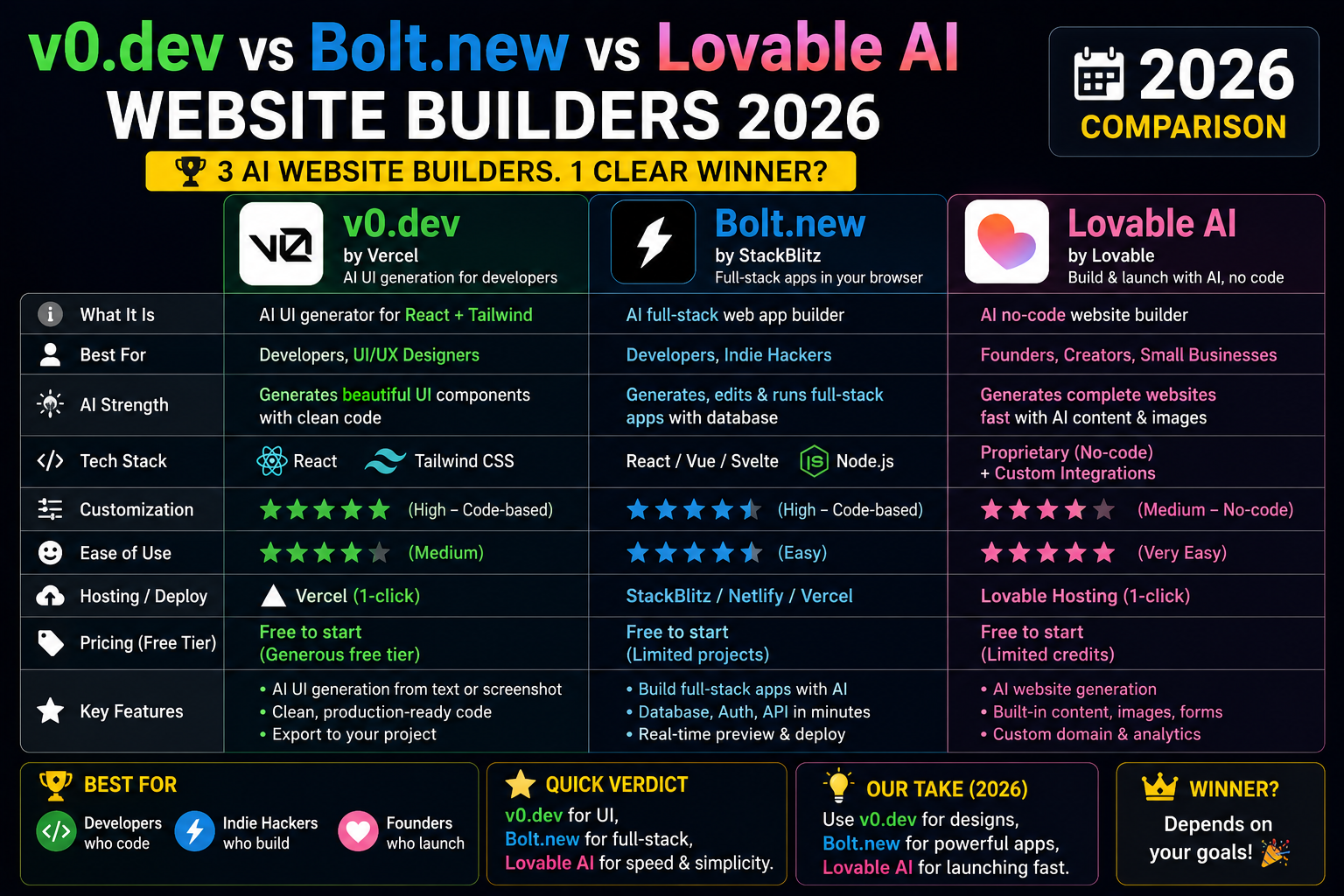
AI website builders went from toy demos to production tools in 2026. Three names dominate: v0.dev (Vercel), Bolt.new (StackBlitz), and Lovable.dev. Each takes a prompt and returns a working web app in seconds. Here is a head-to-head comparison based on output quality, pricing, and how Filipino freelancers actually use them.
Head-to-head comparison (2026)
| Feature | v0.dev | Bolt.new | Lovable.dev |
|---|---|---|---|
| Default framework | Next.js + shadcn/ui | Next.js, Astro, Svelte, Vite | React + Vite + Supabase |
| Free tier | Yes (limited generations) | Yes (1M tokens/month) | Yes (5 projects/month) |
| Paid tier (USD/mo) | $20 Pro, $40 Team | $20 Pro, $50 Teams | $20 Starter, $50 Launch |
| Export code | Yes (copy or GitHub) | Yes (download or GitHub) | Yes (GitHub sync) |
| One-click deploy | Vercel | Netlify, Vercel | Built-in hosting + Vercel |
| Best at | Component-first designs | Full-stack MVPs | Backend-heavy apps |
Which one to pick (by use case)
- Building a marketing landing page or portfolio site: v0.dev. Best default aesthetics, tightest shadcn/ui integration.
- Building a full-stack MVP with auth and API: Bolt.new. Handles server-side code and deploys front + back together.
- Building an app with database, auth, and file storage: Lovable.dev. Baked-in Supabase means you skip infra setup.
- You want to hand off code to a dev team later: All three export. Bolt.new produces the cleanest exportable code as of mid-2026.
- Client wants a live URL right now: Lovable.dev’s built-in hosting is fastest to a live domain.
- You already deploy on Vercel: v0.dev, tightest integration and one-click “Deploy to Vercel” button.
PH freelancer angle
Filipino freelancers on Upwork and Fiverr use these tools to deliver client landing pages in 2-4 hours instead of 2-3 days. Charge rates on Upwork for AI-assisted landing pages have settled at $200-$500 USD (₱11,600-₱29,000) per site. The margin is high because the tool cost is $20/month and you can ship 20+ sites per month.
Bolt.new and Lovable.dev also work for capstone project frontends. Some Filipino BSIT students shipped their entire senior thesis frontend from these tools in 2026.
Common mistakes when using AI website builders
- Shipping the AI-default output as-is. These tools produce generic aesthetics. Add your own colors, typography, and copy to make it feel custom.
- Skipping the code review. Generated code sometimes contains security bugs or accessibility issues. Read the diff before merging.
- Committing to hosting lock-in. If you deploy on Lovable’s built-in hosting, moving off later means re-configuring backend. Export to your own repo early.
- Assuming the AI can debug complex flows. Auth flows, payment integrations, and multi-role permissions still need human dev review.
Comparison at a glance
Different AI tools serve different purposes. Match the tool to your workflow before committing to any single vendor.
- General-purpose chat: ChatGPT (Plus tier for GPT-4), Claude (Pro tier), Gemini Advanced. All cost $20/month with similar quality but different personalities.
- Coding assistance: GitHub Copilot ($10/month), Cursor ($20/month), Codeium (free tier). Copilot integrates deepest with VS Code; Cursor is a purpose-built AI editor.
- Search + citation: Perplexity is the search-first alternative. Better for research where sources matter than for open-ended conversation.
- Image generation: DALL-E (in ChatGPT Plus), Midjourney ($10/month), Stable Diffusion (free, self-hosted). Midjourney has the strongest artistic quality; DALL-E is best for realistic photos.
- Free tiers matter: Every major tool has a free tier good enough for casual use. Start free, upgrade only when you hit limits.
Common mistakes when adopting AI tools
- Trusting first-draft output blindly. Every AI hallucinates. Verify factual claims, code correctness, and dates. Treat AI output as a strong first draft, not final work.
- Paying for tools without a use case. Do not subscribe to Copilot Plus, ChatGPT Team, and Claude Pro simultaneously if you rarely use them. Pick one primary tool and use free tiers of the others.
- Ignoring privacy. Free tiers of most AI tools use your prompts for training. If you handle sensitive data, use paid tiers with data-usage guarantees or self-hosted models.
- Overusing AI for simple tasks. Sometimes a quick Google search or a look at the docs is faster than crafting a prompt. Match tool to task complexity.
- Not learning prompt engineering. The gap between beginner and expert AI users is prompt quality. Invest 2-3 hours learning prompt patterns; it multiplies your output.
Practical adoption path
How to add AI tools to your workflow without disrupting what works:
Week 1: Pick one general-purpose chat tool (ChatGPT, Claude, or Gemini). Use free tier for 5-10 real tasks: writing emails, summarizing documents, drafting code, brainstorming ideas. Track which tasks it accelerates versus where it slows you down.
Week 2: Add a coding tool if you code (Copilot or Cursor). Same evaluation: which tasks does it accelerate? Which does it distract from?
Week 3: Assess. If a tool consistently saves you 30+ minutes per day, subscribe. If it only helps occasionally, stay on the free tier.
Ongoing: Reassess quarterly. AI tools evolve fast. A tool that was great in Q1 may have been surpassed by Q3.
Best practices for AI-assisted work
- Verify before shipping. AI output looks confident even when wrong. Always test code, fact-check claims, and review generated content before it goes out.
- Version your prompts. Keep a library of prompts that work well. Reuse and iterate rather than starting from scratch each time.
- Combine tools. Use one for brainstorming, another for polishing. Different tools have different strengths.
- Learn continuously. The AI space changes weekly. Follow one credible newsletter (Ben’s Bites, TLDR AI, The Batch) to stay current without drowning in noise.
Comparison at a glance
Different AI tools serve different purposes. Match the tool to your workflow before committing to any single vendor.
- General-purpose chat: ChatGPT (Plus tier for GPT-4), Claude (Pro tier), Gemini Advanced. All cost $20/month with similar quality but different personalities.
- Coding assistance: GitHub Copilot ($10/month), Cursor ($20/month), Codeium (free tier). Copilot integrates deepest with VS Code; Cursor is a purpose-built AI editor.
- Search + citation: Perplexity is the search-first alternative. Better for research where sources matter than for open-ended conversation.
- Image generation: DALL-E (in ChatGPT Plus), Midjourney ($10/month), Stable Diffusion (free, self-hosted). Midjourney has the strongest artistic quality; DALL-E is best for realistic photos.
- Free tiers matter: Every major tool has a free tier good enough for casual use. Start free, upgrade only when you hit limits.
Common mistakes when adopting AI tools
- Trusting first-draft output blindly. Every AI hallucinates. Verify factual claims, code correctness, and dates. Treat AI output as a strong first draft, not final work.
- Paying for tools without a use case. Do not subscribe to Copilot Plus, ChatGPT Team, and Claude Pro simultaneously if you rarely use them. Pick one primary tool and use free tiers of the others.
- Ignoring privacy. Free tiers of most AI tools use your prompts for training. If you handle sensitive data, use paid tiers with data-usage guarantees or self-hosted models.
- Overusing AI for simple tasks. Sometimes a quick Google search or a look at the docs is faster than crafting a prompt. Match tool to task complexity.
- Not learning prompt engineering. The gap between beginner and expert AI users is prompt quality. Invest 2-3 hours learning prompt patterns; it multiplies your output.
Practical adoption path
How to add AI tools to your workflow without disrupting what works:
Week 1: Pick one general-purpose chat tool (ChatGPT, Claude, or Gemini). Use free tier for 5-10 real tasks: writing emails, summarizing documents, drafting code, brainstorming ideas. Track which tasks it accelerates versus where it slows you down.
Week 2: Add a coding tool if you code (Copilot or Cursor). Same evaluation: which tasks does it accelerate? Which does it distract from?
Week 3: Assess. If a tool consistently saves you 30+ minutes per day, subscribe. If it only helps occasionally, stay on the free tier.
Ongoing: Reassess quarterly. AI tools evolve fast. A tool that was great in Q1 may have been surpassed by Q3.
Best practices for AI-assisted work
- Verify before shipping. AI output looks confident even when wrong. Always test code, fact-check claims, and review generated content before it goes out.
- Version your prompts. Keep a library of prompts that work well. Reuse and iterate rather than starting from scratch each time.
- Combine tools. Use one for brainstorming, another for polishing. Different tools have different strengths.
- Learn continuously. The AI space changes weekly. Follow one credible newsletter (Ben’s Bites, TLDR AI, The Batch) to stay current without drowning in noise.
Official product pages
Frequently Asked Questions
Can I use these tools for BSIT capstone?
Yes. Bolt.new and Lovable.dev handle full-stack apps well. You still need to document the code you deploy for defense panel questions. Cursor or Claude Code paired with these builders speeds up the whole workflow.
Do these support Filipino/Tagalog UI?
Yes. You can specify language in the prompt: “Build a landing page in Tagalog” or “Include Filipino localization”. Output quality is roughly equal to English but you should review the phrasing before shipping.
Are they suitable for client work?
Yes for landing pages, marketing sites, MVPs, and internal tools. Not yet for complex e-commerce, real-time apps, or high-scale platforms. Export the code + polish manually for anything client-critical.
What is the free tier really useful for?
Prototyping. All three free tiers let you build 1-3 landing pages per month. Enough for personal projects, portfolio experiments, and A/B tests. Client work at scale needs paid tier for higher generation limits.
Will these tools replace web developers?
Not in 2026. They compress the boilerplate work. Human developers still handle architecture, integration, security review, performance optimization, and complex business logic. Web devs who adopt AI tools earn more, not less.