
You ran a Python script that referenced os.environ['PATH'] or tried to subprocess pip and got KeyError: 'PATH'. The variable is set in your shell, you can verify with echo $PATH, but Python can’t see it. Why?
Almost always: your Python process inherited a different environment than the one you tested in. This guide covers the 4 most common scenarios and their fixes.
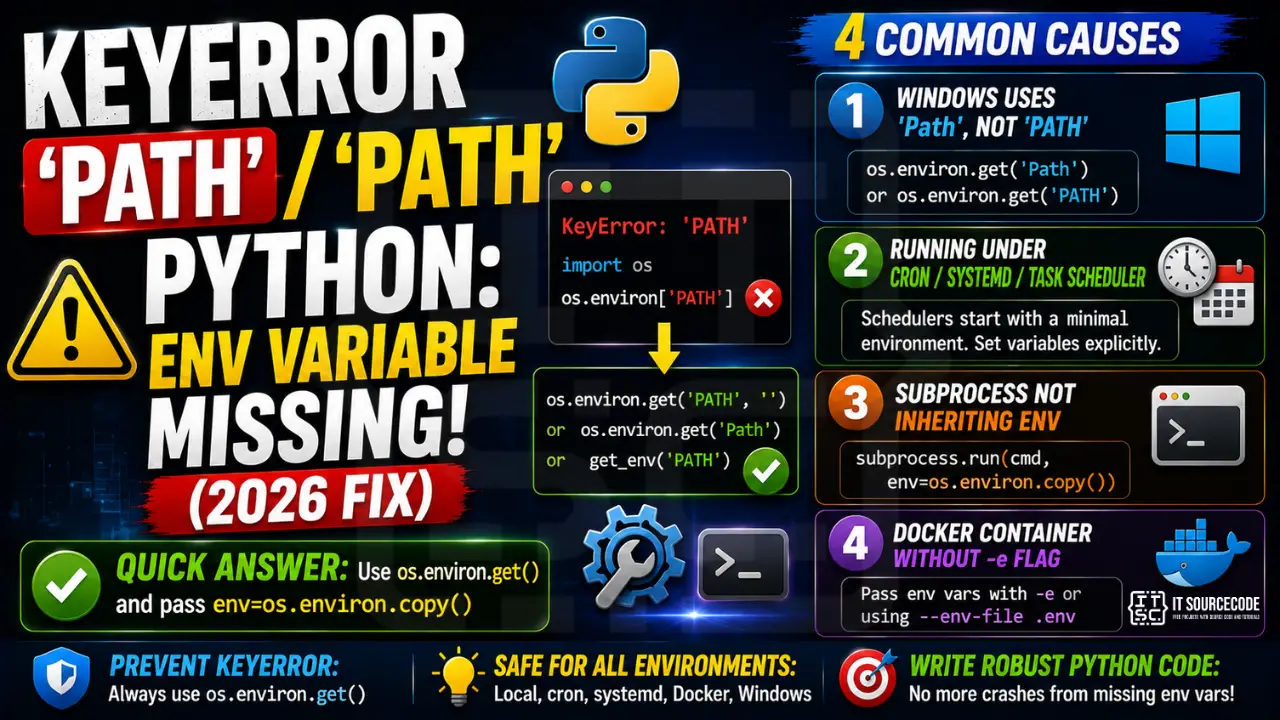
📌 Quick answer: Replace os.environ['PATH'] with os.environ.get('PATH', '') for a safe fallback. For Windows path issues, use os.environ.get('Path') or os.environ.get('PATH'). For subprocess calls, explicitly pass env=os.environ.copy() so children inherit your variables.
Cause 1: Windows uses ‘Path’, not ‘PATH’
Windows environment variable names are case-insensitive at the shell level, but Python’s os.environ dict is case-sensitive. The actual key in os.environ on Windows is typically 'Path', not 'PATH'.
import os

# ❌ Crashes on Windows
path = os.environ['PATH']

# ✓ Works cross-platform
path = os.environ.get('Path') or os.environ.get('PATH')

# ✓ Cleanest: case-insensitive helper
def get_env(name, default=''):
    for key, value in os.environ.items():
        if key.lower() == name.lower():
            return value
    return default
path = get_env('PATH')
Cause 2: Running under cron, systemd, or Windows Task Scheduler
When your Python script runs under a scheduler, it starts with a minimal environment, often just PATH, HOME, and a few defaults. Custom variables you set in .bashrc or .zshrc are not loaded.
# In crontab, explicitly set the variables you need:
DATABASE_URL=postgres://user:pass@host/db
PATH=/usr/local/bin:/usr/bin:/bin
0 * * * * /usr/bin/python3 /home/me/script.py

# In systemd unit file:
[Service]
Environment="DATABASE_URL=postgres://user:pass@host/db"
EnvironmentFile=/etc/myapp/env.conf
Rule of thumb: never assume cron or systemd inherits your interactive shell environment. Set every variable explicitly.
Cause 3: subprocess not inheriting environment
You call subprocess.run(['pip', 'install', '-r', 'requirements.txt']) and it fails with FileNotFoundError or your child Python script raises KeyError on env vars. The default behavior in some Python versions on Windows is to not pass the full environment.
import subprocess, os

# ❌ Child process may not see your env vars
subprocess.run(['python', 'worker.py'])

# ✓ Explicitly pass the environment
subprocess.run(['python', 'worker.py'], env=os.environ.copy())

# ✓ Add custom env vars without losing the parent's
env = os.environ.copy()
env['EXTRA_CONFIG'] = '/etc/special.conf'
subprocess.run(['python', 'worker.py'], env=env)
Cause 4: Docker container without -e flag
You ran docker run myapp and the container crashes because os.environ['DATABASE_URL'] raises KeyError. Containers start with a minimal environment unless you pass variables explicitly.
# ❌ No env vars passed
docker run myapp

# ✓ Pass single var
docker run -e DATABASE_URL=postgres://... myapp

# ✓ Pass an env file
docker run --env-file .env myapp

# ✓ Compose handles it (docker-compose.yml):
services:
  app:
    image: myapp
    env_file: .env
Prevention: Use os.environ.get() Everywhere
The single most important rule: never use bare os.environ['KEY']. Always use os.environ.get('KEY', default) or wrap in try/except with a clear error message.
# Pattern 1: optional, with default
db_url = os.environ.get('DATABASE_URL', 'sqlite:///dev.db')

# Pattern 2: required, with clear error
db_url = os.environ.get('DATABASE_URL')
if not db_url:
    raise RuntimeError(
        "DATABASE_URL not set. "
        "Add it to your .env file or pass --env to docker run."
    )

# Pattern 3: use python-dotenv at startup
from dotenv import load_dotenv
load_dotenv()  # reads .env into os.environ
db_url = os.environ['DATABASE_URL']  # now safe (dotenv loaded it)
Related Guides
- os.environ KeyError: Missing Environment Variables (Full Fix)
- 5 Safe dict-lookup Patterns
- All KeyError fixes
Verifying your pip installation location
# See where pip lives:
python -m pip --version
# Example: pip 24.1 from /usr/lib/python3.11/site-packages/pip (python 3.11)

# See which Python interpreter your shell uses:
which python
which python3
which pip

# See the current PATH the shell searches:
echo $PATH        # macOS / Linux
$env:PATH          # Windows PowerShell
Common PATH setup mistakes
- Multiple Python installs: system Python + Homebrew Python + pyenv Python. Each has its own pip. Confirm with
which -a python3. - Editing ~/.bashrc but using zsh (or vice versa): shell reads its own dotfile. macOS uses zsh by default in 2026. Add PATH exports to ~/.zshrc.
- Windows PATH not refreshed: after installing Python, close and reopen the terminal. If still missing, restart Explorer.exe or log out.
- Global vs virtualenv confusion: activating a venv changes PATH temporarily. Deactivate first if you want the system pip.
Fix PATH once and for all
# macOS / Linux: add to ~/.zshrc (or ~/.bashrc for bash)
export PATH="$HOME/.local/bin:$PATH"

# Then reload
source ~/.zshrc

# Windows PowerShell (persistent):
[Environment]::SetEnvironmentVariable(
    "Path",
    [Environment]::GetEnvironmentVariable("Path", "User") + ";C:\Users\YOU\AppData\Roaming\Python\Python311\Scripts",
    "User"
)
Environment variable KeyError patterns
KeyError on os.environ fires when the environment variable is not set. This happens in local dev without a .env loaded, in Docker without ENV directives, and in CI when secrets are missing.
Common triggers
- .env not loaded. Missing python-dotenv or forgotten load_dotenv() call.
- Docker missing ENV. Dockerfile did not declare the variable.
- CI secret missing. GitHub Actions / GitLab CI secret not set.
- Case sensitivity. os.environ is case-sensitive on Linux but not on Windows.
- Wrong variable name. DATABASE_URL vs DB_URL — typo in one place.
Diagnostic pattern
# BAD — assumes env var exists
import os
db_url = os.environ["DATABASE_URL"]  # KeyError if unset

# GOOD — provide default or fail with clear message
db_url = os.environ.get("DATABASE_URL")
if db_url is None:
    raise RuntimeError("DATABASE_URL is required — set it or create a .env file")

# Modern pattern — pydantic-settings
from pydantic_settings import BaseSettings

class Settings(BaseSettings):
    database_url: str
    api_key: str
    debug: bool = False

    class Config:
        env_file = ".env"

settings = Settings()  # loads + validates from env or .env
Best practices
- Use pydantic-settings. Type-safe env var loading with defaults.
- Validate all env vars at startup. Fail fast if anything is missing.
- Use python-dotenv for local dev. Load .env before reading os.environ.
- Never commit .env to git. Add to .gitignore, provide .env.example instead.
Official documentation
Quick step-by-step summary (click to expand)
- Verify PATH is set for your Python installation. On Windows, add Python and Scripts folders to PATH via System Properties > Environment Variables.
- Use python -m pip instead of pip. python -m pip install package works even when the pip command is not on PATH.
- Reinstall Python with “Add to PATH” checked. The Python installer has an “Add Python to PATH” checkbox. If PATH is missing, reinstall with this box ticked.
- Set the environment variable manually. os.environ[“PATH”] = os.environ.get(“PATH”, “”) + “:/usr/local/bin” in Python, then re-run pip via subprocess.
Frequently Asked Questions
Is os.environ[‘PATH’] case-sensitive?
Yes. Even though Windows shells treat PATH and Path as the same variable, Python’s os.environ dict is case-sensitive. On Windows the actual key is usually ‘Path’. Use os.environ.get(‘Path’) or os.environ.get(‘PATH’) for cross-platform safety.
Why doesn’t my cron job see my env variables?
Cron starts with a minimal environment (PATH, HOME, a few defaults). It does NOT load .bashrc, .zshrc, or interactive shell config. Set required variables explicitly at the top of your crontab or in the cron command itself.
Why does subprocess.run() lose my environment?
subprocess inherits the calling process’s environment by default, but on some Windows setups or when using shell=False, custom vars may not propagate. Explicitly pass env=os.environ.copy() to be safe. To add custom vars while keeping the parent’s, copy first then mutate.
How do I pass env vars to a Docker container?
Three ways: (1) -e KEY=value on the docker run command, (2) –env-file .env to load a file, (3) env_file or environment section in docker-compose.yml. The container does NOT inherit your shell’s variables automatically.
Should I use python-dotenv or os.getenv() with defaults?
Both. python-dotenv loads .env into os.environ at app startup (so you get one source of truth for local dev). Use os.getenv() everywhere in your code for safe access with defaults. In production, .env is typically not used; the platform (Heroku, Docker, systemd) sets env vars directly.

Angel Jude Suarez
Full-Stack Developer at PIES IT Solution
Focuses on Python development, machine learning, and AI integration. Has built production AI systems including OpenAI Whisper integration for medical transcription and GPT-4o-powered diagnosis assistance. Strong background in pandas, scikit-learn, and TensorFlow.
Expertise: Python · PHP · Java · VB.NET · ASP.NET · Machine Learning · AI Integration · OpenCV · Django · CodeIgniter
· View all posts by Angel Jude Suarez →