
You wrote data[0] expecting the first row of a DataFrame or the first item of a dict, and Python threw KeyError: 0.
The fix depends entirely on what data actually is, a pandas DataFrame, a regular dict, or a JSON-loaded dict where the integer turned into a string. This guide walks through all 4 common causes with fixes.
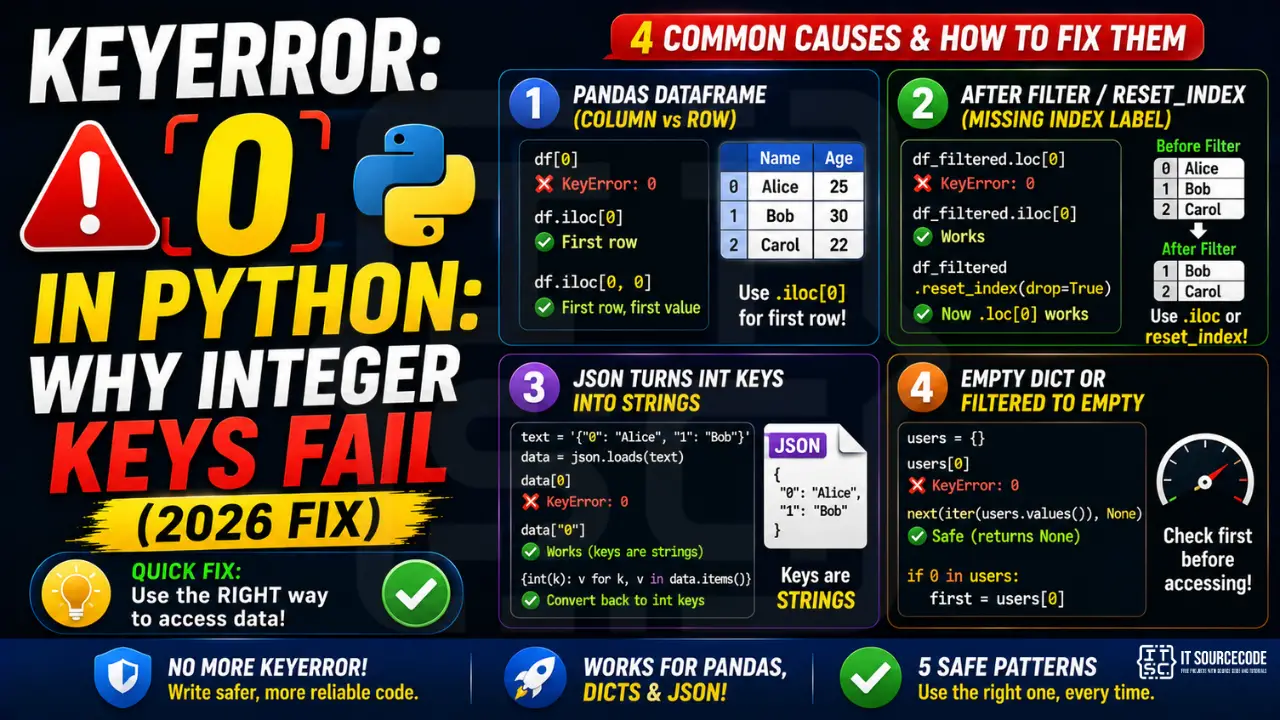
📌 Quick answer: If you’re indexing a pandas DataFrame, use df.iloc[0] instead of df[0]. If you’re indexing a regular dict, the key 0 simply doesn’t exist (check with print(list(my_dict.keys()))). If you loaded JSON, integer keys became strings: use data["0"] not data[0].
Cause 1: pandas DataFrame with non-default index
The most common cause. You expected df[0] to give you the first row, but pandas treats square-bracket access on a DataFrame as column access, not row access. df[0] means “give me the column whose label is the integer 0,” and if no such column exists, you get KeyError: 0.
import pandas as pd
df = pd.read_csv("data.csv")

df[0]              # ❌ KeyError: 0 (no column named 0)
df.iloc[0]         # ✓ first row by integer position
df.loc[0]          # ✓ first row by label (works if index is default 0,1,2...)
df.iloc[0, 0]      # ✓ first row, first column (scalar value)
Rule of thumb: use .iloc[i] for “give me the i-th row by position.” Use .loc[label] when you know the actual index label. Never use bare df[0] unless you have a column literally named with the integer 0.
Cause 2: After reset_index() with drop=False
You called df.reset_index() hoping to make row indexes go 0, 1, 2… but the old index became a new column called “index”. If you then try df.loc[0] after a filter that dropped row 0, you get KeyError.
import pandas as pd
df = pd.DataFrame({"name": ["Alice", "Bob", "Carol"]})
df_filtered = df[df["name"] != "Alice"]  # drops index 0

df_filtered.loc[0]       # ❌ KeyError: 0 (index 0 was dropped)
df_filtered.iloc[0]      # ✓ first remaining row (by position, not by label)

# Or rebuild the index so labels match positions:
df_filtered = df_filtered.reset_index(drop=True)
df_filtered.loc[0]       # ✓ works now
Rule of thumb: after any filter, sort, or join that might drop or shuffle rows, call .reset_index(drop=True) if you intend to use .loc[0] downstream. Or just use .iloc[0], which is always position-based.
Cause 3: JSON loaded integer keys as strings
JSON has no integer-keyed objects, all keys are strings. When you json.loads() a Python dict that had integer keys, they become strings during serialization, and your old data[0] code now fails.
import json

# Server sends back integer-keyed lookup as JSON
text = '{"0": "Alice", "1": "Bob"}'
data = json.loads(text)

data[0]            # ❌ KeyError: 0
data["0"]          # ✓ works (keys are strings)

# If you control the deserialization, convert keys back:
data = {int(k): v for k, v in json.loads(text).items()}
data[0]            # ✓ "Alice"
Rule of thumb: any JSON-loaded dict has string keys. If your design needs integer keys, convert in a single dict comprehension immediately after the loads() call.
Cause 4: Empty dict or filtered-to-empty result
Your code worked on the test data but breaks in production because the upstream filter returned an empty dict. data[0] raises KeyError because the dict has no keys at all.
users = filter_active_users()  # might return {}
first = users[0]               # ❌ KeyError: 0 on empty dict

# Safer pattern:
first = next(iter(users.values()), None)   # None if empty
if first is None:
    print("No active users")
else:
    print(first.name)

# Or check first:
if 0 in users:
    first = users[0]
else:
    first = None
Rule of thumb: always guard “first item” extraction with if data: or use next(iter(data.values()), default). Never assume a dict is non-empty.
Prevention: 3 Patterns to Avoid KeyError: 0
- Use iloc[] for pandas position lookups, never bare df[0]
- Convert JSON dicts at load time if you need integer keys:
data = {int(k): v for k, v in json.loads(s).items()} - Check len before .loc/.iloc:
if len(df) > 0: first = df.iloc[0]
Related Guides
- Python KeyError on dict: 5 Safe Patterns
- Pandas KeyError: Column Not in DataFrame
- Browse all KeyError fixes
- Python Tutorial hub
Python KeyError debugging checklist
- Print the actual keys.
print(list(my_dict.keys()))shows what is available. - Check for case and whitespace. “name” vs “Name” vs ” name ” — all different keys.
- Use dict.get with default. Returns None or a fallback instead of raising.
- Guard with “key in dict”. Explicit check before access.
- Consider defaultdict or Counter. Automatic default values for missing keys.
Safe dict access patterns
# BAD — raises KeyError on missing
d = {"name": "Alice"}
age = d["age"]  # KeyError

# GOOD — several safe alternatives
age = d.get("age")                    # None if missing
age = d.get("age", 0)                 # 0 if missing
age = d.setdefault("age", 0)          # sets AND returns 0

# For nested access with fallback
from collections import defaultdict
counts = defaultdict(int)
counts["apples"] += 1                 # no KeyError, auto-init to 0

# For counting
from collections import Counter
words = Counter(["a", "b", "a", "c"])
print(words["z"])                     # 0, no KeyError
Modern tooling to prevent KeyError
- pydantic v2. Runtime validation with clear error messages.
- TypedDict + mypy. Static checking of dict shape.
- dataclasses. Attribute access is safer than dict lookup.
- pydantic-settings. For environment variables specifically.
Official documentation
Quick step-by-step summary (click to expand)
- Verify the key type matches. Print list(mydict.keys())[:5] to see actual key types. “0” (string) and 0 (int) are different keys.
- Convert string keys to int if needed. When loading JSON, keys become strings. Convert with mydict = {int(k): v for k, v in mydict.items()}.
- Use .get() to bypass KeyError. mydict.get(0, default) returns default on missing key regardless of the underlying key type mismatch.
- Standardize key types at the boundary. When receiving external data, normalize keys to one type immediately so internal code does not deal with mixed types.
Frequently Asked Questions
Why does df[0] raise KeyError in pandas?
In pandas, df[col] means column access by label. df[0] tries to look up a column literally named with the integer 0, which usually doesn’t exist. For row access by position, use df.iloc[0]. For row access by index label, use df.loc[label].
Why does my JSON dict raise KeyError on integer access?
JSON only supports string keys. When you save a Python dict with integer keys to JSON and reload it, the keys become strings. data[0] fails but data[“0”] works. To recover integer keys: data = {int(k): v for k, v in json.loads(s).items()}.
What’s the difference between df.loc[0] and df.iloc[0]?
df.iloc[0] is position-based: always returns the first row regardless of index labels. df.loc[0] is label-based: returns the row with index label 0, which may not exist after filtering, sorting, or merging. Use iloc when you want “first / Nth row by position,” loc when you want “row with this specific index label.”
How do I safely get the first item from a dict or DataFrame?
For dicts: next(iter(my_dict.values()), None) returns None if the dict is empty. For DataFrames: if len(df) > 0: first = df.iloc[0] else: first = None. Both patterns prevent KeyError on empty containers.
When does reset_index() solve KeyError: 0?
After any filter, sort, or join that drops or shuffles rows in a DataFrame. df.reset_index(drop=True) rebuilds the index as 0, 1, 2… so df.loc[0] becomes equivalent to df.iloc[0] again. drop=True discards the old index; without it, the old index becomes a new “index” column.

Angel Jude Suarez
Full-Stack Developer at PIES IT Solution
Focuses on Python development, machine learning, and AI integration. Has built production AI systems including OpenAI Whisper integration for medical transcription and GPT-4o-powered diagnosis assistance. Strong background in pandas, scikit-learn, and TensorFlow.
Expertise: Python · PHP · Java · VB.NET · ASP.NET · Machine Learning · AI Integration · OpenCV · Django · CodeIgniter
· View all posts by Angel Jude Suarez →