
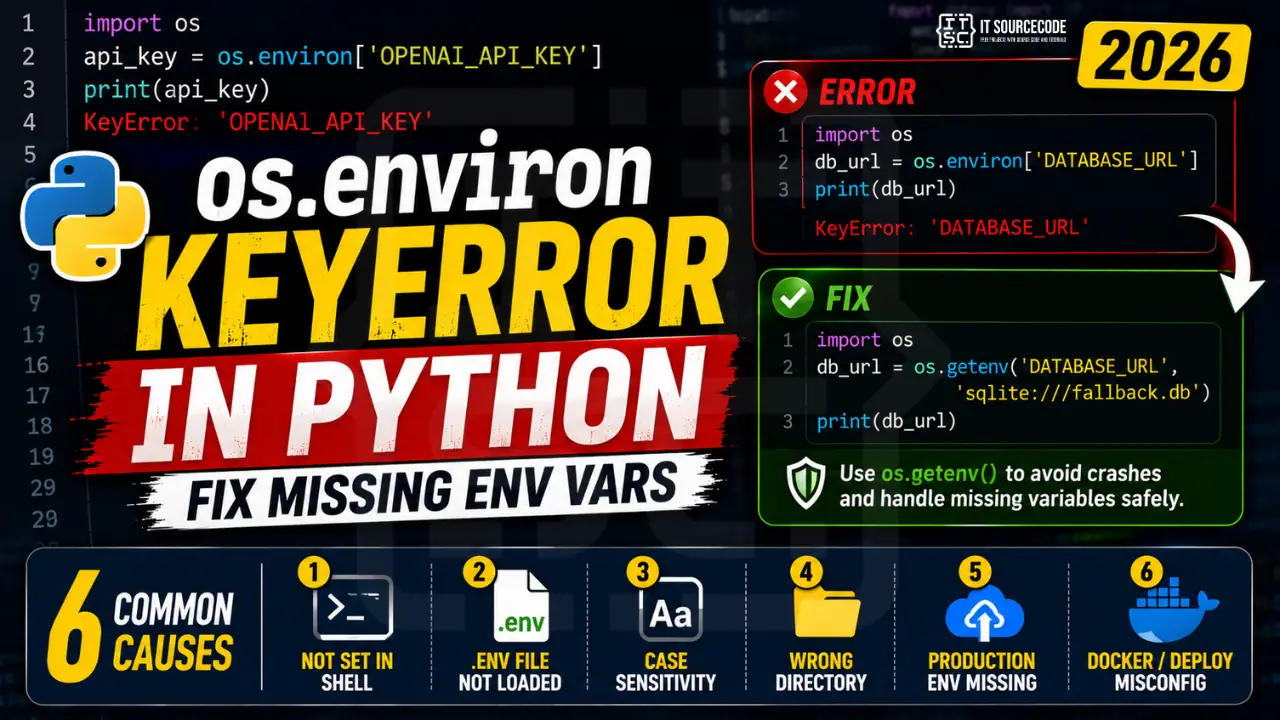
Your Python app worked perfectly on your laptop. You pushed it to Heroku, Render, or Railway, and now it crashes on boot with KeyError: 'DATABASE_URL' from a line that reads os.environ['DATABASE_URL']. Welcome to one of the most common deployment errors in Python.
The cause is almost always the same: the environment variable exists in your local .env file but isn’t actually present in the process environment where your code is running. This guide walks through all 7 common causes, from missing shell exports to Docker -e flags to Django’s settings.py import-time gotcha, with copy-paste fixes you can deploy immediately.
📌 Quick fix: Replace os.environ['DATABASE_URL'] with os.getenv('DATABASE_URL', 'sqlite:///fallback.db'). The os.getenv() form returns None (or your default) instead of raising KeyError, so your app boots, logs a warning, and you can debug the missing variable in production logs instead of crash-looping.
What os.environ KeyError Actually Means
os.environ is a dictionary-like object that mirrors the environment variables of the process running your Python script. When you write os.environ['DATABASE_URL'], Python performs a dictionary lookup, and if no variable by that name was set when the process started, you get KeyError: 'DATABASE_URL'.
The critical thing to understand:
- Case-sensitive on all platforms:
os.environ['Path']≠os.environ['PATH'], even on Windows where the shell itself is case-insensitive - Read once at process startup: changes you make to your shell after the Python process starts don’t appear in
os.environ - Not aware of
.envfiles: Python doesn’t auto-load.env; you needpython-dotenvor similar - Different on every host: your laptop, CI runner, Docker container, and production server each have their own environment
The error message tells you exactly which variable was missing. The hard part is figuring out WHY the host you’re running on doesn’t have that variable set.
Cause #1: Variable Not Set in Current Shell Session
The most basic cause: you simply haven’t exported the variable in the shell you’re running Python from:
import os

api_key = os.environ['OPENAI_API_KEY']   # ❌ KeyError if you never exported it
The diagnostic, check from the shell BEFORE running Python:
# Linux / macOS
echo $OPENAI_API_KEY     # prints empty line if not set
env | grep OPENAI        # filters env for matching vars

# Windows PowerShell
echo $env:OPENAI_API_KEY
Get-ChildItem Env: | Where-Object Name -like "*OPENAI*"
The fix, export before running:
# Linux / macOS: one session only
export OPENAI_API_KEY="sk-..."
python app.py

# Linux / macOS: persistent across sessions
echo 'export OPENAI_API_KEY="sk-..."' >> ~/.bashrc   # or ~/.zshrc
source ~/.bashrc

# Windows PowerShell: current session
$env:OPENAI_API_KEY = "sk-..."
python app.py
Remember: export only affects the current shell and its children. Opening a new terminal tab gives you a fresh environment.
Cause #2: .env File Not Loaded (Need python-dotenv)
This is probably the #1 cause of “but it works locally!” confusion. You created a .env file:
# .env
DATABASE_URL=postgresql://user:pass@localhost/mydb
SECRET_KEY=abc123
Then you run your script and get KeyError: 'DATABASE_URL'. The problem: Python does not read .env files automatically. .env is just a convention, you need a library to load it into os.environ.
The fix, install and use python-dotenv:
pip install python-dotenv
import os
from dotenv import load_dotenv

load_dotenv()   # ✅ loads .env into os.environ: MUST come BEFORE you read vars

db_url = os.environ['DATABASE_URL']   # now works
The order matters. load_dotenv() must run before any code that accesses os.environ. Put it at the very top of your entry point.
Cause #3: Case Sensitivity (Yes, Even on Windows)
Windows shells are case-insensitive, echo %path% and echo %PATH% print the same thing. But os.environ in Python is case-sensitive on every platform, including Windows:
# On Windows, both of these set the same shell variable
set DATABASE_URL=postgresql://localhost/mydb

# But in Python:
os.environ['DATABASE_URL']   # ✅ works
os.environ['database_url']   # ❌ KeyError: 'database_url'
os.environ['Database_Url']   # ❌ KeyError: 'Database_Url'
This catches Windows developers off guard. The Python os.environ mapping preserves the exact case used at process startup.
The diagnostic, print every env var and look for case mismatches:
import os

# Print all env vars whose name contains "database" (case-insensitive search)
for key in os.environ:
    if "database" in key.lower():
        print(f"{key} = {os.environ[key][:20]}...")
The fix, standardize on UPPER_SNAKE_CASE everywhere (industry convention) and never mix cases between your .env, deploy config, and Python code.
Cause #4: Running Script from a Different Directory
load_dotenv() by default looks for .env in the current working directory, not the directory of your Python file. Run your script from a different folder and the .env file isn’t found:
# Project structure:
# myapp/
#   .env
#   src/
#     app.py

cd myapp/src
python app.py        # ✅ works only if .env is found via search

cd /
python myapp/src/app.py   # ❌ likely KeyError: .env not found from /
This bites cron jobs, systemd services, and CI pipelines hard, they typically run from / or some unrelated directory.
The fix, pass an absolute path to load_dotenv:
import os
from pathlib import Path
from dotenv import load_dotenv

# ✅ Resolve .env relative to THIS file, not the CWD
env_path = Path(__file__).resolve().parent.parent / ".env"
load_dotenv(dotenv_path=env_path)
This guarantees the same .env loads no matter where the script is invoked from.
Cause #5: Production vs Development (Heroku, Render, Railway, AWS)
You set variables in .env for local dev, but .env is in .gitignore (correctly), so it never reaches your production host. On the server, those variables don’t exist:
# Local: works
os.environ['SECRET_KEY']   # ✅ loaded from .env

# Production: crashes on boot
os.environ['SECRET_KEY']   # ❌ KeyError: never set on Heroku/Render/Railway
The fix depends on your platform:
# Heroku
heroku config:set SECRET_KEY="abc123" DATABASE_URL="postgres://..."
heroku config       # list all vars

# Render: set via Dashboard → Environment tab, or render.yaml
# render.yaml:
services:
  - type: web
    envVars:
      - key: SECRET_KEY
        value: abc123

# Railway: set via Dashboard → Variables tab, or CLI
railway variables set SECRET_KEY=abc123

# AWS EC2: add to /etc/environment or systemd unit file
echo 'SECRET_KEY=abc123' | sudo tee -a /etc/environment

# AWS Lambda / ECS: set via Console → Configuration → Environment variables

# Vercel
vercel env add SECRET_KEY
After setting, redeploy or restart the process, env vars are read once at startup.
Cause #6: Docker Container Missing -e Flag or env_file
Docker containers start with a clean environment by default, your host machine’s variables are NOT inherited. You must explicitly pass them in:
# ❌ Won't work: env var from host not passed to container
docker run myapp:latest

# ✅ Pass individual variable
docker run -e SECRET_KEY=abc123 -e DATABASE_URL=postgres://... myapp:latest

# ✅ Pass entire .env file
docker run --env-file .env myapp:latest
For docker-compose:
# docker-compose.yml
services:
  web:
    image: myapp:latest
    env_file:
      - .env                  # ✅ load whole .env file
    environment:
      - DEBUG=False           # ✅ or set individual vars
      - DATABASE_URL=${DATABASE_URL}   # ✅ pass through from host
The diagnostic, check what env vars are actually inside the container:
docker exec -it <container_id> env | sort
# or for a one-shot:
docker run --rm myapp:latest env
Cause #7: Django/Flask settings.py Reads at Import Time
The trickiest cause. Django’s settings.py runs at import, which often happens BEFORE your application’s startup code calls load_dotenv():
# ❌ Wrong: settings.py crashes before load_dotenv runs
# settings.py
import os
SECRET_KEY = os.environ['SECRET_KEY']   # KeyError at Django import time

# manage.py
from dotenv import load_dotenv
load_dotenv()        # too late: settings.py already errored
The fix, load env vars at the TOP of manage.py and wsgi.py:
# manage.py: MUST be first
import os
from pathlib import Path
from dotenv import load_dotenv
load_dotenv(Path(__file__).resolve().parent / ".env")

# THEN import Django
import django
from django.core.management import execute_from_command_line
# wsgi.py: same pattern for production
import os
from pathlib import Path
from dotenv import load_dotenv
load_dotenv(Path(__file__).resolve().parent.parent / ".env")

from django.core.wsgi import get_wsgi_application
application = get_wsgi_application()
For Flask, do the same in your entry point (usually app.py or wsgi.py) before from flask import Flask.
The Right Way: os.getenv() vs os.environ vs Config Libraries
Now that you know the causes, here’s the hierarchy of approaches from worst to best:
❌ Avoid, os.environ[‘KEY’] (crashes on missing):
SECRET_KEY = os.environ['SECRET_KEY'] # KeyError if missing
✅ Better, os.getenv() with default:
SECRET_KEY = os.getenv('SECRET_KEY', 'dev-fallback-key')
DEBUG = os.getenv('DEBUG', 'False').lower() == 'true'   # cast to bool
PORT = int(os.getenv('PORT', '8000'))                    # cast to int
✅ Better, os.environ.get() (identical to os.getenv):
SECRET_KEY = os.environ.get('SECRET_KEY', 'dev-fallback-key')
✅✅ Best for production, python-decouple (handles type casting + required flag):
pip install python-decouple
from decouple import config

SECRET_KEY = config('SECRET_KEY')                    # raises clear error if missing
DEBUG = config('DEBUG', default=False, cast=bool)    # auto type cast
PORT = config('PORT', default=8000, cast=int)
✅✅✅ Best for type safety, pydantic-settings:
pip install pydantic-settings
from pydantic_settings import BaseSettings

class Settings(BaseSettings):
    secret_key: str            # required: clear error on missing
    debug: bool = False        # default value + type cast
    port: int = 8000
    database_url: str

    class Config:
        env_file = ".env"

settings = Settings()   # ✅ validates everything on import
pydantic-settings is the modern standard for FastAPI projects and anything that values fail-fast configuration.
Quick Prevention Checklist
To stop hitting os.environ KeyError in your Python deployments:
- Never use
os.environ['KEY']directly: useos.getenv('KEY', default)orpython-decouple - Load
.envat the very top of your entry point, before any other imports that read env vars - Use absolute paths with
load_dotenv(Path(__file__).parent / ".env")to survive different working directories - Keep
.env.examplecommitted: list every variable your app needs, with placeholder values - Validate required vars at startup: fail fast with a clear error rather than crashing mid-request
- Mirror your
.envon every host: Heroku config, Render dashboard, Docker--env-file, etc. - For Django/Flask, load env vars in
manage.pyANDwsgi.py: both are entry points
Quick step-by-step summary (click to expand)
- Use os.environ.get() with a default. Replace os.environ[“API_KEY”] with os.environ.get(“API_KEY”, “”) to return empty string on missing vars.
- Use os.getenv() for cleaner code. os.getenv(“API_KEY”, “default”) is equivalent to os.environ.get() and reads more naturally.
- Load .env files with python-dotenv. For local development, install python-dotenv and call load_dotenv() at the top of your script to auto-populate os.environ from a .env file.
- Validate required env vars at startup. Add a startup check that lists all required env vars and raises a clear error if any are missing. Better than crashing 5 function calls later.
Official documentation
Frequently Asked Questions
What does KeyError os.environ mean in Python?
os.environ is a dictionary of environment variables present at process startup. When you access os.environ['VAR_NAME'] and that variable wasn’t set, Python raises KeyError: 'VAR_NAME'. The variable might exist in your .env file or local shell, but Python only sees what was actually exported into the process. Common causes: .env not loaded with python-dotenv, variable not configured on the production host (Heroku, Render, Railway), or running from a directory where .env isn’t found.How do I check if an environment variable is set in Python?
'VAR_NAME' in os.environ returns True/False; (2) os.getenv('VAR_NAME') returns the value or None, never raises; (3) os.getenv('VAR_NAME', 'default') returns a fallback. From the shell, use echo $VAR_NAME on Linux/macOS or echo $env:VAR_NAME on Windows PowerShell. To see every variable Python sees, run python -c "import os; print(list(os.environ))".What’s the difference between os.environ[‘KEY’] and os.getenv(‘KEY’)?
os.environ['KEY'] raises KeyError if the variable is missing, it treats env vars as required. os.getenv('KEY') returns None for missing variables, and you can pass a default: os.getenv('KEY', 'fallback'). os.environ.get('KEY', 'fallback') is identical to os.getenv('KEY', 'fallback'). Use os.getenv() by default; only use bracket access when you genuinely want the app to crash on a missing variable.Why does my Django app raise KeyError on Heroku but not locally?
.env file is (correctly) in .gitignore, so it never reached Heroku. The variables exist on your laptop but not in the production process. Fix: run heroku config:set SECRET_KEY="..." DATABASE_URL="..." for every variable your app reads. Verify with heroku config. Same pattern applies to Render (Dashboard → Environment), Railway (railway variables set), Vercel (vercel env add), and AWS (set in /etc/environment or systemd unit).How do I load a .env file in Python?
python-dotenv: pip install python-dotenv. Then at the top of your entry point: from dotenv import load_dotenv; load_dotenv(). For reliable loading regardless of working directory: load_dotenv(Path(__file__).resolve().parent / ".env"). This must run before any code that reads os.environ. For Django, put it in manage.py AND wsgi.py, both are entry points that import settings.py.Are environment variables case-sensitive in Python?
os.environ is case-sensitive on every platform, including Windows. os.environ['PATH'] and os.environ['Path'] are treated as different keys, even though the Windows shell itself is case-insensitive. This catches Windows developers off guard. Convention: use UPPER_SNAKE_CASE for all environment variables, and use the same case in your .env file, deploy config, and Python code.Why does my script work in PyCharm but not when I run it from terminal?
export VAR=value) or, better, load from a .env file with python-dotenv so both environments behave identically. This is the same root cause as the “works locally, breaks on server” problem, different processes see different environments.📌 Shipping your capstone or side project?
If you’re deploying real apps, see best Python projects with source code, find 150 capstone project ideas for IT students, or pick the best Python IDE 2026.
Final Recommendation
If you take only one habit from this guide, make it this: stop using os.environ['KEY'] in application code. Replace every bracket access with either os.getenv('KEY', default) for optional config, or a real config library like python-decouple or pydantic-settings for production apps.
# Bad: crashes if missing, no type safety
SECRET_KEY = os.environ['SECRET_KEY']

# Good: sane default, never crashes
SECRET_KEY = os.getenv('SECRET_KEY', 'dev-only-replace-in-prod')

# Best: required + type-cast + validated at boot
from decouple import config
SECRET_KEY = config('SECRET_KEY')
DEBUG = config('DEBUG', default=False, cast=bool)
Pair that with load_dotenv() at the top of every entry point, an .env.example committed to your repo, and a verified mirror of variables on every deployment target (Heroku, Render, Railway, Docker, AWS). Together these habits eliminate ~95% of os.environ KeyError occurrences before they reach production.
🎯 Your next steps:
- Grep your codebase for
os.environ[and replace withos.getenv()orpython-decouple - Add
load_dotenv()to the top ofmanage.py,wsgi.py, or your Flask entry point - Create
.env.examplelisting every required variable, and commit it - Verify your production host (Heroku/Render/Railway/Docker) has every variable set
- If you’re also hitting pandas KeyError or want the full Python KeyError guide, see those next
- Explore more KeyError fixes, IndexError guides, or Python tutorials
Still stuck on a specific os.environ KeyError? Paste your platform (Heroku/Render/Docker/etc), the variable name, and the output of env | grep YOUR_VAR in the comments, we’ll help you debug it.

Angel Jude Suarez
Full-Stack Developer at PIES IT Solution
Focuses on Python development, machine learning, and AI integration. Has built production AI systems including OpenAI Whisper integration for medical transcription and GPT-4o-powered diagnosis assistance. Strong background in pandas, scikit-learn, and TensorFlow.
Expertise: Python · PHP · Java · VB.NET · ASP.NET · Machine Learning · AI Integration · OpenCV · Django · CodeIgniter
· View all posts by Angel Jude Suarez →