
You called df.groupby("category") and the next step (.sum(), .agg({...}), or accessing a group) crashed with KeyError. This is one of the most common pandas debugging traps because the error often points at the wrong line.
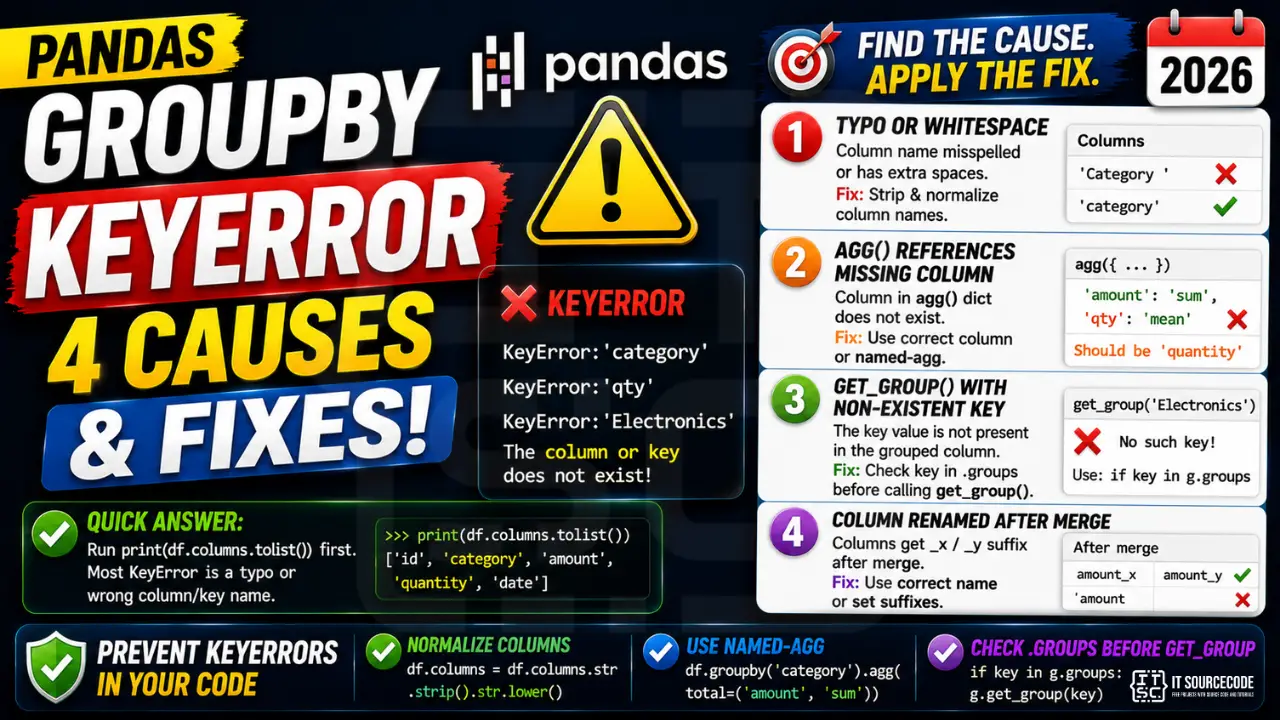
📌 Quick answer: Run print(df.columns.tolist()) before the groupby. 90% of pandas groupby KeyError is a typo or whitespace mismatch in the column name. The other 10% is calling .get_group(key) with a value that doesn’t exist in the grouped column.
Cause 1: Typo or whitespace in column name
import pandas as pd
df = pd.read_csv("sales.csv")

df.groupby("Category").sum()    # ❌ KeyError if column is "category" (lowercase)

# Diagnose
print(df.columns.tolist())   # ['ID', 'category', 'amount']
print([repr(c) for c in df.columns])   # check for trailing spaces

# Fix: strip whitespace at load time
df.columns = df.columns.str.strip().str.lower()
df.groupby("category").sum()    # ✓ works
Cause 2: agg() dict references missing column
df.groupby("category").agg({
    "amount": "sum",
    "qty": "mean"           # ❌ KeyError: 'qty' if column is named "quantity"
})

# Fix: use the named-agg pattern (Pandas 1.0+) for clearer errors
df.groupby("category").agg(
    total=("amount", "sum"),
    avg_qty=("quantity", "mean")
)
Cause 3: get_group() with non-existent key
grouped = df.groupby("category")
grouped.get_group("Electronics")    # ❌ KeyError if no row has category="Electronics"

# Safe pattern
if "Electronics" in grouped.groups:
    sub = grouped.get_group("Electronics")
else:
    sub = pd.DataFrame()

# Or iterate
for name, group in grouped:
    print(name, len(group))
Cause 4: After merge, column renamed with _x or _y suffix
orders = pd.DataFrame({"id": [1,2], "amount": [100,200], "status": ["paid","pending"]})
shipping = pd.DataFrame({"id": [1,2], "amount": [10,15], "carrier": ["DHL","LBC"]})

merged = orders.merge(shipping, on="id")
# Now columns are: id, amount_x, amount_y, status, carrier

merged.groupby("status")["amount"].sum()    # ❌ KeyError: 'amount' (renamed)
merged.groupby("status")["amount_x"].sum()  # ✓ works

# Or rename to avoid the suffix
merged = orders.merge(shipping, on="id", suffixes=("_order", "_ship"))
merged.groupby("status")["amount_order"].sum()    # ✓ clearer
Prevention: 3 Defensive Patterns
- Normalize column names on load:
df.columns = df.columns.str.strip().str.lower() - Use named-agg form for groupby aggregations (clearer error messages)
- Check .groups dict before get_group():
if key in g.groups: g.get_group(key)
Related Guides
Quick step-by-step summary (click to expand)
- Verify the groupby column exists. Print df.columns to confirm the column name matches exactly, including case and whitespace.
- Strip whitespace from column names. df.columns = df.columns.str.strip() removes trailing spaces from CSV imports.
- Drop rows with NaN in group column. Use df.dropna(subset=[“group_col”]).groupby(“group_col”) to avoid NaN grouping errors.
- Test with df.head() first. Run the groupby on df.head(20) to confirm arguments are valid before running on the full DataFrame.
Frequently Asked Questions
Pandas KeyError patterns
KeyError in pandas fires when you access a column, index label, or row that does not exist. Because pandas uses labels (not just positions), a KeyError on df["column_name"] means the column string literally is not in df.columns.
Common triggers
- Column not in DataFrame. Whitespace, case, or typo in the column name. Print df.columns.tolist() to see the actual names.
- Index label not present. df.loc[label] fails if label is not in df.index.
- Renamed on load. read_csv may rename columns if header parsing was wrong.
- MultiIndex access. df.loc[key] on MultiIndex needs a tuple, not a scalar.
- Merged column disappeared. After merge, only the join key remains as one column — the right-side extra columns get suffixed (_x, _y).
Diagnostic pattern
# BAD — whitespace in column name
import pandas as pd
df = pd.read_csv("data.csv")
print(df["price"])  # KeyError if actual name is " price" or "Price"

# GOOD — inspect columns first
print(df.columns.tolist())  # ['name', ' price', 'quantity']

# Normalize names on load
df.columns = df.columns.str.strip().str.lower()
print(df["price"])  # now works
Best practices
- Normalize column names on load. Strip, lower, replace spaces with underscores.
- Use df.get(“col”). Returns None instead of raising, similar to dict.get.
- Check with “col in df.columns” before accessing.
- Use assert on expected columns. Fails fast in data pipelines.
Official documentation
Why does df.groupby raise KeyError on a column I can see?
Whitespace or case mismatch. CSVs often have trailing spaces in column names. Print df.columns.tolist() and [repr(c) for c in df.columns] to see the actual strings. Normalize at load: df.columns = df.columns.str.strip().str.lower().
How do I safely call get_group() when the key might not exist?
Check the .groups dict first: if key in grouped.groups: sub = grouped.get_group(key) else: sub = pd.DataFrame(). Or iterate with ‘for name, group in grouped’ if you don’t need a specific key.
Why does my agg dict cause KeyError after merge?
Merge renames overlapping columns with _x and _y suffixes by default. Your “amount” may now be “amount_x” and “amount_y”. Either reference the suffixed names or use suffixes=(‘_order’,’_ship’) in the merge for clearer names.
Should I use named-agg or dict-agg?
Named-agg (Pandas 1.0+): df.groupby(‘cat’).agg(total=(‘amount’,’sum’)). Clearer error messages, controlled output column names, no MultiIndex columns. Use named-agg for new code; dict-agg is legacy.
How do I groupby multiple columns?
Pass a list: df.groupby([“country”, “city”]).sum(). To access a specific group later: grouped.get_group((“PH”, “Manila”)) with a tuple. To flatten the MultiIndex result: .reset_index().

Angel Jude Suarez
Full-Stack Developer at PIES IT Solution
Focuses on Python development, machine learning, and AI integration. Has built production AI systems including OpenAI Whisper integration for medical transcription and GPT-4o-powered diagnosis assistance. Strong background in pandas, scikit-learn, and TensorFlow.
Expertise: Python · PHP · Java · VB.NET · ASP.NET · Machine Learning · AI Integration · OpenCV · Django · CodeIgniter
· View all posts by Angel Jude Suarez →