
Polars is the fast Rust-powered DataFrame library that has been replacing pandas in 2026 data pipelines. If your script raises ModuleNotFoundError: No module named ‘polars’, the fix is one pip command, but you should know which build to install for your CPU and how to enable optional features.
Two builds available:polars for modern CPUs (AVX2 / x86-64-v3), or polars-lts-cpu for older CPUs (pre-2013) and ARM emulation. Pick the right one or you will get a SIGILL crash before the import even errors.
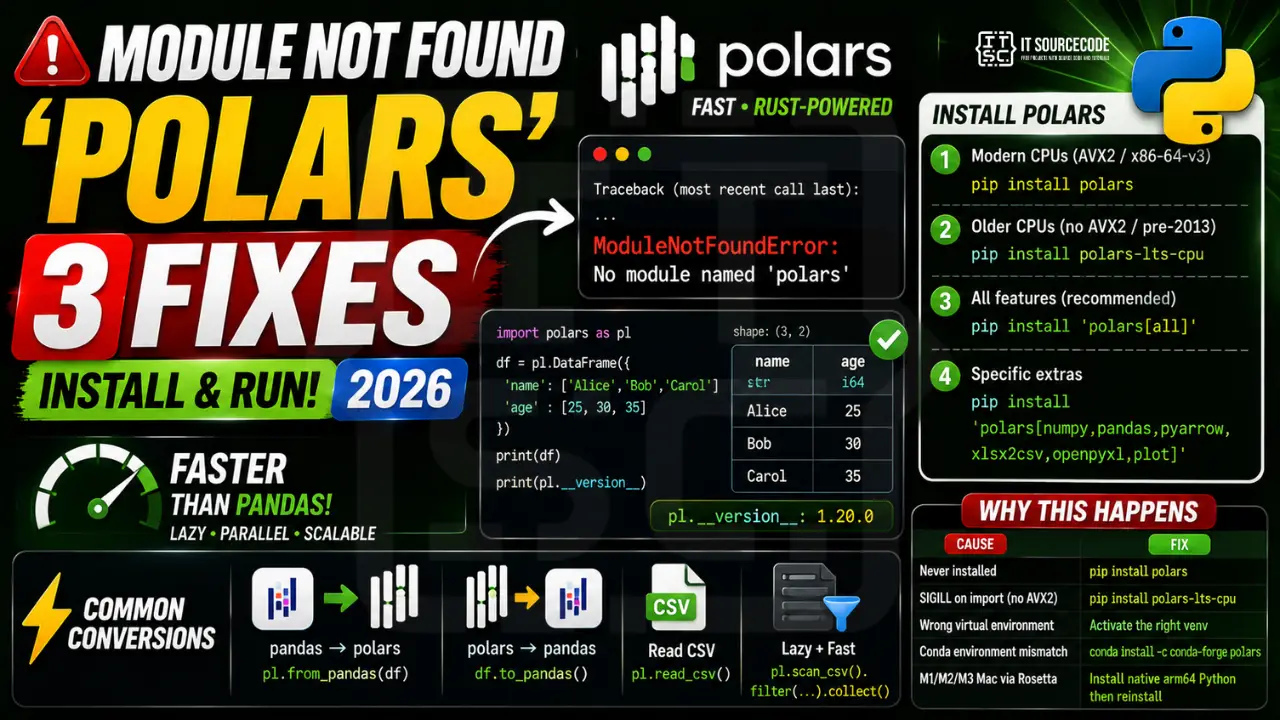
Step 1: Install polars
# Modern CPUs (most laptops 2014+):
pip install polars

# Older CPUs or VMs with no AVX2:
pip install polars-lts-cpu

# With all optional features (Excel, Parquet, async, plotting):
pip install 'polars[all]'

# Specific extras:
pip install 'polars[numpy,pandas,pyarrow,xlsx2csv,openpyxl,plot]'
Step 2: Verify the install
import polars as pl

df = pl.DataFrame({
    'name': ['Alice', 'Bob', 'Carol'],
    'age': [25, 30, 35],
})
print(df)
print(pl.__version__)
Step 3: Common quick conversions
import pandas as pd
import polars as pl

# pandas DataFrame -> polars
pl_df = pl.from_pandas(pandas_df)

# polars -> pandas (uses Arrow zero-copy when possible)
pandas_df = pl_df.to_pandas()

# Read CSV (much faster than pandas on large files)
pl.read_csv('big_file.csv')

# Lazy mode (streaming, lazy query optimization)
pl.scan_csv('big_file.csv').filter(pl.col('age') > 30).collect()
Why this error happens
| Cause | Fix |
|---|---|
| Never installed | pip install polars |
| SIGILL on import (no AVX2) | pip uninstall polars then pip install polars-lts-cpu |
| Wrong venv | Activate the right venv first |
| Conda env mismatch | conda install -c conda-forge polars |
| M1/M2/M3 Mac via Rosetta | Install native arm64 Python then reinstall |
Common polars install pitfalls
- SIGILL (Illegal instruction) on import: your CPU lacks AVX2 (common on 2013-and-older CPUs, WSL2 without passthrough, some Docker images). Fix: pip install polars-lts-cpu instead of polars.
- M1/M2/M3 Mac errors: usually caused by running Python under Rosetta. Use native arm64 Python from python.org.
- Old pip version: polars requires pip 22+. Run
python -m pip install --upgrade pipfirst. - Frozen conda base env: create a fresh environment.
conda create -n pl python=3.12then install. - Corporate proxy blocks PyPI wheel: use
--index-urlpointing to your mirror or usepip downloadfrom a machine that has access.
Polars vs pandas: when to pick which
| Situation | Pick |
|---|---|
| Files under 100 MB, prototyping | pandas , smaller mental model |
| Files over 1 GB, group-by heavy | polars , 5-30x faster |
| Team already knows pandas | pandas , cost of switching high |
| Cloud pipeline needing memory efficiency | polars , lazy mode + streaming |
| Need scikit-learn or statsmodels compatibility | pandas , better ecosystem support |
Real-world example: streaming a large CSV
import polars as pl

# lazy mode: nothing runs until .collect() or .sink_parquet()
q = (
    pl.scan_csv("orders_2026.csv")            # 5 GB file
    .filter(pl.col("amount") > 1000)
    .group_by("region")
    .agg([
        pl.col("amount").sum().alias("total"),
        pl.col("order_id").n_unique().alias("orders"),
    ])
    .sort("total", descending=True)
)

# Streaming execution keeps memory usage low
result = q.collect(streaming=True)
print(result)
Verify install worked
python -c "import polars as pl; print(pl.__version__)"
# Expected output: 0.20.x or 1.x
polars data types cheat sheet
Polars uses Arrow-backed types under the hood. Knowing them saves memory and speeds up joins:
| Type | Use for | Notes |
|---|---|---|
| pl.Int64 | large IDs, counts | default int type |
| pl.Int32 | smaller counts | half the memory of Int64 |
| pl.Utf8 | strings | variable-length, UTF-8 encoded |
| pl.Categorical | low-cardinality strings (country, status) | 3-10x memory savings vs Utf8 |
| pl.Datetime | timestamps | ns precision, timezone-aware |
| pl.Struct | nested JSON | access with .struct.field() |
Reading Parquet with polars
Parquet is the preferred format for polars , column-selective reads, compressed on disk, native Arrow:
import polars as pl

# Read all columns
df = pl.read_parquet("orders.parquet")

# Column pruning: only load 2 columns from a 100-column file (huge speed-up)
df = pl.read_parquet("orders.parquet", columns=["order_id", "amount"])

# Predicate pushdown: filter at scan time
df = (
    pl.scan_parquet("orders.parquet")
    .filter(pl.col("region") == "PH")
    .select(["order_id", "amount"])
    .collect()
)

# Write back
df.write_parquet("filtered.parquet", compression="zstd")
Verify polars import works
python -c "import polars as pl; print(pl.__version__); pl.DataFrame({'a':[1,2,3]}).head()"
# Expected: version prints, then a small table renders
Converting between polars and pandas
You often need to hand data between the two libraries. The conversions are cheap when the schema is simple:
import polars as pl
import pandas as pd

# polars to pandas
pl_df = pl.DataFrame({"a": [1, 2, 3], "b": ["x", "y", "z"]})
pd_df = pl_df.to_pandas()

# pandas to polars
pd_df = pd.DataFrame({"a": [1, 2, 3], "b": ["x", "y", "z"]})
pl_df = pl.from_pandas(pd_df)

# NumPy round-trip
import numpy as np
arr = pl.Series([1, 2, 3]).to_numpy()
back = pl.Series(arr)
Polars in Jupyter Notebook
Polars renders as a compact HTML table in Jupyter by default. To show more rows or configure the display:
import polars as pl

# Show more rows in the default output
pl.Config.set_tbl_rows(100)

# Show more columns
pl.Config.set_tbl_cols(20)

# Wider column width
pl.Config.set_tbl_width_chars(200)
When polars is the wrong tool
Some situations still favor pandas or another tool entirely:
- You are teaching a beginner , pandas has better learning resources.
- You need seaborn or statsmodels , those expect pandas objects.
- Your team already has years of pandas code , the switching cost is real.
- Data fits in a spreadsheet , Excel or Google Sheets is often the honest answer.
Official documentation
Quick step-by-step summary (click to expand)
- Verify Python version is 3.9 or newer. Run python –version. polars requires Python 3.9+.
- Install polars. Run uv pip install polars (recommended) or pip install polars.
- Install polars-lts-cpu for older hardware. If your CPU lacks AVX2 support, install polars-lts-cpu instead: uv pip install polars-lts-cpu.
- Verify with import test. Run python -c “import polars as pl; print(pl.__version__)” to confirm.
Frequently Asked Questions
Is polars faster than pandas in 2026?
Yes, often 5-30x on group-by, joins, and aggregations on dataframes over 1 million rows. Polars is multithreaded by default, uses Apache Arrow memory, and has a query optimizer. For tiny dataframes under 10k rows, pandas can be comparable or slightly faster due to overhead.
Should I use polars or polars-lts-cpu?
Use polars on any laptop or server from 2014 or later (Haswell+) with AVX2 support. Use polars-lts-cpu on older CPUs, in Docker containers without AVX2 passthrough, or if you get “Illegal instruction” on import. Check with: cat /proc/cpuinfo | grep avx2 (Linux) or sysctl -n machdep.cpu.features (Mac).
Can I use polars with Jupyter Notebook?
Yes. Install in your notebook: !pip install polars. Polars DataFrames render as HTML tables in Jupyter automatically. For larger displays, use pl.Config.set_tbl_rows(100) to show more rows.
Does polars support reading Excel files?
Yes, with extras: pip install ‘polars[xlsx2csv,openpyxl,calamine]’. Then pl.read_excel(‘file.xlsx’). For large Excel files, calamine is the fastest engine.
Can I mix polars and pandas in the same script?
Yes. Convert with pl.from_pandas(df) and pl_df.to_pandas(). Conversions use Arrow zero-copy when dtypes allow, so memory cost is minimal. Common pattern: load + transform with polars, hand off to a pandas-based library (scikit-learn, statsmodels) for the final step.

Adrian Mercurio
Full-Stack Developer at PIES IT Solution
Specializes in building complete capstone projects with full documentation. Strong background in PHP/MySQL development and database design. Has personally built and tested over 30 capstone-ready projects with ER diagrams, DFDs, and chapter-by-chapter thesis documentation.
Expertise: PHP · Laravel · Database Design · Capstone Projects · C# · C · C++ · Python · AI Projects
· View all posts by Adrian Mercurio →