
LangGraph is LangChain’s graph-based agent orchestration library, now the default way to build multi-agent AI systems in 2026. If you see ModuleNotFoundError: No module named ‘langgraph’, you need to install the package separately from langchain itself. Here is the full setup with checkpointer and LangSmith integration.
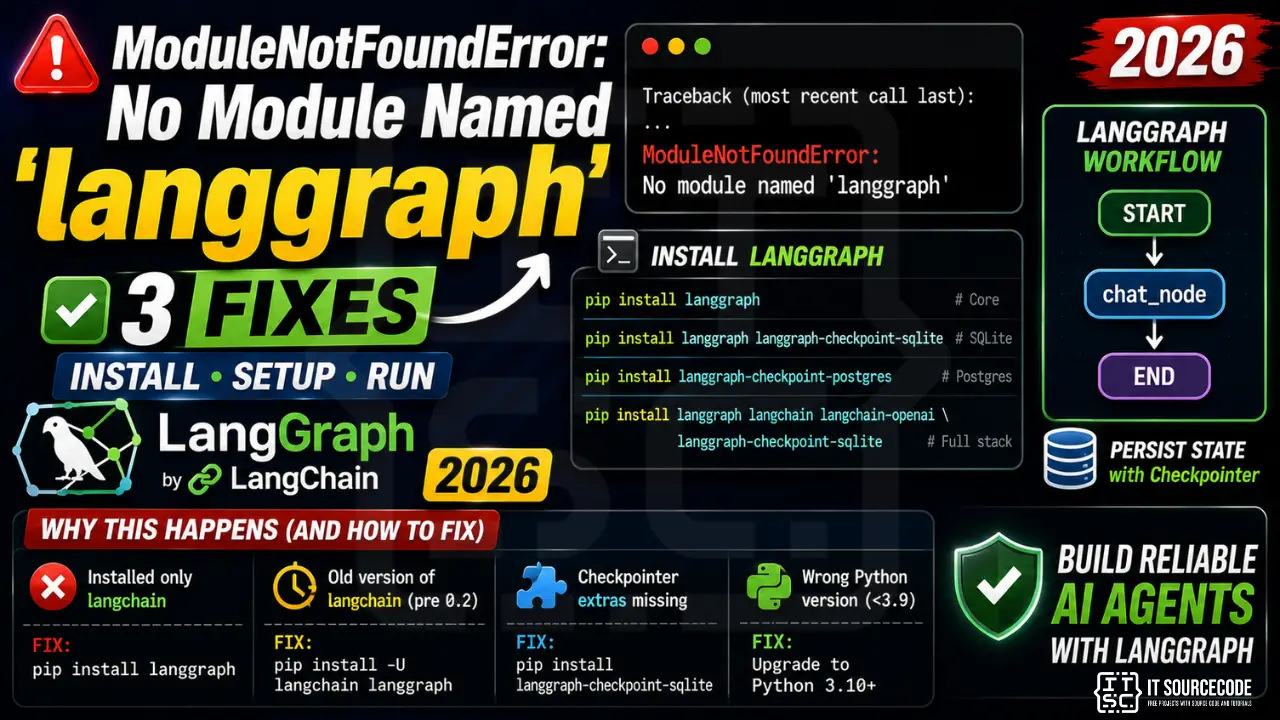
Step 1: Install langgraph
pip install langgraph

# With persistence (SQLite checkpointer):
pip install langgraph langgraph-checkpoint-sqlite

# With Postgres checkpointer:
pip install langgraph langgraph-checkpoint-postgres

# Full stack (most production deployments):
pip install langgraph langchain langchain-openai langgraph-checkpoint-sqlite
Step 2: Minimal agent example
from langgraph.graph import StateGraph, START, END
from typing import TypedDict

class State(TypedDict):
    messages: list

def chat_node(state):
    state['messages'].append("Hello from chat_node!")
    return state

workflow = StateGraph(State)
workflow.add_node("chat", chat_node)
workflow.add_edge(START, "chat")
workflow.add_edge("chat", END)

app = workflow.compile()
result = app.invoke({"messages": []})
print(result)
Step 3: Add checkpointer for state persistence
from langgraph.checkpoint.sqlite import SqliteSaver

memory = SqliteSaver.from_conn_string(":memory:")  # or "sqlite:///state.db"
app = workflow.compile(checkpointer=memory)

config = {"configurable": {"thread_id": "user-123"}}
app.invoke({"messages": []}, config=config)
# State persists across invocations under thread_id
Why this error happens
| Cause | Fix |
|---|---|
| Installed only langchain, expecting langgraph included | pip install langgraph separately |
| Old version of langchain (pre 0.2) | pip install -U langchain langgraph |
| Checkpointer extras missing | pip install langgraph-checkpoint-sqlite |
| Wrong Python version (under 3.9) | Upgrade to Python 3.10+ |
Quick step-by-step summary (click to expand)
- Activate the correct virtual environment. Ensure you are in the venv where you want LangGraph installed.
- Install langgraph and dependencies. Run uv pip install langgraph. This pulls in langchain-core and other required packages.
- Install checkpointer for stateful graphs. For persistence, also install uv pip install langgraph-checkpoint-sqlite or langgraph-checkpoint-postgres.
- Verify with import test. Run python -c “from langgraph.graph import StateGraph” to confirm the module loads.
Diagnostic checklist for “No module named ‘langgraph'”
- Verify pip install target. Run
pip show langgraph— if not installed, runpip install langgraph. - Check the active Python interpreter.
which python(mac/Linux) orwhere python(Windows). Both pip and python must point to the same environment. - Check virtual environment activation. If you use venv/conda, activate before installing:
source .venv/bin/activate. - Rule out uppercase/lowercase. Python imports are case-sensitive:
import PyPDF2notimport pypdf2. - Rule out the pip-vs-package-name mismatch. Some packages install under a different name than you import (e.g.
pip install beautifulsoup4→import bs4).
Modern install for LLM frameworks
# 2026 recommended workflow — uv is fastest
pip install uv
uv pip install langgraph

# Or classic pip
pip install langgraph

# With extras for LLM providers
pip install "langgraph[openai,anthropic]"
Common “No module named ‘langgraph'” causes
- Version pinning conflict. LLM libraries update fast —
pip install --upgrade langgraphif you saw the module before. - Multiple Python versions. LLM tutorials often use Python 3.11 or 3.12. Verify
python --versionmatches. - Notebook kernel. Jupyter picks a different kernel than pip installs to. Use
%pip install langgraphinside the notebook. - WSL / Docker paths. Install in the same environment as your Python — not on the host if you run Python inside WSL.
Working code example
# Verify install
import langgraph
print(langgraph.__version__)

# Basic usage skeleton
# (adapt to your specific langgraph version)
Best practices
- Use a virtual environment for every LLM project. Dependencies overlap and pin conflicts are common.
- Pin your versions in
requirements.txtorpyproject.toml. LLM libraries move fast. - Consider uv or Poetry. Modern package managers handle dep resolution far better than pip alone.
Official documentation
Frequently Asked Questions
What is the difference between langchain and langgraph?
LangChain provides the building blocks (LLM wrappers, retrievers, prompts, tools). LangGraph adds the orchestration layer for multi-step, multi-agent systems using a directed graph of nodes. Use LangChain alone for simple chains; add LangGraph when you have loops, branching, or multiple agents.
Do I need a checkpointer to use LangGraph?
No, you can run graphs without one. But you need a checkpointer for: human-in-the-loop approval, conversation memory across turns, resume-after-crash, or time-travel debugging. SqliteSaver works for dev; PostgresSaver for production.
Can LangGraph run async?
Yes. Define async node functions and call app.ainvoke({…}, config) instead of app.invoke. All checkpointers have async equivalents (AsyncSqliteSaver, AsyncPostgresSaver). Required for FastAPI integration.
Is LangGraph free and open-source?
Yes, MIT licensed. The companion LangGraph Cloud (hosted deployment + observability) is paid SaaS but the library itself is free. Self-host with Docker for production at zero cost.
Does LangGraph work with local LLMs like Ollama?
Yes. Install pip install langchain-ollama then use ChatOllama as your LLM inside graph nodes. Great for capstone projects with no API keys or costs.

Adrian Mercurio
Full-Stack Developer at PIES IT Solution
Specializes in building complete capstone projects with full documentation. Strong background in PHP/MySQL development and database design. Has personally built and tested over 30 capstone-ready projects with ER diagrams, DFDs, and chapter-by-chapter thesis documentation.
Expertise: PHP · Laravel · Database Design · Capstone Projects · C# · C · C++ · Python · AI Projects
· View all posts by Adrian Mercurio →