
You called df.iloc[100] but the DataFrame has only 50 rows, so pandas threw IndexError: single positional indexer is out-of-bounds. Note: .iloc raises IndexError (position-based), while .loc raises KeyError (label-based). Knowing which is which saves debugging time.
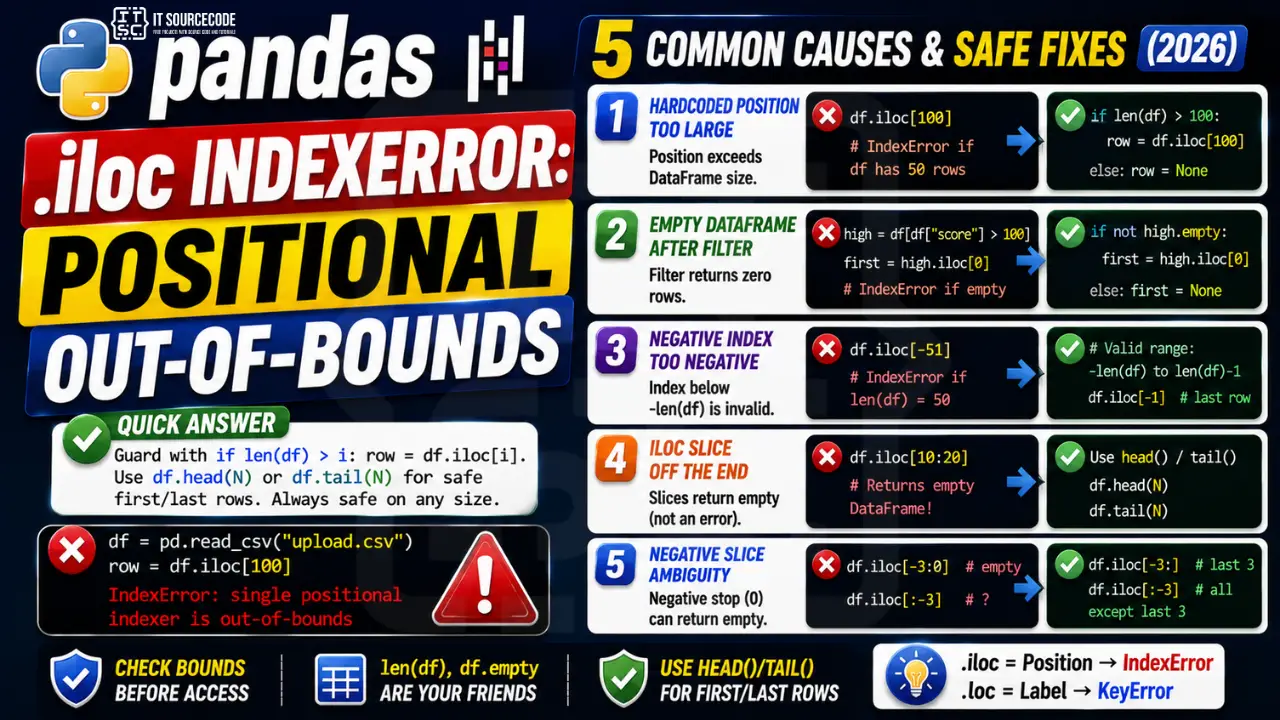
📌 Quick answer: Guard with if len(df) > i: row = df.iloc[i]. For “last N rows” use df.tail(N). For “first N rows” use df.head(N). Both are safe on any size DataFrame, including empty ones.
Cause 1: Hardcoded position larger than DataFrame
You wrote df.iloc[100] in production code; user uploaded a 50-row CSV; crash.
df = pd.read_csv("upload.csv")
row = df.iloc[100]    # ❌ IndexError if df has 50 rows

# Safe
if len(df) > 100:
    row = df.iloc[100]
else:
    row = None
Cause 2: Empty DataFrame after filter
Filter returned zero rows, df.iloc[0] now fails.
high = df[df["score"] > 100]
first = high.iloc[0]    # ❌ if no row has score > 100

# Safe
if not high.empty:
    first = high.iloc[0]
Cause 3: Negative index too negative
df.iloc[-100] on a 50-row DataFrame fails.
df.iloc[-1]    # ✓ last row
df.iloc[-50]   # ✓ first row (wraps)
df.iloc[-51]   # ❌ IndexError
Cause 4: iloc slice off the end (does NOT error)
df.iloc[10:20] on a 5-row DataFrame returns empty, NOT an error. Surprising if you expected an error.
small = pd.DataFrame({"a": [1, 2, 3]})
small.iloc[10:20]    # ✓ returns empty DataFrame, no error
small.iloc[10]       # ❌ raises IndexError

# Slice semantics differ from scalar semantics in pandas
Cause 5: iloc with negative slice and ambiguity
df.iloc[-3:0] returns empty (because -3 > 0 in slice terms, even though -3 means “row count minus 3” in normal indexing).
df.iloc[-3:]      # ✓ last 3 rows
df.iloc[-3:0]     # ⚠ empty (slice stop=0 means before first row)
df.iloc[:-3]      # ✓ everything except last 3
Prevention
- Use .head(N) and .tail(N) for safe top/bottom access
- Always check
not df.emptyorlen(df) > ibefore scalar iloc - Prefer slices over scalars:
df.iloc[0:1]returns empty on empty df instead of erroring - Don’t mix .iloc with .loc semantics:
.ilocis position,.locis label
Related Guides
- List index out of range (full guide)
- String index out of range
- All IndexError fixes
- Python Tutorial hub
Why IndexError happens
pandas IndexError usually comes from positional access with iloc going beyond the DataFrame’s row or column count.
Common triggers
- Off-by-one.
my_list[len(my_list)]fails — uselen(my_list) - 1. - Empty container.
my_list[0]fails when the list is empty. - Wrong data source. CSV had fewer columns than expected.
- Loop range wrong.
for i in range(len(my_list) + 1)— off-by-one. - API returned empty result. Unhandled empty response.
Diagnostic pattern
# BAD — accessing first element without check
def get_first(items):
    return items[0]     # IndexError if items is empty

# GOOD — guard for empty
def get_first(items):
    if not items:
        return None
    return items[0]

# BETTER — use Optional and let caller handle
from typing import Optional, Sequence, TypeVar
T = TypeVar("T")

def get_first(items: Sequence[T]) -> Optional[T]:
    return items[0] if items else None

# For pandas, use .iloc with .empty check
import pandas as pd
def first_row(df: pd.DataFrame) -> Optional[dict]:
    if df.empty:
        return None
    return df.iloc[0].to_dict()

# For enumerate-based loops, this is safe
for i, item in enumerate(items):
    print(i, item)      # never IndexError

# Never write: for i in range(len(items) + 1)
Best practices
- Prefer enumerate over range(len()). Never off-by-one.
- Guard empty containers. Return None or default before accessing.
- Use slicing.
items[:5]is safe even if items has fewer than 5 elements. - Use type hints with Optional. Communicates that the value may not exist.
- Use pytest with edge cases. Test empty lists, single-element lists, off-by-one boundaries.
Official documentation
iloc vs loc: when to use each
Pandas gives you two ways to index a DataFrame: iloc for positional indexing and loc for label-based indexing. Mixing them up is the single most common source of IndexError and KeyError bugs in data pipelines. Here is how to pick the right one.
Use iloc when…
You want to select by row number or column number, regardless of what index values or column names your DataFrame has. Example: df.iloc[0] always returns the first row. df.iloc[-1] always returns the last row. iloc is purely positional and follows Python list conventions.
Use loc when…
You want to select by index label or column name. Example: df.loc[100] returns the row whose index is labeled 100 (not the 101st row). df.loc['2026-01-01'] works with datetime indexes. loc is label-based and does not care about position.
Common causes of iloc IndexError
Even when you know the difference between iloc and loc, iloc can still throw IndexError in specific situations. Here are the four causes I see most.
- Filtering with .iloc[boolean_series]. iloc expects positional indices, not boolean masks. Use
df.loc[condition]ordf[condition]instead for boolean filtering. - Chained assignment on a filtered subset. Filtering a DataFrame returns a view or copy in unpredictable ways. Use
.locfor both selection and assignment to avoid SettingWithCopyWarning that can lead to silent failures. - Empty DataFrame after filtering. If your filter matched zero rows,
df.iloc[0]raises IndexError. Always checklen(df) > 0before accessing the first row. - Negative index beyond DataFrame length.
df.iloc[-1]is safe.df.iloc[-100]when there are only 50 rows raises IndexError. Bounds-check large negative indices.
My rule of thumb: use loc by default, drop to iloc only when you need the first row, last row, or a specific numeric slice regardless of index. This convention avoids most iloc IndexError bugs in my production pandas code.
Quick step-by-step summary (click to expand)
- Check DataFrame shape before iloc access. Print df.shape or len(df) to confirm the DataFrame has enough rows for your positional index.
- Add length check before positional access. Use if len(df) greater than 0: first = df.iloc[0] to prevent IndexError on empty results.
- Use head() or tail() for safer slicing. df.head(1) returns empty DataFrame on empty input instead of raising IndexError.
- Use boolean masks with loc instead of iloc. For conditional access, df.loc[mask] handles empty results gracefully. iloc does not accept boolean masks.
Frequently Asked Questions
What’s the difference between iloc IndexError and loc KeyError?
iloc is position-based and raises IndexError when the position is out of range. loc is label-based and raises KeyError when the label doesn’t exist. Same DataFrame, different exception types depending on which accessor.
Why does df.iloc[100] error but df.iloc[10:20] doesn’t?
Scalar vs slice semantics. Scalar iloc raises IndexError when out of bounds. Slice iloc silently clips to the available range and returns whatever’s there (often empty). This is consistent with Python list slicing.
How do I safely access the first or last row of a DataFrame?
df.head(1) for first row (returns empty DataFrame if empty). df.tail(1) for last row. df.iloc[0] only if you’ve already verified df is non-empty.
Can negative iloc indexes go too negative?
Yes. df.iloc[-N] works for N up to len(df). df.iloc[-len(df)-1] raises IndexError. df.iloc[-N:] (slice form) clips safely and returns the last N rows or as many as exist.
Should I use iloc or loc?
iloc when you want ‘the Nth row by position regardless of label’. loc when you want ‘the row with this specific index label’. iloc is safer in pipelines because position doesn’t depend on the index being intact.

Adrian Mercurio
Full-Stack Developer at PIES IT Solution
Specializes in building complete capstone projects with full documentation. Strong background in PHP/MySQL development and database design. Has personally built and tested over 30 capstone-ready projects with ER diagrams, DFDs, and chapter-by-chapter thesis documentation.
Expertise: PHP · Laravel · Database Design · Capstone Projects · C# · C · C++ · Python · AI Projects
· View all posts by Adrian Mercurio →