
You’re calling a function that returns a tuple, you grab the third value with result[2], and Python throws IndexError: tuple index out of range. Sound familiar? This is the most common Python error BSIT students hit when they start writing functions that return multiple values.
Tuples behave a lot like lists for indexing, but there’s one big twist: tuples are immutable. You can’t fix a too-short tuple by appending to it like you would with a list. That changes how you debug and prevent this error. This guide covers all 6 common causes with working code examples and prevention rules tailored for capstone-stage Python developers.
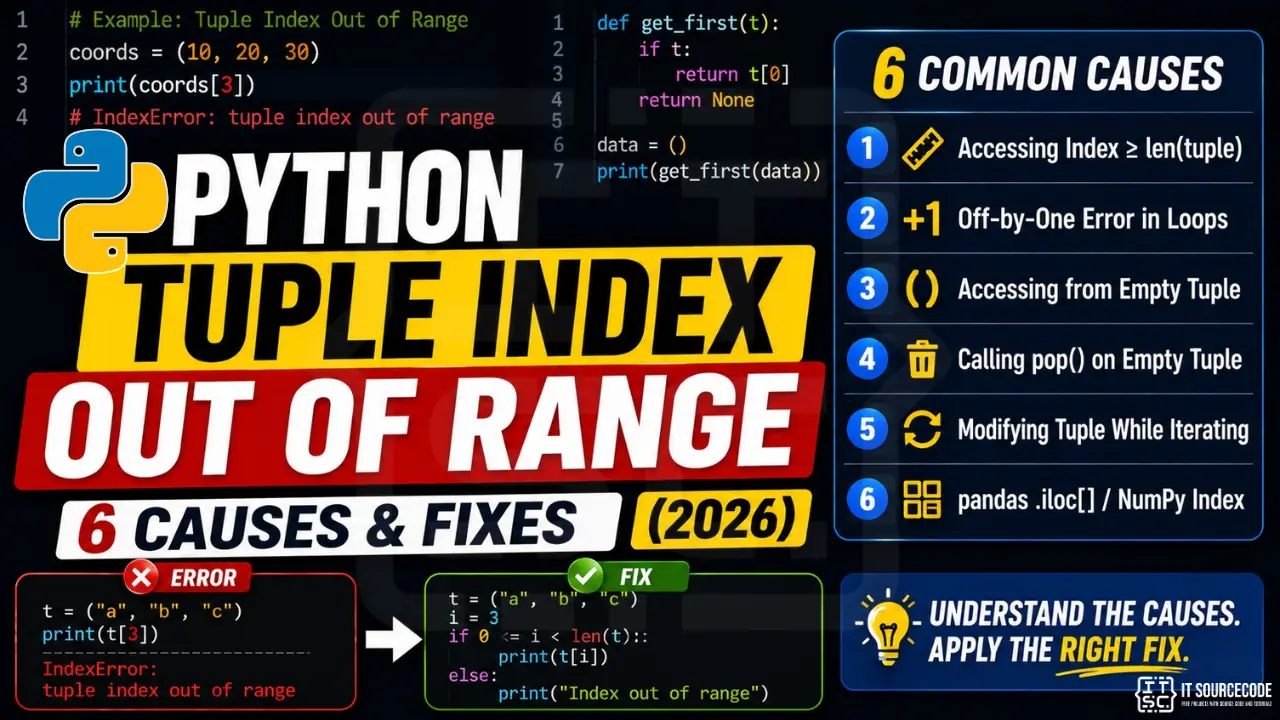
📌 Quick answer: IndexError: tuple index out of range means you’re trying to access a tuple element using an index number that doesn’t exist. Tuples are zero-indexed like lists, so a tuple with 3 items has valid indexes 0, 1, 2. The most common cause is unpacking a function return value, e.g., writing a, b, c = my_func() when my_func() only returns 2 values. The fix: print the tuple length with len(t) first, use safe unpacking with defaults, and prefer for item in t over manual index loops.
What “Tuple Index Out of Range” Actually Means
A tuple is an ordered, immutable sequence in Python. You create one with parentheses: colors = ("red", "green", "blue"). Indexing works exactly like a list, the first item is at position 0, the last at len(tuple) - 1. When you ask for an index that’s equal to or greater than the tuple’s length, Python raises IndexError: tuple index out of range.
Here’s the simplest example:
colors = ("red", "green", "blue")   # length = 3, valid indexes: 0, 1, 2
print(colors[3])   # ❌ IndexError: tuple index out of range
The tuple has 3 items. Asking for colors[3] looks for the 4th item, which doesn’t exist. And because tuples are immutable, you can’t simply colors.append("yellow") the way you would with a list, that method doesn’t exist on tuples at all. If a tuple is too short, you must either build a new tuple or fix the source that produced it.
Cause #1: Accessing Index ≥ len(tuple)
The most basic version. It happens when you hardcode an index the tuple doesn’t have, or compute an index that exceeds the actual length.
student = ("Maria", 21, "BSIT")
print(student[3])   # ❌ IndexError: only 3 items, max index is 2
The fix: always verify the index is valid before accessing:
student = ("Maria", 21, "BSIT")
i = 3

if i < len(student):
    print(student[i])
else:
    print(f"Index {i} is out of range. Tuple has {len(student)} items.")
Or use a safer helper that returns a default instead of raising:
def safe_get(t, i, default=None):
    return t[i] if 0 <= i < len(t) else default

print(safe_get(student, 3, "N/A"))   # prints: N/A
Cause #2: Tuple Unpacking Too Few Values
This is the #1 way capstone students hit IndexError: tuple index out of range in real projects. You unpack a tuple into variables, but the number on the left doesn’t match the number on the right:
# ❌ Wrong: 3 names on the left, only 2 values on the right
a, b, c = (1, 2)
# ValueError: not enough values to unpack (expected 3, got 2)
Strictly speaking, plain unpacking raises ValueError, not IndexError. But the matching IndexError pattern shows up the moment you index into the returned tuple instead of unpacking:
def get_user():
    # Only returns name and age: no email
    return ("Maria", 21)

result = get_user()
name  = result[0]
age   = result[1]
email = result[2]   # ❌ IndexError: tuple index out of range
This bites hardest when you change a function to return fewer values but forget to update every caller.
The fix, use named unpacking with a length check, or use a dictionary:
# ✅ Unpack with default using * (extras absorbed into a list)
def get_user():
    return ("Maria", 21)

name, age, *extras = get_user()
email = extras[0] if extras else None   # safe: extras is [] when missing

# ✅ Even better: return a dict so missing keys are obvious
def get_user():
    return {"name": "Maria", "age": 21}

user = get_user()
email = user.get("email")   # returns None instead of raising
For BSIT capstone work, dictionaries or collections.namedtuple are almost always safer than raw tuples for function returns. Use a tuple only when the size is fixed and obvious (like a 2D coordinate (x, y)).
Cause #3: Looping Over Tuple by Index Instead of Value
Same off-by-one trap as lists. You loop with range(len(t) + 1) by mistake, or write a manual index counter that overshoots:
grades = (85, 90, 78, 92)

# ❌ Wrong: len() + 1 goes one index too far
for i in range(len(grades) + 1):
    print(grades[i])   # IndexError on the last iteration

# ❌ Also wrong: manual counter that doesn't stop
i = 0
while i <= len(grades):     # should be <, not <=
    print(grades[i])
    i += 1
The fix, iterate directly:
# ✅ Direct iteration: no indexes, no off-by-one possible
for grade in grades:
    print(grade)

# ✅ When you need both index AND value, use enumerate()
for i, grade in enumerate(grades):
    print(f"Subject {i+1}: {grade}")
enumerate() works on tuples exactly the same as on lists. Use it whenever you need the index.
Cause #4: Empty Tuple Access
An empty tuple is written as (). Accessing any index, even [0], raises IndexError:
filters = ()           # empty tuple
first = filters[0]     # ❌ IndexError: tuple index out of range
This happens often when a function conditionally returns a tuple, and sometimes returns () when there’s nothing to report:
def find_matches(query):
    if not query:
        return ()   # empty tuple when there's nothing to search
    return ("match1", "match2")

results = find_matches("")
top = results[0]     # ❌ IndexError when query was empty
The fix, truthiness check before accessing:
# ✅ Empty tuple is falsy, so this works
if results:
    top = results[0]
else:
    top = None

# ✅ Cleaner with next() and iter()
top = next(iter(results), None)
Cause #5: Function Returning Variable-Length Tuple
This is the most painful capstone bug. A function returns a tuple whose length depends on input, and you forget the case where it’s shorter than expected:
def parse_name(full_name):
    """Returns (first, middle, last) :  but middle is missing for 2-word names."""
    return tuple(full_name.split())

first, middle, last = parse_name("Maria Santos")
# ❌ ValueError: not enough values to unpack (expected 3, got 2)

# Or, if you index instead of unpack:
parts = parse_name("Maria Santos")
last_name = parts[2]   # ❌ IndexError: tuple index out of range
You’ll see this everywhere, split CSV lines, regex groups, JSON parsing, database row tuples. The function “usually” returns the same number of items, until one input breaks the pattern.
The fix, design the function to ALWAYS return a fixed shape, or document and handle the variable case:
# ✅ Option A: always return a fixed shape, use None for missing
def parse_name(full_name):
    parts = full_name.split()
    first  = parts[0] if len(parts) > 0 else None
    middle = parts[1] if len(parts) > 2 else None   # only middle if 3+ parts
    last   = parts[-1] if len(parts) > 1 else None
    return (first, middle, last)

first, middle, last = parse_name("Maria Santos")   # ✅ ("Maria", None, "Santos")

# ✅ Option B: use star unpacking to absorb extras
first, *middles, last = parse_name("Maria Reyes Santos").split()
# first="Maria", middles=["Reyes"], last="Santos"

# ✅ Option C: return a namedtuple for self-documenting code
from collections import namedtuple
Name = namedtuple("Name", ["first", "middle", "last"])

def parse_name(full_name):
    parts = full_name.split()
    return Name(
        first=parts[0] if parts else None,
        middle=parts[1] if len(parts) > 2 else None,
        last=parts[-1] if len(parts) > 1 else None,
    )
For capstone projects, always design functions to return a predictable shape. A function that “usually” returns 3 values and “sometimes” returns 2 is a bug waiting to happen.
Cause #6: Nested Tuple Element Access
Tuples of tuples (a common matrix or coordinate pattern) compound the problem, you can get IndexError on the outer OR inner tuple:
matrix = (
    (1, 2, 3),
    (4, 5, 6),
)   # 2 rows × 3 columns

val = matrix[2][0]   # ❌ IndexError: only 2 rows (indexes 0, 1)
val = matrix[0][5]   # ❌ IndexError: only 3 columns (indexes 0, 1, 2)
The error message is the same in both cases, so you need to inspect which dimension blew up.
The fix, check both dimensions before accessing:
# ✅ Validate both row and column
row, col = 2, 0

if row < len(matrix) and col < len(matrix[row]):
    val = matrix[row][col]
else:
    val = None
    print(f"({row}, {col}) is out of bounds for a {len(matrix)}×{len(matrix[0])} matrix")

# ✅ Or write a safe helper for 2D access
def get_cell(grid, r, c, default=None):
    if 0 <= r < len(grid) and 0 <= c < len(grid[r]):
        return grid[r][c]
    return default
If you’re working with real matrices (not just nested tuples), use NumPy arrays, they give clearer shape-mismatch errors and are vastly faster.
Tuples vs Lists for IndexError: When to Choose Which
Both tuples and lists raise IndexError the same way, but their immutability changes how you debug and recover. Pick the right one up front and you’ll cut these errors in half.
| Situation | Use Tuple | Use List |
|---|---|---|
| Fixed-size record (coordinate, RGB color) | ✅ Yes | ❌ Overkill |
| Function returning multiple named values | ⚠️ Use namedtuple | ❌ Use dict instead |
| Growing collection (search results, queue) | ❌ Can’t grow | ✅ Yes |
| Dictionary key | ✅ Hashable | ❌ Not hashable |
| Data parsed from external source (CSV, API) | ⚠️ Variable-length risk | ✅ Safer with checks |
Rule of thumb: if the size is fixed and known at design time, use a tuple. If the size depends on data, use a list, or better, a dict. Tuples shine for things like (latitude, longitude) where there will always be exactly 2 elements. They become dangerous when used for “return 3 things, maybe 4 things later.”
For a deeper comparison with the list error pattern, see our list index out of range fix guide.
Quick Prevention Checklist
To stop hitting tuple index out of range in future code, internalize these habits:
- Iterate directly:
for item in my_tuple:instead offor i in range(len(my_tuple)): - Use enumerate() when you need indexes:
for i, item in enumerate(my_tuple): - Truthiness-check before access:
if my_tuple: …beforemy_tuple[0] - Use star unpacking for variable-length returns:
first, *rest = my_tuple - Prefer namedtuple or dict for function returns with named fields, your IDE will autocomplete and your tests catch missing keys
- Always print
len()first when debugging: instantly clarifies whether the tuple is shorter than you expected - Treat variable-length tuples as a design smell: refactor to fixed shape or use a dict instead
When You Should Use try/except IndexError
As with lists, don’t wrap every tuple access in try/except, it hides bugs. Use it only at system boundaries where the tuple shape genuinely is unpredictable:
# ✅ Good: parsing CSV rows that might be malformed
def parse_row(row):
    try:
        return (row[0], row[1], row[2])
    except IndexError:
        return None   # log + skip malformed rows

# ❌ Bad: hides a logic bug in your own function's return shape
def get_third(t):
    try:
        return t[2]
    except IndexError:
        return 0      # silently returns 0: you'll debug this for hours
Rule of thumb: if you can prevent the error with a check (if t:, if i < len(t):, star unpacking), do that instead of catching the exception. Reserve try/except for parsing untrusted data.
Quick step-by-step summary (click to expand)
- Check tuple size before indexing. Use if len(mytuple) greater than index before any positional access.
- Unpack safely with defaults. Use starred unpacking a, b, star_rest = mytuple to handle variable-length tuples cleanly.
- Use slicing for tolerant access. mytuple[i:i+1] returns empty tuple on out-of-range instead of crashing.
- Handle empty tuples explicitly. Add if not mytuple: return default at the top of any function that accesses tuple positions.
Official documentation
Frequently Asked Questions
What does “tuple index out of range” mean in Python?
t[-4] raises the same error.Why does my function return cause “tuple index out of range”?
return ("Maria", 21) in the function but name, age, email = my_func() in the caller raises ValueError; using my_func()[2] raises IndexError. Fix: print the return value first with print(len(my_func())), then either change the function to always return the expected number of fields, or switch to a dictionary return so missing keys are explicit.How is tuple index out of range different from list index out of range?
.append() method. You must either build a new tuple (t + (new_item,)) or fix the source that produced the tuple. Lists let you grow on the fly, which is why lists are better for unknown-size collections.Can I append to a tuple to avoid this error?
append() method. You can simulate appending by creating a new tuple: new_tuple = old_tuple + (extra_item,). The trailing comma matters, (extra_item) without a comma is just parentheses around a value, not a single-item tuple. If you need to grow a collection frequently, use a list instead. If the shape genuinely needs to be fixed, fix the function that returns the tuple.Why does enumerate() help avoid tuple IndexError?
enumerate(my_tuple) hands you each index AND value together, so you never write a manual counter that can overshoot. Compare for i in range(len(t) + 1): print(t[i]) (off-by-one IndexError) vs for i, item in enumerate(t): print(i, item) (impossible to overshoot). enumerate() eliminates the entire class of “I miscalculated the loop bound” bugs.What’s the safest way to unpack a tuple of unknown length?
first, *rest = my_tuple to grab the first element and put everything else in a list, or first, *middle, last = my_tuple to grab the first and last with anything between in a list. This never raises IndexError as long as the tuple has at least 1 (or 2) elements. For totally variable-shape data, return a dictionary from your function instead, data.get("key") returns None for missing keys without raising.How is IndexError different from KeyError?
📌 Sharpen your Python skills
Once you’re past tuple errors, browse our best Python projects with source code, the best Python IDE 2026, and the full Python tutorial series.
Final Recommendation
If you take only one habit from this guide, make it this: stop using raw tuples for function returns with named fields. Use a dict or collections.namedtuple instead. Both eliminate the entire family of “function returned 2 values but I expected 3” bugs that produce IndexError: tuple index out of range at the call site.
For the remaining cases, fixed-shape data like coordinates, parsed external data, nested matrices, combine a quick bounds check with star unpacking. try/except IndexError is appropriate only at boundaries where the input shape is genuinely outside your control (CSV parsing, third-party API responses).
🎯 Your next steps:
- Audit your codebase for functions that return tuples with 3+ items, convert them to namedtuples or dicts
- Replace
range(len(t))loops with direct iteration orenumerate() - Read our sibling guide on list index out of range, the patterns transfer
- Also see string index out of range for the third member of the IndexError family
- Browse more IndexError fixes or Python tutorials
Still stuck on a specific tuple IndexError? Drop the exact error message and the function that produced it in the comments, we’ll help you redesign the return shape.

Adrian Mercurio
Full-Stack Developer at PIES IT Solution
Specializes in building complete capstone projects with full documentation. Strong background in PHP/MySQL development and database design. Has personally built and tested over 30 capstone-ready projects with ER diagrams, DFDs, and chapter-by-chapter thesis documentation.
Expertise: PHP · Laravel · Database Design · Capstone Projects · C# · C · C++ · Python · AI Projects
· View all posts by Adrian Mercurio →