
Best School Management System Project In PHP Source Code
In this post about the Best School Management System Project In PHP Source Code, I will be sharing one of my PHP projects with source code.
This PHP language code project is created using PHP and MySQLi with almost complete features from student registration to enrollment, and etc.
Online Enrollment System Philippines
One of the challenges of universities with high student populations within the Philippines is the implementation of a best School System project.
Many of those systems are not tested to handle unforeseen serious influx of user connections and technologies used aren’t best-fitted for such events.
School Management System Project In PHP Source Code
- Student Registration
- Online Student Enrollment
- Assigning of subjects to student
- Faculty Subject Loading
- Subject Scheduling
- Student Inquiry System
- Faculty Inquiry System
- Statement of Account
- Assigning of charges per course
- Billing or Cashiering system
- Settings of Defaults
- Manage user
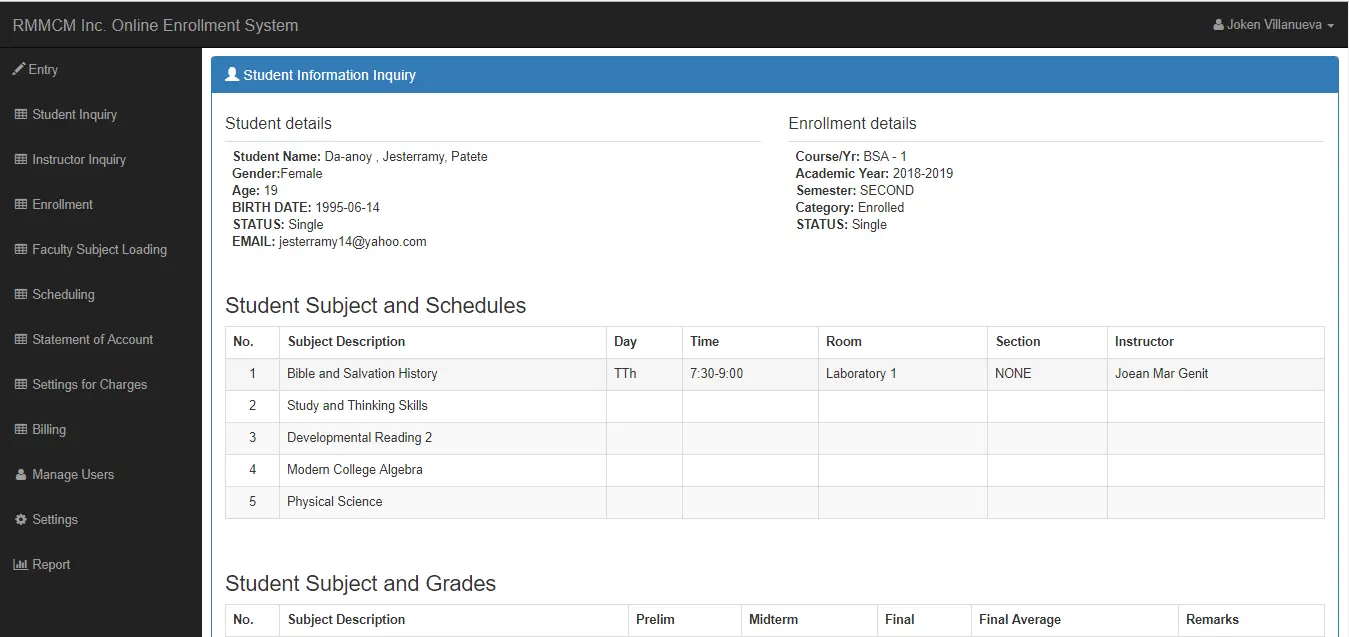
Sample Screenshots of a School Management System
Instruction to run the project with source code
To run this School Management System Project, you need to download first the database here and import it to your PHPMyAdmin. After this process, Download the full Source code below. But make sure to run a quick virus scan of this project for secure download.
Here’s the downloadable source code for this system.
To use this project, you need to log in using this user account.
Username: joken@yahoo.com
Password: j
Other Version of this System
If you want an offline enrollment System full source code 100% free. Just click the link below. Simple Enrollment System
Technology stack and requirements
To run this PHP project, you need these tools on your development machine:
- XAMPP or WAMP server. Bundles Apache, MySQL, and PHP so you can run PHP on Windows without individual installs. Free from apachefriends.org.
- PHP 8.0 or higher. Included with XAMPP. Older versions (5.x, 7.x) may work but modern PHP features improve security and performance.
- MySQL or MariaDB. Comes with XAMPP. phpMyAdmin manages the database through a browser UI.
- VS Code or PhpStorm. Free code editor with PHP syntax highlighting, IntelliSense, and debugging support.
- Web browser. Chrome, Firefox, or Edge for testing the running app.
Installing the source code
- Download the archive. Get the ZIP file from the download link on this page and extract it.
- Move to htdocs. Place the extracted folder inside C:\xampp\htdocs\ so Apache can serve it.
- Import the database. Open http://localhost/phpmyadmin, click Import, and select the .sql file included in the archive.
- Update database credentials. Open the config.php or connection.php file and set the correct database name, username, and password (default XAMPP: root / empty password).
- Run the project. Start Apache + MySQL in XAMPP, then visit http://localhost/your-project-folder/ in a browser.
Using this project for your BSIT capstone
This PHP project maps cleanly to standard BSIT capstone documentation. Suggested chapter alignment:
- Chapter 1 (Introduction). Discuss the problem the system solves in real-world context. Cite Philippine business or academic use cases where a manual process could be replaced.
- Chapter 2 (Review of Related Literature). Compare this system’s features against 5-10 similar published projects. Cite journals like IJERT or IEEE Access for academic-standard sources.
- Chapter 3 (Methodology). Include Use Case Diagram, Data Flow Diagram, Entity Relationship Diagram, and Activity Diagram covering all major workflows.
- Chapter 4 (Results and Discussion). Screenshot each module of the running system with a caption explaining what data it processes and which user role interacts with it.
- Chapter 5 (Conclusion and Recommendations). Identify features that could be added in a Version 2, such as mobile app, REST API export, or AI-powered analytics.
Modules typical of School Management System Project
- Student information. Personal info, guardian details, enrollment status, program of study.
- Enrollment / registration. Term-by-term subject selection with prerequisite checking.
- Grading system. Teacher input for quiz, exam, and project scores with weighted average.
- Report card generation. Printable grade slip and transcript of records.
- Library / borrowing (optional). Track book borrowing, return date, fine computation.
- Announcements. Post school-wide bulletins visible from the login screen.
Common enhancements for capstone review
- Online portal. Add PHP or ReactJS portal so parents and students see grades from home.
- SMS grade notification. Auto-send new-grade alerts to parent’s mobile via a service like Semaphore.
- Digital ID card. Print student ID with photo, QR code, and academic year.
- Alumni tracking. Extend the database to include post-graduation contact info.
Official documentation
Frequently Asked Questions
How does this PHP school management system work?
Modules: student enrollment, teacher/staff management, class scheduling, attendance, grade entry, report card generation, fee collection, library, transport. Session-based role separation: admin / teacher / student / parent.
What PHP and MySQL versions does this project require?
Most projects in this batch run on PHP 7.4 to PHP 8.2 with MySQL 5.7+ or MariaDB 10+. A few older projects need PHP 5.6 (deprecated, use XAMPP 7.x). To run: install XAMPP / WAMP / Laragon, extract project to htdocs, import the included .sql file via phpMyAdmin, edit the connection file (usually config.php or db_connect.php) with your DB credentials, browse to the project URL in your browser.
How do I set up the database for this PHP project?
Open phpMyAdmin (http://localhost/phpmyadmin/ on XAMPP), create a new empty database with the name specified in the project’s config.php. Click the Import tab, choose the included .sql file, click Go. Then edit config.php (or includes/connection.php) with: ‘localhost’, your MySQL username (usually ‘root’), your MySQL password (usually blank for XAMPP), and the database name.
Can I use this PHP project for a BSIT capstone or thesis?
Yes, but extend it. A bare CRUD app is too narrow for full capstone scope. Add: user roles via session checks, reports/dashboards (Chart.js + AJAX), PDF exports (TCPDF library), email notifications (PHPMailer), real domain extension (analytics, audit log, multi-branch support). Pair with Chapter 1-5 documentation matching your panel’s rubric.
Why am I getting ‘connection error’ or ‘undefined function mysqli_connect’?
Three common PHP issues: (1) Connection error: Apache + MySQL services not running in XAMPP control panel, OR database name in config.php does not match what you created in phpMyAdmin. (2) ‘undefined function mysqli_connect’: MySQL extension not enabled, in php.ini uncomment extension=mysqli (then restart Apache). (3) ‘No such file or directory’: MySQL socket path wrong, use 127.0.0.1 instead of localhost in the connection string.
Where can I find more PHP projects with source code?
Browse the PHP Projects hub for the full library (300+ vanilla PHP systems). For modern PHP MVC alternatives see Laravel Projects (74 systems) or CodeIgniter Projects (32 systems). For BSIT-focused capstone idea lists see 150 Best Capstone Project Ideas.
Related PHP Projects
- Advanced School Management System In PHP With Source Code
- School Management System Project In Laravel With Source Code
- School Management System In CodeIgniter With Source Code
- School Management System In PHP Open Source
- Car Driving School Management System In PHP With Source Code
- Hospital Management System Project In PHP With Source Code
Inquiries
If you have any questions or suggestions about this management system project, just send your inquiry using our contact page or simply leave a comment below.

Joken E. Villanueva
Founder & Lead Developer at PIES IT Solution
Founder of PIES Information Technology Solutions, a software company building production-grade applications for institutions across the Philippines. Over 8 years of hands-on full-stack development experience, currently leading the development of ClinicAI, an AI-powered clinic management platform.
Expertise: PHP · MySQL · JavaScript · AI Integration · SaaS Architecture · VB.NET · Database Design · Capstone Documentation · Java
· View all posts by Joken E. Villanueva →
What an amazing website. Thanks for this source codes, keep up the good work.
bro do you have a fix assign subject?
Fatal error: Uncaught Error: Call to undefined function mysql_connect() in C:\xampp\htdocs\phpmyreservation\main.php:13 Stack trace: #0 C:\xampp\htdocs\phpmyreservation\index.php(1): include_once() #1 {main} thrown in C:\xampp\htdocs\phpmyreservation\main.php on line 13
use “mysqli_connect(“localhost”,”root”,””,”your_db_name”);
use “mysqli_connect(“localhost”,”root”,””,”your_db_name”);
ser i have an error Problem in selecting database
Sir may i know if you have update for Subject assign ?
Thnxs..
Wow! This very helpful. Thanks for the source code. But why css files are not working?
Problem in selecting database
where is the database?
Warning: require_once(C:/xampp/htdocs\ramonsys\include\config.php): failed to open stream: No such file or directory in C:\xampp\htdocs\ramonsys\ramonsys\include\initialize.php on line 21
Fatal error: require_once(): Failed opening required ‘C:/xampp/htdocs\ramonsys\include\config.php’ (include_path=’C:\xampp\php\PEAR’) in C:\xampp\htdocs\ramonsys\ramonsys\include\initialize.php on line 21
how did you solve your problem
Warning: require_once(C:/wamp64/www\ramonsys\include\config.php): failed to open stream: No such file or directory in C:\wamp64\www\ramonsys\ramonsys\include\initialize.php on line 21
Fatal error: require_once(): Failed opening required ‘C:/wamp64/www\ramonsys\include\config.php’ (include_path=’.;C:\php\pear’) in C:\wamp64\www\ramonsys\ramonsys\include\initialize.php on line 21
Warning: mysqli_fetch_object() expects parameter 1 to be mysqli_result, boolean given in C:\xampp\htdocs\sasa\include\database.php on line 58
Warning: mysqli_free_result() expects parameter 1 to be mysqli_result, boolean given in C:\xampp\htdocs\sasa\include\database.php on line 65
sir can you help me solve this problem…it is located on the schedule section
Wow..this is an exciting website..please continue on the good work..
its shows this when i try to run the project
Warning: require_once(E:/xampp/htdocs\ramonsys\include\config.php): failed to open stream: No such file or directory in E:\xampp\htdocs\NEW ERP\individuals\admission system\model 2\ramonsys\include\initialize.php on line 21
Fatal error: require_once(): Failed opening required ‘E:/xampp/htdocs\ramonsys\include\config.php’ (include_path=’.;E:\xampp\php\PEAR’) in E:\xampp\htdocs\NEW ERP\individuals\admission system\model 2\ramonsys\include\initialize.php on line 21
Problem in selecting database! Contact administrator!
i cant
log in
Problem in selecting database! Contact administrator!
am having this error pliz help guys
Warning: require_once(C:/xampp/htdocs\ramonsys\include\config.php): failed to open stream: No such file or directory in C:\xampp\htdocs\ramonsys\ramonsys\include\initialize.php on line 21
Fatal error: require_once(): Failed opening required ‘C:/xampp/htdocs\ramonsys\include\config.php’ (include_path=’.;C:\xampp\php\PEAR’) in C:\xampp\htdocs\ramonsys\ramonsys\include\initialize.php on line 21
Problem in selecting database!
adding empty record problem ( user – student )
i am facing this problem while importing to phpMyAdmin
this is the error it shows
..
phyMyAdmin- Error
Incorrect format parameter
Sir, give a help me?
when i search student ID in the student inquiry it says not found? what could be the problem?
I have a problem sir
mysqli_num_rows() expects parameter 1 to be mysqli_result, bool given in C:\xampp\htdocs\ramonsys\include\database.php on line 98
why download button is not working? I can’t Download the soource code 🙁
Fatal error: __autoload() is no longer supported, use spl_autoload_register() instead in C:\xampp\htdocs\ramonsys\include\function.php on line 37
You need to install xampp version 7.4.3