

Real Estate Management System Project in PHP is a type of property management system that automates most operations tasks.
The program is a direct answer to common problems with manual RE management, like lost files and mistakes made by people.
About the Project
The Real Estate Management System Project in PHP Free Download was developed using PHP, HTML, CSS, JavaScript, Bootstrap and MySQL Database.
This Real Estate Management System PHP is designed to provide the facility where the customer can easily buy or sell their properties such as land, house, and shop.
The user just has to register on this web portal, then the user can easily upload information of their properties to sell and also search properties to buy.
A Online Real Estate Management System Project In PHP contains a search filter which helps users to search property in a certain city, area or state.
While buying Property such as house, land, and shops as per user’s requirements, the user can view the details of each and every property and if the user is interested then he/she can contact to the owner of the property. Likewise, while selling property in different areas & requirements.
This PHP project with tutorial and guide for developing a code. This is simple and basic level small project for learning purpose.
Also you can modified this system as per your requirements and develop a perfect advance level project.
This Real Estate Management System In PHP also includes a downloadable Real Estate Management System Project Source Code In PHP for free, just find the downloadable source code below and click to start downloading.
Real Estate Management System Project In PHP Documentation Features
- Login/Register system
- Search Property
- Buy and Sell Property
- Feedbacks from customers
To start executing this Real Estate Management System Project In PHP Free Download, makes sure that you have sublime or any platform of PHP and MySQL installed in your computer.
How to run the Real Estate Management System Project in PHP?
Time needed: 5 minutes
These are the steps on how to run the Real Estate Management System Project In PHP Free Download.
- Step 1: Download source code.
First, download the source code given below.

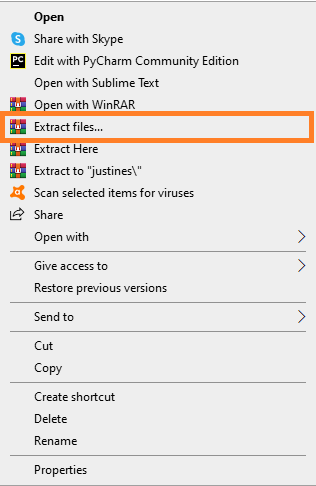
- Step 2: Extract file.
Second, after you finished download the source code, extract the zip file.

- Step 3: Copy project folder.
Third, copy the project folder and paste it into the xampp/htdocs folder.

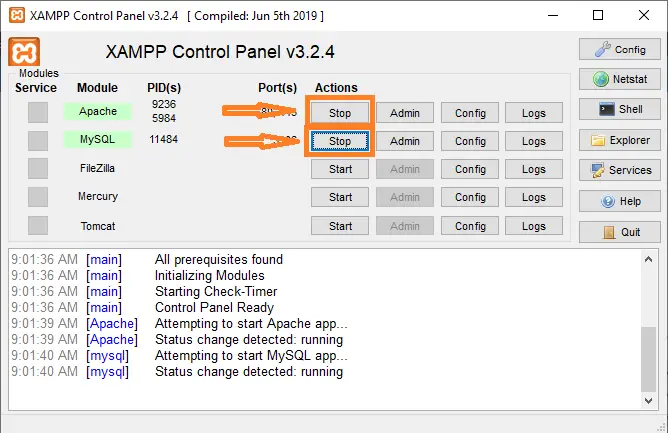
- Step 4: Open xampp.
Fourth, open xampp and start the apache and MySQL.

- Step 5: Open browser.
Fifth, Open a browser and go to URL “http://localhost/phpmyadmin/”

- Step 6: Create database.
Sixth, click on databases tab and Create database naming “realestate”.

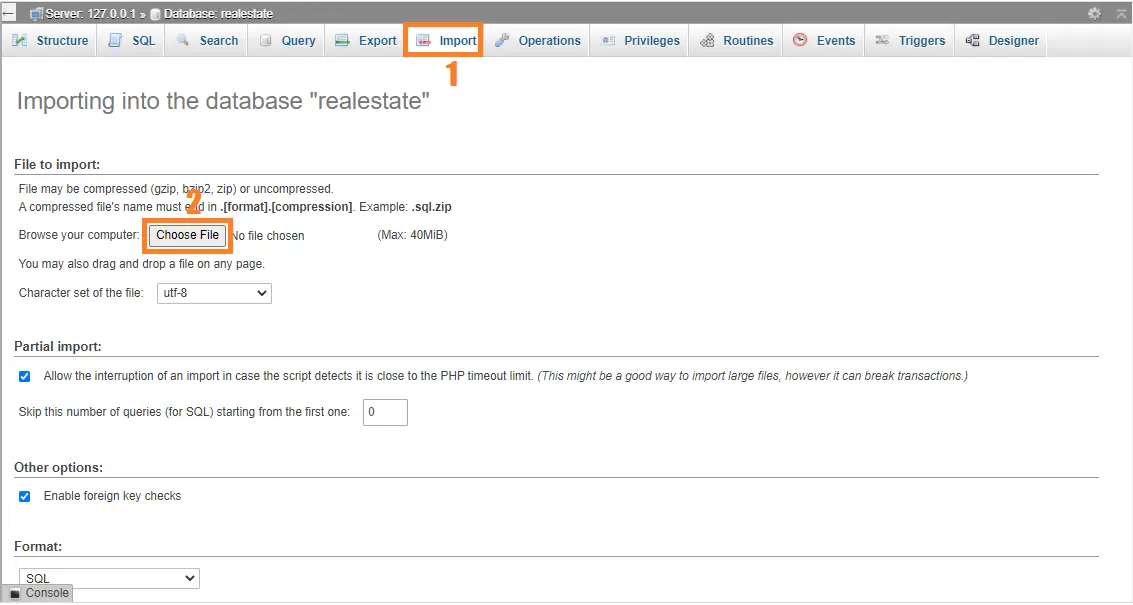
- Step 7: Import “realestate.sql”.
Seventh, Click on browse file and select “realestate.sql” file which is inside “database” folder and after import click “go“.

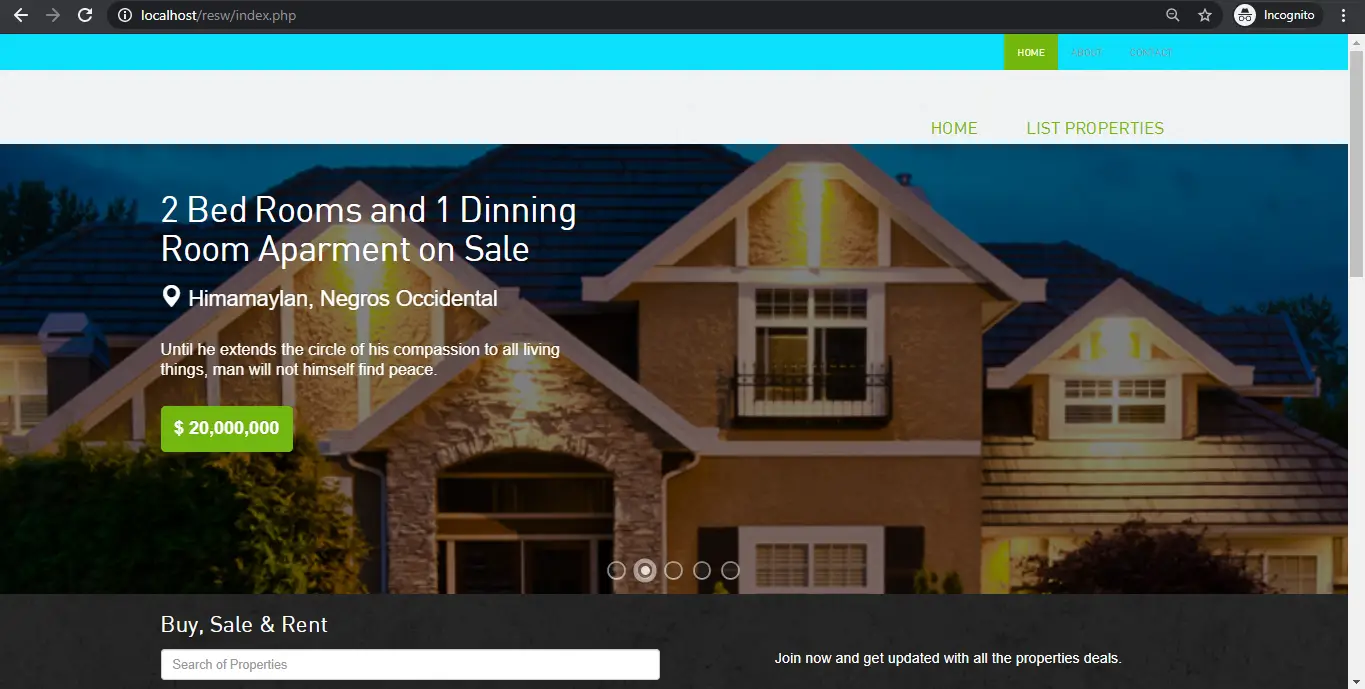
- Step 8: Open browser and type folder name.
Eight, Open a browser and go to URL “http://localhost/resw/”.

- Step 9: Explore manipulating.
Final step , Login from the User’s login side. Just provide the Admin’s login detail, it will redirect you to Admin panel.




Download Source Code below
Anyway, if you want to level up your programming knowledge, especially PHP, try this new article I’ve made for you Best PHP Projects With Source Code Free Download.
Summary
The Project In PHP With Source Code was developed using PHP MySQL database, Using HTML, CSS, Bootstrap, JavaScript, Ajax, J Query, and Modal.
This Real Estate Management System Project In PHP Free Download makes easier to the user for buying and selling properties online. This project is not difficult to operate and understood by the users.
Real Estate Management System project is a web application which is developed in PHP platform.
This PHP project with tutorial and guide for developing a code. Real Estate Management System is a open source you can Download zip and edit as per you need. If you want more latest PHP projects here.
This is simple and basic level small project for learning purpose. Also you can modified this system as per your requirements and develop a perfect advance level project.
Zip file containing the source code that can be extracted and then imported into Mozilla, Google Chrome, IE8,OPERA.
Official documentation
Frequently Asked Questions
How does this PHP real estate or apartment management system work?
Property listings (photos, location, price, status), agent management, inquiry tracking, viewing schedules, transaction pipeline.
What PHP and MySQL versions does this project require?
Most projects in this batch run on PHP 7.4 to PHP 8.2 with MySQL 5.7+ or MariaDB 10+. A few older projects need PHP 5.6 (deprecated, use XAMPP 7.x). To run: install XAMPP / WAMP / Laragon, extract project to htdocs, import the included .sql file via phpMyAdmin, edit the connection file (usually config.php or db_connect.php) with your DB credentials, browse to the project URL in your browser.
How do I set up the database for this PHP project?
Open phpMyAdmin (http://localhost/phpmyadmin/ on XAMPP), create a new empty database with the name specified in the project’s config.php. Click the Import tab, choose the included .sql file, click Go. Then edit config.php (or includes/connection.php) with: ‘localhost’, your MySQL username (usually ‘root’), your MySQL password (usually blank for XAMPP), and the database name.
Can I use this PHP project for a BSIT capstone or thesis?
Yes, but extend it. A bare CRUD app is too narrow for full capstone scope. Add: user roles via session checks, reports/dashboards (Chart.js + AJAX), PDF exports (TCPDF library), email notifications (PHPMailer), real domain extension (analytics, audit log, multi-branch support). Pair with Chapter 1-5 documentation matching your panel’s rubric.
Why am I getting ‘connection error’ or ‘undefined function mysqli_connect’?
Three common PHP issues: (1) Connection error: Apache + MySQL services not running in XAMPP control panel, OR database name in config.php does not match what you created in phpMyAdmin. (2) ‘undefined function mysqli_connect’: MySQL extension not enabled, in php.ini uncomment extension=mysqli (then restart Apache). (3) ‘No such file or directory’: MySQL socket path wrong, use 127.0.0.1 instead of localhost in the connection string.
Where can I find more PHP projects with source code?
Browse the PHP Projects hub for the full library (300+ vanilla PHP systems). For modern PHP MVC alternatives see Laravel Projects (74 systems) or CodeIgniter Projects (32 systems). For BSIT-focused capstone idea lists see 150 Best Capstone Project Ideas.
Related PHP Projects
- Laravel Real Estate Management System Project With Source Code
- Vehicle Management System Project In PHP Free Download
- Insurance Management System Project In PHP Free Download
- Society Management System Project In PHP Free Download
- Banking Management System Project In PHP Free Download
- Sports Management System Project In PHP Download
Inquiries
If you have any questions or suggestions about Real Estate Management System Project In PHP Free Download, please feel free to leave a comment below.

Angel Jude Suarez
Full-Stack Developer at PIES IT Solution
Focuses on Python development, machine learning, and AI integration. Has built production AI systems including OpenAI Whisper integration for medical transcription and GPT-4o-powered diagnosis assistance. Strong background in pandas, scikit-learn, and TensorFlow.
Expertise: Python · PHP · Java · VB.NET · ASP.NET · Machine Learning · AI Integration · OpenCV · Django · CodeIgniter · View all posts by Angel Jude Suarez →
Hello.
I followed your project Real Estate Management System Project In PHP Free Download but I do not understand the last step number 9.
Step 9: Explore manipulating.
Final step, Login from the User’s login side. Just provide the Admin’s login detail, it will redirect you to Admin panel.
Please explain how to login and with what password as Admin, where are those Admin login details?
It’s easy for you, it’s hard for me because I’m a beginner in these things.
Greeting
hi sir i need this site and it documentation for my final year project at my college so kindly send me its fully documentation
i
shall be very thankful to you for this kindness
my email address is
Azhariqbal6226@gmail.com
kindly send me its fully documentation if you have
17.bsit.789@gmail.com
Thank you so much sir!
Kindly provide me the full documentation..
That would be more helpful
Email :Sharathsinghsha@gmail.com
Sir I need admin password
Username
Project real estate management system
I need
same here
i want that too… plzz help
Why its not stated on the website itself
needed Admin userid and password,kindly send that sir
The user and password is inside in the sql database
no admin credentials,such a waste of time
The admin credentials is in the sql database
There are not even files for admin panel, If I am wrong then state credentials in reply section instead of telling everyone to check sql file
Hello Sir. I want to use this project for my final year capstone at my University. I will be very thankful to you if you send the full project and documentation.
Here is my email address:
prantosen85@gmail.com
We dont have a project documentation for this system.
There isn’t any login details for admin panal
You already import the database in phpmyadmin?
Why you wasting our time, there are no files of admin panel
Sir please…the user id and password…and the documentation of this project…..at 18cs0140@gmail.com
The the user id and password is in the sql database