
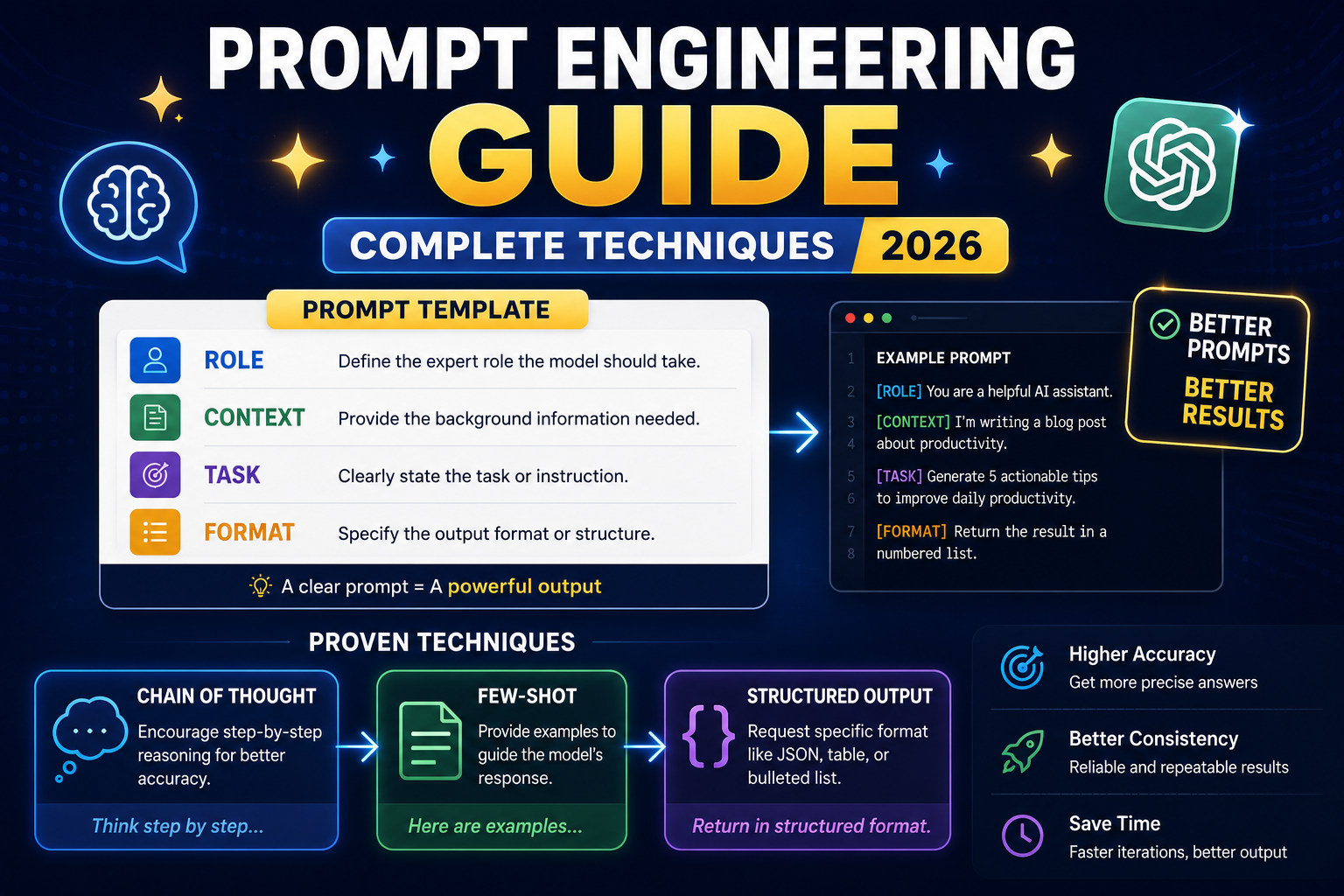
Prompt engineering is the art of writing instructions that get AI to give you exactly what you want. A great prompt can turn a mediocre AI response into a production-ready result. This 2026 guide covers every prompt engineering technique, role prompting, few-shot learning, chain of thought, ReAct, and more, with real examples that work.
Why prompts matter
- Same AI + different prompt = different quality output.
- Good prompt = 10x better response, no model upgrade needed.
- Prompt engineering is a real skill (LinkedIn’s #2 fastest-growing skill in 2024).
- Understanding prompts helps you use AI professionally.
The prompt formula: RCTF
R - Role: who should the AI be?
C - Context: what's the situation?
T - Task: what should the AI do?
F - Format: how should the output look?

Example:
R: "You are a senior Python developer."
C: "I'm building a Flask API for a healthcare clinic in Manila."
T: "Refactor this function to use dependency injection."
F: "Return the refactored code + 3-sentence explanation."
Technique 1: Role Prompting
Assign a specific role/persona to the AI:
"Act as a [role] with [experience]."

Examples:
"Act as a senior data scientist with 10 years in fintech."
"Act as a code reviewer at Google reviewing junior engineer PRs."
"Act as a technical writer explaining APIs to beginner developers."
"Act as a copyeditor for The New Yorker."

Why it works: sets tone, vocabulary, and quality expectations.
Technique 2: Few-Shot Learning
Give examples of input/output pairs:
"Convert product names to slugs.

Input: 'Premium Widget Pro Max'
Output: 'premium-widget-pro-max'

Input: 'Wireless Headphones (2024 Edition)'
Output: 'wireless-headphones-2024-edition'

Input: 'Ultra Comfort Chair - Black'
Output: [AI generates: 'ultra-comfort-chair-black']"

Why it works: AI learns the pattern from examples.
Technique 3: Chain of Thought (CoT)
Ask the AI to think step by step:
"Solve this step by step. Explain your reasoning."

Or:

"Think through this problem carefully.
Step 1: Identify what's being asked.
Step 2: Break down what we know.
Step 3: Apply relevant knowledge.
Step 4: Reason to a conclusion.
Step 5: Verify the answer.

The problem: [your problem]"

Why it works: forces reasoning, catches errors, improves accuracy on math/logic tasks.
Technique 4: Structured Output
Request specific format:
"Return your answer as JSON:
{
  'summary': [2-sentence summary],
  'key_points': [3-5 bullet points],
  'recommendations': [3 actions],
  'confidence': [0-10 scale]
}"

Or:

"Format as a markdown table with columns: Feature, Description, Pro, Con."

Why it works: consistent output, easy to parse, professional.
Technique 5: Constraint Specification
Tell the AI what NOT to do:
"Write a product description for [product].

Constraints:
- Max 100 words
- No superlatives (best, greatest, amazing)
- Must include: dimensions, material, warranty
- Tone: technical, not marketing
- No em-dashes"

Why it works: prevents common AI output problems (generic marketing speak, overuse of certain phrases).
Technique 6: Self-Critique
Ask AI to check its own work:
"Write a Python function to validate email addresses.

Then critique your solution: does it handle all edge cases? Rewrite if the critique reveals issues."

Why it works: AI catches its own mistakes, produces more robust code.
Technique 7: Comparison / Multiple Options
Request 3 approaches:
"Give me 3 different approaches to solve this problem. For each: name, pros, cons, when to use.

Then recommend which is best for [my specific situation]."

Why it works: forces AI to consider trade-offs, gives you options.
Technique 8: Iterative Refinement
First response is rarely optimal. Iterate:
Round 1: "Write a function to compute X."
Round 2: "Add input validation."
Round 3: "Add error handling for invalid types."
Round 4: "Add unit tests covering all edge cases."
Round 5: "Optimize for large inputs (millions of records)."
Round 6: "Add docstrings and inline comments."

Why it works: each round adds a concern. Final result: production-ready.
Technique 9: Persona + Audience
"You are [persona]. Write to [audience].

Example:
'You are a startup CTO. Write to junior engineers on your team explaining our migration to Kubernetes. Be direct but encouraging.'"

Why it works: matches vocabulary and tone to specific audience.
Technique 10: Positive Framing
Tell AI what to DO, not what NOT to do:
Weak: "Don't be too formal."
Strong: "Use conversational language like you're talking to a coworker at coffee."

Weak: "Don't use jargon."
Strong: "Use plain English words a high school student would understand."

Why it works: positive framing gives AI a target, negative framing leaves room for interpretation.
Advanced: ReAct (Reason + Act)
Combine reasoning with action steps:
"For each step:
1. THOUGHT: what should I do next?
2. ACTION: do it.
3. OBSERVATION: what did I learn?

Repeat until problem solved."

Great for multi-step problems, debugging, research.
Prompt engineering rules of thumb
- Be specific: vague prompts get vague answers.
- Show don’t tell: examples beat descriptions.
- Set expectations: format, length, tone, quality.
- Iterate: first response is a draft; refine 3-5 times.
- Test alternatives: try different framings, models.
- Save winners: keep a “prompt library” of your best.
Common prompt mistakes
- Too vague (“Write about AI”).
- Too long (paragraph-length prompts confuse AI).
- Contradictory instructions (“Be short but comprehensive”).
- No role or context.
- Not iterating.
- Not showing examples.
- Assuming AI knows current information.
Comparison at a glance
- General-purpose chat: ChatGPT Plus ($20/mo), Claude Pro ($20/mo), Gemini Advanced ($20/mo). All similar quality; personality differs.
- Coding assistance: GitHub Copilot ($10/mo), Cursor ($20/mo), Codeium (free tier). Copilot integrates deepest with VS Code.
- Search + citation: Perplexity ($20/mo Pro) is search-first with source citations.
- Free tiers: All major tools have free tiers good enough for casual use. Start free, upgrade when limits become blockers.
Common mistakes when adopting AI tools
- Trusting first-draft output blindly. Every AI hallucinates. Verify facts, test code, check dates. Treat AI output as strong first draft.
- Paying for multiple overlapping tools. Do not subscribe to ChatGPT Team, Claude Pro, and Gemini Advanced simultaneously. Pick one primary, use free tiers for others.
- Ignoring privacy. Free tier prompts may be used for training. Use paid tiers with data-usage guarantees for sensitive work.
- Overusing AI for simple tasks. Sometimes Google Search or docs are faster than prompt engineering.
- Not learning prompt engineering. The gap between beginner and expert AI users is prompt quality.
Practical adoption path
Week 1: Pick one general-purpose chat tool. Use free tier for 5-10 real tasks. Track which tasks it accelerates vs slows down.
Week 2: Add a coding tool if you code. Evaluate the same way.
Week 3: Decide. If a tool saves 30+ minutes daily, subscribe. If it only helps occasionally, stay on free tier.
Ongoing: Reassess quarterly. AI moves fast. What was best in Q1 may be surpassed by Q3.
Best practices for AI-assisted work
- Verify before shipping. Test code, fact-check claims, review generated content.
- Version your prompts. Keep a library of prompts that work. Reuse and iterate.
- Combine tools. Different tools have different strengths. Use each where it excels.
- Learn continuously. Follow one credible newsletter (Ben’s Bites, TLDR AI, The Batch) to stay current.
- Set boundaries. AI is a tool, not a replacement for thinking. Some tasks deserve human focus.
Official documentation
Recommended prompt engineering resources
The links below are affiliate links. We may earn a commission at no extra cost to you when you buy or sign up. See our affiliate disclosure.
Frequently Asked Questions
Is prompt engineering a real career?
Yes. Companies pay $150-300K for senior Prompt Engineers. It’s a legit skill, especially for people integrating AI into products. Even if you’re not applying for the role, the skill makes you 10x more effective with AI.
Do the same prompts work on all AI tools?
Mostly yes. Techniques (role prompting, few-shot, CoT) work across all major AI. Some fine differences: Claude prefers XML tags for structure, GPT prefers JSON. Test to see what works.
Can I use prompt engineering to make ChatGPT do X?
If X is legitimate: prompting techniques help you get better output. If X is bypassing safety guardrails: NO. Companies actively patch jailbreaks and use them against you.
Are there prompt libraries I can copy?
Yes. Anthropic Prompt Library, OpenAI Cookbook, GitHub repos with 1000s of prompts. But don’t copy blindly, customize for your specific need. Prompts are tools, not templates.
Will prompt engineering matter in 5 years?
Format may change but the underlying skill (thinking clearly, specifying requirements, iterating) will always matter. The AI will get smarter but people who communicate well with AI will always outperform those who don’t.

Angel Jude Suarez
Full-Stack Developer at PIES IT Solution
Focuses on Python development, machine learning, and AI integration. Has built production AI systems including OpenAI Whisper integration for medical transcription and GPT-4o-powered diagnosis assistance. Strong background in pandas, scikit-learn, and TensorFlow.
Expertise: Python · PHP · Java · VB.NET · ASP.NET · Machine Learning · AI Integration · OpenCV · Django · CodeIgniter · View all posts by Angel Jude Suarez →