
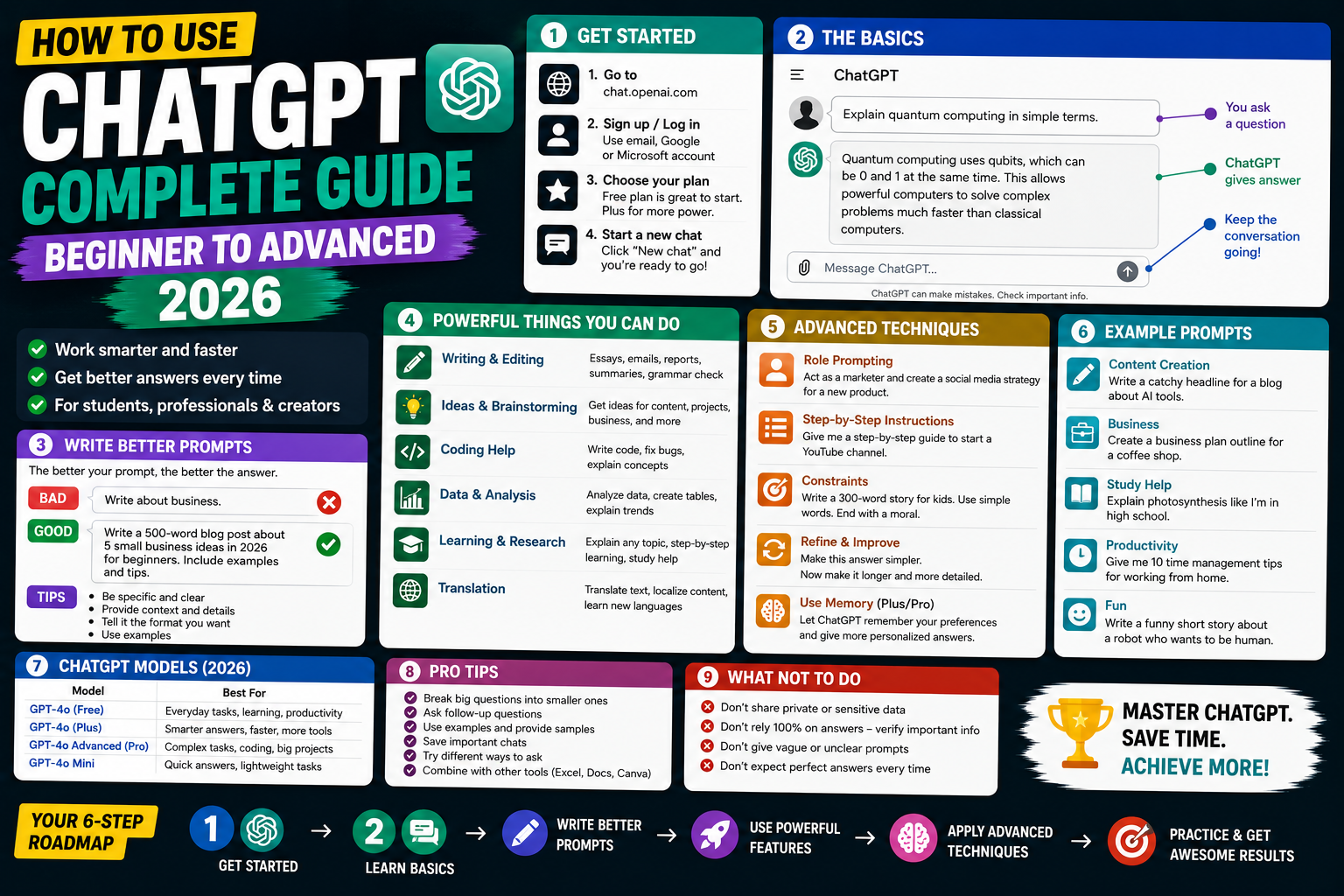
ChatGPT is the most-used AI tool in the world, with 300 million weekly users writing code, drafting emails, learning concepts, and building products. Getting the most out of it takes more than typing questions, you need to understand prompts, model selection, custom instructions, and when to use Plus features. This 2026 complete guide walks you through everything, from sign-up to advanced use.
Step 1: Sign up for ChatGPT
- Go to chatgpt.com.
- Click Sign up.
- Use email, Google, Microsoft, or Apple account.
- Verify phone number (required to prevent abuse).
- Free account activated. You can start using GPT-4o immediately with daily limits.
Free vs Plus vs Team vs Enterprise plans
| Plan | Cost | Key features |
|---|---|---|
| Free | $0 | GPT-4o with daily limits, basic image generation, web browsing (limited) |
| Plus | $20/mo | Higher GPT-4o limits, priority access, advanced image gen, voice, custom GPTs |
| Team | $25/user/mo | Plus features + team workspace + admin console + no training on your data |
| Enterprise | Custom | Unlimited usage, SSO, audit logs, dedicated support |
Your first prompt
- Click New chat.
- Type your question or request.
- Press Enter or click send.
- ChatGPT responds in real time.
- You can follow up, it remembers the whole conversation.
Write better prompts (basics)
Weak: "Write me a blog post about AI"

Strong: "Write a 1,000-word blog post about AI for BSIT students in the Philippines. Cover: what AI is, top 3 use cases in local companies, entry-level roles, salary range. Tone: friendly and practical. Include a call to action at the end."

Why it works: role, audience, scope, structure, tone, CTA, the more context, the better the output.
Select the right model
- GPT-4o (default): most versatile, handles text + images + voice.
- GPT-4o mini: faster but less capable.
- o1 / o1-preview: for complex reasoning (math, science, coding architecture).
- o1-mini: faster reasoning.
- Switch model at top of chat window.
Upload files and images
- Click the paperclip icon in chat.
- Upload:
- Images (photos, screenshots, diagrams), ChatGPT sees and analyzes.
- PDFs, summarizes and answers questions.
- Documents (Word, Excel), reads and processes.
- Code files, reviews, refactors, debugs.
- Then ask questions about the uploaded content.
Generate images with DALL-E
- Type a description: “Create an image of a modern minimal home office with plants.”
- ChatGPT generates.
- Ask for variations: “Make it warmer with sunset lighting.”
- Download by right-clicking > Save image.
Free tier has daily limits; Plus has more generations.
Voice mode (Plus and Team only)
- Click the headphones icon or speaker button.
- Speak into your microphone.
- ChatGPT transcribes and responds in a natural voice.
- Great for hands-free brainstorming, language practice, tutorials while walking.
Custom Instructions (permanent context)
- Click your profile > Customize ChatGPT.
- Fill in:
- What would you like ChatGPT to know about you? (name, role, location, goals)
- How would you like ChatGPT to respond? (tone, format, length)
- Save. Applied to every future chat automatically.
Memory (remembers across sessions)
- Available in Plus and Team plans.
- ChatGPT remembers facts you share across all chats.
- Example: tell it once “I’m a BSIT student in Manila working on my capstone”, remembered forever.
- View/manage: Settings > Personalization > Memory.
Use ChatGPT for common tasks
- Programming: “Explain this Python error”, “Write a function that…”, “Refactor this code.”
- Writing: emails, essays, reports, resumes, cover letters.
- Learning: “Explain [concept] like I’m a BSIT student”, follow up with detailed questions.
- Research: summarize papers, PDFs, articles.
- Analysis: upload Excel/CSV, ask for insights.
- Ideation: brainstorm blog post ideas, project topics, marketing angles.
- Translation: professional-quality between languages including Tagalog.
Common ChatGPT mistakes to avoid
- Assuming everything is accurate, always verify facts, dates, and code.
- Copying essays and passing off as your own, plagiarism + universities detect AI content.
- Using it for medical/legal/financial advice, get professional help.
- Sharing sensitive info (passwords, credit cards), ChatGPT stores conversations.
- Not iterating, first response is rarely optimal. Refine with follow-ups.
Official documentation
Recommended AI learning resources
The links below are affiliate links. We may earn a commission at no extra cost to you when you buy or sign up. See our affiliate disclosure.
Advanced ChatGPT prompting patterns for real work
Once you have the basics down, these four prompting patterns will change how you use ChatGPT. They are what I reach for whenever I need reliable output from a real work task, not a casual question.
Role prompting
Start the conversation by telling ChatGPT what expert it should act as. Example: You are a senior code reviewer with 10 years of experience in Django and PostgreSQL. Review this pull request for security issues, performance problems, and style violations. ChatGPT gives more focused, higher-quality answers when it has a clear identity to inhabit.
Few-shot prompting
Give ChatGPT 2 or 3 examples of the exact input-output pattern you want, then ask it to complete the fourth. Example: Convert these SQL queries to Django ORM. Input: SELECT * FROM users WHERE age > 18. Output: User.objects.filter(age__gt=18). Now convert: SELECT * FROM orders WHERE status = “shipped”. This works far better than describing the pattern in words.
Chain of thought
For any question that needs reasoning, add Think step by step to your prompt. ChatGPT will show its work, which catches mistakes and makes the answer easier to verify. This single phrase makes a measurable difference on math, logic, and debugging problems.
Structured output
Tell ChatGPT exactly what format you want the answer in. Example: Return your answer as a JSON object with fields “summary” (string), “confidence” (0 to 1), and “next_steps” (array of strings). Structured outputs are easier to copy into other tools and never get mixed up with prose commentary.
Using ChatGPT for BSIT capstone projects: 5 real use cases
ChatGPT is a genuinely useful tool for capstone work when you use it right. It is not a replacement for doing the work, but it accelerates the parts where you would otherwise get stuck. Here are five ways I recommend Filipino BSIT students use it in 2026.
- Chapter 2 literature review brainstorming. Ask ChatGPT to list common systems related to your topic and their weaknesses. Use its output as a starting point, then verify each claim with real published sources you cite yourself. Never copy its output directly into your thesis.
- ER diagram sanity checks. Paste your database schema and ask ChatGPT to identify missing relationships, denormalization issues, or foreign key mistakes. It catches structural problems faster than a manual review.
- DFD level explanation. Ask it to describe each process at level 0, 1, and 2 based on your system description. Rewrite the output in your own words to match your school format.
- Panel defense practice. Give ChatGPT your abstract and ask it to generate 20 hard questions your panelists might ask. Rehearse your answers out loud. This alone can raise your defense score by a full letter grade.
- Code debugging when Stack Overflow does not help. Paste your error message plus the code that produced it. ChatGPT will suggest fixes. Always understand the fix before you apply it, or you will fail your defense when a panelist asks why does this work?
The pattern that separates great capstone teams from average ones is this: use ChatGPT to accelerate research and drafting, but do the thinking and the writing yourself. Panelists can smell AI-generated prose from a mile away in 2026, and using it as a shortcut will hurt you during defense. Use it as a partner, not a ghostwriter.
Frequently Asked Questions
Is ChatGPT free?
Yes. Free tier includes GPT-4o with daily message limits. For higher limits, image generation, voice, and Custom GPTs, upgrade to Plus ($20/month).
Should I get ChatGPT Plus?
If you use ChatGPT daily for work or study, yes. Higher limits, priority during peak hours, unlimited image generation, and voice mode. If casual: free tier is enough.
Can I use ChatGPT for schoolwork?
Yes for learning, research, and brainstorming. Do NOT copy-paste ChatGPT output as your own, most universities have AI detection. Use it as a study aid, not a substitute.
Does ChatGPT know current events?
Depends on model. GPT-4o has web browsing to check current events. Older models have knowledge cutoffs. Ask ChatGPT to check the web for latest info.
Is my ChatGPT data private?
Free and Plus: OpenAI may use conversations to improve models unless you opt out (Settings > Data Controls). Team and Enterprise: your data is never used for training by default.

Angel Jude Suarez
Full-Stack Developer at PIES IT Solution
Angel Jude Suarez is a full-stack developer at PIES IT Solution. Focuses on Python development, machine learning, and AI integration. Has built production AI systems including OpenAI Whisper integration for medical transcription and GPT-4o-powered diagnosis assistance. Strong background in pandas, scikit-learn, and TensorFlow.
Expertise: Python, PHP, Java, VB.NET, ASP.NET, Machine Learning, AI Integration, OpenCV, Django, CodeIgniter · View all posts by Angel Jude Suarez →