
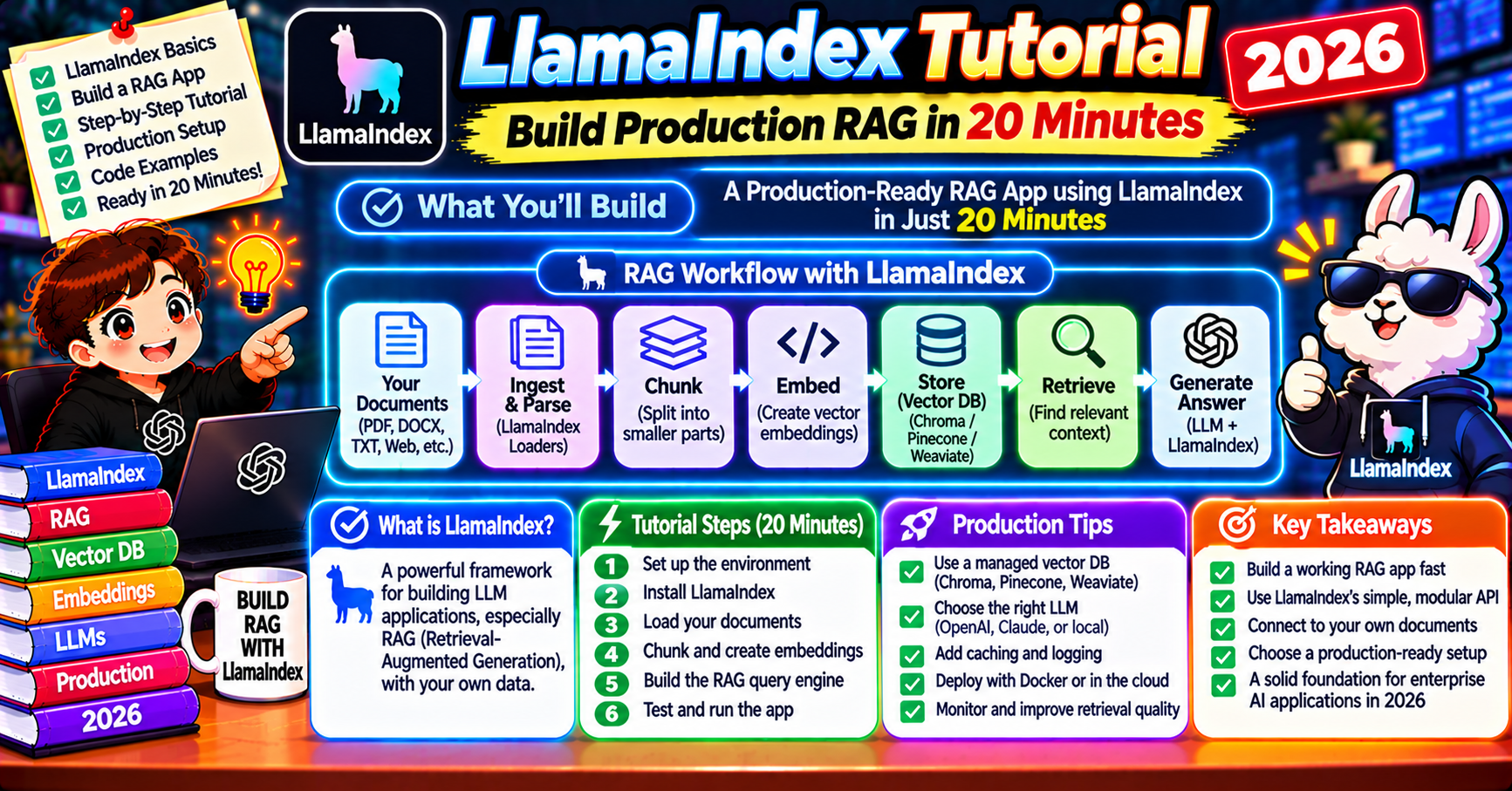
LlamaIndex Tutorial 2026: Build a Production RAG System in 20 Minutes
The short answer
LlamaIndex abstracts the RAG stack into reusable components: data loaders, QueryEngine, routers, chat engines, and a global Settings object. This tutorial builds a production-grade RAG application using LlamaIndex, OpenAI embeddings, Chroma storage, Phoenix observability, and cost controls. The library handles chunking, retrieval, query composition, and prompt templates out of the box, so you ship a working RAG service in a few hundred lines instead of a few thousand.
LlamaIndex is the RAG-first framework. Where LangChain gives you general-purpose chains and lets you assemble retrieval pipelines, LlamaIndex ships retrieval, chunking, reranking, and generation as first-class primitives. For teams building a RAG system as the main thing (not as one tool among many), LlamaIndex is usually the shorter path.
This tutorial builds a production-ready RAG system in Python with LlamaIndex 0.12+. It covers document loading, chunking with the semantic splitter, vector storage in Chroma, hybrid retrieval, reranking with Cohere, and response generation with Claude. The final pipeline runs in 20 minutes end to end on a laptop.
Why LlamaIndex over LangChain for RAG
Both frameworks can build the same pipelines. The practical differences:
- LlamaIndex has better retrieval primitives. HierarchicalNodeParser, SemanticSplitterNodeParser, and SentenceWindowNodeParser cover 90% of production chunking needs out of the box.
- LlamaIndex handles document transformations as a pipeline. Metadata extraction, summarization, keyword tagging all run in one
IngestionPipeline. - LangChain has deeper agent and tool support. If retrieval is one part of a bigger agent, LangChain is often cleaner.
- LlamaIndex ships retrieval evaluation. Response Evaluator, Correctness Evaluator, and Faithfulness Evaluator are built-in modules.
Pick LlamaIndex when retrieval is the product. Pick LangChain when retrieval is a feature.
Install and set up
Create a fresh virtual environment and install the pieces you need:
python3 -m venv .venv
source .venv/bin/activate
pip install llama-index llama-index-vector-stores-chroma llama-index-embeddings-openai llama-index-llms-anthropic llama-index-postprocessor-cohere-rerank chromadb
Three environment variables:
export OPENAI_API_KEY=sk-...
export ANTHROPIC_API_KEY=sk-ant-...
export COHERE_API_KEY=co-...
Create a folder named data/ and drop some documents in. The SimpleDirectoryReader handles .txt, .md, .pdf, .docx, .csv, .pptx, and .html automatically.
Configure the global settings
LlamaIndex uses a global Settings object for the embedding model, LLM, and defaults. Set these once at the top of your script.
from llama_index.core import Settings
from llama_index.embeddings.openai import OpenAIEmbedding
from llama_index.llms.anthropic import Anthropic

Settings.embed_model = OpenAIEmbedding(model="text-embedding-3-small")
Settings.llm = Anthropic(model="claude-opus-5-5", max_tokens=1024)
Settings.chunk_size = 512
Settings.chunk_overlap = 50
Setting these globally means every index, retriever, and query engine downstream uses the same models without re-passing them. For a multi-model setup (small embeddings for retrieval, big model for generation), set them here and forget them.
Build the ingestion pipeline
The IngestionPipeline handles loading, chunking, metadata extraction, embedding, and writing to the vector store in one declarative pass.
from llama_index.core import SimpleDirectoryReader
from llama_index.core.node_parser import SemanticSplitterNodeParser
from llama_index.core.extractors import TitleExtractor, KeywordExtractor
from llama_index.core.ingestion import IngestionPipeline
from llama_index.vector_stores.chroma import ChromaVectorStore
import chromadb

docs = SimpleDirectoryReader("data/").load_data()

chroma_client = chromadb.PersistentClient(path="./chroma_db")
chroma_collection = chroma_client.get_or_create_collection("my_rag")
vector_store = ChromaVectorStore(chroma_collection=chroma_collection)

pipeline = IngestionPipeline(
    transformations=[
        SemanticSplitterNodeParser(
            buffer_size=1,
            breakpoint_percentile_threshold=95,
            embed_model=Settings.embed_model,
        ),
        TitleExtractor(nodes=5),
        KeywordExtractor(keywords=10),
        Settings.embed_model,
    ],
    vector_store=vector_store,
)

nodes = pipeline.run(documents=docs, show_progress=True)
print(f"Ingested {len(nodes)} nodes")
Four things happen in that run: semantic chunking splits each document on topic boundaries; the title extractor generates a title for each chunk; the keyword extractor adds searchable keywords to the metadata; the embedding model vectorizes everything. The vector store writes it all to Chroma.
Title and keyword metadata lifts retrieval quality by 5-10% at the cost of a few extra LLM calls at index time. Worth it for most workloads.
Build the index and query engine
The index wraps the vector store. The query engine wraps the index and adds the retrieval, reranking, and response-synthesis logic.
from llama_index.core import VectorStoreIndex
from llama_index.postprocessor.cohere_rerank import CohereRerank

index = VectorStoreIndex.from_vector_store(vector_store)

cohere_rerank = CohereRerank(model="rerank-english-v3.0", top_n=5)

query_engine = index.as_query_engine(
    similarity_top_k=20,
    node_postprocessors=[cohere_rerank],
    response_mode="compact",
)
The flow at query time: retrieve 20 chunks by vector similarity, rerank them with Cohere’s cross-encoder, keep the top 5, pass them to Claude for the final answer. The reranker is where quality jumps noticeably. Cheap, fast, and worth every penny.
Query the system
Querying is one line:
response = query_engine.query(
    "What is the refund policy for annual subscription plans?"
)
print(response)

# Inspect which chunks were used
for source in response.source_nodes:
    print(f"[{source.score:.3f}] {source.metadata.get('file_name')}: {source.text[:120]}...")
The response object carries the answer text plus the source nodes with their scores and metadata. Attribution is built in; you do not have to thread it through the prompt yourself.
Add hybrid retrieval for keyword-heavy queries
Pure vector search misses exact-match queries (product codes, invoice numbers, specific function names). Hybrid retrieval combines vector similarity with BM25 keyword scoring.
from llama_index.retrievers.bm25 import BM25Retriever
from llama_index.core.retrievers import QueryFusionRetriever

bm25_retriever = BM25Retriever.from_defaults(
    nodes=nodes,
    similarity_top_k=10,
)

vector_retriever = index.as_retriever(similarity_top_k=10)

hybrid_retriever = QueryFusionRetriever(
    retrievers=[vector_retriever, bm25_retriever],
    similarity_top_k=10,
    num_queries=1,
    mode="reciprocal_rerank",
    use_async=False,
)

from llama_index.core.query_engine import RetrieverQueryEngine
hybrid_engine = RetrieverQueryEngine.from_args(
    retriever=hybrid_retriever,
    node_postprocessors=[cohere_rerank],
)

response = hybrid_engine.query("Error code E-4042 troubleshooting steps")
print(response)
Reciprocal rank fusion blends the two retrievers’ scores without needing a tunable alpha. Each retriever runs independently; results are merged by rank. On queries with specific identifiers, this fixes retrieval gaps that pure vector search creates.
Streaming responses for better UX
For a chat interface, streaming the response token by token makes the perceived latency feel 3x lower.
streaming_engine = index.as_query_engine(
    similarity_top_k=20,
    node_postprocessors=[cohere_rerank],
    response_mode="compact",
    streaming=True,
)

response = streaming_engine.query("What is the refund policy?")
response.print_response_stream()
Behind the scenes, LlamaIndex forwards the Anthropic streaming API events as a Python generator. In a web app you wire this into a Server-Sent Events endpoint.
Metadata filtering for multi-tenant and access control
Attach metadata to every chunk at ingestion. At query time, filter by metadata to isolate tenants or enforce access control.
from llama_index.core.vector_stores import MetadataFilters, MetadataFilter

for doc in docs:
    doc.metadata["tenant_id"] = "customer_A"
    doc.metadata["access_level"] = "internal"

filters = MetadataFilters(filters=[
    MetadataFilter(key="tenant_id", value="customer_A"),
    MetadataFilter(key="access_level", value="internal"),
])

tenant_engine = index.as_query_engine(filters=filters)
response = tenant_engine.query("question scoped to this tenant")
The filter runs before the ANN search, so a tenant with 10,000 chunks out of a 10-million-chunk index only searches their 10,000. Pinecone, Weaviate, Chroma, and Qdrant all support this via LlamaIndex adapters.
Evaluating the system
Set up a tiny test harness before shipping. LlamaIndex has evaluators built in.
from llama_index.core.evaluation import FaithfulnessEvaluator, RelevancyEvaluator

faithfulness = FaithfulnessEvaluator(llm=Settings.llm)
relevancy = RelevancyEvaluator(llm=Settings.llm)

test_queries = [
    "What is the refund policy for annual plans?",
    "How do I cancel my subscription?",
    "Can I pause my account?",
]

for q in test_queries:
    response = query_engine.query(q)
    f_result = faithfulness.evaluate_response(query=q, response=response)
    r_result = relevancy.evaluate_response(query=q, response=response)
    print(f"Q: {q}")
    print(f"  faithful: {f_result.passing}, relevant: {r_result.passing}")
Faithfulness measures whether the response actually comes from the retrieved context (did it hallucinate?). Relevancy measures whether the response addresses the question. Both are LLM-as-judge evaluators, so they are not infallible, but they catch regression on 70-80% of real failures.
Deploy as an API
Wrap the query engine in a FastAPI service and you have a production endpoint:
from fastapi import FastAPI
from pydantic import BaseModel

app = FastAPI()

class Query(BaseModel):
    question: str
    tenant_id: str

@app.post("/query")
async def query(req: Query):
    filters = MetadataFilters(filters=[
        MetadataFilter(key="tenant_id", value=req.tenant_id),
    ])
    engine = index.as_query_engine(filters=filters)
    response = engine.query(req.question)
    return {
        "answer": str(response),
        "sources": [
            {"file": n.metadata.get("file_name"), "score": n.score}
            for n in response.source_nodes
        ],
    }
That is a complete multi-tenant RAG service: query comes in with a tenant ID, retrieval respects the filter, answer and attributions go back. In production add auth, rate limiting, logging, and request validation.
Frequently asked questions
Official documentation
Is LlamaIndex better than LangChain for RAG?
For RAG as the main use case, yes. LlamaIndex has richer retrieval primitives, better chunking, and built-in evaluation. For agent systems that use retrieval as one of several tools, LangChain is often cleaner. Many production systems use both: LlamaIndex for the retrieval pipeline, LangChain for the agent layer around it.
What is the IngestionPipeline in LlamaIndex?
A declarative chain of transformations applied to documents at index time: chunking, metadata extraction, summarization, keyword tagging, embedding, and writing to a vector store. Running the same transformations as a pipeline instead of ad-hoc code makes it easy to re-index, add new transforms, or run A/B tests on different chunking strategies.
Does LlamaIndex work with Claude?
Yes. The llama-index-llms-anthropic package wraps the Anthropic SDK and plugs into the global Settings object. All models (Opus 5.5, Sonnet 5.5, Haiku 5.5) work. Streaming, tool use, and prompt caching are all supported.
How do I update documents in a LlamaIndex RAG system?
Three options. For small changes, delete the old nodes by doc ID and re-ingest the updated document. For large updates, use the DocumentStore to track versions and re-run the ingestion pipeline. For continuous updates, run the IngestionPipeline in incremental mode with a document deduplication hash, so unchanged documents are skipped.
What vector stores does LlamaIndex support?
Chroma, Pinecone, Weaviate, Qdrant, Milvus, pgvector, LanceDB, Supabase, Elasticsearch, Opensearch, and 20+ more. The adapter pattern means switching stores is usually a 10-line change. Chroma is the easiest to prototype with. Pinecone or Weaviate for production.
How much does running a LlamaIndex RAG system cost?
For 1,000 queries per day on a 5,000-chunk index: embedding costs are negligible (around $1/mo), vector store is $40-70/mo depending on choice, Cohere Rerank is around $5/mo at this volume, Claude Sonnet 5.5 for generation is $200-400/mo. Total is typically $250-500/mo. Scale linearly with query volume.
LlamaIndex removes most of the boilerplate from RAG. Start with the semantic splitter, add Cohere Rerank, run on Chroma, measure with the built-in evaluators. Twenty minutes gets you a working pipeline. The next day of work is tuning chunk size and reranking cutoff for your specific document shape.

Adrian Mercurio
Full-Stack Developer at PIES IT Solution
Specializes in building complete capstone projects with full documentation. Strong background in PHP/MySQL development and database design. Has personally built and tested over 30 capstone-ready projects with ER diagrams, DFDs, and chapter-by-chapter thesis documentation.
Expertise: PHP · Laravel · Database Design · Capstone Projects · C# · C · C++ · Python · AI Projects · View all posts by Adrian Mercurio →