
Google Gemini and OpenAI ChatGPT: two of the biggest AI assistants competing for your attention.
Both offer free tiers, both have paid Pro plans, but they differ significantly in models, ecosystem integration, and what they’re best at. This 2026 comparison breaks down where each wins.
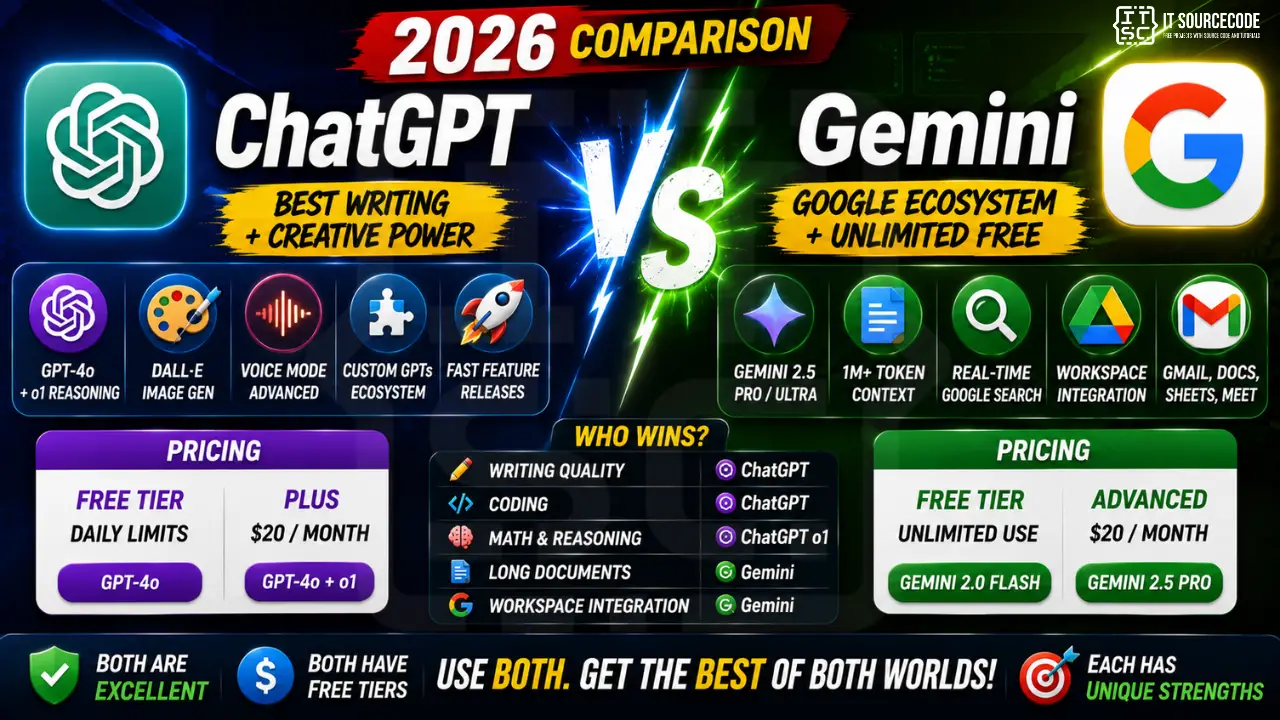
Quick verdict
- Pick Gemini if: you live in Google Workspace (Gmail + Docs + Sheets), want unlimited free use, or need integration with Google Search.
- Pick ChatGPT if: you want the best writing quality, image generation, voice mode, or the largest AI ecosystem.
- Get both: both are free. Use each for its strengths.
Pricing comparison
| Plan | Gemini | ChatGPT |
|---|---|---|
| Free tier | Unlimited use | Daily message limits on GPT-4o |
| Individual Pro | $20/mo (Advanced) | $20/mo (Plus) |
| Business / Team | Included with Workspace Enterprise | $25/user/mo |
Models comparison (2026)
| Provider | Top Model | Context |
|---|---|---|
| Google Gemini | Gemini 2.5 Pro / Ultra | 1M+ tokens |
| ChatGPT | GPT-4o + o1 reasoning | 128K tokens |
Gemini has larger context (can process massive documents), ChatGPT has better reasoning on complex tasks.
Task-by-task comparison
| Task | Winner |
|---|---|
| General writing | ChatGPT (more natural) |
| Long documents (500+ pages) | Gemini (1M+ context) |
| Coding | ChatGPT (slight edge) |
| Math + reasoning | ChatGPT o1 (strongest) |
| Image generation | ChatGPT DALL-E |
| Image analysis | Tie |
| Voice mode | ChatGPT |
| Real-time search | Gemini (uses Google Search) |
| Workspace integration | Gemini (in Gmail, Docs, Sheets) |
| Custom GPTs / Gems | ChatGPT (bigger ecosystem) |
Google Gemini in Google Workspace
The biggest advantage of Gemini for Workspace users:
- Gmail: help drafting emails, summarize threads.
- Google Docs: rewrite paragraphs, brainstorm, format.
- Google Sheets: generate formulas, analyze data.
- Slides: create presentations from prompts.
- Meet: real-time meeting notes.
- Integrated at the sidebar level, no context switching to another app.
ChatGPT’s ecosystem advantage
- Custom GPTs (thousands of pre-built assistants).
- Larger developer community.
- More tutorials, guides, best practices online.
- Faster feature releases historically.
Best for developers
Tie.
- ChatGPT: slightly better code quality on average.
- Gemini: larger context = paste entire codebase.
- Both integrate with development workflows.
Best for students
Tie.
- Gemini: FREE and unlimited, integrated with Google Workspace for Education.
- ChatGPT: better ecosystem for learning, more resources.
- Use both.
Best for business
Depends on your stack.
- Google Workspace: Gemini integrates deeply.
- Microsoft 365: neither is native (Copilot is).
- General use: ChatGPT’s ecosystem wins.
Best for creative work
Winner: ChatGPT.
- DALL-E for image generation.
- Voice mode for brainstorming.
- More creative writing quality historically.
Real-world verdict from developers
- ChatGPT still dominates general AI use.
- Gemini growing fast, especially in enterprises using Workspace.
- Neither is a clear “winner”. Both are excellent.
- Use both. Both have free tiers. Cost is zero to try both.
Comparison at a glance
- General-purpose chat: ChatGPT Plus ($20/mo), Claude Pro ($20/mo), Gemini Advanced ($20/mo). All similar quality; personality differs.
- Coding assistance: GitHub Copilot ($10/mo), Cursor ($20/mo), Codeium (free tier). Copilot integrates deepest with VS Code.
- Search + citation: Perplexity ($20/mo Pro) is search-first with source citations.
- Free tiers: All major tools have free tiers good enough for casual use. Start free, upgrade when limits become blockers.
Common mistakes when adopting AI tools
- Trusting first-draft output blindly. Every AI hallucinates. Verify facts, test code, check dates. Treat AI output as strong first draft.
- Paying for multiple overlapping tools. Do not subscribe to ChatGPT Team, Claude Pro, and Gemini Advanced simultaneously. Pick one primary, use free tiers for others.
- Ignoring privacy. Free tier prompts may be used for training. Use paid tiers with data-usage guarantees for sensitive work.
- Overusing AI for simple tasks. Sometimes Google Search or docs are faster than prompt engineering.
- Not learning prompt engineering. The gap between beginner and expert AI users is prompt quality.
Practical adoption path
Week 1: Pick one general-purpose chat tool. Use free tier for 5-10 real tasks. Track which tasks it accelerates vs slows down.
Week 2: Add a coding tool if you code. Evaluate the same way.
Week 3: Decide. If a tool saves 30+ minutes daily, subscribe. If it only helps occasionally, stay on free tier.
Ongoing: Reassess quarterly. AI moves fast. What was best in Q1 may be surpassed by Q3.
Best practices for AI-assisted work
- Verify before shipping. Test code, fact-check claims, review generated content.
- Version your prompts. Keep a library of prompts that work. Reuse and iterate.
- Combine tools. Different tools have different strengths. Use each where it excels.
- Learn continuously. Follow one credible newsletter (Ben’s Bites, TLDR AI, The Batch) to stay current.
- Set boundaries. AI is a tool, not a replacement for thinking. Some tasks deserve human focus.
Building AI tools into your daily workflow
Beyond one-off uses, integrating AI into your daily workflow multiplies productivity gains. Common integration patterns:
- Morning briefing. Ask your AI to summarize overnight news, emails, or Slack messages while you have coffee.
- Meeting prep. Feed context documents to AI 5 minutes before meetings for a quick brief on what to discuss.
- Draft-and-refine writing. AI generates the first draft; you edit for accuracy, voice, and specificity.
- Code review companion. Ask AI to spot bugs, suggest improvements, or explain unfamiliar code before your human reviewer sees it.
- Learning accelerator. AI explains concepts, generates practice problems, and grades your work. Great for self-directed learning.
Prompt engineering fundamentals
The gap between beginner and expert AI users is prompt quality. Master these fundamentals:
- Provide context. “I am a junior developer working on…” is far better than just “write code”.
- Specify format. “Return the output as a JSON object with keys X, Y, Z” produces cleaner output.
- Give examples. Show the AI what good output looks like. It matches your examples.
- Break complex tasks into steps. Chain of thought prompting improves accuracy on hard problems.
- Iterate. First response is rarely perfect. Refine your prompt based on what came back.
Ethical considerations for AI tools
AI tools raise real ethical questions worth thinking through. Some guidelines:
- Attribution and transparency. If you use AI to write content, disclose when appropriate. Academic and journalistic contexts often require it.
- Privacy of prompts. Do not paste sensitive company data, personal identification, or confidential client information into public AI tools.
- Bias awareness. AI reflects the biases of its training data. Review outputs for gender, race, cultural, or political biases before publishing.
- Copyright and originality. AI-generated content sits in legal gray areas. Consult with your organization’s legal or compliance team for commercial use.
- Skill atrophy. Over-relying on AI can dull your own skills. Balance AI usage with human practice on core competencies.
Official documentation
Recommended AI mastery resources
The links below are affiliate links. We may earn a commission at no extra cost to you when you buy or sign up. See our affiliate disclosure.
Frequently Asked Questions
Is Gemini free?
Yes with unlimited use. ChatGPT free tier has daily limits. Gemini’s free is more generous.
Which has better accuracy?
ChatGPT o1 wins on complex reasoning. Gemini 2.5 Pro is close. Both hallucinate, verify critical info.
Does Gemini work in Gmail?
Yes. Gemini sidebar integrated in Gmail, Docs, Sheets, Slides for Workspace subscribers. Free tier has limited integration.
Should I switch from ChatGPT to Gemini?
Use both. Free tiers overlap. If forced to pick one: Gemini if you’re deep in Google Workspace, ChatGPT for everything else.
Which is more private?
Both use conversations to improve models unless you opt out. Google Workspace Enterprise has enhanced privacy; ChatGPT Team/Enterprise also does. Casual use: similar privacy.

Angel Jude Suarez
Full-Stack Developer at PIES IT Solution
Focuses on Python development, machine learning, and AI integration. Has built production AI systems including OpenAI Whisper integration for medical transcription and GPT-4o-powered diagnosis assistance. Strong background in pandas, scikit-learn, and TensorFlow.
Expertise: Python · PHP · Java · VB.NET · ASP.NET · Machine Learning · View all posts by Angel Jude Suarez →