
Disclosure: This article contains affiliate links. itsourcecode.com may earn a commission when you purchase through them. All recommendations are independently chosen.
A mechanical keyboard is one of the few BSIT student purchases that improves your daily life immediately. Better typing feel, less finger fatigue during 8-hour coding sessions, and your fingers actually FEEL when keys register. If you’re typing 4+ hours daily, the upgrade from a stock laptop keyboard is dramatic.
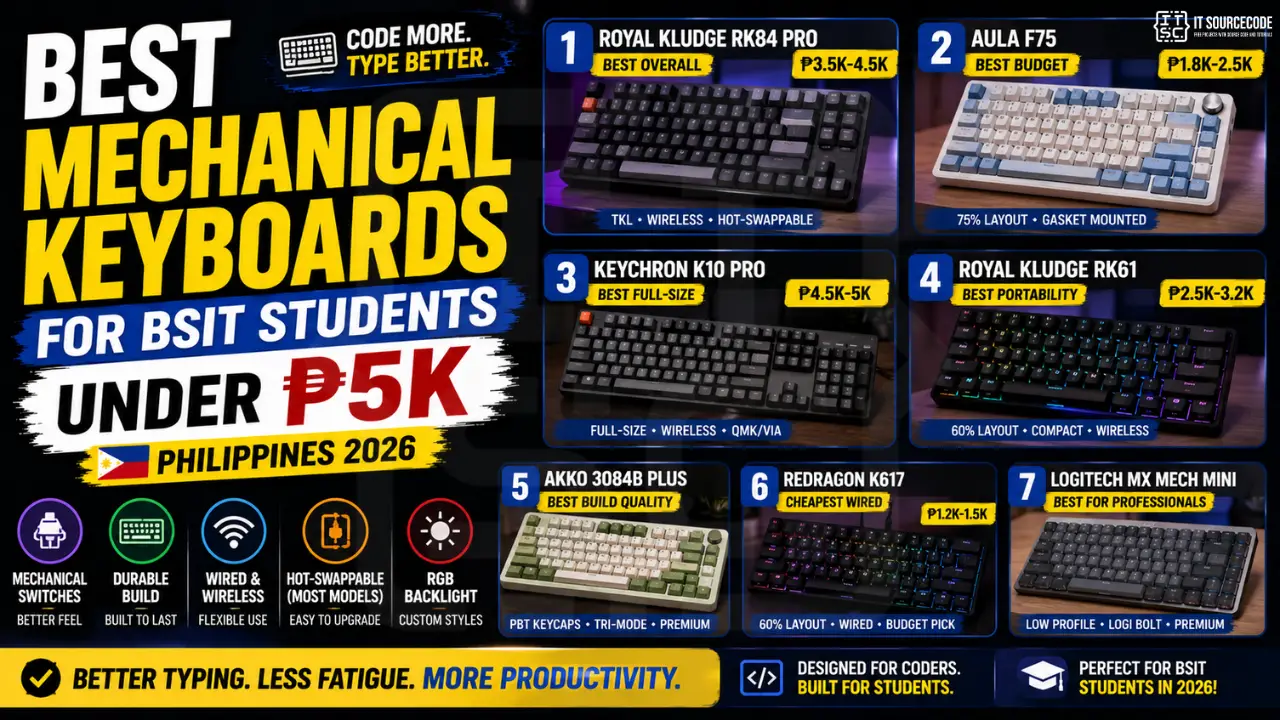
This guide covers the 7 best mechanical keyboards available in the Philippines under ₱5,000 in 2026, plus the switch/layout/feature explanations BSIT students actually need.
Quick Decision: Which Best Keyboard Should You Buy?
- Best overall under ₱5K: Royal Kludge RK84 Pro (₱3,500-4,500), wireless, hot-swappable, tenkeyless
- Best ultra-budget: Aula F75 (₱1,800-2,500), compact 75% layout, surprisingly good build
- Best for full-size lovers: Keychron K10 Pro (₱4,500-5,000), full-size with all extras
- Best for portability: Royal Kludge RK61 (₱2,500-3,200), true 60%, fits in laptop bag
Understanding Mechanical Switches (5-Minute Crash Course)
Mechanical keyboards use physical switches under each key. The switch type determines how the keyboard feels and sounds:
Tactile Switches: Best for Programming
Examples: Cherry MX Brown, Gateron Brown, Kailh Box Brown.
Feel: Small bump in the middle of the keypress confirms registration. Quiet enough for libraries.
Why programmers prefer: Tactile feedback prevents typos without being annoyingly loud. Reduces fatigue over long sessions.
Linear Switches: Best for Speed
Examples: Cherry MX Red, Gateron Red, Kailh Red.
Feel: Smooth, no bump. Faster but easier to make typos.
Best for: Gamers who also code (linear is preferred for FPS games).
Clicky Switches: Avoid in Shared Spaces
Examples: Cherry MX Blue, Gateron Blue.
Feel: Loud audible click + tactile bump. Satisfying for solo use; intolerable for roommates/classrooms/coffee shops.
Verdict: Only buy if you live/work alone.
Our recommendation
Get tactile (Brown) switches as your first mechanical keyboard. They work in any environment, libraries, classrooms, shared rooms, and feel great for programming. After 6 months, you’ll know if you want to try linear or clicky.
Keyboard Layouts (Sizes) Explained
- Full-size (104 keys): Includes number pad. Best for data entry, accounting. Bulky.
- Tenkeyless / TKL (87 keys): Removes number pad. Most popular for programmers. Good balance.
- 75% (84 keys): Tenkeyless minus a few keys, more compact. Function row + arrow keys retained.
- 65% (68 keys): Minimalist. Arrow keys retained but function row removed. Programming friendly.
- 60% (61 keys): Smallest. No arrow keys, no function row (accessed via FN layer). Acquired taste.
Recommendation for BSIT students: Start with tenkeyless (TKL) or 75%. You’ll appreciate the number pad’s absence (your mouse moves closer = less shoulder strain) without losing essential keys.
Top 7 Mechanical Keyboards Under ₱5K in Philippines (2026)
#1: Royal Kludge RK84 Pro (Tenkeyless, Wireless), Best Overall
Price: ₱3,500-4,500 on Lazada/Shopee
Features: Hot-swappable switches (change without soldering), tri-mode (USB, Bluetooth, 2.4GHz wireless), RGB backlight, PBT keycaps option
Why it wins: Best feature-to-price ratio in 2026. Wireless mode lasts 2-3 days, hot-swap means you can experiment with switches later without buying a new mechanical keyboard.
#2: Aula F75 (75% layout), Best Ultra-Budget
Price: ₱1,800-2,500
Features: Compact 75% layout, gasket-mounted (better typing feel), pre-lubed switches, USB-C cable
Why we love it: Punches WAY above its price. Used by many content creators in 2025-2026 because it sounds and feels like ₱5K keyboards. Hot-swap version available for ₱500 more.
#3: Keychron K10 Pro (Full-size), Best for Full-Size Lovers
Price: ₱4,500-5,000
Features: Full-size with number pad, wireless + USB, QMK/VIA programmable, hot-swappable
Best for: Students who use number pad heavily (accounting capstones, data analysis).
#4: Royal Kludge RK61 (60% layout), Best for Portability
Price: ₱2,500-3,200
Features: True 60% (very compact), wireless tri-mode, RGB, hot-swap
Best for: Students who travel between dorm/coffee shop/school. Fits in any laptop bag.
Watch out: No arrow keys means you’ll use FN+J/K/L/I for navigation, takes 2 weeks to adapt.
#5: Akko 3084B Plus (75%), Best Build Quality
Price: ₱3,800-4,500
Features: Premium PBT keycaps from factory, dye-sublimated legends (won’t fade), tri-mode wireless, multiple gorgeous colorways
Best for: Students who care about aesthetics + premium typing feel.
#6: Redragon K617 (60%), Cheapest Wired Mechanical
Price: ₱1,200-1,500
Features: Wired 60%, basic RGB, brown/red/blue switch options
Best for: Trying mechanical for the first time without big spend. Build quality is plastic but functional.
#7: Logitech MX Mechanical Mini (75%), Best for Professional Use
Price: ₱4,800-5,500 (slightly over budget)
Features: Low-profile mechanical (slim like laptop keyboard but mechanical feel), Logi Bolt receiver, MacOS-compatible, premium build
Best for: Students transitioning to internships at professional companies. Looks professional in office settings.
PBT vs ABS Keycaps: Why It Matters
Cheap keyboards come with ABS plastic keycaps that develop a shiny “wear” on the most-used keys (W, A, S, D, E, R, T) within 6 months. PBT keycaps stay matte forever and have better-feeling texture.
Buying a keyboard with PBT keycaps from the start saves you ₱800-1,500 in upgrade costs later. The Aula F75, Akko 3084B Plus, and Royal Kludge RK84 Pro (PBT version) all come with PBT from factory.
Where to Buy Mechanical Keyboards in Philippines
- Lazada / Shopee: best prices, watch for 10.10, 11.11, 12.12 sales
- EastGate Keys (Facebook page): local enthusiast seller, custom builds available
- Keychron PH (official store): for Keychron models specifically, with PH warranty
- Cubao Expo / Greenhills: some shops carry these in-person if you want to test feel before buying
Frequently Asked Questions
More BSIT gear guides
Our first complete capstone bundle is live: PHP + MySQL e-commerce with full Chapter 1-5 documentation, 6 UML diagrams, ERD, installation guide, user manual, and defense presentation template. More bundles (Library, POS, Hospital) coming soon. Save 3 to 4 weeks of capstone work.
Sold via Gumroad. See our affiliate disclosure.
Do mechanical keyboards actually improve productivity for coders?
Are mechanical keyboards too loud for libraries and classrooms?
Is hot-swappable worth the extra cost?
Should I get wireless or wired mechanical keyboard?
What’s the lifespan of a mechanical keyboard?
Final Recommendation
If you’re buying your first mechanical keyboards as a BSIT student in Philippines 2026: Royal Kludge RK84 Pro (tenkeyless, wireless, hot-swap, Brown switches) at ₱3,500-4,500. It’s the most balanced choice, quality switches, wireless flexibility, hot-swap for future experimentation, and tenkeyless layout that works for any task.
If budget is under ₱2,500, the Aula F75 is the surprise winner, punches WAY above its price class.
🎯 Complete your BSIT setup:
- Get the laptop first → see our Best Laptops Under ₱30K guide
- Add a quality monitor for split-screen work → Best Monitors Under ₱15K
- Set up your code editor → VS Code vs Cursor vs Zed Comparison

Adrian Mercurio
Full-Stack Developer at PIES IT Solution
Specializes in building complete capstone projects with full documentation. Strong background in PHP/MySQL development and database design. Has personally built and tested over 30 capstone-ready projects with ER diagrams, DFDs, and chapter-by-chapter thesis documentation.
Expertise: PHP · Laravel · Database Design · Capstone Projects · C# · C · C++ · Python · AI Projects · View all posts by Adrian Mercurio →