
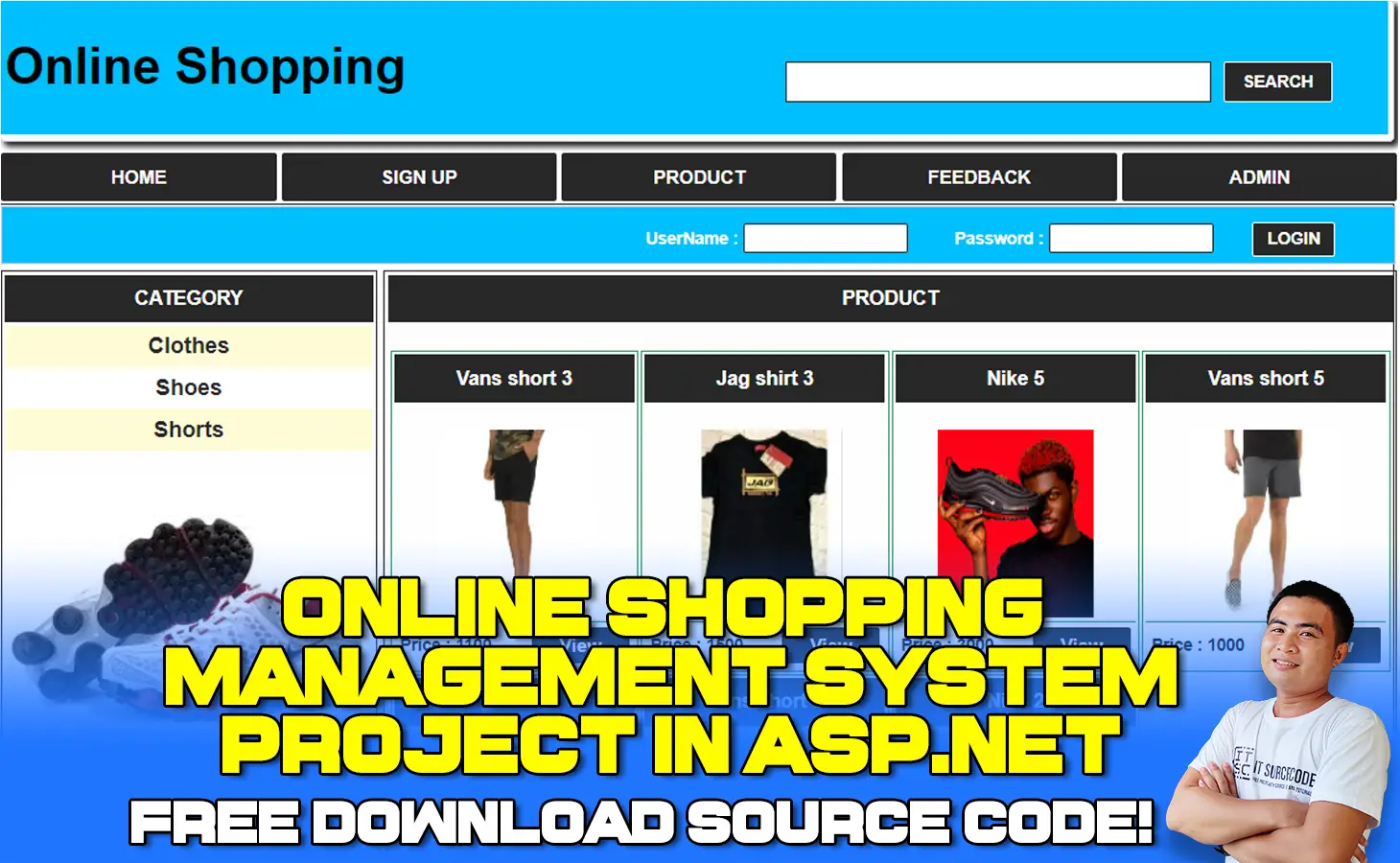
The Online Shopping Project in ASP.net is a web-based application written in Visual Studio and utilizes the C# programming language that allows users to search the internet for the latest products in various patterns.
This website allows users to purchase the most recent products directly from the site.
How do I make a shopping website project in ASP.net?
The customer is a user who wants to buy products from our website. To buy a product user needs to register first and after he can buy a product and finally make an online payment to confirm the order.
After confirming the order user gets shoes at his delivery address.
The Admin is a responsible person to run the website, or we can say the owner of a website.
Admin can manage all products, customer details, and order details. Admin can add, delete, and update any information regarding products.
How would you describe an online shopping project in asp.net MVC?
Online shopping Project in ASP.net is a form of electronic commerce that allows consumers to directly buy goods or services from a seller over the internet using a web browser
Is ASP NET good for eCommerce?
Yes, it is a good idea to create eCommerce websites with ASP.NET. This is mainly because of the high security and functionality that ASP.NET confers on websites.
The result is an eCommerce website that is safe and secure for online shoppers, especially when it comes to making payments on the site.
What is the purpose of the online shopping portal project in asp.net?
Online shopping Portal Project in ASP.net and visiting an online shop enables the customer to search, find, order, and pay for the products, information, and services that they need.
To be able to do online shopping, one must visit an online shop, like a website or an account on a social networking site that sells products.
Online Shopping Website Features
Admin site module:
- Login module
- Manage Category
- Manage Item
- Manage user
- Manage order
- Manage Reports
User site module:
- Registration
- Login
- Make Order
- Make Payment
- Manage Account
- Change Password
Online Shopping Project in ASP.net: Project Details and Technology
| Project Title: | Online Shopping Project in ASP.net |
|---|---|
| Abstract : | Online shopping is a form of electronic commerce which allows consumers to directly buy goods or services from a seller over the Internet using a web browser or a mobile app. |
| Project Type: | Website |
| Technology : | Microsoft Visual Studio 2022 |
| Database : | SQL Server Database |
Project output


Online Shopping Project in ASP.net
The Online Shopping Project in ASP.net is created in ASP.net Programming Language using Visual Studio 2022 and SQL Server Database as the system’s Back-end.
This Project also includes a downloadable Online Shopping Project in ASP.net with Source Code and Database for free.
To start executing Online Shopping make sure that you have a Microsoft Visual Studio installed on your computer.
How to run an Online Shopping Project in ASP.net? A step-by-step Guide with Source Code
These are the steps on how to run an Online Shopping Project With Source Code
Time needed: 5 minutes
Online Shopping Project in ASP.net With Source Code
- Step 1: Download Source Code
First, find the downloadable source code below and click to start downloading the source code file.

- Step 2: Extract File
Next, after finishing downloading the file, go to the file location, then right-click the file, and click extract.

- Step 3: Open Visual Studio
Next, open Microsoft Visual Studio click the File then choose open and click Web Site…, and open the extracted folder.

- Step 4: Run Project
Last, click the run button to start executing the project.




Download the Source Code below
Anyway, if you want to level up your programming knowledge, especially ASP.net, try this new article I’ve made for you ASP.Net Projects With Source Code For Final Year Students.
Recommended Database Schema
A solid online shopping system needs at least six tables. Here is the schema most BSIT panels accept:
CREATE TABLE Users (
    UserId       INT IDENTITY PRIMARY KEY,
    Email        NVARCHAR(120) UNIQUE NOT NULL,
    PasswordHash NVARCHAR(255) NOT NULL,
    FullName     NVARCHAR(120),
    Role         NVARCHAR(20)  DEFAULT 'customer',  -- customer / admin
    CreatedAt    DATETIME      DEFAULT GETDATE()
);

CREATE TABLE Categories (
    CategoryId   INT IDENTITY PRIMARY KEY,
    Name         NVARCHAR(80) UNIQUE NOT NULL,
    SortOrder    INT DEFAULT 0
);

CREATE TABLE Products (
    ProductId    INT IDENTITY PRIMARY KEY,
    Name         NVARCHAR(160) NOT NULL,
    Description  NVARCHAR(MAX),
    Price        DECIMAL(10,2) NOT NULL,
    Stock        INT DEFAULT 0,
    CategoryId   INT REFERENCES Categories(CategoryId),
    ImageUrl     NVARCHAR(255),
    IsActive     BIT DEFAULT 1
);

CREATE TABLE Cart (
    CartId       INT IDENTITY PRIMARY KEY,
    UserId       INT REFERENCES Users(UserId),
    ProductId    INT REFERENCES Products(ProductId),
    Quantity     INT NOT NULL,
    AddedAt      DATETIME DEFAULT GETDATE()
);

CREATE TABLE Orders (
    OrderId      INT IDENTITY PRIMARY KEY,
    UserId       INT REFERENCES Users(UserId),
    TotalAmount  DECIMAL(10,2) NOT NULL,
    Status       NVARCHAR(20) DEFAULT 'pending',
    OrderedAt    DATETIME DEFAULT GETDATE()
);

CREATE TABLE OrderItems (
    OrderItemId  INT IDENTITY PRIMARY KEY,
    OrderId      INT REFERENCES Orders(OrderId),
    ProductId    INT REFERENCES Products(ProductId),
    Quantity     INT NOT NULL,
    UnitPrice    DECIMAL(10,2) NOT NULL
);
The split between Cart and Orders is intentional. The Cart is temporary state; once the user checks out, you move items from Cart into OrderItems and clear the Cart. This avoids data inconsistency if a user abandons their cart with stale prices.
Suggested MVC Folder Structure
OnlineShop/
├── Controllers/
│   ├── HomeController.cs
│   ├── ProductsController.cs
│   ├── CartController.cs
│   ├── OrdersController.cs
│   └── AdminController.cs
├── Models/
│   ├── User.cs
│   ├── Product.cs
│   ├── CartItem.cs
│   └── Order.cs
├── Views/
│   ├── Home/
│   ├── Products/
│   ├── Cart/
│   └── Shared/        (layout, navbar, footer)
├── wwwroot/
│   ├── css/
│   ├── js/
│   └── images/
└── Data/
    └── AppDbContext.cs
Capstone Enhancements to Stand Out
- Payment gateway integration. Connect to Stripe (test mode), PayMongo (Philippines), or GCash sandbox. Real payment processing demonstrates production readiness.
- Email confirmation on order placement. Use the built-in
System.Net.Mail.SmtpClientor SendGrid SDK. Examiners always ask “does the customer get a receipt?” - Product image upload via Azure Blob Storage or local
wwwroot/uploads. Image handling separates a starter project from a real one. - Sales analytics dashboard for the admin: best-sellers, daily revenue chart, low-stock alerts. Charts impress panels visually.
- JWT authentication if you split into an API + SPA. Otherwise standard cookie-based auth is fine.
Common Beginner Mistakes
- Storing passwords as plain text or MD5. Use ASP.NET Identity which handles hashing with PBKDF2 by default. Never roll your own password storage.
- No CSRF token on form submissions. Razor’s
@Html.AntiForgeryToken()belongs in every state-changing form. Without it, attackers can trick logged-in users. - Hardcoding the database connection string. Put it in
appsettings.json(or Web.config for older versions) and reference via configuration. - SQL injection from string concatenation. Always use Entity Framework or parameterized queries.
"SELECT * FROM Products WHERE Name LIKE '%" + search + "%'"is a bug. - Not validating quantities on the server. Frontend validation can be bypassed. Re-check that quantity is positive and stock is available before saving to the database.
Summary
This Project was developed using ASP.net Programming and SQL Server Database as the system’s Back-End, it also includes a downloadable ASP.net Project Source Code for free.
Inquiries
If you have any questions or suggestions about the Online Shopping Project in ASP.net With Source Code, please feel free to leave a comment below.
Frequently Asked Questions
What features should an online shopping project in ASP.NET include?
The core modules are: user registration and login, product catalog with categories, shopping cart, checkout with payment processing, order history, and an admin panel for managing products, categories, and orders. For a stronger capstone, add product reviews, search and filter, wishlist, and basic sales analytics.
Is ASP.NET good for an e-commerce capstone in 2026?
Yes. ASP.NET Core 8 LTS is mature, well-documented, and runs on Windows, Linux, and macOS. Entity Framework Core handles the database layer cleanly. The main competitor is PHP/Laravel for low-cost hosting, but ASP.NET wins on type safety and IDE tooling. For a BSIT capstone, ASP.NET demonstrates strong enterprise skills.
Should I use ASP.NET MVC or ASP.NET Core for this project?
ASP.NET Core (now just called “.NET” since version 5+). The original “ASP.NET MVC” framework based on .NET Framework 4.x is in maintenance mode — new features go to .NET Core/.NET. Use the latest .NET 8 LTS for any new project in 2026.
How do I handle product images in an ASP.NET shopping project?
Two options. For a starter capstone, store image files in wwwroot/images/products/ and save the relative path in the database. For a production-quality project, upload to Azure Blob Storage or an S3-compatible service and store the public URL. Use IFormFile on the controller to receive uploads.
What payment gateway works best for a Philippine BSIT capstone?
PayMongo’s test mode is the most popular choice in 2026. It supports GCash, GrabPay, Maya, and credit card payments. The sandbox is free and integrates with ASP.NET via a simple REST API. As a backup, GCash’s developer sandbox also works but requires more onboarding paperwork.
help please
help please me
Hi,
I followed the process but when run the project it say’s master file User.master not found. Any idea why is that ?
На мен ми дава, че admin.master не съществува. Но като гледам никой не отговаря