
Attendance Management System Project in Laravel with Source Code
The Attendance Management System in Laravel is a simple PHP Laravel/MySQL Database project that will assist instructors in keeping track of their students’ attendance records for each class and subject inside a school.
The system saves the relevant data or information required to create class attendance as well as the data required to organize the pupils.
This system allows professors to save their students’ attendance records for each subject, and by simply selecting a class per subject to check attendance, a list of students in that class will be displayed automatically, along with checkboxes to indicate whether the student is present, late, or absent on the selected date of the class.
A monthly report on class student attendance is also generated by the system.
The HTML, PHP/MySQL, CSS, JavaScript, and Bootstrap frameworks were used to create the designs for the Student Attendance Management System. Admin, Teacher, and student and parents are the four sorts of users in the system.
The admin user has access to all of the system’s data and can utilize all of the system’s functionality. Only managing users are restricted to the teacher user, who is a semi-admin.
Only the attendance of his or her students is under the faculty’s control.
What is Laravel?
Laravel is a web application framework with a syntax that is both expressive and beautiful. To be really meaningful, we believe development must be a fun and creative experience.
Laravel aims to make development easier by simplifying processes like authentication, routing, sessions, queueing, and caching that are typical in most online applications.
Laravel is simple to use while yet being strong, giving the tools needed to build huge, sophisticated applications.
A fantastic inversion of control container, an expressive migration system, and tightly integrated unit testing support offer you all the tools you need to design any application.
Why Laravel?
When developing a web application, you may use a range of tools and frameworks.
We feel, however, that Laravel is the ideal framework for creating contemporary, full-stack online applications.
| ABOUT PROJECT | PROJECT DETAILS |
|---|---|
| Project Name : | Attendance Management System Project in Laravel |
| Project Platform : | Php |
| Programming Language Used: | Laravel Language |
| Developer Name : | itsourcecode.com |
| IDE Tool (Recommended): | Sublime |
| Project Type : | Web Application |
| Database: | MySQL |
| Upload Date and Time: |
Admin Features in Attendance Management System Project in Laravel
- Login Module – The page where system users enter their credentials in order to access and control the system’s data.
- Dashboard – When logging into the system, system users will be sent to this page by default.
- Course Module – This is the page where the system administrator or staff manages the course list.
- Subject Module – The list of subjects is managed on this page by the system administrator and personnel.
- Teacher – The portal that lists and manages the school teacher.
- Student Module – This is the page where you may manage and list your students.
- Class Module – The admin or staff oversees the list of classes on this page.
- Check Attendance – This is the page where the teacher keeps track of their students’ attendance.
Laravel Attendance Management System Steps On How To Run The Project
Time needed: 5 minutes
Here’s the step’s on how to run a Laravel Attendance Management System.
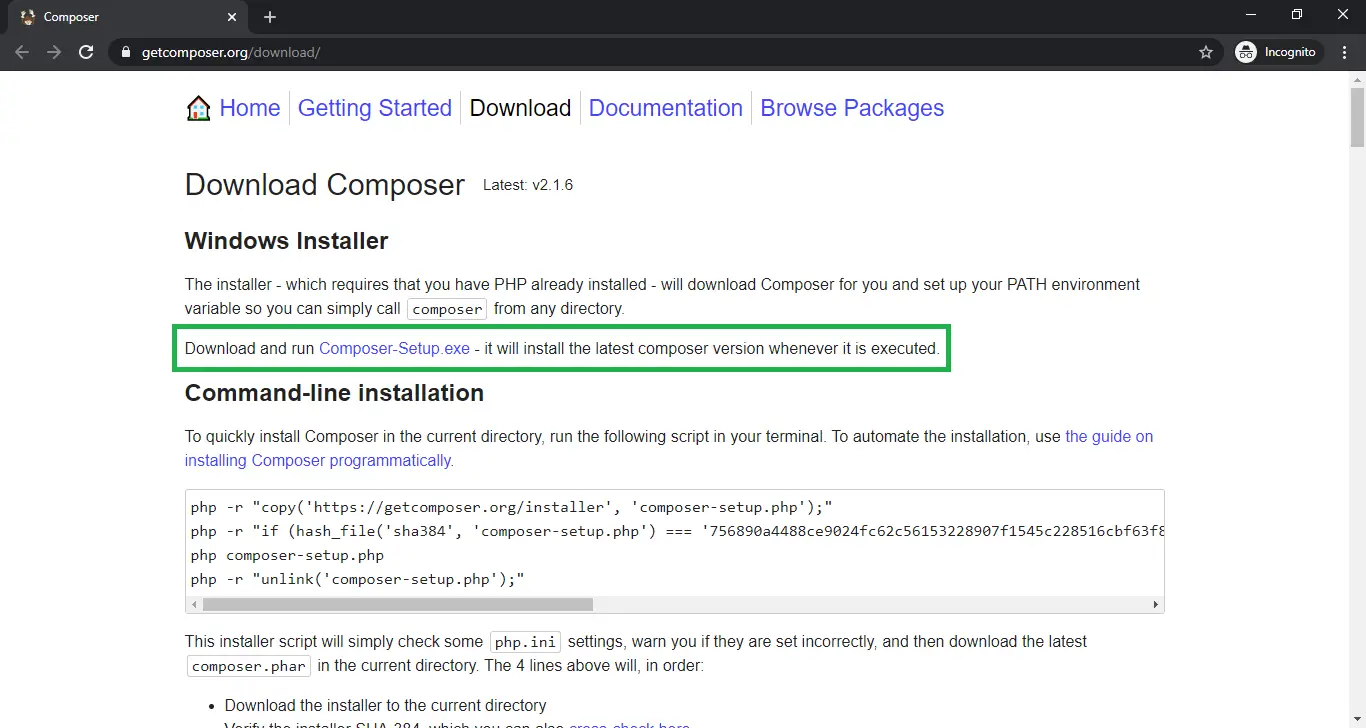
- Step 1: Installed the composer and the Laravel dependencies
First, You need to install first the Composer and the Laravel libraries.

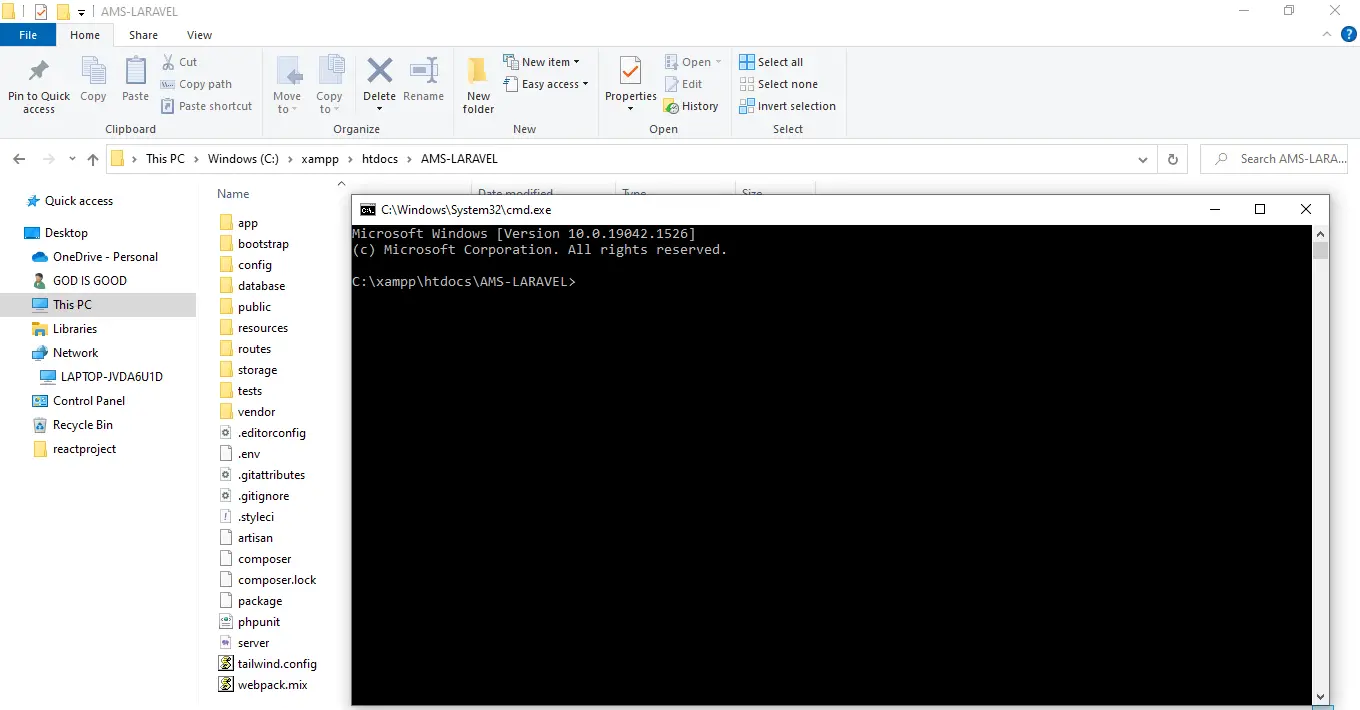
- Step 2: Open Command Prompt
Next, go to the project folder directory then type CMD to open the command prompt.

- Step 3: Composer Install
Then, After you finish to installed the composer and the Laravel. now type “composer install” in your command prompt to install the composer dependencies.

- Step 4: php artisan key:generate
After that, then type “php artisan key:generate ” in your command prompt. A command that sets the APP_KEY value in your . env file. By default, Run the following command to have the database tables migrated for you so that you can begin using the system.

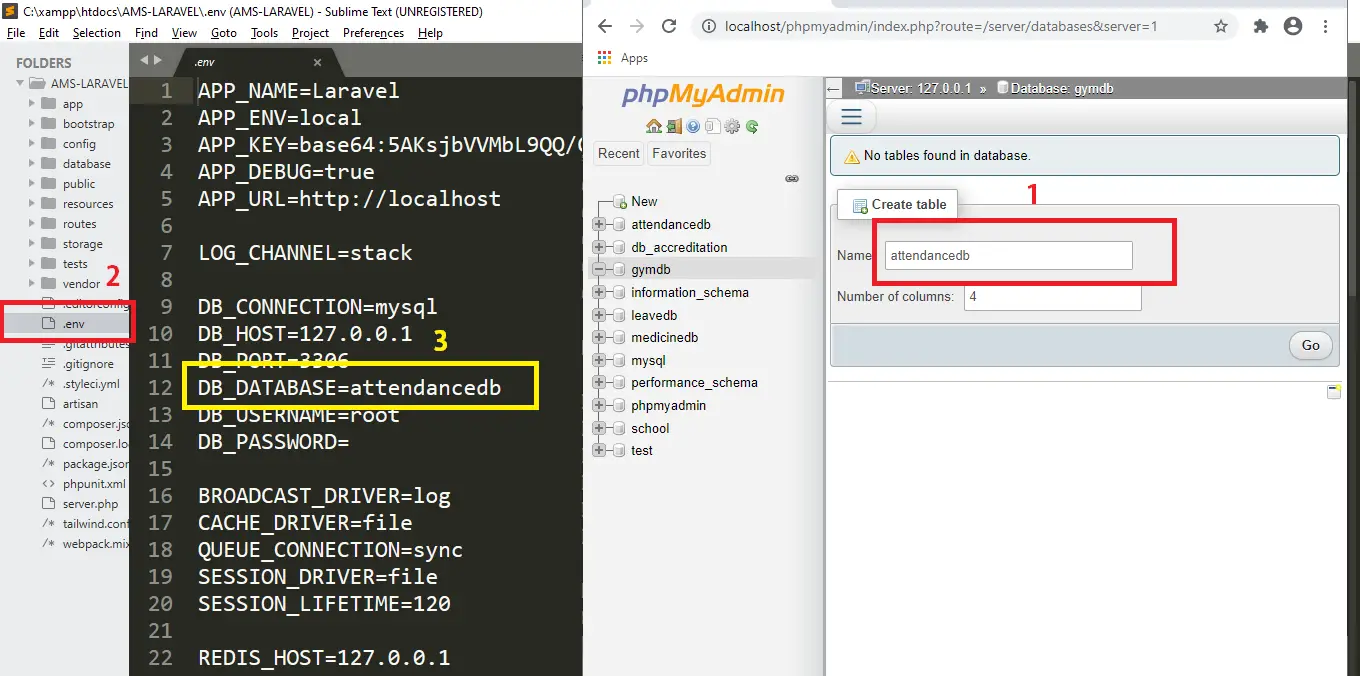
- Step 5: Create Database
After that, To install and run the application correctly. Simply go to phpmyadmin and make a new database. After that, “Be” and rename it to “.env“, then go to connection and modify the default database connection name, only database connection, database username, and password.

- Step 6: php artisan migrate
Lastly, you’ve set up the environment, you’ll need to establish a database configuration for it. Use the following command to create database tables: “php artisan migrate“.

- Step 7: php artisan serve
Lastly, type “php artisan serve” in your command prompt. The purpose of using PHP artisan serve (PHP built in server) is just for testing and easy starting your project it should not be used in real website deployment.
- Step 8: Copy “http://127.0.0.1:8000/”
Finally, In your browser, type the following code to access your project dashboard.





Download Source Code below
Summary
This project includes source code for a Attendance Management System Project in Laravel with Source Code is solely for instructional purposes.
By downloading it, you may use it as a reference and learn more about how to design a system.
You are completely free to make whatever changes you want.
Anyway, if you want to level up your programming knowledge, especially Laravel PHP, try this new article I’ve made for you Awesome Laravel Projects With Source Code Free Download.
Related Articles
- Attendance Management System Software Free Download In ASP NET
- Employee Attendance Management System Project Report (PDF)
- Attendance Management System In CodeIgniter With Source Code
- Student Attendance Management System in C Language w/ Source Code
- Real-Time Student Attendance Management System Project In Python
- Attendance Management System In Python With MySQL Database
- Attendance Management System in JavaScript with Source Code
- Attendance Management System In vb.net Source Code
- Attendance Management System In PHP With Source Code
- Attendance Management System Django With Source Code
Inquiries
If you have any questions or suggestions about Attendance Management System Project in Laravel with Source Code, please feel free to leave a comment below.
Official documentation
Frequently Asked Questions
How does this Laravel attendance management system work?
Daily attendance entry (manual, biometric integration, or QR-code scan), tardy/absent calculation, monthly attendance report, integration with payroll. Foundation: school/college student attendance OR corporate employee attendance. Eloquent: User, AttendanceLog, AttendanceSummary.
What Laravel and PHP versions does this project require?
Most projects in this batch run on Laravel 9 or 10 with PHP 8.1+. A few older projects need Laravel 7-8 with PHP 7.4. Check the project’s composer.json for the exact requirement. To run any of them: install Composer, run composer install, copy .env.example to .env, generate the app key with php artisan key:generate, migrate the database with php artisan migrate, then php artisan serve.
How do I set up the database for this Laravel project?
Open phpMyAdmin (or your MySQL client), create a new empty database (typical names: laravel_school, laravel_pos, etc.). Edit your .env file: set DB_DATABASE to the new database name, DB_USERNAME and DB_PASSWORD to your local MySQL credentials. Run php artisan migrate –seed to create tables and (if seeders are included) sample data.
Can I use this Laravel project for a BSIT capstone or thesis?
Yes, but extend it. A bare CRUD app is too narrow for full capstone scope. Add: user roles (Spatie Permission), reports/dashboards (Laravel Charts), PDF exports (Laravel Snappy or DomPDF), email notifications (Laravel Mail), and a real domain extension (analytics, audit log, multi-branch support). Pair with Chapter 1-5 documentation matching your panel’s rubric.
Why am I getting ‘Class not found’ or ‘No application encryption key’ errors?
Three common Laravel startup issues: (1) Run composer install to pull dependencies into vendor/. (2) Run php artisan key:generate to create the APP_KEY in .env (required for cookies, sessions, and encrypted fields). (3) Run composer dump-autoload after adding new classes manually. If migrations fail with ‘Specified key was too long’: add Schema::defaultStringLength(191) to AppServiceProvider::boot().
Where can I find more Laravel projects with source code?
Browse the Laravel Projects hub for the full library. For broader PHP capstones see PHP Projects (300+ vanilla PHP + MySQL systems). For Python full-stack alternatives see Django Projects. For BSIT-focused capstone idea lists see 150 Best Capstone Project Ideas.

Adones Evangelista
Programmer & Technical Writer at PIES IT Solution
Adones Evangelista is a programmer and writer at PIES IT Solution, author of over 900 tutorials and error-fix guides at itsourcecode.com. Specializes in JavaScript, Django, Laravel, and Python error debugging covering ValueError, TypeError, AttributeError, ModuleNotFoundError, and RuntimeError, plus C/C++ and PHP capstone projects for BSIT students.
Expertise: JavaScript · Python · Django · Laravel · Error Debugging · C/C++ · View all posts by Adones Evangelista →
Please how can we get the security key required to unzip the file downloaded
Zip file password: itsourcecode.com or itsourcecode
wrong passsword
you may look at your database if the username and password is correct.
Bro ,I’m having trouble while installing the composer, tried many ways but not working. Can you please help me out….
Hi good day! Can you show me the error?
its not shown me towrite password and downloaded with file missed
zip file password: itsourcecode or itsourcecode.com
Bro what is the password of admin, teacher and students?
Admin
email:admin@gmail.com
Password: admin123
Teacher
email: teacher@gmail.com
password: teacher123
Students
email: student@gmail.com
password: student123
Parent
email: parent@gmail.com
password: parent123
bro what is main home page user and password
The main home page is admin
bro where is the data ; the database is emty !
It is empty because you need to migrate it. Just follow the instructions.