
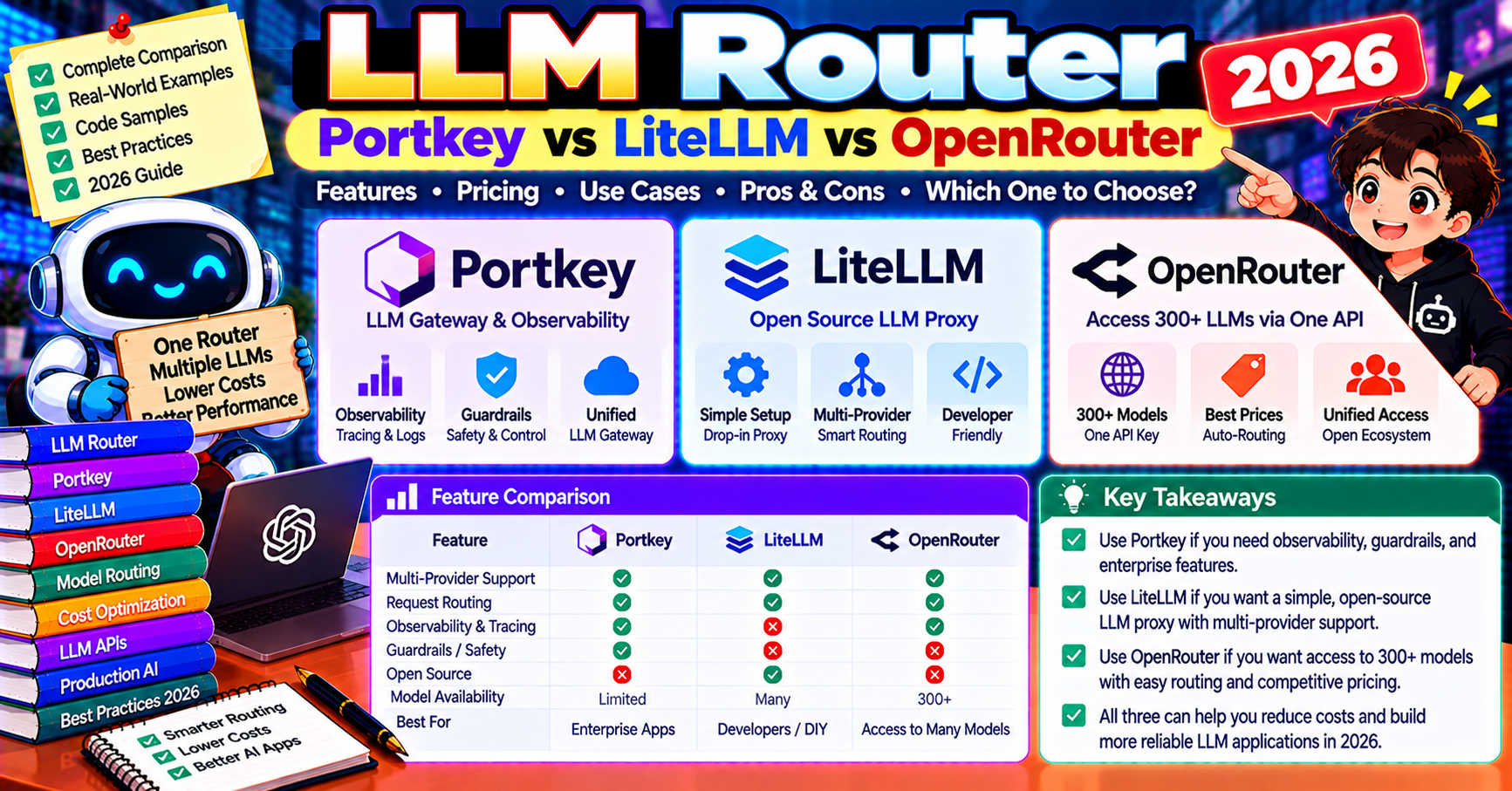
LLM routing is the production pattern where you point your app at one gateway and the gateway picks the right model for each request. The three tools dominating this space in 2026 are Portkey (managed gateway), LiteLLM (open-source library + proxy), and OpenRouter (unified API across providers). Each one solves routing slightly differently and the right pick depends on whether you want managed infrastructure, self-hosted control, or just a one-stop API across models. This article compares all three on setup, routing capabilities, cost, and fit per use case.
What each product does
Portkey: hosted LLM gateway with routing, fallbacks, caching, load balancing, observability, and governance in one platform. You call Portkey’s API, it routes to OpenAI/Anthropic/Google/local models under policies you define. SOC 2 compliant, enterprise-ready.
LiteLLM: open-source Python library + proxy server. 100+ LLM providers behind a unified OpenAI-compatible interface. Run locally as a Python import or deploy the Docker image as a company-wide proxy. Zero vendor lock-in.
OpenRouter: hosted unified API for 200+ models from every major provider. Pay OpenRouter directly (one bill, one API key), access any model instantly. Includes basic routing and cost optimization but less feature-rich than Portkey.
Setup comparison
OpenRouter (simplest):
from openai import OpenAI

client = OpenAI(
    base_url="https://openrouter.ai/api/v1",
    api_key=OPENROUTER_KEY,
)

# Call any of 200+ models with the same code
response = client.chat.completions.create(
    model="anthropic/claude-sonnet-5-5",  # or "openai/gpt-5", "google/gemini-2.5-pro"
    messages=[{"role": "user", "content": "Hello"}],
)
One line config change, access everything. OpenRouter charges a 5% markup on provider pricing in exchange for the convenience.
LiteLLM (Python-first):
pip install litellm

from litellm import completion

# Set env vars: OPENAI_API_KEY, ANTHROPIC_API_KEY, etc.
response = completion(
    model="claude-sonnet-5-5",
    messages=[{"role": "user", "content": "Hello"}],
)

# Fallback example
response = completion(
    model="gpt-5",
    messages=[...],
    fallbacks=["claude-sonnet-5-5", "gemini-2.5-pro"],
)
Keep your existing provider accounts; LiteLLM just abstracts the API surface. For company-wide use, deploy the proxy:
docker run -p 4000:4000 \
    -v $(pwd)/config.yaml:/app/config.yaml \
    -e OPENAI_API_KEY=... \
    -e ANTHROPIC_API_KEY=... \
    ghcr.io/berriai/litellm:main-latest \
    --config /app/config.yaml
Config file defines routes, fallbacks, rate limits, per-user tracking.
Portkey (hosted):
from openai import OpenAI

client = OpenAI(
    base_url="https://api.portkey.ai/v1",
    default_headers={
        "x-portkey-api-key": PORTKEY_KEY,
        "x-portkey-config": "config-id-with-routing-policy",
    },
)

response = client.chat.completions.create(
    model="gpt-5",
    messages=[...],
)
Routing policies live in Portkey’s dashboard. Reference by config ID in the header. Change routes without a deploy.
Routing capabilities head-to-head
| Feature | Portkey | LiteLLM | OpenRouter |
|---|---|---|---|
| Model fallback on error | yes | yes | yes |
| Load balancing (round robin, weighted) | yes | yes | limited |
| Conditional routing (by prompt length, user tier) | yes | yes | no |
| Semantic caching | yes | yes | no |
| Rate limiting per user/key | yes | yes | yes |
| Budget enforcement | yes | yes | yes |
| Observability dashboard | yes (built-in) | yes (via proxy UI) | basic |
| Self-host option | enterprise only | free (open-source) | no |
| Guardrails integration | yes (plus-partners) | yes (via middleware) | no |
The pricing math
At 10M requests/month:
- OpenRouter: 5% markup on provider costs. If base cost is $10K/month, you pay $10,500. Zero infrastructure. One bill.
- LiteLLM self-hosted: free framework. Pay providers directly ($10K base). Infrastructure cost: $50-200/month for the proxy. Total: ~$10,100-$10,250.
- LiteLLM cloud: $50-500/month depending on tier. Pay providers directly. Mid-tier total: ~$10,200.
- Portkey: pay-per-request pricing. At 10M requests/month, typical is $500-$2,000. Pay providers directly. Total: $10,500-$12,000.
Portkey is the premium pick for enterprise features. OpenRouter is the simplest for single-API access. LiteLLM self-hosted is the cheapest at scale if you have the ops bandwidth.
Which one wins by use case
- You need to try multiple models in a prototype: OpenRouter. One API key, 200+ models, 10-minute setup.
- You run production with 2-3 providers and want self-hosted: LiteLLM. Deploy the proxy, keep your provider accounts, zero vendor lock-in.
- You need enterprise governance (budget caps, SOC 2, SSO): Portkey. Built for enterprise from day one.
- You want advanced routing (conditional on prompt length, user tier, cost caps): Portkey or LiteLLM. OpenRouter’s routing is basic.
- You run high-volume agents (100M+ req/month): LiteLLM self-hosted. Lowest cost at scale.
- You want zero infrastructure: OpenRouter or Portkey (both hosted).
- Compliance (HIPAA, data residency): LiteLLM self-hosted in your VPC, or Portkey enterprise.
Conditional routing: the real power of a gateway
Simple fallback (if OpenAI fails, use Anthropic) is table stakes. The real win is conditional routing based on the request shape:
- By prompt length: short prompts to GPT-4o-mini ($0.15/M), long contexts to Claude Sonnet 5.5 (bigger context window)
- By user tier: free users get GPT-4o-mini, paid users get GPT-5
- By task type: code tasks to Claude Opus 5.5, chat tasks to Gemini Flash
- By cost cap: once a user hits their monthly budget, downgrade to cheaper models until they top up
- By time of day: route to spot-instance models during off-peak, premium during business hours
LiteLLM and Portkey both support this via config. OpenRouter is simpler and does not. Example LiteLLM route policy:
# config.yaml
model_list:
  - model_name: smart-router
    litellm_params:
      model: gpt-4o-mini
    rpm_limit: 1000
  - model_name: smart-router
    litellm_params:
      model: claude-sonnet-5-5
    rpm_limit: 500

routing_strategy: least-busy
fallbacks:
  - smart-router: [claude-sonnet-5-5, gpt-4o]
Operational gotchas
- Gateway latency: hosted gateways (Portkey, OpenRouter) add 30-100ms per request. Self-hosted LiteLLM in your VPC adds under 10ms. For latency-critical apps, measure before committing.
- Provider rate limits: gateways do not fix your underlying rate limits. If OpenAI throttles you, the gateway sees the same throttle. Multi-provider setups fix this by failing over to a different provider.
- Response format differences: tool calls, streaming chunks, and finish reasons differ subtly between providers. Gateways normalize most of these but edge cases exist. Test on your actual production flow.
- Cost tracking: hosted gateways track per-request cost in their dashboard. Self-hosted needs your own instrumentation or integration with LangSmith/Langfuse.
Observability per gateway
LLM routers quietly turn into your source of truth for AI usage data across the org. Three capability layers worth comparing:
- Per-request logging: Portkey and LiteLLM proxy capture every request/response pair with metadata (user, cost, model, latency). OpenRouter logs cost and request count but not full prompt/response text. For debugging specific user issues, Portkey and LiteLLM are the right pick.
- Aggregate dashboards: Portkey ships the strongest built-in dashboard with per-user, per-model, per-feature breakdowns. LiteLLM proxy has a decent UI since 2024. OpenRouter dashboard shows cost but limited drill-down.
- Export to external tools: all three support webhook export, Prometheus metrics, or SIEM integration. For integration with existing observability stacks (Datadog, Grafana), configure the export rather than relying on the gateway’s native UI.
If LLM traces are the only observability signal you track, Portkey’s dashboard is enough on its own. If you already run Datadog or Grafana for the rest of your stack, point the gateway at the same backend and keep one unified pane.
Frequently Asked Questions
Can I use multiple gateways together?
Yes but unusual. One pattern: LiteLLM internally with OpenRouter as one of its backends. Lets you access OpenRouter’s 200+ models through LiteLLM’s advanced routing. Adds complexity without much benefit for most teams.
How does caching interact with routing?
Cache before route. Hit the semantic cache first; on miss, invoke the router. If routing picks GPT-4o this time vs Claude last time, store the cache entry with a key that is model-agnostic (same question gets same cached answer regardless of which model generated it).
Can I A/B test models through these gateways?
Yes. All three support percent-based routing. “Route 50% of traffic to GPT-4o, 50% to Claude Sonnet 5.5” is a config change. Collect user feedback by model, pick the winner.
Which one supports Azure OpenAI deployments?
All three. LiteLLM has first-class Azure support (deployment names, API versions). Portkey wraps Azure as another provider. OpenRouter does not route to private Azure deployments (only shared OpenAI).
Do these work with local models (Ollama, vLLM)?
LiteLLM yes (first-class). Portkey yes via private endpoints. OpenRouter only hosted models by default. For hybrid local + cloud setups, LiteLLM is the clearest fit.
Can I migrate from one to another?
Yes with minor code changes. All three expose OpenAI-compatible APIs; swap the base URL and headers. The routing policies do not migrate automatically; those are specific to each tool and need to be redeclared.
Official documentation

Adones Evangelista
Programmer & Technical Writer at PIES IT Solution
Adones Evangelista is a programmer and writer at PIES IT Solution, author of over 900 tutorials and error-fix guides at itsourcecode.com. Specializes in JavaScript, Django, Laravel, and Python error debugging covering ValueError, TypeError, AttributeError, ModuleNotFoundError, and RuntimeError, plus C/C++ and PHP capstone projects for BSIT students.
Expertise: JavaScript · Python · Django · Laravel · Error Debugging · C/C++ · View all posts by Adones Evangelista →