
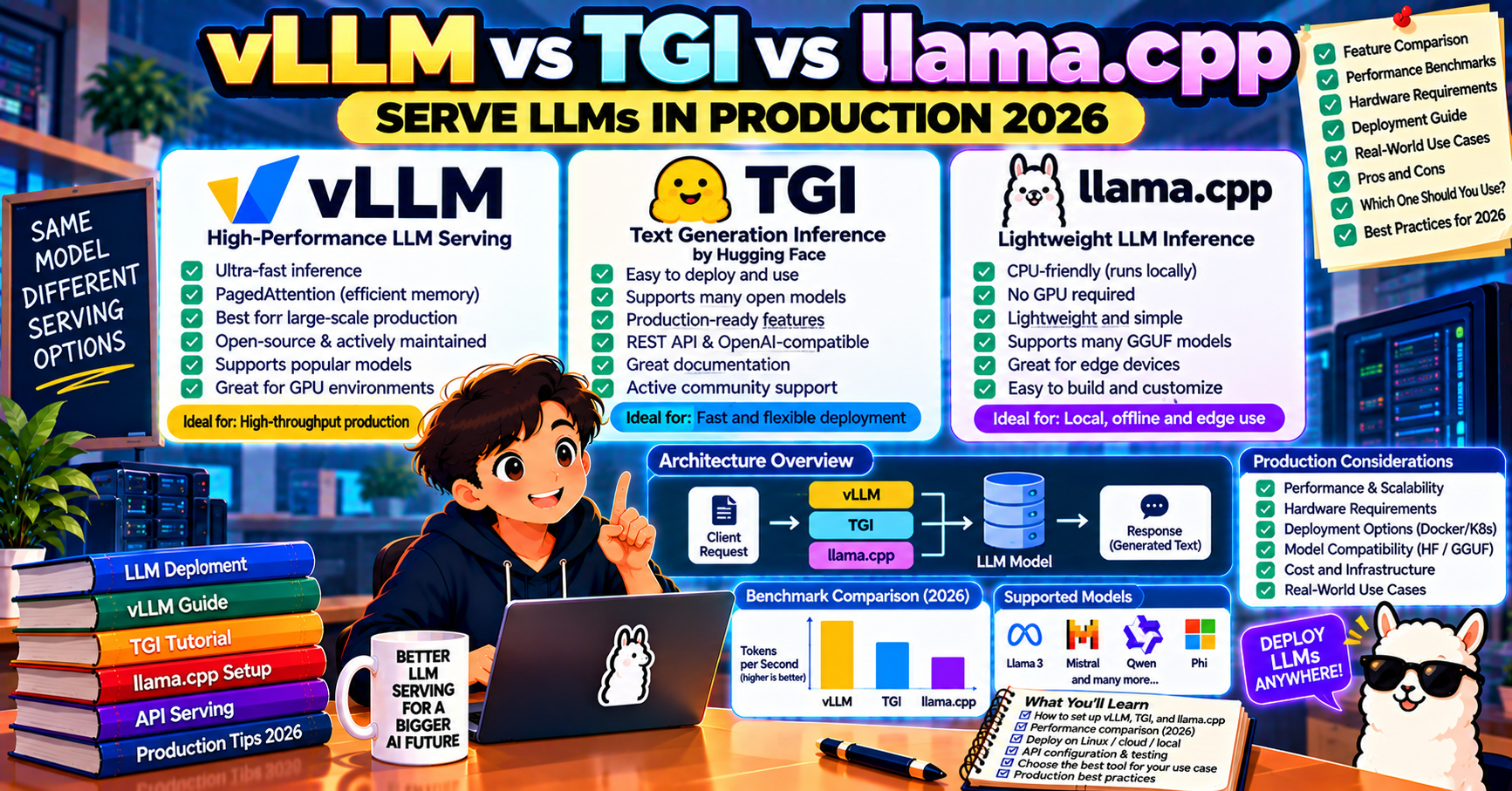
Running an LLM locally on your laptop is one problem. Serving an LLM to real users at production load is a different one, and the right tool depends on your hardware, concurrency, and whether you need to batch inference across many requests. The three serious self-hosted LLM serving frameworks in 2026 are vLLM, Hugging Face Text Generation Inference (TGI), and llama.cpp. This article compares them on throughput, hardware fit, model support, and operational burden.
The three frameworks in one minute
vLLM is the throughput king. Built around PagedAttention (a memory management technique borrowed from OS virtual memory) and continuous batching, vLLM serves 10x to 20x more concurrent requests on the same GPU than naive approaches. Written in Python and CUDA. Backed by UC Berkeley Sky Computing Lab and a huge open-source community.
Hugging Face TGI is the production-smooth choice. Not quite as fast as vLLM on raw throughput, but easier to deploy (Docker container with sensible defaults), tighter integration with Hugging Face Hub model loading, and strong support for serving multiple models from one endpoint. Rust core with Python shell.
llama.cpp is the CPU-and-everything-else runtime. Written in C++, runs on CPU, Apple Silicon GPU, NVIDIA GPU, AMD GPU, and even Raspberry Pi. Lower raw throughput than vLLM or TGI on dedicated NVIDIA hardware, but the only serious option when you do not have a server-grade GPU. Powers Ollama, LM Studio, and most consumer local-LLM apps.
Throughput benchmarks (September 2026)
Tokens-per-second on a single A100 80GB serving Llama 3.1 70B (4-bit quantized), batch size 16 concurrent requests:
- vLLM: 2800 to 3400 tokens/sec
- TGI: 2100 to 2600 tokens/sec
- llama.cpp (CUDA): 900 to 1300 tokens/sec
At batch size 1 (single user, interactive chat) the gap narrows:
- vLLM: 55 to 70 tokens/sec
- TGI: 50 to 65 tokens/sec
- llama.cpp (CUDA): 45 to 55 tokens/sec
vLLM’s advantage is proportional to concurrency. If you serve one user at a time, llama.cpp is almost as fast and uses less memory. If you serve dozens or hundreds of concurrent users, vLLM is dramatically more efficient per dollar of GPU.
Hardware fit
- vLLM: NVIDIA GPU required (CUDA 11.8+). Supports H100, A100, H200, L40S, RTX 3090/4090/5090. AMD ROCm support is experimental in 2026 but improving. No CPU or Apple Silicon support.
- TGI: NVIDIA GPU primary. AMD and Intel Gaudi supported. CPU inference is possible but slow.
- llama.cpp: everything. CPU, Apple Silicon Metal, CUDA, ROCm, Vulkan, SYCL. The only option on a MacBook, a mini PC with integrated graphics, or an edge device.
Model support
All three support the major open-source model families (Llama, Mistral, Qwen, Gemma, Phi, DeepSeek) in 2026. The nuances:
- vLLM: supports models in Hugging Face transformers format. New model architectures usually land in vLLM within 1 to 2 weeks of release.
- TGI: ties directly to Hugging Face Hub. Any model on the Hub with a compatible architecture can be loaded by name.
- llama.cpp: uses the GGUF format. Models need to be converted or downloaded in GGUF (the conversion is automated for most popular models within days of release). Supports a wider range of quantization levels (Q2 through Q8) which lets you squeeze bigger models into less memory with a quality tradeoff.
Deployment examples
vLLM
pip install vllm
vllm serve meta-llama/Llama-3.1-8B-Instruct \
  --dtype auto --api-key your-key --port 8000
vLLM exposes an OpenAI-compatible API at http://localhost:8000/v1/chat/completions, so your existing OpenAI SDK code points at the local endpoint with one line change.
TGI
docker run --gpus all --shm-size 1g -p 8080:80 \
  -v $HOME/data:/data \
  ghcr.io/huggingface/text-generation-inference:latest \
  --model-id meta-llama/Llama-3.1-8B-Instruct
TGI’s API is HTTP/REST (not OpenAI-compatible by default, but TGI 2.x added an OpenAI-compatible endpoint). Metrics are exposed on /metrics for Prometheus scraping out of the box.
llama.cpp
# Install and run with the built-in server
./llama-server -m models/llama-3.1-8b-instruct.Q4_K_M.gguf \
  --host 0.0.0.0 --port 8080 --n-gpu-layers 99
llama.cpp ships llama-server with an OpenAI-compatible endpoint on /v1/chat/completions. Lighter weight than vLLM or TGI; the binary alone is around 30 MB, no Python runtime required.
Operational considerations
- Observability: TGI has first-class Prometheus metrics. vLLM 0.5+ added structured metrics. llama.cpp has basic logs; you add structured metrics with a sidecar.
- Multi-model serving: TGI handles multiple models per endpoint cleanly. vLLM has an experimental multi-LoRA setup. llama.cpp is one-model-per-process.
- Autoscaling: all three run in Kubernetes. vLLM has the richest reference implementations (vLLM Production Stack, KubeRay integrations).
- GPU memory efficiency: vLLM’s PagedAttention is 2-3x more memory-efficient than naive KV cache management. For 70B+ models on a 48 GB GPU, this is the difference between fitting and not fitting.
Which to pick for your use case
- Production SaaS with hundreds of concurrent users and NVIDIA GPUs: vLLM. Highest throughput per dollar.
- Enterprise deployment with Hugging Face Hub integration and observability needs: TGI. Smoother ops.
- MacBook, Apple Silicon, or any non-NVIDIA hardware: llama.cpp. Only serious option.
- Edge device or low-memory server: llama.cpp with heavy quantization (Q4_K_M, Q3_K_M).
- Interactive single-user chat: all three are fast enough; llama.cpp has the lightest footprint.
- Starting from scratch with no infra opinion: vLLM for production, llama.cpp for prototyping on your own machine.
Benchmarking your actual workload
Published throughput numbers assume short prompts and fixed-size outputs. Real workloads mix prompt lengths, retrieval contexts, and long generations. Three steps to get an accurate picture before committing to a serving stack:
- Sample 100 to 500 real production prompts with their expected output lengths. Save them as a JSONL file to replay.
- Run a load test with vegeta, k6, or Locust against each candidate server. Measure p50/p95/p99 latency, requests-per-second at target latency, and GPU utilization.
- Chart throughput vs latency SLO: at p95 under 500ms, vLLM might sustain 80 RPS where TGI sustains 60 and llama.cpp sustains 25. The right pick is the cheapest stack that meets your SLO.
Operational tradeoffs beyond throughput
Pure speed is one dimension. These matter in production too:
- Reload-after-config-change time: vLLM takes 30 to 60 seconds to reload a 70B model. During a config roll, you lose that window. Blue-green deploy or batch scheduling matters.
- Memory headroom for prompt caching: vLLM’s PagedAttention leaves more KV-cache headroom than naive implementations. If your workload has shared prefixes, you get prefix caching speedup basically for free.
- Observability: TGI exports native Prometheus metrics. vLLM has them in 0.5.1+. llama.cpp needs a sidecar. Pick based on what you can plug into your existing monitoring.
Frequently Asked Questions
Official documentation
Which is fastest in 2026?
vLLM on NVIDIA GPUs under high concurrency. On a single A100 serving a 70B model to 16 concurrent users, vLLM pushes 2800 to 3400 tokens/second total throughput, roughly 30% ahead of TGI and 3x ahead of llama.cpp.
Can I run vLLM on a Mac?
No. vLLM requires CUDA. On a MacBook or Mac Studio use llama.cpp (which has first-class Apple Silicon Metal support), typically through Ollama or LM Studio which both wrap llama.cpp.
Does TGI support the OpenAI API format?
Yes, as of TGI 2.0. The messages API endpoint at /v1/chat/completions accepts OpenAI-shaped requests, so you can point an existing OpenAI SDK at a TGI server with just the base URL change.
What about Ollama for production serving?
Ollama is excellent for single-user local use and small team deployments. For production serving hundreds of concurrent users, swap to vLLM or TGI. Ollama uses llama.cpp underneath, so it inherits llama.cpp’s lower throughput ceiling under heavy concurrency.
How do I choose between vLLM and TGI?
vLLM wins on raw throughput; TGI wins on ops smoothness. If your team is comfortable with Python debugging and wants maximum GPU efficiency, pick vLLM. If you want a Docker container that just works and tight Hugging Face integration, pick TGI. For most teams either works and the difference is marginal below a few hundred concurrent users.
Is llama.cpp slower on NVIDIA than vLLM?
Yes, meaningfully. On a 70B model at 16 concurrent requests, llama.cpp pushes around 900 to 1300 tokens/sec vs vLLM’s 2800+. For single-user chat the gap is small; for high-concurrency serving vLLM is the right choice when NVIDIA hardware is available.

Adones Evangelista
Programmer & Technical Writer at PIES IT Solution
Adones Evangelista is a programmer and writer at PIES IT Solution, author of over 900 tutorials and error-fix guides at itsourcecode.com. Specializes in JavaScript, Django, Laravel, and Python error debugging covering ValueError, TypeError, AttributeError, ModuleNotFoundError, and RuntimeError, plus C/C++ and PHP capstone projects for BSIT students.
Expertise: JavaScript · Python · Django · Laravel · Error Debugging · C/C++ · View all posts by Adones Evangelista →