
You added 10,000 documents to ChromaDB last night. This morning you restart the script and the collection is empty. This is the most-reported ChromaDB bug in 2026. The database itself is not broken.
The cause is almost always one of five things: wrong path, using Client() instead of PersistentClient(), forgetting to call add() at commit time, running inside a sandbox that wipes the disk, or a Docker volume mount that points somewhere unexpected. Here is how to diagnose and fix each.
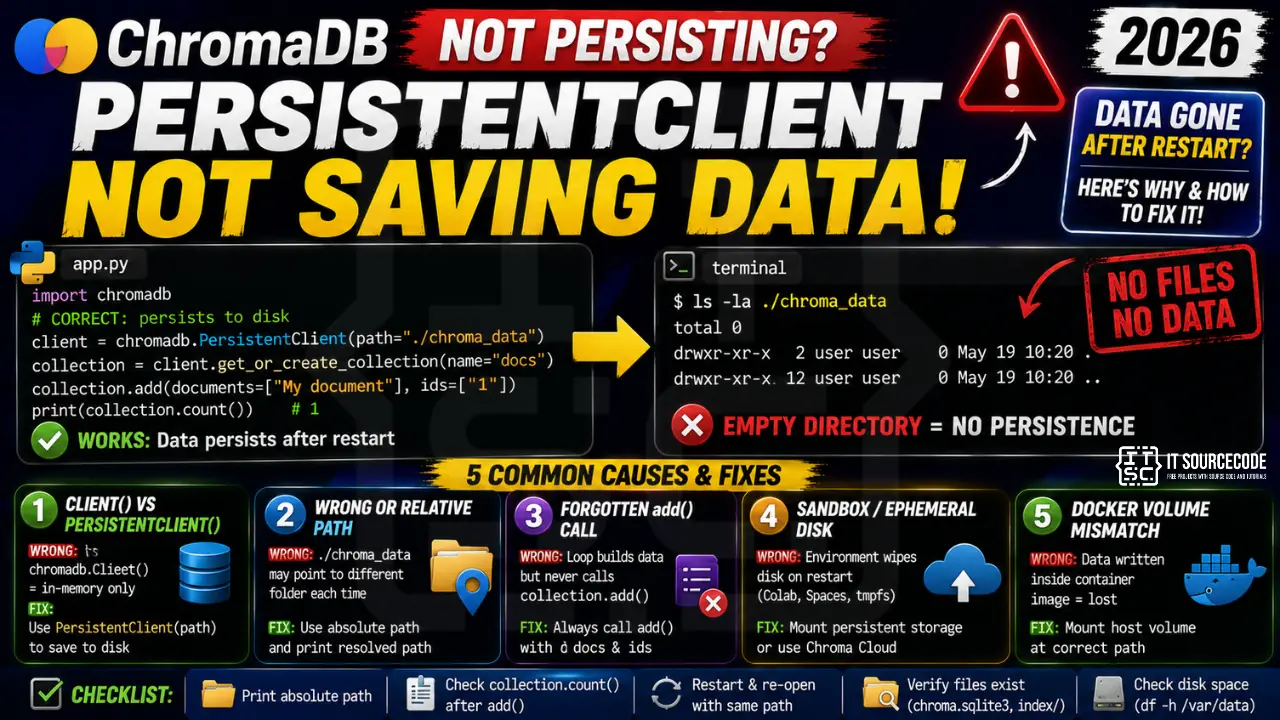
Cause 1: Client() vs PersistentClient()
The most common trap. chromadb.Client() is in-memory only. All data disappears when the process exits. chromadb.PersistentClient(path=...) writes to disk. If you mix these in different scripts, the “second” script sees an empty in-memory client and reports no data.
import chromadb

# WRONG: in-memory, wipes on exit
# client = chromadb.Client()

# CORRECT: persists to disk
client = chromadb.PersistentClient(path="./chroma_data")
collection = client.get_or_create_collection(name="docs")
collection.add(documents=["Persist me"], ids=["1"])

print(collection.count())   # 1
# Restart the script and rerun this line
# client = chromadb.PersistentClient(path="./chroma_data")
# collection = client.get_or_create_collection(name="docs")
# print(collection.count())  # still 1
Cause 2: relative vs absolute path
Using path="./chroma_data" resolves relative to the current working directory. If your script runs from different directories (cron, Docker, systemd), the data ends up in different places. Use absolute paths in production.
import os
import chromadb

# Production-safe: absolute path anchored to a known location
CHROMA_PATH = os.environ.get(
    "CHROMA_DATA_PATH",
    "/var/data/chroma"   # or wherever your app owns writable disk
)
os.makedirs(CHROMA_PATH, exist_ok=True)

client = chromadb.PersistentClient(path=CHROMA_PATH)
collection = client.get_or_create_collection(name="production_docs")
print(f"Chroma persisting to: {CHROMA_PATH}")
print(f"Current doc count: {collection.count()}")
Cause 3: forgotten add() call inside a loop
A subtle bug: your ingestion loop builds a list of documents but never calls collection.add() because of a conditional or return early.
# WRONG: add() is inside a branch that never runs in prod
def ingest_docs(collection, docs):
    for i, d in enumerate(docs):
        if len(d) < 100:
            continue
        # ...processing...
        if DEBUG:
            collection.add(documents=[d], ids=[f"doc_{i}"])

# CORRECT: always add valid documents
def ingest_docs(collection, docs):
    to_add = []
    ids = []
    for i, d in enumerate(docs):
        if len(d) >= 100:
            to_add.append(d)
            ids.append(f"doc_{i}")
    if to_add:
        collection.add(documents=to_add, ids=ids)
    print(f"Added {len(to_add)} docs. Collection now has {collection.count()}.")
Cause 4: sandbox or ephemeral disk
Running inside Google Colab, HuggingFace Spaces, uv run –isolated, or a container with tmpfs writes data to disk that vanishes when the sandbox restarts. The client is correctly configured but the disk is not durable.
- Colab: mount Google Drive first:
from google.colab import drive; drive.mount('/content/drive'). Then setCHROMA_PATH="/content/drive/MyDrive/chroma". - Docker: mount a persistent volume:
docker run -v /host/data/chroma:/var/data/chroma yourimage. - Kubernetes: use a PersistentVolumeClaim, not emptyDir.
- Serverless (Vercel, Lambda): Chroma cannot persist locally. Use Chroma Cloud or a hosted vector DB.
Cause 5: Docker volume mismatch
# WRONG Dockerfile pattern: /app/chroma is inside the container image
# WORKDIR /app
# RUN mkdir chroma
# CMD ["python", "app.py"]

# CORRECT: mount host disk into a well-known container path
# In docker-compose.yml:
#
# services:
#   app:
#     image: myapp:latest
#     volumes:
#       - ./chroma_data:/var/data/chroma
#     environment:
#       - CHROMA_DATA_PATH=/var/data/chroma

# Then in Python:
import os
import chromadb
client = chromadb.PersistentClient(path=os.environ["CHROMA_DATA_PATH"])
Debugging checklist
- Print the exact resolved path:
print(os.path.abspath(CHROMA_PATH)). Confirm it is where you expect. - After
collection.add(), immediately printcollection.count(). If it says N documents were added, the write succeeded. - Exit the process. Re-open a fresh Python shell. Recreate the client with the same path. Read the count. If it dropped, disk is not durable or path is wrong.
- Verify the directory has files:
ls -la /var/data/chroma. You should see achroma.sqlite3file and index folders. - Check disk space:
df -h /var/data. Chroma silently truncates writes on a full disk.
Real-world example: safe ingest with verification
import os
import chromadb
from chromadb.utils.embedding_functions import OpenAIEmbeddingFunction

CHROMA_PATH = os.environ.get("CHROMA_DATA_PATH", "/var/data/chroma")
os.makedirs(CHROMA_PATH, exist_ok=True)

print(f"Using Chroma at: {os.path.abspath(CHROMA_PATH)}")

client = chromadb.PersistentClient(path=CHROMA_PATH)
ef = OpenAIEmbeddingFunction(
    api_key=os.environ["OPENAI_API_KEY"],
    model_name="text-embedding-3-small",
)

collection = client.get_or_create_collection(
    name="production_docs",
    embedding_function=ef,
)

before = collection.count()
print(f"Docs before ingest: {before}")

# Real ingest
docs = ["Doc A content", "Doc B content", "Doc C content"]
ids = [f"doc_{i}" for i in range(len(docs))]
collection.add(documents=docs, ids=ids)

after = collection.count()
print(f"Docs after ingest: {after}")

assert after == before + len(docs), (
    f"Ingest failure. Expected {before + len(docs)}, got {after}."
)
print("Ingest verified. Data persisted.")
Common mistakes with ChromaDB persistence
- Mixing Client() in one script and PersistentClient() in another. They do not share state. Standardize on PersistentClient across the codebase.
- Assuming Chroma auto-flushes. It does, but only synchronously with each add() call. If your process crashes mid-ingest, uncommitted writes are lost.
- Deleting the chroma_data folder as part of cleanup scripts. A well-meaning
rm -rf ./tmp/*can wipe your Chroma folder if paths overlap. - Running two processes writing to the same path. Chroma is single-writer. Concurrent writers can corrupt the SQLite index. Serialize writes or use Chroma’s server mode.
Official documentation
Common causes of ChromaDB persistence failures
The ChromaDB PersistentClient should save your embeddings to disk, but real-world usage hits several patterns that silently break persistence. Here are the four most common causes.
- Wrong path parameter format. Use an absolute path like /home/user/chromadb or use os.path.join(os.getcwd(), “chromadb”). Relative paths break when your working directory changes.
- Missing directory permissions. The Python process must have write access to the target directory. Check permissions with ls -la and adjust with chmod 755 if needed.
- Client not calling client.persist() explicitly. Depending on your chromadb version, some operations require an explicit persist call. Newer versions auto-persist but older versions do not.
- Database corruption from concurrent access. Multiple Python processes writing to the same PersistentClient path corrupts the SQLite backing store. Use a lock or migrate to Qdrant for concurrent workloads.
Verifying persistence in production ChromaDB deployments
Silent persistence failures are painful in production RAG pipelines. The best defense is proactive verification. Add a smoke test that inserts a known document, exits the Python process, restarts it, and verifies the document is retrievable. Run this smoke test in your CI pipeline before every deployment.
For long-running services, add periodic health checks that count the total number of documents in the collection and compare against an expected minimum. If the count drops unexpectedly, alert your on-call engineer. Silent data loss caught 2 weeks after it happens is much more expensive than the small overhead of proper verification.
Also keep regular backups of your chromadb data directory. Simple tar archives to S3 or backup storage every 24 hours are enough for most projects. When persistence bugs eventually happen (and they will), a recent backup means minutes of recovery instead of days of re-embedding your entire corpus. This one small habit prevents the worst-case scenario in every ChromaDB production deployment.
Quick step-by-step summary (click to expand)
- Use an absolute path for the client. Change PersistentClient(path=”./chromadb”) to an absolute path like PersistentClient(path=”/home/user/chromadb”).
- Verify directory write permissions. Run ls -la on the target directory. The Python process must have write permissions.
- Call client.persist() explicitly if using older chromadb. For chromadb versions below 0.4, call client.persist() after every batch of writes.
- Prevent concurrent access. Ensure only one Python process writes to the same PersistentClient path. Use a lock or migrate to Qdrant for concurrent workloads.
Frequently Asked Questions
Does PersistentClient need explicit flush?
No. Each add() call writes synchronously to disk. There is no flush() method. If the process crashes before add() returns, that batch is lost.
Can two processes write to the same Chroma path?
Not safely. Chroma’s SQLite backend is single-writer. Use Chroma Server (Docker) if you need concurrent writes.
How to back up Chroma data?
Stop the writer process, copy the entire path directory (chroma.sqlite3 plus index folders), restart. For online backup, use SQLite’s .backup command against chroma.sqlite3.
Can I use Chroma in AWS Lambda?
Not with PersistentClient. Lambda’s /tmp is ephemeral and small. Use Chroma Cloud, or pick a hosted vector DB like Pinecone or Qdrant Cloud for serverless.
Why is chroma.sqlite3 growing so fast?
Every embedding stored is a large vector (1536 floats for OpenAI). 100k embeddings occupies roughly 600 MB. Plan disk budget accordingly. Chroma also stores metadata and index structures alongside vectors.

Adrian Mercurio
Full-Stack Developer at PIES IT Solution
Adrian Mercurio is a full-stack developer at PIES IT Solution. Specializes in building complete capstone projects with full documentation. Strong background in PHP/MySQL development and database design.
Expertise: PHP, Laravel, Database Design, Capstone Projects, C#, Python, AI Projects