
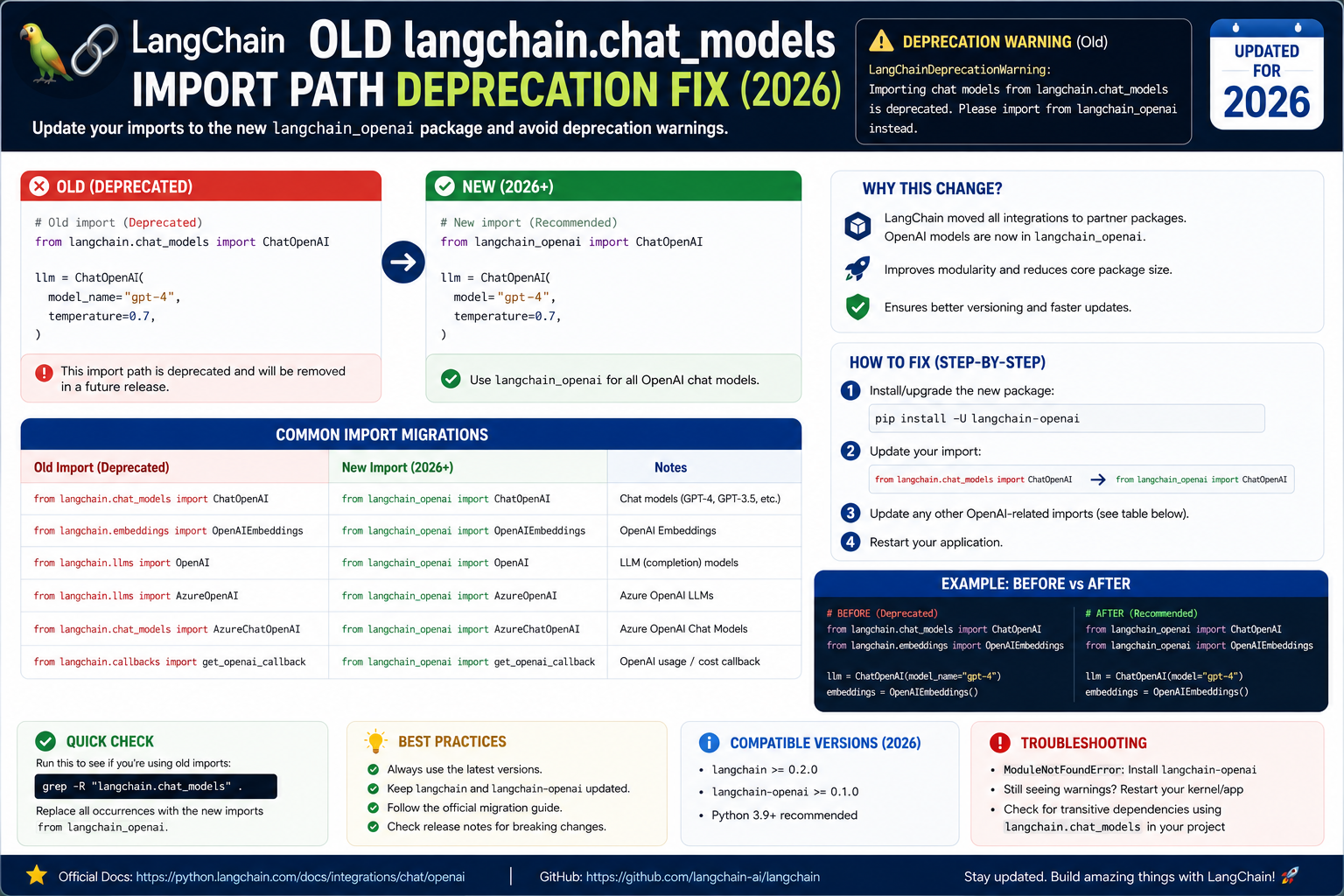
Since LangChain 0.2 (early 2024) and continuing into 2026, every chat model provider moved out of the monolithic langchain.chat_models package into its own langchain-* package. If you copy old tutorials or migrate an older codebase, you get errors like ImportError: cannot import name 'ChatAnthropic' from 'langchain.chat_models'. Here is the complete migration table and the current-year import pattern.
Why the old imports are gone
The LangChain 0.2 architecture split providers into separate PyPI packages so each provider can ship on its own release cadence. This means langchain-anthropic, langchain-openai, langchain-groq, langchain-google-genai, and others are now installed independently. The old langchain.chat_models path is gone. Old from langchain.chat_models import ChatAnthropic statements silently succeeded on some 0.1 minor versions but now consistently error.
The fix: install the provider package + update the import
# Install the provider package (pick what you need)
uv add langchain-anthropic
uv add langchain-openai
uv add langchain-groq
uv add langchain-google-genai
uv add langchain-ollama

# Or with pip
pip install langchain-anthropic langchain-openai
# WRONG (deprecated, raises ImportError in 2026)
# from langchain.chat_models import ChatAnthropic
# from langchain.chat_models import ChatOpenAI
# CORRECT (2026 pattern)
from langchain_anthropic import ChatAnthropic
from langchain_openai import ChatOpenAI
from langchain_groq import ChatGroq
from langchain_google_genai import ChatGoogleGenerativeAI
from langchain_ollama import ChatOllama
llm = ChatAnthropic(model="claude-opus-4-8")
reply = llm.invoke("Hello LangChain 2026")
print(reply.content)Complete migration table
| Old import (0.1) | New import (0.2+) | Install |
|---|---|---|
from langchain.chat_models import ChatAnthropic | from langchain_anthropic import ChatAnthropic | langchain-anthropic |
from langchain.chat_models import ChatOpenAI | from langchain_openai import ChatOpenAI | langchain-openai |
from langchain.chat_models import ChatGoogleGenerativeAI | from langchain_google_genai import ChatGoogleGenerativeAI | langchain-google-genai |
from langchain.chat_models import ChatOllama | from langchain_ollama import ChatOllama | langchain-ollama |
from langchain.embeddings import OpenAIEmbeddings | from langchain_openai import OpenAIEmbeddings | langchain-openai |
from langchain.vectorstores import Chroma | from langchain_chroma import Chroma | langchain-chroma |
from langchain.tools import DuckDuckGoSearchRun | from langchain_community.tools import DuckDuckGoSearchRun | langchain-community |
Debugging checklist
- Confirm the provider package is installed:
pip show langchain-anthropic. If empty, install withuv addorpip install. - Check your Python is the same one running your script:
which pythonvs the venv you installed into. - If you see two versions of langchain installed side by side (0.1 and 0.2), uninstall the older one to prevent import confusion.
- If you use LangSmith or LangChain Hub, they now expect the provider-package imports too. Update your hub prompts if they reference old paths.
Real-world example: multi-provider fallback pattern
# A common 2026 pattern: try Claude first, fall back to GPT-4
from langchain_anthropic import ChatAnthropic
from langchain_openai import ChatOpenAI
from langchain_core.messages import HumanMessage
import anthropic

PRIMARY = ChatAnthropic(model="claude-opus-4-8", max_tokens=2048)
FALLBACK = ChatOpenAI(model="gpt-4o", max_tokens=2048)

def robust_chat(prompt: str):
    try:
        return PRIMARY.invoke([HumanMessage(content=prompt)]).content
    except (anthropic.InternalServerError, anthropic.APIConnectionError):
        return FALLBACK.invoke([HumanMessage(content=prompt)]).content

reply = robust_chat("Explain retrieval-augmented generation in 2 sentences.")
print(reply)
Common mistakes when migrating
- Installing the provider package but keeping the old import. Both changes must happen together.
- Mixing 0.1 and 0.2 in the same requirements file. Old langchain and new langchain-core packages together create a fragile mix. Pin all to 0.2+.
- Forgetting langchain-community for tools. Tools like DuckDuckGo, Serper, and Wikipedia moved to
langchain-community. Install that package alongside your chat model package. - Copy-pasting stale StackOverflow answers. Most pre-2024 answers use the deprecated path. Cross-check with current LangChain docs.
Debugging checklist for the SDK/library error
Before diving into fixes, run through this diagnostic checklist. Nine times out of ten the answer surfaces here.
- Read the full traceback, not just the error message. The stack trace shows exactly which line and which call chain triggered the error. The last line names the immediate cause; earlier lines show how you got there.
- Add print or debug statements just before the failing line. Print the variable, its type, and its value. Nine out of ten error surprises come from the value being different from what you assumed.
- Check Python version compatibility. Errors sometimes result from APIs that changed between versions. Run your interpreter version check and compare against the library documentation for that version.
- Isolate the failing call in a minimal reproducer. Copy the failing line into a small standalone script with hardcoded inputs. If it fails there too, the bug is in your code. If not, something in your surrounding context is contributing.
- Search the exact error message. Include the class name and the specific text in your search. Chances are someone else hit the same issue and the fix is documented on Stack Overflow or the library’s GitHub issues.
Common causes for the SDK/library error
Most instances of this error trace back to one of these root causes:
- Uninitialized or missing input. A variable was not populated before use, or the input source (file, API response, database row) did not contain the expected key or value.
- Type mismatch. The code expected a specific type (dict, list, string) but received something different. Python’s dynamic typing means this often surfaces at runtime, not at compile time.
- Version drift. The library API changed and your code assumes the old signature. Check the library’s changelog for breaking changes since the version you last used.
- Race condition or ordering issue. Async or concurrent code sometimes tries to access data before it is ready. Add awaits, locks, or explicit ordering to fix.
- Copy-paste from stale tutorial. Older tutorials may use APIs that no longer exist. Always check the official docs for the current version.
Testing and prevention
Preventing this class of error from recurring is more valuable than fixing it once. Build these habits into your workflow:
- Write tests that trigger the error path. If your test suite hits the error scenario, catch and assert it. A well-written test prevents the same bug from returning.
- Validate inputs at API boundaries. When data enters your code from external sources (HTTP requests, file uploads, database queries), validate structure and types immediately.
- Use type hints and static analysis. Tools like mypy for Python or TypeScript for JavaScript catch many type mismatches before you run the code.
- Log important state. Structured logging with context helps you debug production issues faster. Include enough context to reconstruct what happened.
- Read the library changelog. Before upgrading a dependency, skim the changelog for breaking changes. Two minutes of reading saves an hour of debugging.
When to ask for help
Some errors are worth solving yourself for the learning. Others are worth asking about early. Ask for help when: the error blocks a customer-facing feature, you have spent an hour without progress, the error involves security or data integrity, or you are unsure whether your fix will introduce new bugs. Post to Stack Overflow with a minimal reproducer, or ask a senior developer on your team. Time boxes are your friend.
Official documentation
Quick step-by-step summary (click to expand)
- Identify the deprecated import. Old: from langchain.chat_models import ChatOpenAI. Warning message: LangChainDeprecationWarning.
- Install the new provider package. Run pip install langchain-openai or pip install langchain-anthropic based on which provider you use.
- Update the import path. Replace langchain.chat_models with the provider-specific package: from langchain_openai import ChatOpenAI.
- Update ChatAnthropic too. from langchain.chat_models import ChatAnthropic becomes from langchain_anthropic import ChatAnthropic.
- Run and verify. Re-run your script. Deprecation warning should disappear. Check LangChain 0.3+ compatibility if issues persist.
Frequently Asked Questions
Will langchain.chat_models come back?
No. The split into provider packages is intentional and permanent. Every new provider ships as its own package.
Do I need both langchain and langchain-core?
Yes for most apps. langchain-core has the base abstractions. langchain has the higher-level utilities like RetrievalQA. Provider packages depend on both.
What about langchain-community?
langchain-community holds community-maintained integrations (search tools, document loaders, retrievers). Install it if you use tools like DuckDuckGoSearchRun or WikipediaLoader.
Can I use LangChain Expression Language (LCEL) after migrating?
Yes. LCEL works identically. Only the import statements change. Your existing chain pipe syntax like prompt | llm | parser stays untouched.
Does the migration break LangSmith tracing?
No. LangSmith works with the new provider packages transparently. Environment variables (LANGSMITH_API_KEY, LANGSMITH_TRACING) stay the same.

Adrian Mercurio
Full-Stack Developer at PIES IT Solution
Specializes in building complete capstone projects with full documentation. Strong background in PHP/MySQL development and database design. Has personally built and tested over 30 capstone-ready projects with ER diagrams, DFDs, and chapter-by-chapter thesis documentation.
Expertise: PHP · Laravel · Database Design · Capstone Projects · C# · C · View all posts by Adrian Mercurio →