
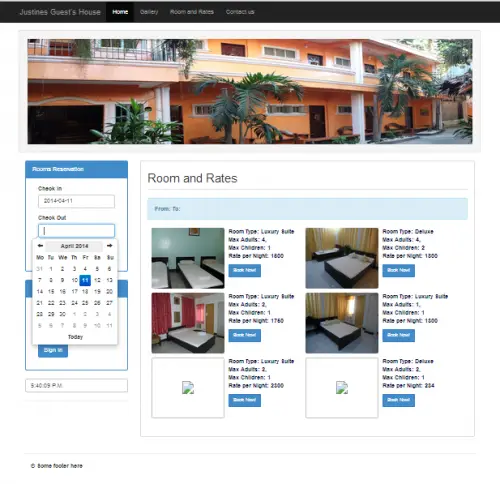
Hotel Management System in PHP is designed for Justine’s Guest House. This is a complete source code for Online Hotel management System is created using PHP/MySQL.
a PHP-based automated project based on the hotel management system. For the first-year, second-year, and final-year IT students’ college projects, the following PHP project provides all crucial characteristics.
It contains significant capabilities that will enable all users to communicate with one another in the manner required by a system to communicate with clients in order to preserve daily records, room booking information, and other data.
The idea behind both this system and the online application is simple, similar to real-life situations, and well-executed.
Please scroll down to the bottom of this post for the Obtain button to download the free hotel management system project in PHP with source code files.
It allows the guest to view room with equivalent rates whether a room is available or not.
Project Details
Moving on, the main goal of this PHP MySQL hotel management system project is to interact with consumers regarding their reservations, hotel data, etc.
Additionally, the system shows all the information that is available, including room classifications, bookings, total revenue, outstanding payments, grievances, staff, and hotel statistics.
Only the system’s management is handled by the project’s Admin Panel. The user can build a room by selecting a category and number in the web app’s overview.
To elaborate on the concept, the system enables customers to keep reservations for certain available rooms.
The system also can be used for easy storing and retrieval of information of guests and their transactions.
Modules of Hotel Management system in PHP
- This system also integrated into the booking of hotel rooms.
- The admin side of this system has the capability to confirm the booking,
- Room Reservation Management
- cancellation of transactions
- Admin module can Add, Update and delete Room
- Amenities, Room Types, User, View comments,
- issue different hotel management system Reports
How to Install the Management System in PHP
- Extract the downloaded file
- then copy it inside your root directory.
- Next, create a new database in your phpmyadmin.
- then, name it as “justinesdb”,
- and import the SQL file that can be found inside the “justines” folder named “justinesdb.sql”.
You can log in into the admin side using this account:
username:joken@yahoo.com
password:1234
Download the source code here
Conclusion
This online hotel management system project in PHP free download is made for student use only, but you can upgrade this system to suit your client’s needs.
If you have any questions or suggestions about these PHP Projects, please feel free to contact us or simply leave a comment below.
Technology stack and requirements
To run this PHP project, you need these tools on your development machine:
- XAMPP or WAMP server. Bundles Apache, MySQL, and PHP so you can run PHP on Windows without individual installs. Free from apachefriends.org.
- PHP 8.0 or higher. Included with XAMPP. Older versions (5.x, 7.x) may work but modern PHP features improve security and performance.
- MySQL or MariaDB. Comes with XAMPP. phpMyAdmin manages the database through a browser UI.
- VS Code or PhpStorm. Free code editor with PHP syntax highlighting, IntelliSense, and debugging support.
- Web browser. Chrome, Firefox, or Edge for testing the running app.
Installing the source code
- Download the archive. Get the ZIP file from the download link on this page and extract it.
- Move to htdocs. Place the extracted folder inside C:\xampp\htdocs\ so Apache can serve it.
- Import the database. Open http://localhost/phpmyadmin, click Import, and select the .sql file included in the archive.
- Update database credentials. Open the config.php or connection.php file and set the correct database name, username, and password (default XAMPP: root / empty password).
- Run the project. Start Apache + MySQL in XAMPP, then visit http://localhost/your-project-folder/ in a browser.
Using this project for your BSIT capstone
This PHP project maps cleanly to standard BSIT capstone documentation. Suggested chapter alignment:
- Chapter 1 (Introduction). Discuss the problem the system solves in real-world context. Cite Philippine business or academic use cases where a manual process could be replaced.
- Chapter 2 (Review of Related Literature). Compare this system’s features against 5-10 similar published projects. Cite journals like IJERT or IEEE Access for academic-standard sources.
- Chapter 3 (Methodology). Include Use Case Diagram, Data Flow Diagram, Entity Relationship Diagram, and Activity Diagram covering all major workflows.
- Chapter 4 (Results and Discussion). Screenshot each module of the running system with a caption explaining what data it processes and which user role interacts with it.
- Chapter 5 (Conclusion and Recommendations). Identify features that could be added in a Version 2, such as mobile app, REST API export, or AI-powered analytics.
Modules typical of Online Hotel Management System Project
- Room / property master. CRUD for room types, amenities, pricing per season.
- Booking calendar. Real-time availability across dates with drag-to-select interface.
- Guest information. Full guest profile, contact, ID scan, and stay history.
- Check-in / check-out. Automated flow that generates the guest bill and receipt.
- Housekeeping status. Room status (dirty, cleaning, clean) tracked per shift.
- Reports. Occupancy rate, revenue per room, cancellations, and repeat-guest data.
Common enhancements for capstone review
- Payment gateway integration. Connect with GCash, PayMaya, or Stripe for online booking deposits.
- Email confirmation. Send automatic booking confirmations and reminders 24 hours before check-in.
- Multi-property support. Add a Property table so a hotel chain can share one system.
- Reviews and ratings. Post-checkout review flow embedded in the confirmation email.
Official documentation
Our first complete capstone bundle is live: PHP + MySQL e-commerce with full Chapter 1-5 documentation, 6 UML diagrams, ERD, installation guide, user manual, and defense presentation template. More bundles (Library, POS, Hospital) coming soon. Save 3 to 4 weeks of capstone work.
Sold via Gumroad. See our affiliate disclosure.
Frequently Asked Questions
How does this PHP hotel reservation system work?
Guests browse rooms by date range, the PHP script checks Booking table for conflicts via MySQL queries, confirmed reservations save with status (pending/confirmed/cancelled). Admin sees occupancy + manages rates. Built with vanilla PHP + MySQL + Bootstrap.
What PHP and MySQL versions does this project require?
Most projects in this batch run on PHP 7.4 to PHP 8.2 with MySQL 5.7+ or MariaDB 10+. A few older projects need PHP 5.6 (deprecated, use XAMPP 7.x). To run: install XAMPP / WAMP / Laragon, extract project to htdocs, import the included .sql file via phpMyAdmin, edit the connection file (usually config.php or db_connect.php) with your DB credentials, browse to the project URL in your browser.
How do I set up the database for this PHP project?
Open phpMyAdmin (http://localhost/phpmyadmin/ on XAMPP), create a new empty database with the name specified in the project’s config.php. Click the Import tab, choose the included .sql file, click Go. Then edit config.php (or includes/connection.php) with: ‘localhost’, your MySQL username (usually ‘root’), your MySQL password (usually blank for XAMPP), and the database name.
Can I use this PHP project for a BSIT capstone or thesis?
Yes, but extend it. A bare CRUD app is too narrow for full capstone scope. Add: user roles via session checks, reports/dashboards (Chart.js + AJAX), PDF exports (TCPDF library), email notifications (PHPMailer), real domain extension (analytics, audit log, multi-branch support). Pair with Chapter 1-5 documentation matching your panel’s rubric.
Why am I getting ‘connection error’ or ‘undefined function mysqli_connect’?
Three common PHP issues: (1) Connection error: Apache + MySQL services not running in XAMPP control panel, OR database name in config.php does not match what you created in phpMyAdmin. (2) ‘undefined function mysqli_connect’: MySQL extension not enabled, in php.ini uncomment extension=mysqli (then restart Apache). (3) ‘No such file or directory’: MySQL socket path wrong, use 127.0.0.1 instead of localhost in the connection string.
Where can I find more PHP projects with source code?
Browse the PHP Projects hub for the full library (300+ vanilla PHP systems). For modern PHP MVC alternatives see Laravel Projects (74 systems) or CodeIgniter Projects (32 systems). For BSIT-focused capstone idea lists see 150 Best Capstone Project Ideas.
Related PHP Projects
- Hotel Management System In PHP With Source Code
- Hotel Management System Project In Laravel With Source Code
- Hotel Management System In CodeIgniter With Source Code
- Online Hotel Management System Source Code
- Sports Management System Project In PHP Download
- School Management System Project Source Code

Joken E. Villanueva
Founder & Lead Developer at PIES IT Solution
Founder of PIES Information Technology Solutions, a software company building production-grade applications for institutions across the Philippines. Over 8 years of hands-on full-stack development experience, currently leading the development of ClinicAI, an AI-powered clinic management platform.
Expertise: PHP · MySQL · JavaScript · AI Integration · SaaS Architecture · VB.NET · Database Design · Capstone Documentation · Java · View all posts by Joken E. Villanueva →
Good Efforts.Thanks a lot for helping every one.God bless you
how can i open it with Vb.net?
no you can’t because it is created using PHP
Great work man
stress free
hinde kopo siya maccess ano poba url? nageerror pag localhost/justine nilagay ko.
You may watch the video on you tube on how the online hotel management system work?
https://youtu.be/_3SfKZHEDB0
i got an error
Fatal error: Uncaught Error: Failed opening required ‘C:/xampp/htdocs\justines\includes\config.php’ (include_path=’C:\xampp\php\PEAR’) in C:\xampp\htdocs\hotel\justines\includes\initialize.php:19 Stack trace: #0 C:\xampp\htdocs\hotel\justines\index.php(2): require_once() #1 {main} thrown in C:\xampp\htdocs\hotel\justines\includes\initialize.php on line 19
how can i solve it