
DuckDB is the embedded OLAP database that has replaced pandas + SQLite in many 2026 data pipelines. If you see ModuleNotFoundError: No module named ‘duckdb’, install with one pip command. No server required, no setup beyond pip.
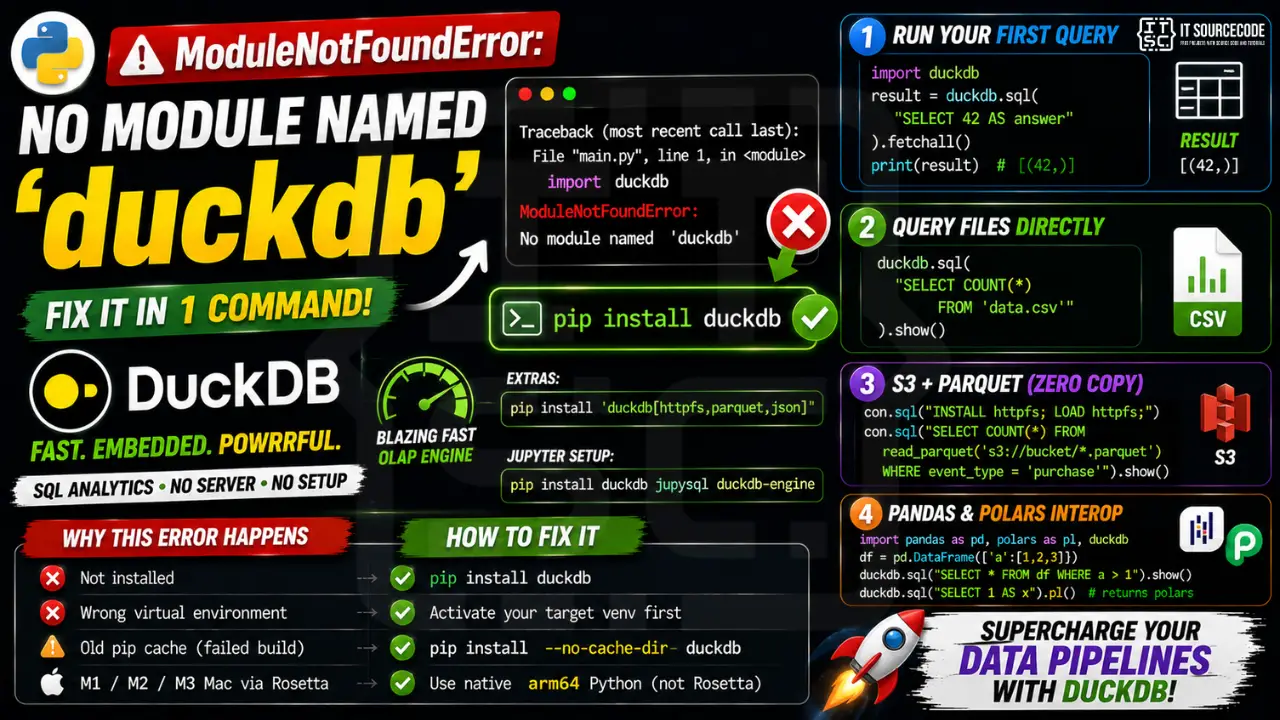
Step 1: Install duckdb
pip install duckdb

# With extra extensions:
pip install 'duckdb[httpfs,parquet,json]'

# For Jupyter integration:
pip install duckdb jupysql duckdb-engine
Step 2: First query
import duckdb

# In-memory database, no file needed
result = duckdb.sql("SELECT 42 AS answer").fetchall()
print(result)  # [(42,)]

# Query a CSV directly without loading it
duckdb.sql("SELECT COUNT(*) FROM 'data.csv'").show()
Step 3: Query Parquet on S3 (zero copy)
import duckdb

con = duckdb.connect()
con.sql("INSTALL httpfs; LOAD httpfs;")
con.sql("""
    SELECT COUNT(*) FROM read_parquet('s3://my-bucket/2026/*.parquet')
    WHERE event_type = 'purchase'
""").show()
Step 4: Polars and pandas interop
import pandas as pd
import polars as pl
import duckdb

# Query a pandas DataFrame directly by variable name
df = pd.DataFrame({'a': [1, 2, 3]})
duckdb.sql("SELECT * FROM df WHERE a > 1").show()

# Same with polars
pl_df = pl.DataFrame({'a': [1, 2, 3]})
duckdb.sql("SELECT * FROM pl_df WHERE a > 1").show()

# Return as polars
duckdb.sql("SELECT 1 AS x").pl()
Why this error happens
| Cause | Fix |
|---|---|
| Not installed | pip install duckdb |
| Wrong venv | Activate target venv first |
| Old pip cache (failed build) | pip install –no-cache-dir duckdb |
| M1/M2/M3 Mac via Rosetta | Use native arm64 Python |
Quick step-by-step summary (click to expand)
- Activate the correct virtual environment. Run source venv/bin/activate on Linux or macOS, or venv/Scripts/activate on Windows to enter the target environment.
- Verify Python version is 3.9 or newer. Run python –version. duckdb requires Python 3.9 or newer.
- Install duckdb with uv or pip. Run uv pip install duckdb (recommended) or pip install duckdb.
- Verify installation. Run python -c “import duckdb” to confirm the import succeeds without error.
Diagnostic checklist for “No module named ‘duckdb’”
- Verify pip install target. Run
pip show duckdb— if not installed, runpip install duckdb. - Check the active Python interpreter.
which python(mac/Linux) orwhere python(Windows). Both pip and python must point to the same environment. - Check virtual environment activation. If you use venv/conda, activate before installing:
source .venv/bin/activate. - Rule out uppercase/lowercase. Python imports are case-sensitive:
import PyPDF2notimport pypdf2. - Rule out the pip-vs-package-name mismatch. Some packages install under a different name than you import (e.g.
pip install beautifulsoup4→import bs4).
Installing duckdb — SQL/DB library
# Standard install
pip install duckdb

# SQLAlchemy with a specific driver
pip install "sqlalchemy[postgresql]"  # or [mysql], [oracle], etc.

# DuckDB (modern in-process OLAP)
pip install duckdb
Common causes for missing SQL modules
- Driver missing. SQLAlchemy needs a DB-specific driver:
psycopg2for PostgreSQL,PyMySQLfor MySQL. - psycopg2 vs psycopg2-binary. psycopg2-binary works out of the box; psycopg2 needs pg_config on your PATH.
- ODBC drivers missing. pyodbc needs the system ODBC layer installed (unixODBC on Linux, Microsoft ODBC on Windows).
- SQLite ships with Python. No pip install needed —
import sqlite3just works.
Working code example
import duckdb
print(duckdb.__version__ if hasattr(duckdb, '__version__') else 'no version')

# DuckDB smoke test
# import duckdb
# print(duckdb.sql("SELECT 42").fetchall())
Best practices
- Use SQLAlchemy for portability. Same code across MySQL, PostgreSQL, SQLite.
- Consider DuckDB for analytics. In-process OLAP, no server, extremely fast.
- Pin driver versions. DB drivers are sensitive to server-side version changes.
Official documentation
Frequently Asked Questions
What is DuckDB and why is it popular in 2026?
DuckDB is an in-process OLAP database, like SQLite but optimized for analytics (column store, vectorized execution). It runs entirely in your Python process with zero setup, queries Parquet/CSV/JSON directly, and is often 10-100x faster than pandas on large datasets. Open-source, free.
DuckDB vs SQLite: which should I pick?
SQLite for OLTP (transactions, single-row writes, mobile apps). DuckDB for OLAP (analytics, aggregations, columnar reads). DuckDB does NOT replace SQLite for typical app backends; it complements them for the analytics layer.
Can DuckDB persist data?
Yes. Use duckdb.connect(‘my.db’) to write to a file. Or use INSERT INTO … FROM read_parquet(…) to load Parquet into a persistent DuckDB database. CSV exports: COPY tablename TO ‘out.csv’ (HEADER, FORMAT CSV).
Does DuckDB support window functions and CTEs?
Yes, plus advanced SQL: window functions (LAG, LEAD, ROW_NUMBER), recursive CTEs, PIVOT/UNPIVOT, ASOF joins, sampling, qualify clauses. Very close to PostgreSQL’s SQL surface, with added analytics functions.
Can I use DuckDB with Jupyter SQL magic?
Yes. pip install jupysql duckdb-engine. Then %load_ext sql followed by %sql duckdb:// gives you %sql magic with column-aware autocomplete and instant DataFrame conversion in notebook cells.

Adrian Mercurio
Full-Stack Developer at PIES IT Solution
Specializes in building complete capstone projects with full documentation. Strong background in PHP/MySQL development and database design. Has personally built and tested over 30 capstone-ready projects with ER diagrams, DFDs, and chapter-by-chapter thesis documentation.
Expertise: PHP, Laravel, Database Design, Capstone Projects, C#, C, C++, Python, AI Projects · View all posts by Adrian Mercurio →