
I have been running PIES for 8 years and paying our team of writers and developers based here in the Philippines using a mix of Wise and GCash. For international clients paying us in USD or EUR, Wise to GCash is the cheapest and fastest route I have found. This guide walks through exactly how to set it up and receive the payment, using real 2026 rates and screenshots-worth of steps.
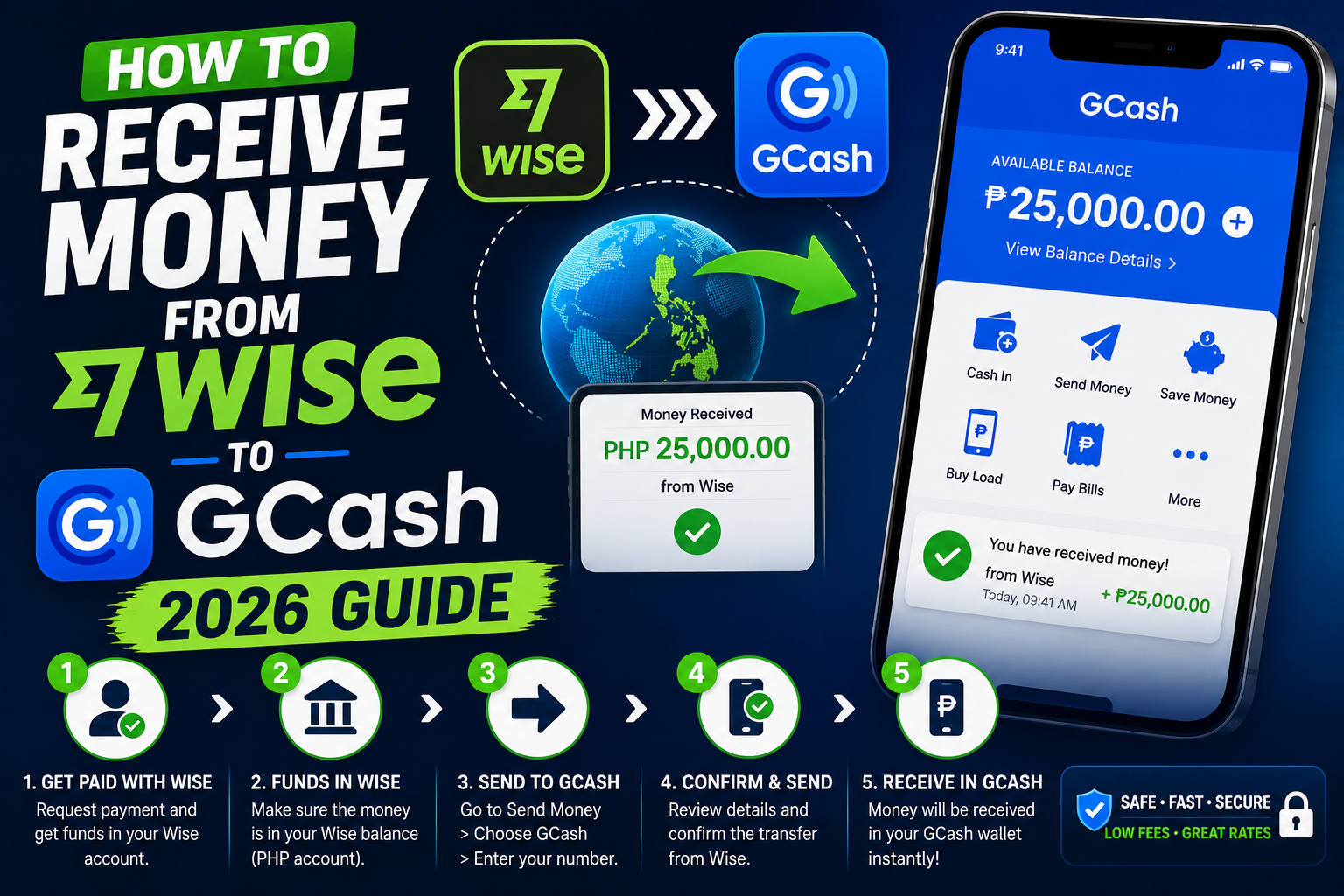
The whole process takes 3 to 5 minutes to set up the first time, then future transfers land in your GCash wallet in 30 seconds to 2 hours.
Why Wise to GCash beats PayPal, Payoneer, and bank wires
By the way, if you are wondering why I recommend this route specifically:
- Fees: Wise charges about 0.5 to 1.5 percent per transfer. PayPal charges 4 to 5 percent plus a bad exchange rate spread. Bank wires charge PHP 500 to 1,500 in fees.
- Exchange rate: Wise uses the real mid-market rate. PayPal marks it up by 3 to 4 percent silently. That is another PHP 1,500 lost on a USD 500 payment.
- Speed: Wise to GCash arrives in seconds to a few hours. Bank wires take 1 to 3 business days.
- Weekend friendly: Works Sunday nights, holidays, unlike bank wires.
I have run the numbers many times. On a USD 500 client payment, Wise saves me around PHP 3,000 to 4,000 compared to PayPal after all fees and FX losses.
Step 1: Make sure your GCash account is fully verified
You need a Fully Verified GCash account (not just Basic). The difference matters because Basic accounts have a receiving cap of PHP 50,000 per month, which is too low for real freelance or OFW use.
- Open GCash on your phone
- Tap your profile icon (top left)
- Check the badge under your name
- If it says Fully Verified, you are good
- If it says Basic or Semi-Verified, tap Get Verified and complete the KYC steps
Full verification requires a valid government ID (drivers license, passport, PhilID, UMID, SSS ID, or PRC ID) and a selfie. Approval usually happens within 30 minutes to 2 hours.
Step 2: Get your GCash mobile number ready
This is the destination for the Wise transfer. Two things to note:
- Use the 11-digit format starting with 09 (example: 09171234567)
- The GCash-registered number must exactly match the name on your Wise account (both must be yours, same person)
If your Wise account is under your name but the GCash number belongs to a family member, the transfer will bounce. This is an anti-money-laundering rule enforced by both platforms.
Step 3: Open Wise and start a new transfer
- Log in to your Wise account at wise.com or open the mobile app
- Tap Send money
- Enter the amount in the sender currency (USD, EUR, GBP, AUD, etc)
- Select Philippine Peso (PHP) as the target currency
- Wise shows you the exact PHP amount and total fees before you commit
Take a screenshot of the confirmed exchange rate for your records. This is useful for freelance tax filing and client transparency.
Step 4: Choose GCash as the delivery method
On the recipient selection screen:
- Tap Add a recipient (or select an existing recipient if you have used Wise before)
- Choose Yourself or Someone else
- Under bank or wallet, scroll and pick GCash (it is listed as a mobile wallet option)
- Enter the full name exactly as registered on GCash
- Enter the GCash-registered mobile number (11 digits starting with 09)
- Enter your email for transaction receipts
Wise does a live name check against GCash. If the name does not match, you get an error immediately and can correct it before charging your card.
Step 5: Fund the transfer and confirm
Wise gives you funding options:
- Debit card: Fastest (arrives in seconds to minutes) but slightly higher fee
- ACH or bank transfer: Cheapest but takes 1 to 3 business days for the initial transfer to Wise
- Wise balance: If you already hold USD, EUR, or another currency in Wise, this is instant and cheapest
Review the total (send amount + fee), tap Confirm and pay, and Wise starts the transfer. You get an email confirmation and a tracking link.
Step 6: Wait for the money to land in your GCash wallet
Typical timing based on my own transfers over the past year:
- USD to PHP via Wise balance: Under 60 seconds
- USD to PHP via debit card: 5 to 30 minutes
- USD to PHP via bank ACH: 2 to 5 business days total (mostly the ACH leg, GCash delivery is fast once Wise has the funds)
You receive an SMS from GCash confirming the deposit and a push notification from the GCash app. The transaction appears in your GCash transaction history labeled “Wise” or “Transfer from Wise Payments Limited”.
Common problems and how to fix them
- “Recipient name does not match”: Your Wise name must match your GCash-registered name exactly, including middle name if GCash has it. Correct in Wise before retrying.
- Transfer stuck at “In progress”: Wise checks BSP compliance. First-time transfers to a new GCash number take longer. Wait 2 to 4 hours, then contact Wise support if still pending.
- GCash wallet limit reached: Fully Verified GCash caps at PHP 100,000 wallet balance. If you already have that much, you cannot receive more until you cash out or send some.
- Wise says “unavailable” on the GCash option: Very rare, but happens during maintenance. Try again 1 to 2 hours later.
- Cannot fund the transfer with a Filipino credit card: Wise only allows the outgoing (send) side. If you want to send money FROM the Philippines, you need to use GCash’s own remittance partner instead.
Tax reminder for Filipino freelancers
By the way, if you are receiving foreign payments regularly, remember to register as a BIR self-employed professional and file quarterly taxes. Wise receipts are BIR-acceptable proof of income if you keep them organized. I have a full guide on that in our capstone project section if you need help setting up.
I hope this article helps you receive your freelance payments faster and cheaper. If you have any questions, feel free to comment below or message us on our Facebook page.
Quick step-by-step summary (click to expand)
- Verify your GCash. Full verification is required. Basic accounts cap at PHP 50,000 per month received.
- Prepare your GCash number. 11 digits starting with 09. Must match your Wise account name.
- Start a Wise transfer. Send money, enter amount, pick Philippine Peso as target currency.
- Pick GCash as the delivery method. Add recipient, choose GCash mobile wallet, enter name and number.
- Fund and confirm. Pay with Wise balance (instant), debit card (fast), or bank ACH (cheapest).
- Wait for landing. Typically 30 seconds to 2 hours. Check your GCash app for the SMS and push notification.
Official documentation
Frequently asked questions
Can I receive money from Wise to a Basic GCash account?
Yes but with limits. A Basic GCash account can only receive up to PHP 50,000 per month total across all sources. Fully Verified accounts have no monthly cap (only a wallet balance cap of PHP 100,000). For any real freelance or OFW use, get Fully Verified first.
How much does Wise charge to send money to GCash?
Wise fees are typically 0.5 to 1.5 percent of the transfer amount plus a small fixed fee. On a USD 500 transfer to GCash, expect around USD 3 to USD 7 in total fees. Wise also uses the real mid-market exchange rate with no hidden markup, so you keep more compared to PayPal or bank wires.
How long does it take for Wise money to arrive in GCash?
If you fund from your Wise balance or debit card, the money usually lands in GCash within 30 seconds to 2 hours. If you fund from a bank ACH transfer, the total time is 2 to 5 business days, mostly waiting for the ACH leg. First-time transfers to a new GCash number sometimes take longer due to compliance checks.
Can I send money from GCash to Wise?
Not directly. Wise only handles the outgoing side to GCash. If you want to send money out of the Philippines, you have to use GCash Padala or a bank transfer to Wise, which takes longer and costs more. Most Filipinos use Wise only for the receiving direction.
What if my Wise name does not match my GCash name?
The transfer will fail immediately during Wise’s live name check. This is a strict anti-money-laundering requirement. Both accounts must be under the exact same person, matching first name, middle name, and last name. If they mismatch, update the name in Wise first (this requires ID re-verification) before retrying.
Is Wise to GCash safe and legal in the Philippines?
Yes. Wise is licensed by the Bangko Sentral ng Pilipinas (BSP) as a remittance partner, and GCash is BSP-regulated as an electronic money issuer. All Wise to GCash transfers are logged and traceable, which is fine for legitimate freelance income and family remittances. Just remember to declare the income for BIR tax purposes if you receive regularly.

Joken E. Villanueva
Founder & Lead Developer at PIES IT Solution
Founder of PIES Information Technology Solutions, a software company building production-grade applications for institutions across the Philippines. Over 8 years of hands-on full-stack development experience, currently leading the development of ClinicAI, an AI-powered clinic management platform.
Expertise: PHP · MySQL · JavaScript · AI Integration · SaaS Architecture · VB.NET · Database Design · Capstone Documentation · Java · View all posts by Joken E. Villanueva →