
This article will show you how to install an Employee Management System in VueJS. This web application uses VueJS, a JavaScript framework used for front-end development. For the database, this web app uses Firebase and runs on XAMPP.
What sets this project apart is its use of a JavaScript framework for a better user interface. Also, Vue can work with other frameworks and tools like CSS, TypeScript, and others.
What is a Web Application (Web App)
A web application is a program that run on a web server. In comparison to desktop apps where they run inside an operating system, Web apps run using web browsers and other web technologies to perform tasks.
What is Vue.JS
Vue.js or Vue is a JavaScript framework for front-end developers. It is used to create single-page applications with stunning UI. Many companies use Vue on their websites. Some of them are Xiaomi, Alibaba, and GitLab.
Employee Management System in VueJS: How to Install the Project
Installing this web app is easy! Just follow the guide and you will get it done in a breeze!.
Time needed: 5 minutes
- Install and Run XAMPP
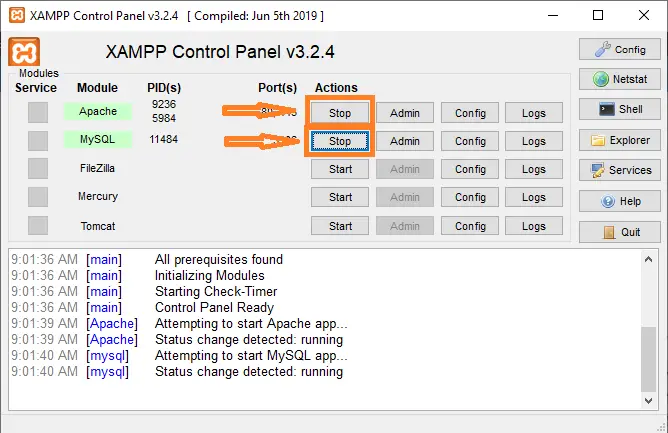
First step is to install XAMPP. This will allow you to run a local web server on your computer. After installation, run XAMPP and start Apache and MySQL

- Open the project and locate “project.json” file
Next step is to locate the JSON file where you can find the instructions to start the web app. Open this file using your selected code or text editor. Now, find the “script” block. This will give you the correct command to start it.

- Open the Command Prompt
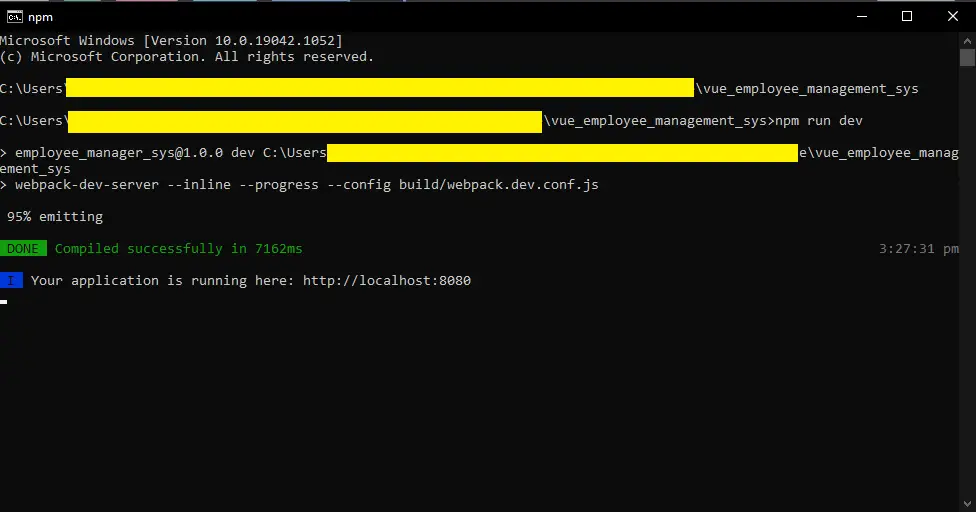
After that you identified the “start” command, Open your CMD terminal and change the directory to the project folder. You can do this by entering “cd “ and the project address. Press enter. Then, type in the “start” command. In this case, the command represents “npm run dev”. You will know that it is successful when you are instructed to open the localhost.

- Open the Web Application on your browser.
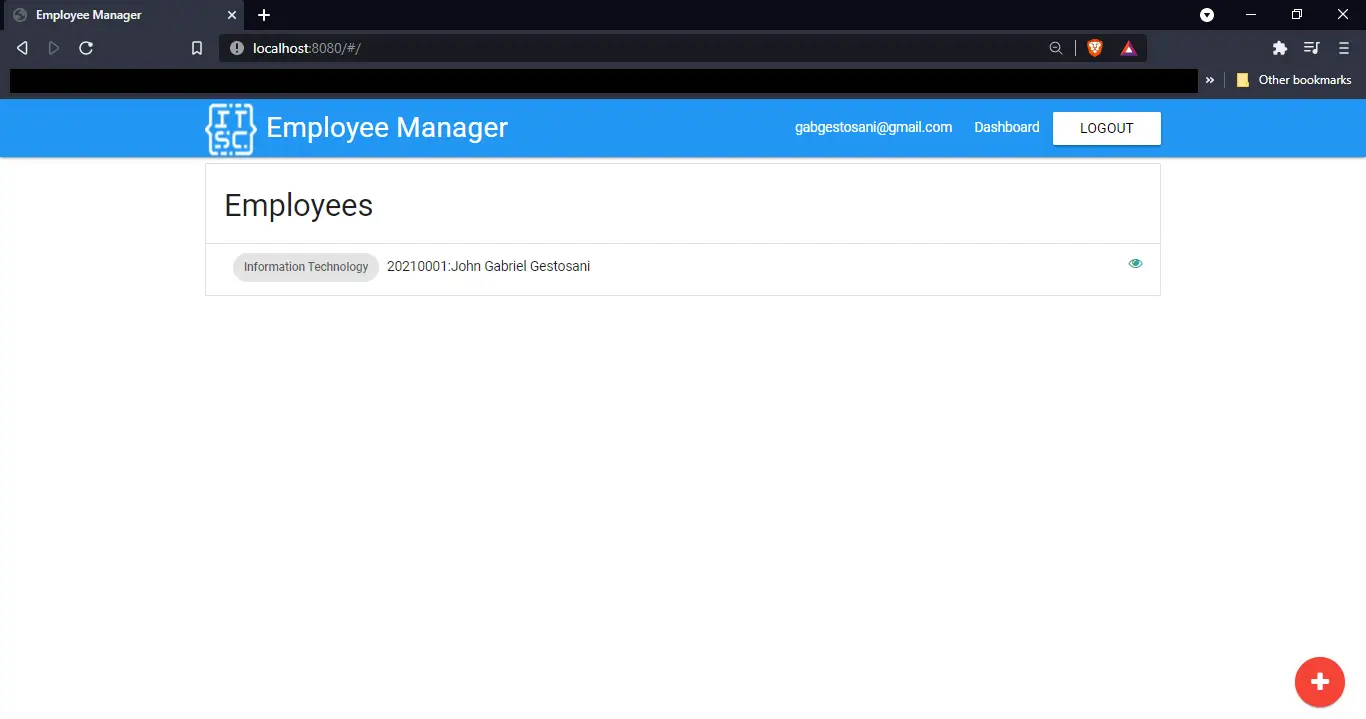
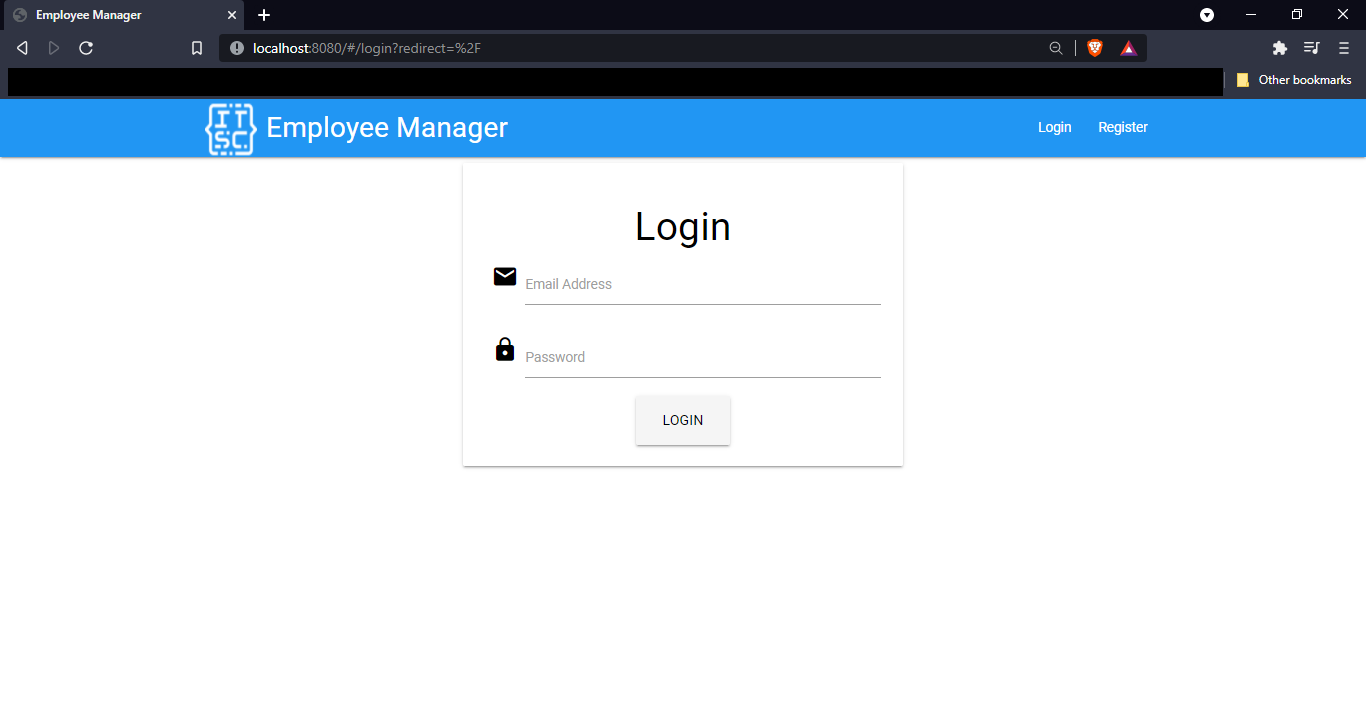
Now you are ready to run the web application! Enter the link to the web browser. The output looks like this:


Employee Management System in VueJS Screen Shots
Here are some screenshots.

Conclusion
So there you have it! Employee Management System in VueJS. Vue.JS is versatile and can be used with other frameworks. These projects are good in developing your skills in programming web applications
| ABOUT PROJECT | PROJECT DETAILS |
|---|---|
| Project Name : | Employee Management System in Vue.JS |
| Project Platform : | Vue.JS |
| Programming Language Used: | php,javascript,html,css |
| Developer Name : | itsourcecode.com |
| IDE Tool (Recommended): | Visual Studio 2019 |
| Project Type : | Web Application |
| Database: | MySQL |
Source Code Download
Click the button below to download the project.
How Employee Management System Project in Vue JS works
This JavaScript project demonstrates common patterns used across web applications. The code is intentionally small so it can be understood in a few reading sessions and extended for a real project.
Extending Employee Management System Project in Vue JS for a capstone project
- Persist data. Add localStorage or a Node.js backend so state survives page reloads.
- Style it. Add Bootstrap, Tailwind, or a custom design so the project looks polished for defense.
- Add authentication. Login and role-based access control for multi-user scenarios.
- Deploy live. Push to GitHub Pages, Netlify, or Vercel so panel members can access it from any device.
- Test on mobile. Use Chrome DevTools device mode to confirm the layout works on phones.
Working code snippet
// A minimal JavaScript pattern for Employee Management System Project in Vue JS
(function () {
  const state = { items: [] };

  function add(item) {
    state.items.push(item);
    render();
  }

  function render() {
    const container = document.getElementById("output");
    container.innerHTML = state.items.map(x => `<li>${x}</li>`).join("");
  }

  document.getElementById("addBtn").addEventListener("click", () => {
    const input = document.getElementById("input");
    if (input.value) {
      add(input.value);
      input.value = "";
    }
  });
})();
Best practices for this JavaScript pattern
- Use const and let. Never var. It has function-scope surprises that trip up beginners.
- Wrap in an IIFE or module. Prevents polluting the global namespace.
- Attach one event listener per action. Not multiple listeners on the same button.
- Separate state from rendering. Update state first, then call render(). Do not mutate DOM directly from event handlers.
Deployment checklist for this JavaScript project
Before showing the project to a client, panel member, or user, run through this checklist:
- Minify the JavaScript. Use esbuild or terser to shrink the file for faster page load.
- Add a .gitignore. Exclude node_modules, .env, and IDE folders before committing to GitHub.
- Set up a README. Explain what the project does, how to install, and how to contribute.
- Add screenshots. A picture beats a paragraph when someone lands on your repo.
- Enable HTTPS. GitHub Pages and Netlify give free HTTPS by default; use it.
- Test in real browsers. Chrome, Firefox, Safari, Edge — not just the one you develop in.
- Check mobile layout. Chrome DevTools device mode simulates common phones and tablets.
Official documentation
Frequently Asked Questions
How does this JavaScript employee management system work?
Employee master, document attachments, performance reviews, training records, asset assignment.
What JavaScript runtime or browser does this project need?
Pure frontend projects (vanilla JS, Vue, jQuery) run in any modern browser (Chrome 90+, Firefox 88+, Safari 14+, Edge 90+) – no install needed. Node.js projects need Node.js 18 LTS or 20 LTS (download from nodejs.org). Run: npm install in project folder, then npm start or node app.js.
How do I run this JavaScript project locally?
For pure HTML/CSS/JS: open index.html in your browser, or use VS Code Live Server extension for auto-reload. For Vue projects: npm install then npm run dev (Vite) or npm run serve (Vue CLI). For Node.js: npm install then npm start. For projects with backend (PHP+MySQL): place in XAMPP htdocs, start Apache + MySQL, browse to localhost/project.
Can I use this JavaScript project for a BSIT capstone or thesis?
Yes. Extend it: add user authentication (JWT for SPA, sessions for traditional), role-based access, real backend (Node.js+Express+MongoDB or PHP+MySQL), responsive design (Bootstrap/Tailwind), PDF exports (jsPDF), real-time features (Socket.IO). Pair with Chapter 1-5 documentation matching your panel’s rubric.
Why am I getting ‘Uncaught ReferenceError’ or ‘Cannot read property of undefined’?
Three common JavaScript issues: (1) Script tag placement wrong, put
Related Articles
- Employee Management System Project In C With Source Code
- ER Diagram for Employee Management System
- Employee Management System Project in PHP With Source Code
- Employee Management System in Laravel With Source Code
- Django Employee Management System with Source Code
- Employee Management System Project Report (PDF)
- Employee Management System Project in NodeJS with Source Code
A web application is a program that run on a web server. In comparison to desktop apps where they run inside an operating system, Web apps run using web browsers and other web technologies to perform tasks.
Vue.js or Vue is a JavaScript framework for front-end developers. It is used to create single-page applications with stunning UI. Many companies use Vue on their websites. Some of them are Xiaomi, Alibaba, and GitLab.Employee Management System Project In C With Source Code
Looking for similar projects or tutorials?
Search for more source code, capstone projects, or programming tutorials
hi,
what’s the password? thanks
Hi there! Please watch the Youtube video to get the password.
thank you bro
Sorry I am asking for the password of the downloaded zip file.
thanks
hi, sorry i didn’t specify what password I am looking, actually password for the downloaded zip file.
thanks
The password for the zip file is found at the YouTube video.
Sir Please Password