
The Employee Record Management System Project in PHP Source Code is software used by businesses to combine a number of necessary HR functions.
Such as storing employee data, managing payrolls, recruitment processes, benefits administration, and keeping track of attendance records.
What is an Employee Management System?
An Employee management system is software useful for the human resource department that allows them to view details of any employee working in the organization or those who worked in the past.
It is designed to simplify the process of record maintenance of employees in an organization.
What is an Employee Management System Project In PHP?
Employee management system project in PHP is a project created using PHP and MySQL database for back-end support.
This is intended to help support the company’s human resource management system department.
What Employee Management system can do?
It helps in managing the information of employees for HR functions. In short, one of the comprehensive parts of the Human Resource Management System.
Project Information
| Project Name: | Employee Management System Project In PHP and MySQL With Source Code |
| Language/s Used: | PHP |
| PHP version (Recommended): | 5.6.3, 7.4.12 |
| Database: | MySQL |
| Type: | Website, Web Application |
| Developer: | IT SOURCECODE |
| Updates: | 0 |
Features of Employee Management System Project In PHP with Source Code
Here are the features of the Employee Management System in PHP:
Admin Module
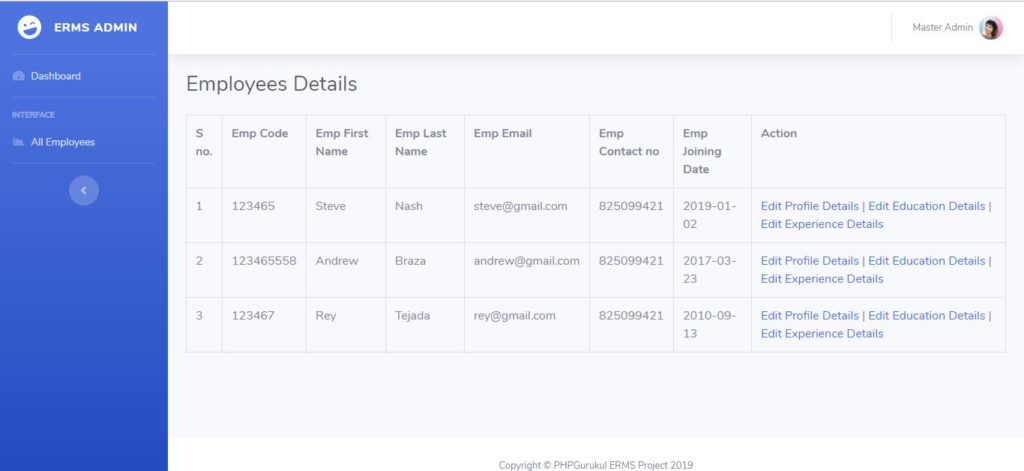
Admin can manage all employee records, edit user personal details, and work exp. details, and work exp. details.
Admin Login
For admin security features it uses session.
Employee Module
This system has an employee module that can monitor attendance, manage payroll, and other HR features.
Employee Management
They Can add or edit their own information such as work experience details, educational background, and the likes.
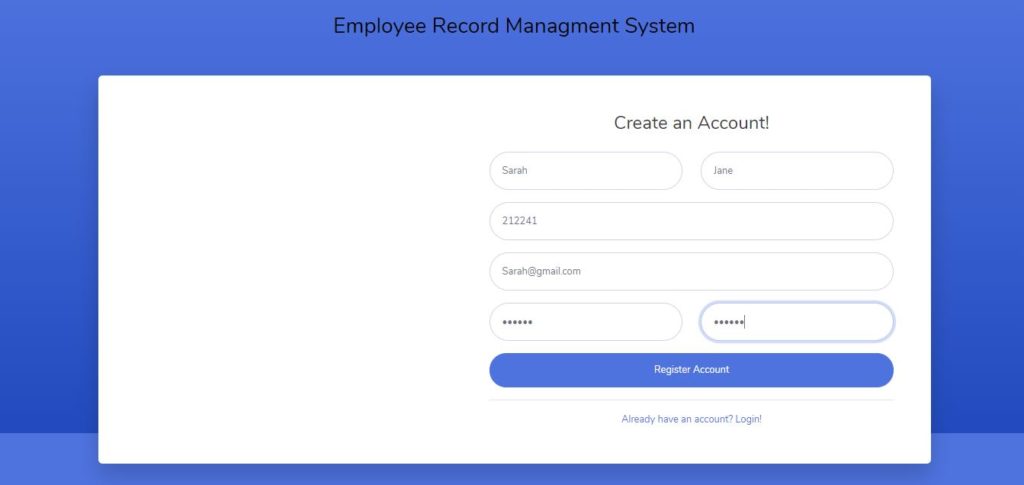
Login Account
username : admin
Password : Test @123
Conclusion
This PHP project was created using PHP and MySQL Database for a student project. You can download the full source code and modify it to fit your client’s requirements.
If you are a student and looking for a list of database design projects with an example you can click it here.
Download the Full Employee Management System in PHP MySQL Source Code below.
Technology stack and requirements
To run this PHP project, you need these tools on your development machine:
- XAMPP or WAMP server. Bundles Apache, MySQL, and PHP so you can run PHP on Windows without individual installs. Free from apachefriends.org.
- PHP 8.0 or higher. Included with XAMPP. Older versions (5.x, 7.x) may work but modern PHP features improve security and performance.
- MySQL or MariaDB. Comes with XAMPP. phpMyAdmin manages the database through a browser UI.
- VS Code or PhpStorm. Free code editor with PHP syntax highlighting, IntelliSense, and debugging support.
- Web browser. Chrome, Firefox, or Edge for testing the running app.
Installing the source code
- Download the archive. Get the ZIP file from the download link on this page and extract it.
- Move to htdocs. Place the extracted folder inside C:\xampp\htdocs\ so Apache can serve it.
- Import the database. Open http://localhost/phpmyadmin, click Import, and select the .sql file included in the archive.
- Update database credentials. Open the config.php or connection.php file and set the correct database name, username, and password (default XAMPP: root / empty password).
- Run the project. Start Apache + MySQL in XAMPP, then visit http://localhost/your-project-folder/ in a browser.
Using this project for your BSIT capstone
This PHP project maps cleanly to standard BSIT capstone documentation. Suggested chapter alignment:
- Chapter 1 (Introduction). Discuss the problem the system solves in real-world context. Cite Philippine business or academic use cases where a manual process could be replaced.
- Chapter 2 (Review of Related Literature). Compare this system’s features against 5-10 similar published projects. Cite journals like IJERT or IEEE Access for academic-standard sources.
- Chapter 3 (Methodology). Include Use Case Diagram, Data Flow Diagram, Entity Relationship Diagram, and Activity Diagram covering all major workflows.
- Chapter 4 (Results and Discussion). Screenshot each module of the running system with a caption explaining what data it processes and which user role interacts with it.
- Chapter 5 (Conclusion and Recommendations). Identify features that could be added in a Version 2, such as mobile app, REST API export, or AI-powered analytics.
Modules typical of Employee Management System Project
- Master data. CRUD forms for the primary entities with search and filter.
- Transaction processing. Data entry forms for day-to-day operations the system automates.
- Reports. Formatted printable output summarizing activity per day, user, or category.
- User management. Login with role-based permissions (Admin, Encoder, Viewer).
- Backup and restore. Export database to a .sql file and restore when needed.
Common enhancements for capstone review
- Modernize the UI. Add Bootstrap 5 or Tailwind CSS for a polished appearance.
- Add printable receipts. Use TCPDF or FPDF to generate PDF reports.
- Multi-user concurrency. Ensure database handles simultaneous writes without lost-update errors.
- Rewrite in Laravel. Migrate to Laravel for maintainability and modern development patterns.
Official documentation
Our first complete capstone bundle is live: PHP + MySQL e-commerce with full Chapter 1-5 documentation, 6 UML diagrams, ERD, installation guide, user manual, and defense presentation template. More bundles (Library, POS, Hospital) coming soon. Save 3 to 4 weeks of capstone work.
Sold via Gumroad. See our affiliate disclosure.
Frequently Asked Questions
How does this PHP employee management system work?
Employee master (profile, position, department, contact, history), document attachments, performance reviews, training records, asset assignment.
What PHP and MySQL versions does this project require?
Most projects in this batch run on PHP 7.4 to PHP 8.2 with MySQL 5.7+ or MariaDB 10+. A few older projects need PHP 5.6 (deprecated, use XAMPP 7.x). To run: install XAMPP / WAMP / Laragon, extract project to htdocs, import the included .sql file via phpMyAdmin, edit the connection file (usually config.php or db_connect.php) with your DB credentials, browse to the project URL in your browser.
How do I set up the database for this PHP project?
Open phpMyAdmin (http://localhost/phpmyadmin/ on XAMPP), create a new empty database with the name specified in the project’s config.php. Click the Import tab, choose the included .sql file, click Go. Then edit config.php (or includes/connection.php) with: ‘localhost’, your MySQL username (usually ‘root’), your MySQL password (usually blank for XAMPP), and the database name.
Can I use this PHP project for a BSIT capstone or thesis?
Yes, but extend it. A bare CRUD app is too narrow for full capstone scope. Add: user roles via session checks, reports/dashboards (Chart.js + AJAX), PDF exports (TCPDF library), email notifications (PHPMailer), real domain extension (analytics, audit log, multi-branch support). Pair with Chapter 1-5 documentation matching your panel’s rubric.
Why am I getting ‘connection error’ or ‘undefined function mysqli_connect’?
Three common PHP issues: (1) Connection error: Apache + MySQL services not running in XAMPP control panel, OR database name in config.php does not match what you created in phpMyAdmin. (2) ‘undefined function mysqli_connect’: MySQL extension not enabled, in php.ini uncomment extension=mysqli (then restart Apache). (3) ‘No such file or directory’: MySQL socket path wrong, use 127.0.0.1 instead of localhost in the connection string.
Where can I find more PHP projects with source code?
Browse the PHP Projects hub for the full library (300+ vanilla PHP systems). For modern PHP MVC alternatives see Laravel Projects (74 systems) or CodeIgniter Projects (32 systems). For BSIT-focused capstone idea lists see 150 Best Capstone Project Ideas.
Related PHP Projects
- Employee Management System Project In CodeIgniter With Source Code
- Leave Management System PHP Source Code
- Library Management System PHP Source Code
- File Management System In PHP With Source Code
- Hotel Management System In PHP With Source Code
- Farm Management System In PHP With Source Code
Inquiries
If you have any questions or suggestions about the Employee Management System Project in PHP MySQL Source Code, please feel free to contact us or simply leave a comment below.
Helloo i just wanna know how i can run it?. It seems not working in php?.
If you have video for this project send its link
sure sir. I will try to make one for this project
Hi i just wanna know how i can run it?.Please also guide me
Install xamp first or wamp server
How can I get the sourcecode
Thanks for sharing such a knowledgeable blog on HRMS softwares, to know more about the Workday Test Accelerator and how does it helps in enhancing user experience, refer the following link – Workday testing tool
Can I please get the documentation of this project?
Can I please get the report of this project?
How can I get the sourcecode
You can click the download button below and wait for the count down to finish to download.
Thanks for sharing such a knowledgeable blog on HRMS software, to know more about Test Automation and how it helps in enhancing user experience, refer to the following link Automation Testing Services
Great share! Thanks for the information. Keep posting!
Thanks for the piece of information. Keep posting!