
BSIT capstone documentation runs 60-120 pages: Chapter 1 (Introduction), Chapter 2 (Related Literature), Chapter 3 (Design and Methodology), Chapter 4 (Implementation), Chapter 5 (Conclusions). Filipino BSIT students in 2026 finish this in weeks instead of months by combining 5 free AI tools. Here is the complete free-tier workflow that avoids paying ₱1,000+/month.
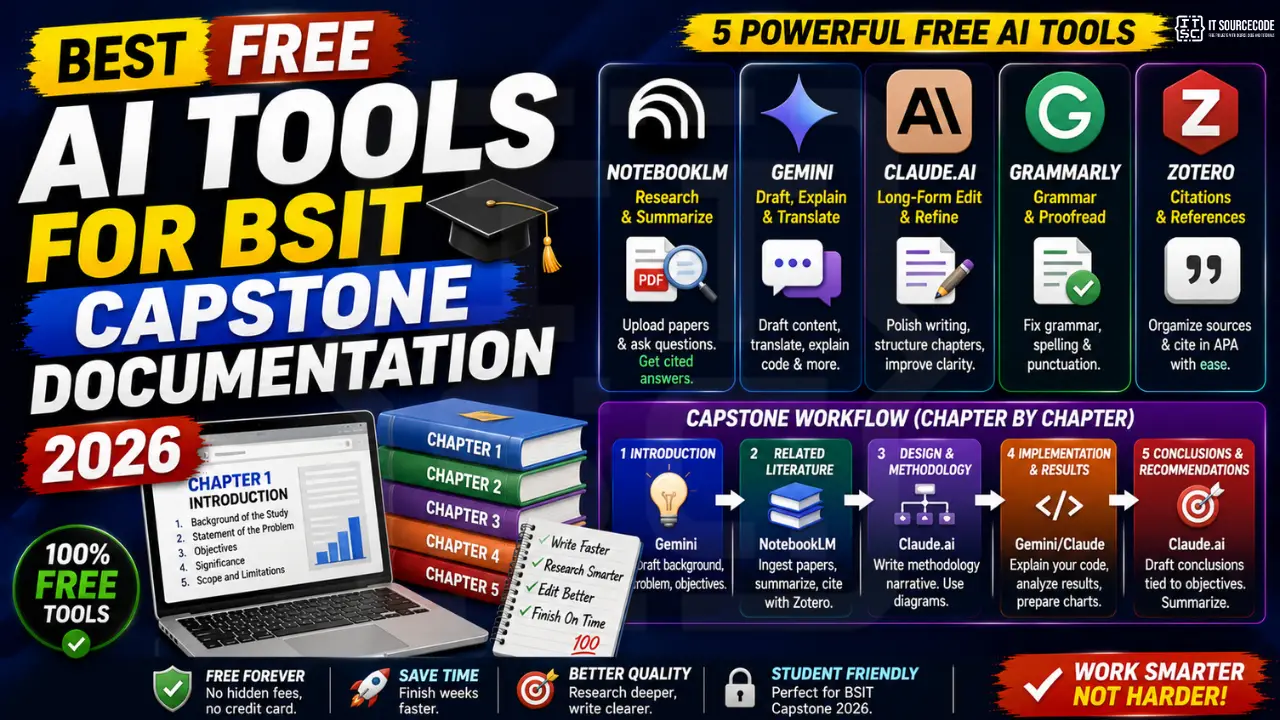
The 5 free tools that cover the entire capstone
| Tool | Best for | Chapter usage |
|---|---|---|
| Google NotebookLM | Ingest and query RRL sources | Chapter 2 (RRL) |
| Google Gemini (free) | Draft assist, translation, code explanation | Chapter 1, 3, 5 |
| Claude.ai (free tier) | Long-form editing, formatting | All chapters |
| Grammarly (free) | Grammar and punctuation | All chapters |
| Zotero (free) | Citation management | Chapter 2, References |
Chapter-by-chapter workflow
Chapter 1: Introduction (background, problem, objectives)
Use Gemini to draft the general background section. Feed it your problem statement in bullet form, ask for a formal academic paragraph. Rewrite in your own voice. Grammarly cleans up grammar.
Chapter 2: Review of Related Literature (RRL)
NotebookLM is the game-changer here. Upload 10-15 research papers as PDFs (Google Scholar or Semantic Scholar). Ask questions like “how do prior authors approach X” or “summarize the methodology used in these papers.” Every response is cited to the exact source PDF. Copy citations to Zotero for reference formatting.
Chapter 3: Design and Methodology
Use Claude.ai for the methodology narrative. It writes clearer methodology paragraphs than Gemini. Draw UML diagrams manually (or use free tools like draw.io, PlantUML). AI cannot generate proper capstone UML from scratch, only refine your ideas.
Chapter 4: Implementation and Results
Use Gemini or Claude to explain your own code back to you. This helps you prepare defense answers. Do not let AI write the code section – describe what YOU built.
Chapter 5: Summary, Conclusions, Recommendations
Feed your Chapter 1 objectives and Chapter 4 results to Claude. Ask it to draft a conclusion tied to each objective. Rewrite in your own voice.
Free tier limits (2026)
- NotebookLM free: 50 sources per notebook, 3 notebooks. Enough for typical capstone RRL.
- Gemini free: Rate-limited but no daily cap. Refresh window ~1 hour when limits hit.
- Claude.ai free: Roughly 30-45 messages per 5-hour window. Save it for editing key paragraphs.
- Grammarly free: Grammar + spelling. Style suggestions require Premium.
- Zotero free: 300 MB storage, unlimited local storage. Enough for 15-20 papers.
Common mistakes to avoid
- Turning in unedited AI drafts. Panel readers spot generic AI phrasing in 2 seconds. Rewrite everything in your own voice.
- Trusting AI-generated citations. AI hallucinates fake references frequently. Use NotebookLM for citations, never plain Gemini or Claude.
- Using AI to write your Chapter 4 code. Panel will ask why you built it that way. Understand your own code.
- Skipping Zotero to save time. Formatting 40 references manually takes hours. Zotero handles it in seconds.
Comparison at a glance
Different AI tools serve different purposes. Match the tool to your workflow before committing to any single vendor.
- General-purpose chat: ChatGPT (Plus tier for GPT-4), Claude (Pro tier), Gemini Advanced. All cost $20/month with similar quality but different personalities.
- Coding assistance: GitHub Copilot ($10/month), Cursor ($20/month), Codeium (free tier). Copilot integrates deepest with VS Code; Cursor is a purpose-built AI editor.
- Search + citation: Perplexity is the search-first alternative. Better for research where sources matter than for open-ended conversation.
- Image generation: DALL-E (in ChatGPT Plus), Midjourney ($10/month), Stable Diffusion (free, self-hosted). Midjourney has the strongest artistic quality; DALL-E is best for realistic photos.
- Free tiers matter: Every major tool has a free tier good enough for casual use. Start free, upgrade only when you hit limits.
Common mistakes when adopting AI tools
- Trusting first-draft output blindly. Every AI hallucinates. Verify factual claims, code correctness, and dates. Treat AI output as a strong first draft, not final work.
- Paying for tools without a use case. Do not subscribe to Copilot Plus, ChatGPT Team, and Claude Pro simultaneously if you rarely use them. Pick one primary tool and use free tiers of the others.
- Ignoring privacy. Free tiers of most AI tools use your prompts for training. If you handle sensitive data, use paid tiers with data-usage guarantees or self-hosted models.
- Overusing AI for simple tasks. Sometimes a quick Google search or a look at the docs is faster than crafting a prompt. Match tool to task complexity.
- Not learning prompt engineering. The gap between beginner and expert AI users is prompt quality. Invest 2-3 hours learning prompt patterns; it multiplies your output.
Practical adoption path
How to add AI tools to your workflow without disrupting what works:
Week 1: Pick one general-purpose chat tool (ChatGPT, Claude, or Gemini). Use free tier for 5-10 real tasks: writing emails, summarizing documents, drafting code, brainstorming ideas. Track which tasks it accelerates versus where it slows you down.
Week 2: Add a coding tool if you code (Copilot or Cursor). Same evaluation: which tasks does it accelerate? Which does it distract from?
Week 3: Assess. If a tool consistently saves you 30+ minutes per day, subscribe. If it only helps occasionally, stay on the free tier.
Ongoing: Reassess quarterly. AI tools evolve fast. A tool that was great in Q1 may have been surpassed by Q3.
Best practices for AI-assisted work
- Verify before shipping. AI output looks confident even when wrong. Always test code, fact-check claims, and review generated content before it goes out.
- Version your prompts. Keep a library of prompts that work well. Reuse and iterate rather than starting from scratch each time.
- Combine tools. Use one for brainstorming, another for polishing. Different tools have different strengths.
- Learn continuously. The AI space changes weekly. Follow one credible newsletter (Ben’s Bites, TLDR AI, The Batch) to stay current without drowning in noise.
Comparison at a glance
Different AI tools serve different purposes. Match the tool to your workflow before committing to any single vendor.
- General-purpose chat: ChatGPT (Plus tier for GPT-4), Claude (Pro tier), Gemini Advanced. All cost $20/month with similar quality but different personalities.
- Coding assistance: GitHub Copilot ($10/month), Cursor ($20/month), Codeium (free tier). Copilot integrates deepest with VS Code; Cursor is a purpose-built AI editor.
- Search + citation: Perplexity is the search-first alternative. Better for research where sources matter than for open-ended conversation.
- Image generation: DALL-E (in ChatGPT Plus), Midjourney ($10/month), Stable Diffusion (free, self-hosted). Midjourney has the strongest artistic quality; DALL-E is best for realistic photos.
- Free tiers matter: Every major tool has a free tier good enough for casual use. Start free, upgrade only when you hit limits.
Common mistakes when adopting AI tools
- Trusting first-draft output blindly. Every AI hallucinates. Verify factual claims, code correctness, and dates. Treat AI output as a strong first draft, not final work.
- Paying for tools without a use case. Do not subscribe to Copilot Plus, ChatGPT Team, and Claude Pro simultaneously if you rarely use them. Pick one primary tool and use free tiers of the others.
- Ignoring privacy. Free tiers of most AI tools use your prompts for training. If you handle sensitive data, use paid tiers with data-usage guarantees or self-hosted models.
- Overusing AI for simple tasks. Sometimes a quick Google search or a look at the docs is faster than crafting a prompt. Match tool to task complexity.
- Not learning prompt engineering. The gap between beginner and expert AI users is prompt quality. Invest 2-3 hours learning prompt patterns; it multiplies your output.
Practical adoption path
How to add AI tools to your workflow without disrupting what works:
Week 1: Pick one general-purpose chat tool (ChatGPT, Claude, or Gemini). Use free tier for 5-10 real tasks: writing emails, summarizing documents, drafting code, brainstorming ideas. Track which tasks it accelerates versus where it slows you down.
Week 2: Add a coding tool if you code (Copilot or Cursor). Same evaluation: which tasks does it accelerate? Which does it distract from?
Week 3: Assess. If a tool consistently saves you 30+ minutes per day, subscribe. If it only helps occasionally, stay on the free tier.
Ongoing: Reassess quarterly. AI tools evolve fast. A tool that was great in Q1 may have been surpassed by Q3.
Best practices for AI-assisted work
- Verify before shipping. AI output looks confident even when wrong. Always test code, fact-check claims, and review generated content before it goes out.
- Version your prompts. Keep a library of prompts that work well. Reuse and iterate rather than starting from scratch each time.
- Combine tools. Use one for brainstorming, another for polishing. Different tools have different strengths.
- Learn continuously. The AI space changes weekly. Follow one credible newsletter (Ben’s Bites, TLDR AI, The Batch) to stay current without drowning in noise.
Official product pages
Our first complete capstone bundle is live: PHP + MySQL e-commerce with full Chapter 1-5 documentation, 6 UML diagrams, ERD, installation guide, user manual, and defense presentation template. More bundles (Library, POS, Hospital) coming soon. Save 3 to 4 weeks of capstone work.
Sold via Gumroad. See our affiliate disclosure.
Frequently Asked Questions
Is using AI cheating for capstone?
Not if you use it as a research assistant and rewrite in your own voice. Universities distinguish between AI-assisted drafting (allowed) and AI-generated final submissions (not allowed). Check your school’s AI policy for specifics.
Which AI is safest for citations?
Only NotebookLM. It cites sources you upload, so you can verify. Gemini, Claude, ChatGPT invent citations regularly. Never trust their references without checking.
Can I write my whole capstone with just free tools?
Yes. The 5-tool combo above handles the entire capstone workflow. Only reason to pay is if you hit free-tier limits during peak thesis-writing weeks.
Does Grammarly free work well enough?
Yes for grammar and punctuation. It catches typos, subject-verb agreement, and comma placement. Premium adds style, tone, and vocabulary suggestions which are nice-to-have but not required.
Should I use ChatGPT or Claude for Chapter drafts?
Claude produces less generic prose than ChatGPT free. If you need more messages per day, Gemini free has generous limits. Combine both.

Angel Jude Suarez
Full-Stack Developer at PIES IT Solution
Focuses on Python development, machine learning, and AI integration. Has built production AI systems including OpenAI Whisper integration for medical transcription and GPT-4o-powered diagnosis assistance. Strong background in pandas, scikit-learn, and TensorFlow.
Expertise: Python, PHP, Java, VB.NET, ASP.NET, Machine Learning, AI Integration, OpenCV, Django, CodeIgniter · View all posts by Angel Jude Suarez →