
Changing your age in Gmail is really changing your birthday in your Google Account. Gmail itself does not store age separately, and there is no Gmail setting for it. All age-related information lives in Google Account personal info, which controls what your Gmail address and every other Google service sees.
This 2026 guide walks through the exact clicks to update your birthday on desktop and mobile, explains the once-per-year change limit for under-13 accounts, and covers what happens after you change the date.
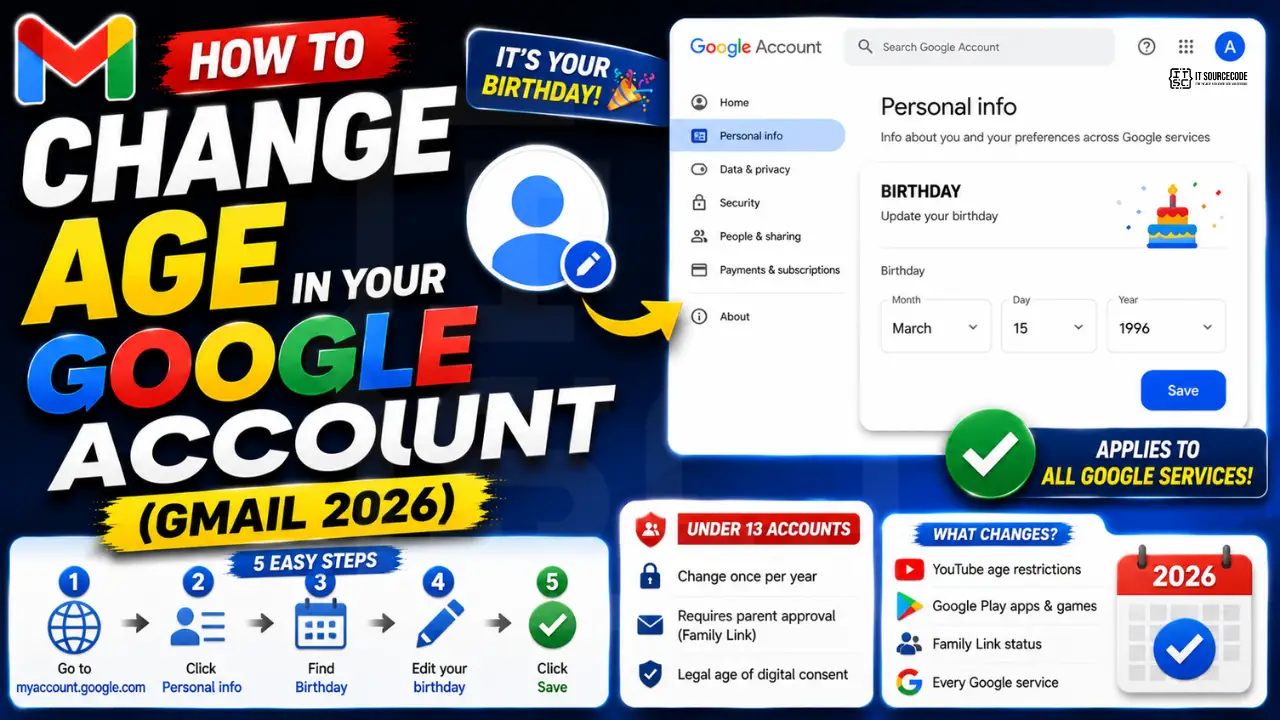
Where age is actually stored in your Google Account
Google Account is the umbrella that Gmail, Drive, YouTube, and every other Google service reads from. Age is calculated from the Birthday field in Personal Info, not stored as a number.
- The Birthday field determines your age at any given time by comparing to today’s date.
- Age controls access to age-gated content on YouTube, Google Play games, and Google Chat.
- Under-13 accounts (or the equivalent local age of digital consent) are treated as supervised accounts with parental controls.
- Changing the birthday updates every Google service that reads from Personal Info at the same time.
Change age in Gmail on desktop
The desktop path is the most complete. Every option including advanced controls appears here.
- Open
myaccount.google.comin any browser. - Sign in with the Gmail address whose age you want to change.
- Click Personal info in the left sidebar (may also appear as a top navigation tab).
- Scroll to the Birthday row inside Personal info.
- Hover over the birthday row until the pencil edit icon appears, then click it.
- Update day, month, and year to your correct birthday.
- Click Save. The change applies immediately across every Google service tied to this account.
Change age in Gmail on mobile (iPhone or Android)
Mobile access to Personal Info is available inside the Gmail app or via the browser.
- Open the Gmail app and tap your profile picture in the top-right corner.
- Tap Manage your Google Account.
- Swipe to Personal info in the top tab bar.
- Tap the Birthday row.
- Update the date fields.
- Tap Save.
The mobile path is slightly slower but supports the same actions as desktop. Choose desktop if you need to change multiple Personal Info fields at once (name, pronouns, gender, birthday).
What happens after you change your birthday
Google applies the birthday change instantly to your account profile. Some downstream effects roll out over a few minutes.
- Your visible age (if you shared it publicly on YouTube channel info, for example) updates immediately.
- Age-restricted content access (YouTube age-gated videos, Google Play mature apps) updates within about 10 minutes.
- Family Link supervised account status may change if you cross the local age of consent threshold.
- Google may email you a confirmation of the birthday change, especially if the change spans a large date range.
Under-13 account rules and the once-per-year limit
Google places extra guardrails on accounts marked as under 13 (or the local age of digital consent in your country). This is a legal requirement under COPPA in the US and GDPR-Kids in Europe.
- Under-13 accounts can only change the birthday once per year and may require parent approval via Family Link.
- The parent linked to the account receives an email notification about the birthday change request.
- If the new birthday crosses the age threshold (making the account “adult”), Google may require additional verification.
- Adult accounts (over 13 verified) can change the birthday freely without limits.
Common mistakes when changing your age in Gmail
- Trying to find age settings inside Gmail. There are no age settings in Gmail itself. Everything lives in Google Account Personal Info.
- Assuming the change affects only Gmail. The birthday updates every Google service including YouTube, Drive, and Google Play. Consider the downstream effects before changing.
- Setting a fake birthday to bypass age restrictions. Google can detect suspicious birthday changes and may lock the account for verification. Age-gate bypass is a Terms of Service violation.
- Forgetting to sign out and back in on shared devices. Some services cache old age status. Sign out and back in to refresh.
- Changing birthday on the wrong account. Confirm you signed in with the exact Gmail whose age you want to change, especially if you have multiple accounts in the same browser.
When changing your birthday is worth doing
Legitimate reasons include correcting an incorrect birthday entered during signup, updating from a placeholder date, or fixing an account created by another person on your behalf. In all these cases the update takes under a minute and syncs across every Google service.
Do not change your birthday to bypass age gates on YouTube or Google Play. Google detects this pattern and may lock the account. If you need adult content access, sign in with a properly registered adult account instead.
For business Workspace accounts, birthdays are usually set by the admin during account provisioning and are less commonly changed. Individual users can still update through Personal Info if the admin allows Personal Info edits (this is a Workspace setting).
Power-user tips for managing your Google Account profile
Personal Info in Google Account is often overlooked, but it powers your identity across every Google service. A quick audit every 6-12 months catches outdated info before it causes verification headaches.
- Set a backup email early. Add a backup email at signup or during profile setup. Recovery is 10x easier with backup email + phone than either alone.
- Update phone when you change providers. A stale phone number in Personal Info means recovery fails when you need it most. Update the day you switch carriers.
- Review your sharing preferences. Under Personal Info > Sharing, control what other users see. Set Birthday to Private if you do not want it visible on your Google profile.
- Enable 2-Step Verification if you have not already. Once Personal Info is accurate, add 2SV for security. Verification codes go to your phone or authenticator app.
For teams using Google Workspace, the admin controls what personal info individual users can edit. Check with your admin if you cannot change certain fields, and confirm whether their organization mandates specific values (like using company name in the About field).
Official documentation
Recommended email productivity resources
The links below are affiliate links. We may earn a commission at no extra cost to you when you buy or sign up. See our affiliate disclosure.
Change your age in a supervised or teen Gmail (Sep 2026)
Google split the age-change flow into two paths in April 2026. If your account was created before you turned 13 (which now covers most Gmail accounts from 2019 onward under COPPA and EU DSA rules), the standard age-edit page redirects you to Family Link instead. Here is what to do in each case.
Standard adult account (created after 18th birthday)
Use the flow already covered above. The myaccount.google.com/personal-info page still exposes the birthday field for edit. Change requires one identity verification step (SMS or recovery email code) added in the June 2026 anti-fraud update.
Teen-to-adult transition (turning 18 or already 18)
If the account was created as a supervised or teen Gmail, editing the birthday goes through Family Link. Steps:
- Open Family Link on your phone (parent’s device) or
families.google.com. - Pick the child account, then “Manage settings” then “Account info.”
- Tap the birthday field. If the corrected age is 18+, Google offers to “Graduate this account to adult.” Confirm to remove parental controls.
- After graduation, log into the account itself; Google Ads, YouTube age-restricted content, and Play Store adult apps all unlock within 24 hours.
If you cannot access the parent Family Link account
Common case: student made the Gmail through a school Family Link setup, then graduated and lost access to the parent’s device. Google added a self-service graduation flow in July 2026 at families.google.com/graduation. Requires: (a) valid government ID upload, (b) selfie liveness check, (c) 7-day cooling period before Google removes parental controls. No parent account contact is needed.
What if you entered a wrong age at signup and are under 13?
Google will not let you decrease age below 13 through any flow. The only path is to delete the account (Google Takeout to preserve emails first) and start over with the correct birthday under a parent’s Family Link supervision. Verification uses the same ID + selfie check as the graduation flow.
Frequently Asked Questions
Can I change my Google Account birthday whenever I want?
Adult accounts (over 13) can update the birthday freely with no limit. Accounts flagged as under-13 can only change it once per year and may need parent approval via Family Link.
Does changing my birthday change my Gmail address?
No. Your Gmail address is independent of your birthday. Updating one has no effect on the other. Your Gmail address only changes if you rename it, and only for Workspace accounts.
Why does Google ask for my birthday during signup?
Google uses your birthday to verify you meet the age requirements for Google services and to comply with COPPA in the US and similar child privacy laws worldwide. It also enables age-appropriate content filtering.
Can I remove my birthday from my Google Account?
You can hide it from other users under the Sharing tab, but you cannot remove it entirely. Google keeps a birthday on file for age verification and legal compliance reasons.
What happens if I set a fake birthday to look older?
Google can detect suspicious birthday changes, especially large jumps or repeat changes. Your account may be locked until you provide proof of age. Bypassing age gates is also a violation of the Google Terms of Service.
Will other people see my new birthday?
Only if you set the sharing option to Public in the Personal info section. By default, birthday is set to Private and only you and Google can see it.

Caren Bautista
Technical Writer at PIES IT Solution
Responsible for crafting clear, well-structured, and beginner-friendly content across the platform. Handles the writing, proofreading, and editorial review of tutorials, guides, and documentation to ensure every article is accurate, readable, and easy to follow.
Expertise: Technical Writing, Content Creation, Documentation, Editorial Writing, JavaScript, TypeScript, Python, Python Errors, HTTP Errors, MS Excel · View all posts by Caren Bautista →